adding a OTP to an entry - qr code?

I wonder how I can add an OTP entry via QR code here. I really can't figure out what the "Application" form is meant to do?
All Comments (9)
Hello,
this is not to add into RDM - this allows you to add the OTP entry to another device with the QR code. The initial request you'll find here 😉
The "Application" is the name how this entry should named in the OTP Application.
Regards,
Min
ok, to put it antoher way: can RDM have the same functionality like Google Authenticator?
Hello,
Could you details what functionality you would like from Devolutions Authenticator? Do you mean use the laptop or PC camera to scan a QR code?
Regards
David Hervieux
no, just to generate TOTPs: after scanning the QR code (or reading it via file) create an MFA account and every 30 seconds creates a new 6 digit code.. I see the menu "copy OTP" but don't know how to import the MFA account from, say, amazon
Hello,
Sorry I was not clear. That what I meant by scanning with the camera but reading a file is also a good idea. I will create an improvement. For now with Amazon you can enter the key for the manual procedure and your email in account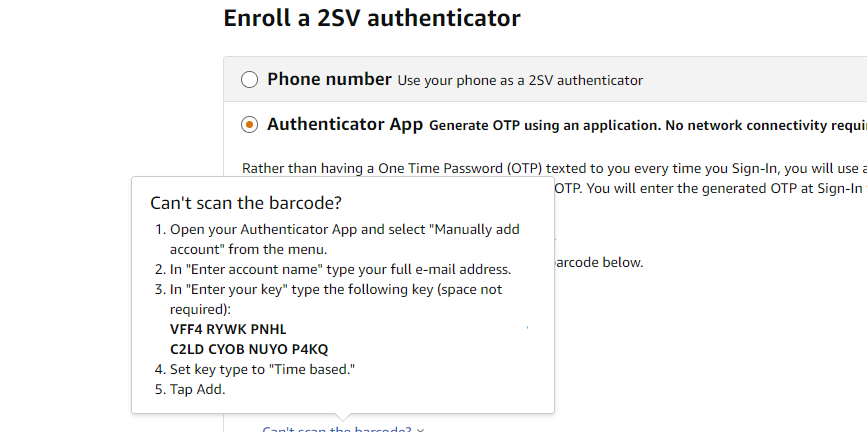
Regards
David Hervieux
2021-04-16_08-12-32.png
ok, this worked, but ideally this form should accept a QR code as this seems to be the de facto standard to connect MFA to an account.
Hello,
I agree with you and I have created a ticket for that.
Regards
David Hervieux
Some sites do not offer codes, only the barcode. I currently have been resorting to downloading the barcode image, running it thru a converter tool, extracting the code and pasting it in to RDM.
It would be nice to be able to point at the image or copy and paste the image into RDM to get the code.
Hello,
Good news, we are adding a feature to RDM to load QR codes from image files. This will be available starting with RDM 2022.1.8.0, in OTP entries and where OTP information is configurable. Once it's out, let us know if it works well for your scenarios.
Regards,
Hubert Mireault