
58sniper
Filezilla encryption options
That appears to be the case. Doesn't look like that's exposed. https://wiki.filezilla-project.org/Command-line_arguments_(Client)
Filezilla encryption options
Greetings! Running Enterprise Edition 13.0.6.0 64 bit. Adding a session for FTP, with Filezilla as the underlying utility, and can't set/disable the encryption. In RDM, on the 'General' tab, with 'Application' set to to 'Filezilla', and protocol set to 'FTP', the box underneath that is greyed out (see attached). This causes a connection using SSL, which won't work with this provider. If I launch directly into Filezilla and open its site manager, and configure the same site, but set encryption to 'only use plain FTP (insecure)', I connect without issue. I don't see any other field in the session settings that seems relevant.
Thoughts?
Open (Select Credential Entry) - don't show list completely expanded
It would be nice if this list wasn't displayed fully expanded. Maybe remember the last state?
Wasted whitespace at bottom
Dang - that was simple and effective. Thanks for the quite reply.
Wasted whitespace at bottom
Rebuilt my workstation, installed 10.6.7.0 (64 bit). Noticed that even when I turn off all of the options (status bar, description, details, info, etc., I still end up with a bunch of unusable space at the bottom. See the attached. Can that be turned off?
Suppress "open previous sessions" when updating
Currently at 10.1.11.0 - it does this for every version upgrade.
Suppress "open previous sessions" when updating
32bit version on Win 8.1. Default layout other than the left side nav is floating. If I open the app, and there is an update available, I get presented with both the dialog box to open previously opened sessions AND the new version update dialog box. If I choose to update, the dialog box for previously opened sessions closes, and after the upgrade, I do not get presented with it again. This is really irritating to the point where I don't ever want to upgrade, as I often have dozens of sessions open, and only close the app when the desktop is rebooted.
Float navigation and flickering right click
Just as a follow up, the problem ONLY happens when the nav pane is on another monitor. If I drag the floating pane to the same monitor that the "main" window is in, it works fine - docked or floating. Confirmed it still occurs in 9.4.12.0
Layout Navigation gone after each upgrade
It's happened to me on multiple machines for quite some time. I've just gotten into the habit of turning the nav pane back on after each update.
Float navigation and flickering right click
If that's a little tough to read, try http://innervation.com/crap/rdm_float.png
Float navigation and flickering right click
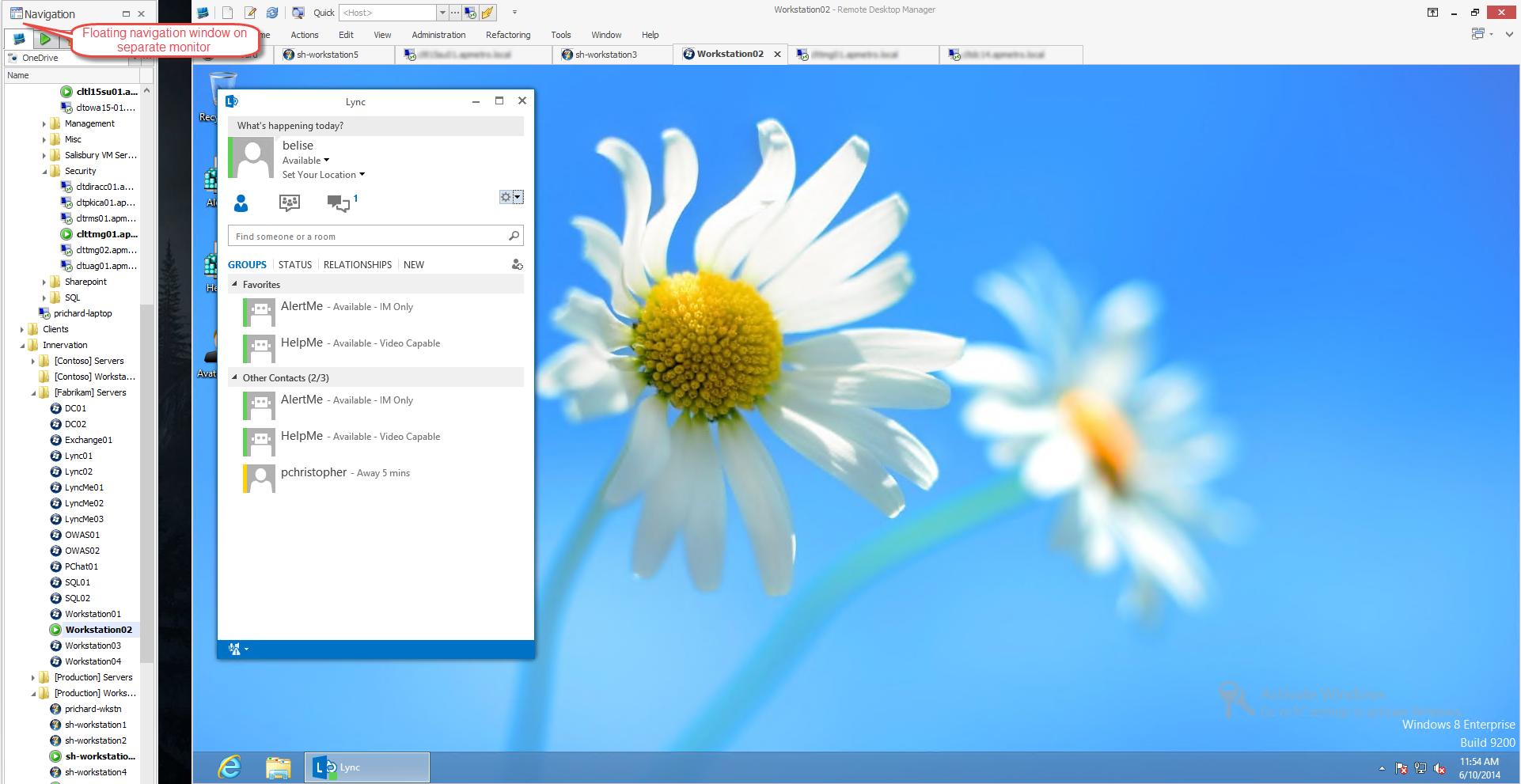
Float navigation and flickering right click
Right click on the Navigation window and choose "Float"
Float navigation and flickering right click
Also - a feature request for a "Always On Top" option for the float menu.
Float navigation and flickering right click
Confirmed that it's the same in v9.4.6.0
Float navigation and flickering right click
Version 9.4.3.0. I float the navigation and drag it to another monitor. Right clicking on any session in that list briefly brings up the context menu, but then it quickly disappears. Docking the nav window again and it works as it should.
"Import options" feature
I see the "export options" button when viewing options. But I don't see a corresponding import options. When someone is reloading their machine and export the data, there is no (apparent) method to import that info back into clean installation of the program.
No horizontal scroll bar for session list
Any word on this? My data source is pretty large, and not having a h-scroll is a pain.
Suppress "open previous sessions" when updating
This is went away for one build. But the last two builds I've installed, including 9.2.4.0, the issue has returned.
Right click on session, and want to cancel
Okay - with NO sessions open, ESC will close the dialog window. With at least one session open, ESC goes to the open session, regardless of which session I have the dialog open for. "Disable close on Escape key pressed" is NOT checked in Options>User Interface>Keyboard>Navigation.
Right click on session, and want to cancel
Sorry for not being more clear. Right click on the session in the session list on the left.
Right click on session, and want to cancel
That is not the case for me. Hitting escape sends that command to the open session.
Right click on session, and want to cancel
So you right click on a session, then decide you don't need to do anything, so you want to cancel. There is no easy way to close the menu that's open. If you click outside of the menu, it should close it, IMHO.
Suppress "open previous sessions" when updating
If you open RDM and an update is available, you get the window about the new version. But you also get the window about reopening previous sessions. If you choose not to reopen previous sessions because you're going to update, that history of opened sessions is cleared.
It would be nice if it would wait for the user to answer the update window. If the user chooses to update, RETAIN the history for the next time the program is launched. If the user choose NOT to update, display the history window as normal.
Update taskbar when installing updated version
On Windows 8.x, if you right click on the icon and add to taskbar, that icon breaks when RDM is updated. It has to be removed and re-added. It would be nice if that was not the case.
Remove "edit ... in batch" checkbox
If you select a bunch of sessions, right click, "Batch Edit>Edit Sessions (session type settings)", the General and Connection tabs require checking the edit in batch checkbox before you can make changes. Since I right clicked on the sessions and chose "batch edit", it's obvious I want to edit them. The checkbox seems unnecessary.
Just a thought.
Using 9.0.5.0