
anpa
Question about the Roadmap
Hi,
Nice to see the roadmap, looking forward to a couple of features :)
Can you please clarify what "Broadcast Actions" means? Is it hooks for actions so that external applications/sites can be notified when something happens in RDM?
/Andreas
Improvement for RDM Jump
I noticed that Wayk Now 2.0 has been released (congrats on reaching that milestone), and was wondering if you have had any chance to look at implementing the tunneling features from Wayk Now in to RDM?
Improvement for RDM Jump
I agree a tool like that would be very useful although building it isn't trivial.
We've been working on Wayk Now, a remote desktop access solution, for some time now. Using the same underlying technology, we plan to develop Wayk Tunnel, on our long-term road map, a tool that would do essentially what you've described.
In the meantime, you can subscribe to the Wayk Now 2.0 beta.
Best regards,
Yep, sounds like we need to wait until Wayk Tunnel is available for RDM - since we still need all the other features in RDM such as open comment, permissions, logging and all that good stuff :)
Improvement for RDM Jump
If I understand your suggestion correctly. You would like to be able to "jump"/proxy without RDP but instead using an "RDM Proxy" that would handle this without necessarily having the UI and from anywhere?
Yes, exactly this! An application that's installed on any server (windows or linux) that RDM uses to tunnel traffic, preferably encrypted with verified encryption (certificates). I know this would make our administration a lot easier.
Improvement for RDM Jump
What do you mean by RDM Servers? Do you mean RDM desktop running on a server? Or do you mean a DVLS (Devolutions Server)?
Sorry, I was using internal lingo to external people - not good :-)
By RDM servers I mean RDS servers with RDM installed, using a common database.
Improvement for RDM Jump
First, I'd like to say that we use RDM a lot and we really like the product.
At the moment, we are running six different RDM servers (five with shared DBs) in order to properly manage all our customers. Remembering which customer is on what server is not always easy for our helpdesk technicians, so we've been looking at RDM Jump to see if it could make our lives easier.
Since we admin stuff from a different network, it would be running RDM in a RDP session, and if using RDM Jump we would basically run RDP in RDP in RDP. Instead of using SSH tunnels, VPN connections, Proxy servers, RDM Agents on different types of sessions, it would be nice if you could improve on RDM Jump to be more like a proxy server.
Some advantages
- Use certificates to connect via it, less user management on proxy/ssh/window rdp
- Use several different rdm-proxies, selectable for folders/entries via a drop down list
- All traffic towards the target is tunneled via the rdm-proxy, making ping, scripts etc. run directly on the RDM client
- One rdm-proxy per default gateway
- Scan networks using different proxies
- Use third party software with the rdm-proxy would be easy to manage
We will try to evaluate the current solution properly as well, but thought we would give you the heads up while we prepare for our test :-)
Having problems after upgrading from 10.x to 12.x
Noticed one odd thing..
In C:\Users\<username>\AppData\Roaming\Devolutions\RemoteDesktopManager\Connections.log we had lots of entries of this kind:
[2017-02-10 16:01:45] Entry edited - 'InventoryScript_test' (PowerShell (Remote))
[2017-02-10 16:01:45] Entry edited - 'InventoryScript_test' (PowerShell (Remote))
[2017-02-10 16:01:46] Entry edited - 'InventoryScript_test' (PowerShell (Remote))
[2017-02-10 16:01:46] Entry edited - 'InventoryScript_test' (PowerShell (Remote))
[2017-02-10 16:01:46] Entry edited - 'InventoryScript_test' (PowerShell (Remote))
[2017-02-10 16:01:46] Entry edited - 'InventoryScript_test' (PowerShell (Remote))
[2017-02-10 16:01:47] Entry edited - 'InventoryScript_test' (PowerShell (Remote))
[2017-02-10 16:01:47] Entry edited - 'InventoryScript_test' (PowerShell (Remote))
[2017-02-10 16:01:47] Entry edited - 'InventoryScript_test' (PowerShell (Remote))
[2017-02-10 16:01:47] Entry edited - 'InventoryScript_test' (PowerShell (Remote))
[2017-02-10 16:01:48] Entry edited - 'InventoryScript_test' (PowerShell (Remote))
[2017-02-10 16:01:48] Entry edited - 'InventoryScript_test' (PowerShell (Remote))
[2017-02-10 16:01:48] Entry edited - 'InventoryScript_test' (PowerShell (Remote))
[2017-02-10 16:01:49] Entry edited - 'InventoryScript_test' (PowerShell (Remote))
[2017-02-10 16:01:49] Entry edited - 'InventoryScript_test' (PowerShell (Remote))
[2017-02-10 16:01:49] Entry edited - 'InventoryScript_test' (PowerShell (Remote))
[2017-02-10 16:01:49] Entry edited - 'InventoryScript_test' (PowerShell (Remote))
[2017-02-10 16:01:50] Entry edited - 'InventoryScript_test' (PowerShell (Remote))
[2017-02-10 16:01:50] Entry edited - 'InventoryScript_test' (PowerShell (Remote))
[2017-02-10 16:01:50] Entry edited - 'InventoryScript_test' (PowerShell (Remote))
[2017-02-10 16:01:50] Entry edited - 'InventoryScript_test' (PowerShell (Remote))
[2017-02-10 16:01:51] Entry edited - 'InventoryScript_test' (PowerShell (Remote))
This was a powershell script that pointed to C:\TEMP (script was there and was working).
We have deleted this entry, let's hope that RDM doesn't crash after this.
Having problems after upgrading from 10.x to 12.x
Here's some more errors:
The program RemoteDesktopManager.exe version 12.0.8.0 stopped interacting with Windows and was closed. To see if more information about the problem is available, check the problem history in the Action Center control panel.
Process ID: 100c
Start Time: 01d283a7c396326f
Termination Time: 4294967295
Application Path: C:\Program Files (x86)\Devolutions\Remote Desktop Manager\RemoteDesktopManager.exe
Report Id: 44731407-ef9b-11e6-9411-0050569d1c5a
Faulting package full name:
Faulting package-relative application ID:
Faulting application name: RemoteDesktopManager.exe, version: 12.0.8.0, time stamp: 0x58643506
Faulting module name: clr.dll, version: 4.6.1087.0, time stamp: 0x583e5b8e
Exception code: 0xc00000fd
Fault offset: 0x004287a2
Faulting process id: 0x2df4
Faulting application start time: 0x01d283a2b74b11fa
Faulting application path: C:\Program Files (x86)\Devolutions\Remote Desktop Manager\RemoteDesktopManager.exe
Faulting module path: C:\Windows\Microsoft.NET\Framework\v4.0.30319\clr.dll
Report Id: 24913a19-ef96-11e6-9411-0050569d1c5a
Faulting package full name:
Faulting package-relative application ID:
Faulting application name: RemoteDesktopManager.exe, version: 12.0.8.0, time stamp: 0x58643506
Faulting module name: DevExpress.Utils.v16.2.ni.dll, version: 16.2.3.0, time stamp: 0x5850fa2d
Exception code: 0xc0000005
Fault offset: 0x00c99c3b
Faulting process id: 0x1bf4
Faulting application start time: 0x01d283a0deb25358
Faulting application path: C:\Program Files (x86)\Devolutions\Remote Desktop Manager\RemoteDesktopManager.exe
Faulting module path: C:\Windows\assembly\NativeImages_v4.0.30319_32\DevExpress.ffe44252#\1b13e6c2432922f352f1491d15ed7cc5\DevExpress.Utils.v16.2.ni.dll
Report Id: e86365c0-ef94-11e6-9411-0050569d1c5a
Faulting package full name:
Faulting package-relative application ID:
Having problems after upgrading from 10.x to 12.x
Hi,
We are seing some issues after upgrading..
Among others, we have Deadlocks on the DB:
System.Data.SqlClient.SqlException (0x80131904): Transaction (Process ID 57) was deadlocked on lock resources with another process and has been chosen as the deadlock victim. Rerun the transaction. at System.Data.SqlClient.SqlConnection.OnError(SqlException exception, Boolean breakConnection, Action`1 wrapCloseInAction) at System.Data.SqlClient.SqlInternalConnection.OnError(SqlException exception, Boolean breakConnection, Action`1 wrapCloseInAction) at System.Data.SqlClient.TdsParser.ThrowExceptionAndWarning(TdsParserStateObject stateObj, Boolean callerHasConnectionLock, Boolean asyncClose) at System.Data.SqlClient.TdsParser.TryRun(RunBehavior runBehavior, SqlCommand cmdHandler, SqlDataReader dataStream, BulkCopySimpleResultSet bulkCopyHandler, TdsParserStateObject stateObj, Boolean& dataReady) at System.Data.SqlClient.SqlDataReader.TryHasMoreRows(Boolean& moreRows) at System.Data.SqlClient.SqlDataReader.TryReadInternal(Boolean setTimeout, Boolean& more) at System.Data.SqlClient.SqlDataReader.Read() at Devolutions.RemoteDesktopManager.Business.DataSources.DatabaseConnectionDataSource.cca8119a110bebd9f7c66a9b8aa671a9c(IDataReader cb8306497615195e4d2b0b196997bb844, List`1 c956c86e3e516742fdb9aca7e24607786) at Devolutions.RemoteDesktopManager.Business.DataSources.DatabaseConnectionDataSource.cca8119a110bebd9f7c66a9b8aa671a9c(IDbCommand c469787a81372d641f189d46c8cbb1738, List`1& c8b9dc1f68940a43e7cd099cb1e4646fe, Byte[]& c9bd301a2fd1db0ad012d647646537ec1, Int32& c0d10ab04b5b18d594b7605de6eda18b5, Nullable`1& c6c7922f70bc4ad6a683a9f6baa3f4b7d) at Devolutions.RemoteDesktopManager.Business.DataSources.DatabaseConnectionDataSource.GetConnections() at Devolutions.RemoteDesktopManager.Managers.ConnectionManager.ca4799bebd8b706f34eea94a778843b55(BaseConnectionDataSource c01af917dca3518ff73ed69848f95f91a)ClientConnectionId:0601babe-b6cf-484c-976d-166572316cebError Number:1205,State:51,Class:13
We have tried creating new profiles, rebooting the server etc.. Also, we see this issue when starting RDM, it's just blank after loading data sources, and consumes 100% cpu on one thread.
I think this occurs when the auto refresh is set, here's a screenshot:
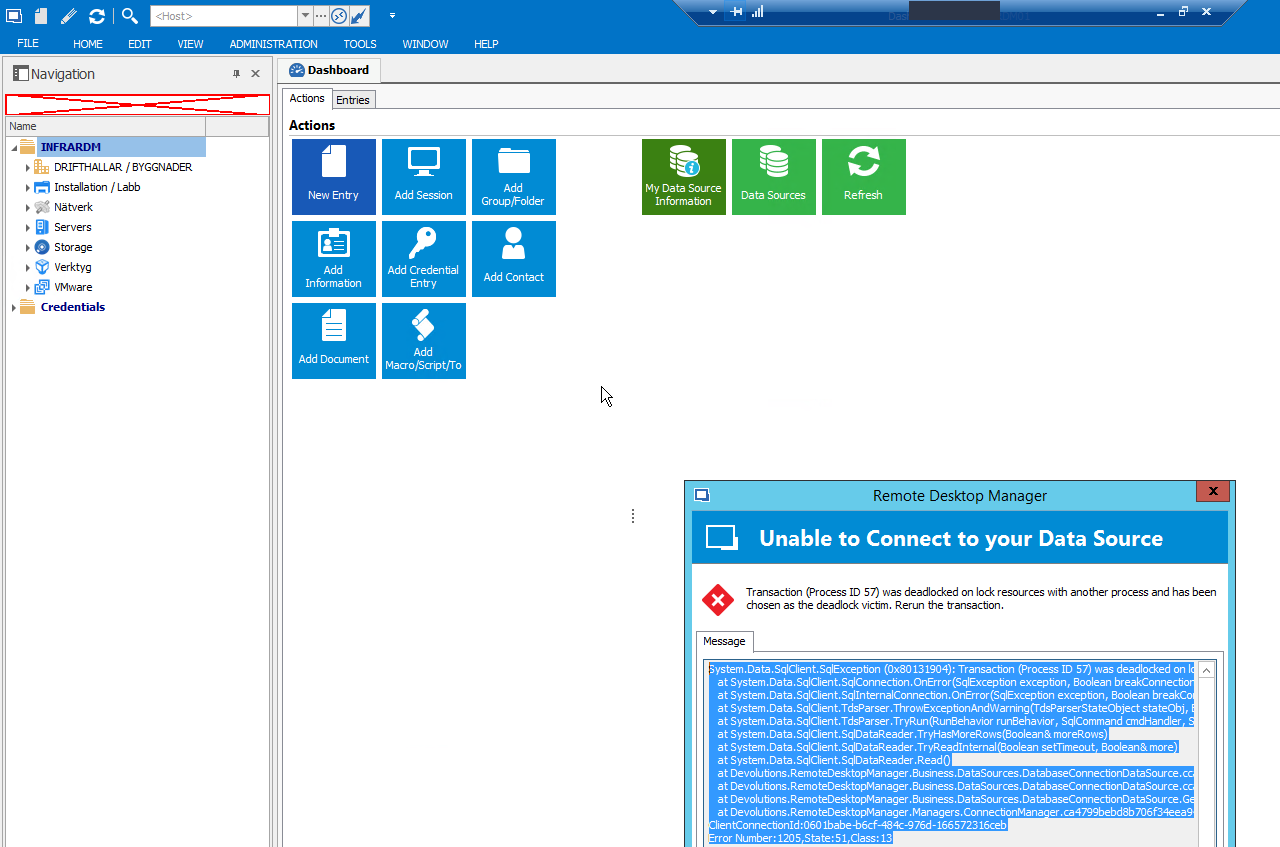
Only other thing that was changed was renaming of server, but we created new data sources with LOCALHOST as SQL servers, so that we are not dependent on names.
Problems with Roles - Cannot Add/edit/Delete
Also, it would be great if those user permissions were batch editable, now I have to go through 80+ users :)
But I guess some of this is not an issue when using DVLS instead of regular RDM?
Problems with Roles - Cannot Add/edit/Delete
Thanks for the quick reply!
So there is no way to assign those rights via a Role - I still need to manually set this on all users, the role only specifies what you can do once you have those rights?
Problems with Roles - Cannot Add/edit/Delete
With these settings on my user I can Add/Edit/Delete stuff:
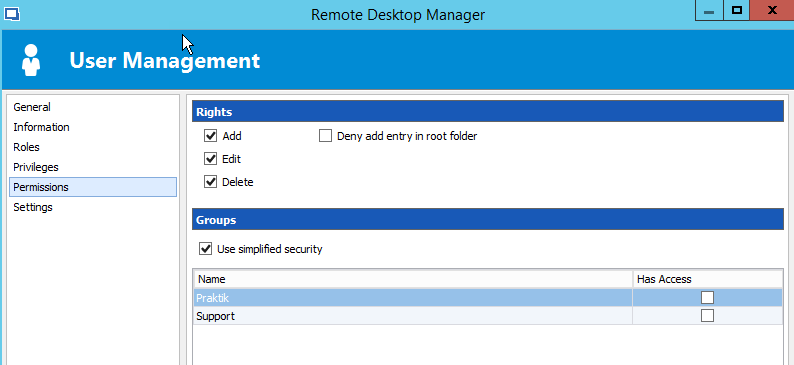
But with these settings I can only view, even though the role says I should be able to Add/Edit/Delete on that security group:
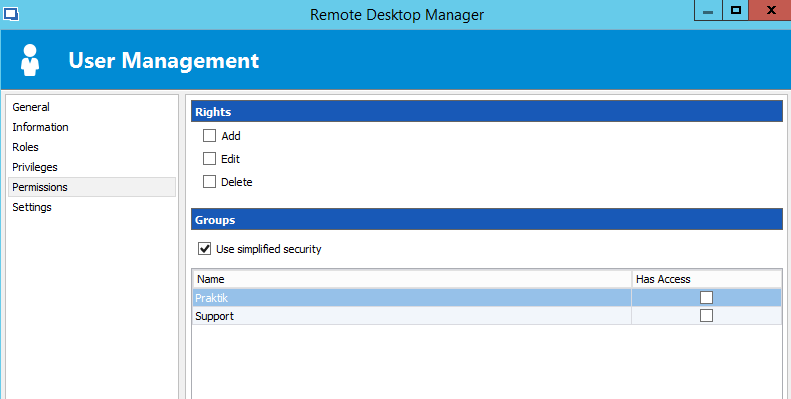
I had hoped that the Roles permissions would take precedence, but it seems I need to allow Add/Edit/Delete as well on all users, would be great if this was done via Roles.
Problems with Roles - Cannot Add/edit/Delete
Hi,
I have just exported all data from my old RDM installation in to the new one, and though that Roles would be better to use when adding all new users. However, I'm having some issues with it.
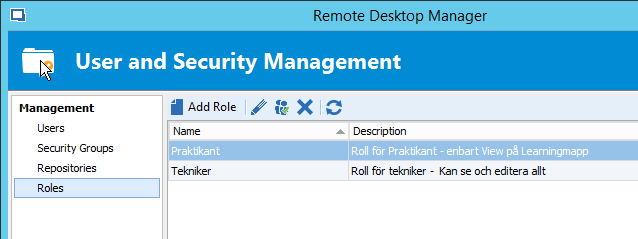
For example, I have two security groups created (Support and Praktik), and two roles created (Tekniker and Praktikant).
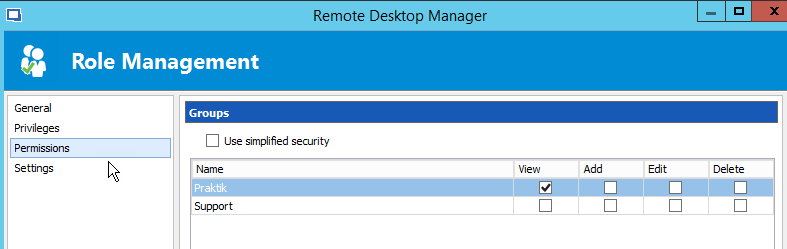
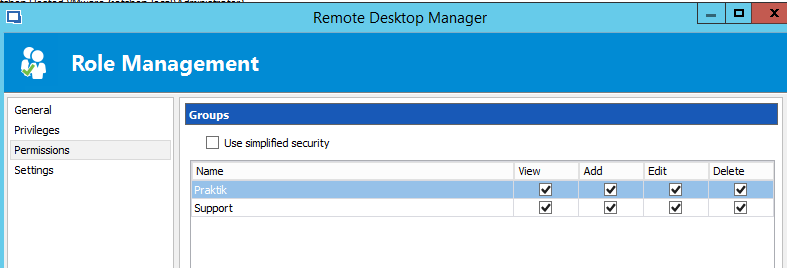
I have given the role Praktikant the permission View on the group Praktik, and given the role Tekniker View/Add/Edit/Delete on the group called Support and the group called Praktik.
Now, I have my own user created and added as member on the role Tekniker, but I cannot edit, delete or create any new entries in folders that have the security group set to Support.
I can manually override this by adding permissions manually on my user, but I'd prefer to have it done via Roles. Is this a known issue, or do I need to check the "Add", "Edit" and "Delete" under Permission->Rights for my user? I thought this was inherited via the Role I set up.
I have attached some screenshots below.
View of the Security groups:
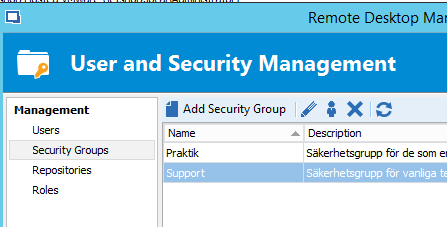
View of the Roles:
SG for Role Praktikant:
SG for Role Tekniker:
Any ideas or suggestions?
Unable to batch edit security group for credentials
Hello,
As per your first thread, you want to configure a Security Groups directly on your credential entries.
In that case, go in View -> Advanced Search and do a search by Connection Type -> Username / Password. After, it will be possible for you to select your entries and doa right-click -> Edit -> Batch Edit -> Edit Security Groups.
Best regards,
Excellent, that did the trick!
Thanks, now all looks good :)
/Andreas
Unable to batch edit security group for credentials
Hello,
The Credentials folder at the bottom like you have is a virtual folder and you cannot set a Security Group on that virtual folder.
For more information on our virtual folders, please consult https://help.remotedesktopmanager.com/kb_understandingourfolderstructure.htm
It's possible to merge the credentials with your remote sessions. This means that the Credentials folder like you see it will no longer be there and your credentials will be merge with your sessions. For some people, it's easier to have the credential entries with the remote sessions. If you are interested to try it, go in File -> Options -> User Interface -> Tree View and check the Merge credential list with sessions option.
Best regards,
Hi,
I tried this, but I am still unable to to batch edits on the root folder (I click, and nothing happens):
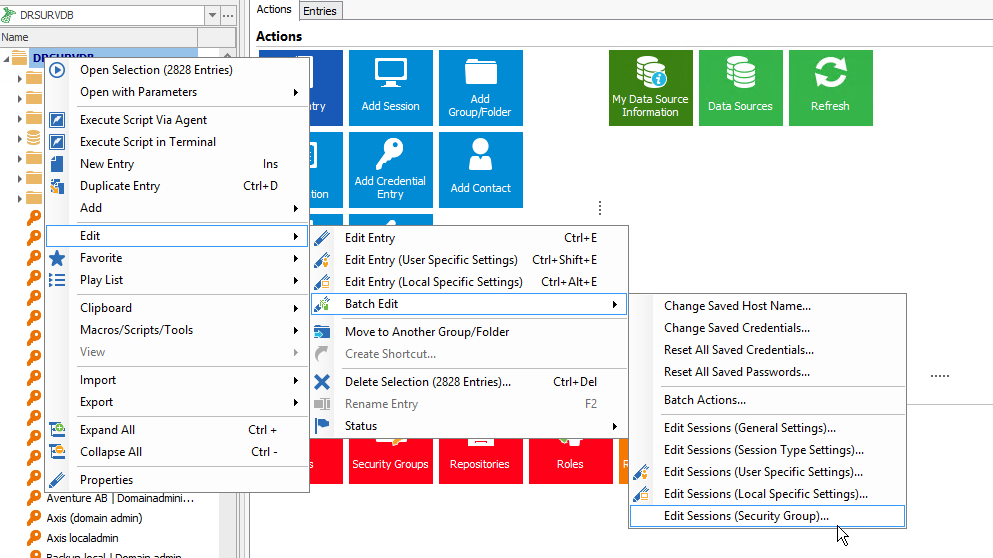
Any ideas on how to fix this without editing each entry manually?
/Andreas
Unable to batch edit security group for credentials
Hello,
I am not able to reproduce your issue with RDM 12.0.2.0 and a SQL Server datasource.
If you select a credential entry and do a right-click -> Edit -> Batch Edit -> Security Group, is it working?
Best regards,
Can you try it on the root folder for credentials?
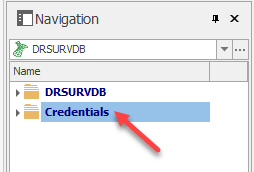
I can do it on other sub folders, but not the root folder..
/Andreas
Terminal Server mode and "rreplace my configuration file"
Hi,
I have a scenario where I alter the Data Sources in the config file, and then distribute the new config file to all TS/RDS servers. The users who chose to have their config files replaced with the new one gets connection errors and need to restart RDM.
In my opinion, when users choose to replace their config file, RDM should automatically restart itself so the entire config file is loaded again, otherwise all settings will not get applied.
Makes sense? :)
/Andreas
How to configure data source for SQL Mirrored DB
Hello,
The only setting in RDM is called the "Failover Partner", its in the advanced settings of the data source properties.
Best regards,
Found it, and it started to work right away :D
Thanks!
How to configure data source for SQL Mirrored DB
Hi,
We have set up SQL mirroring for our RDM DB, but I cannot find any settings on how to configure primary/secondary servers in the data source, so when the DB is failed over, RDM cannot connect anymore.
Any ideas on this?
/Andreas
Unable to batch edit security group for credentials
Hi,
When I right click on Credentials, choose Edit -> Batch Edit -> Edit Sessions (Security Group)..., nothing happens..
My use case here is that I want to set permissions for credentials, I want all credentials to have one group as owner, and add other groups that need access to these credentials on special occasions.
We have regular technicians, and then we have interns. Interns should only have access to a certain folder called "Learning". Since we've been running RDM for quite some time, almost all credentials are in the root folder, and I don't want to go through them one by one to set the security group for them :)
Tree menu changed in beta version
Thanks for the clarification! :)
Tree menu changed in beta version
Ok, when I added another data repository, everything started to look good. Very strange!
Tree menu changed in beta version
I have the same problem in the 12.0 release.
Checking or unchecking "Merge Credentials list" doesn't have any difference, everything is still in the same folder.
I started out with a fresh install, and then imported data from old RDM setup.
Combine multiple data sources
Hi,
We have two separate instances for RDM at the moment, but we are looking at combining them to the same database.
Is this possible?
For example, use RDM1 as the default database and import everything from RDM2 into the folder RDM2 on RDM1?
/Andreas
Sysadminotaur website?
Hi,
Didn't know where to send this, but it seems like the comics on http://sysadminotaur.com/ isn't updated anymore, but there seems to be new comics in the newsletters atleast :)
/Andreas