Having problems after upgrading from 10.x to 12.x

Hi,
We are seing some issues after upgrading..
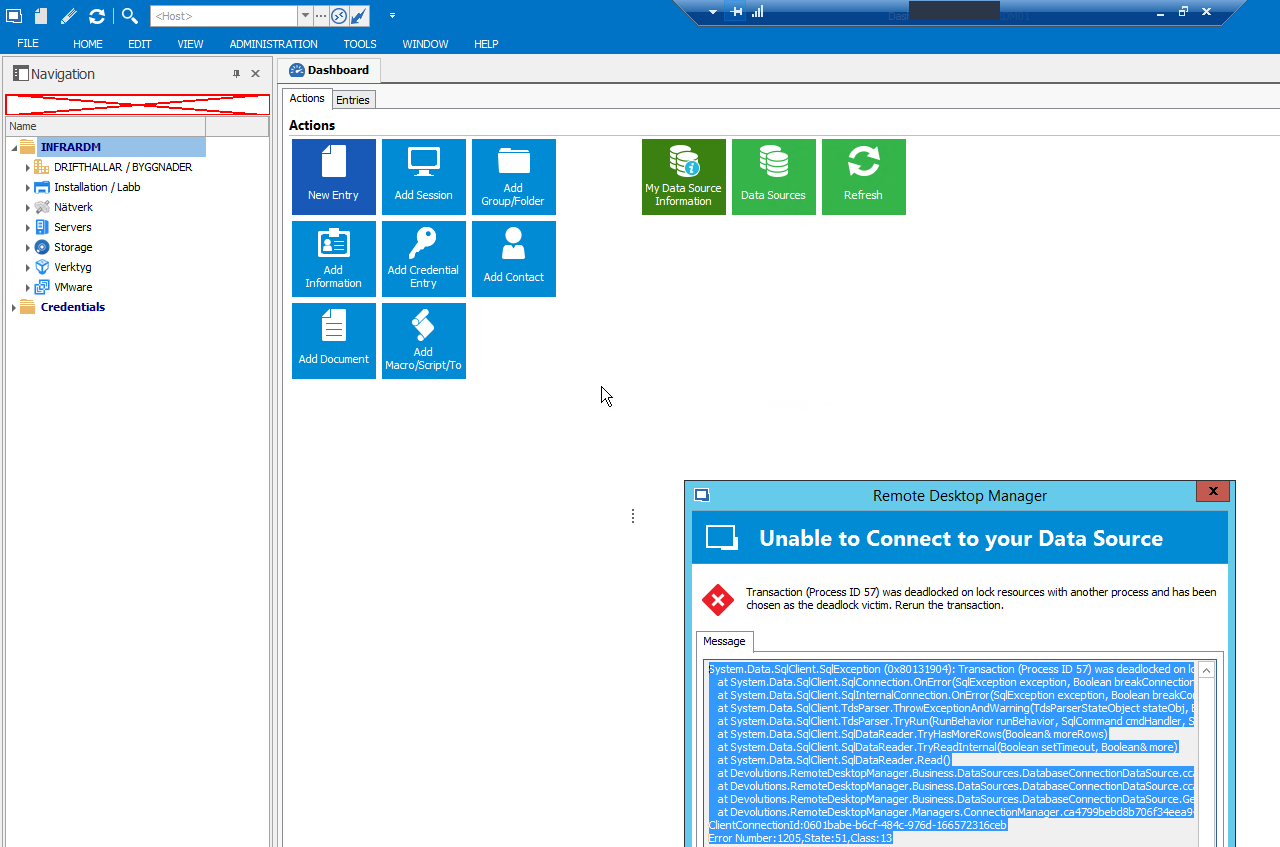
Among others, we have Deadlocks on the DB:
We have tried creating new profiles, rebooting the server etc.. Also, we see this issue when starting RDM, it's just blank after loading data sources, and consumes 100% cpu on one thread.
I think this occurs when the auto refresh is set, here's a screenshot:
Only other thing that was changed was renaming of server, but we created new data sources with LOCALHOST as SQL servers, so that we are not dependent on names.
2017-02-10_15-16-01.png
All Comments (8)
Here's some more errors:
Noticed one odd thing..
In C:\Users\<username>\AppData\Roaming\Devolutions\RemoteDesktopManager\Connections.log we had lots of entries of this kind:
[2017-02-10 16:01:45] Entry edited - 'InventoryScript_test' (PowerShell (Remote))
[2017-02-10 16:01:45] Entry edited - 'InventoryScript_test' (PowerShell (Remote))
[2017-02-10 16:01:46] Entry edited - 'InventoryScript_test' (PowerShell (Remote))
[2017-02-10 16:01:46] Entry edited - 'InventoryScript_test' (PowerShell (Remote))
[2017-02-10 16:01:46] Entry edited - 'InventoryScript_test' (PowerShell (Remote))
[2017-02-10 16:01:46] Entry edited - 'InventoryScript_test' (PowerShell (Remote))
[2017-02-10 16:01:47] Entry edited - 'InventoryScript_test' (PowerShell (Remote))
[2017-02-10 16:01:47] Entry edited - 'InventoryScript_test' (PowerShell (Remote))
[2017-02-10 16:01:47] Entry edited - 'InventoryScript_test' (PowerShell (Remote))
[2017-02-10 16:01:47] Entry edited - 'InventoryScript_test' (PowerShell (Remote))
[2017-02-10 16:01:48] Entry edited - 'InventoryScript_test' (PowerShell (Remote))
[2017-02-10 16:01:48] Entry edited - 'InventoryScript_test' (PowerShell (Remote))
[2017-02-10 16:01:48] Entry edited - 'InventoryScript_test' (PowerShell (Remote))
[2017-02-10 16:01:49] Entry edited - 'InventoryScript_test' (PowerShell (Remote))
[2017-02-10 16:01:49] Entry edited - 'InventoryScript_test' (PowerShell (Remote))
[2017-02-10 16:01:49] Entry edited - 'InventoryScript_test' (PowerShell (Remote))
[2017-02-10 16:01:49] Entry edited - 'InventoryScript_test' (PowerShell (Remote))
[2017-02-10 16:01:50] Entry edited - 'InventoryScript_test' (PowerShell (Remote))
[2017-02-10 16:01:50] Entry edited - 'InventoryScript_test' (PowerShell (Remote))
[2017-02-10 16:01:50] Entry edited - 'InventoryScript_test' (PowerShell (Remote))
[2017-02-10 16:01:50] Entry edited - 'InventoryScript_test' (PowerShell (Remote))
[2017-02-10 16:01:51] Entry edited - 'InventoryScript_test' (PowerShell (Remote))
This was a powershell script that pointed to C:\TEMP (script was there and was working).
We have deleted this entry, let's hope that RDM doesn't crash after this.
Hello,
Thank you for your posts and letting us know that is now working, really appreciated.
Best regards,
Jeff Dagenais
I'm not sure if I'm having the same issue, but there's definitely deadlocking going on with MS SQL. I poked around with the above advice and found this in the roaming directory. Here's a screenshot:
https://goo.gl/photos/N1LZfeCBDCUms7Xx5
It won't let me open the file in Notepad or Notepad++
The behavior up until today was that I'd head back over to the server running RDM after an hour or two and it will have crashed at some point. Today, I was powershelling some user add's and this happened:
Unable to save the user in the database! Transaction (Process ID 64) was deadlocked on lock resources with another process and has been chosen as the deadlock victim. Rerun the transaction.
This all seemed to start after I upgraded to 12.0.8.0.
Also of note, I have 5 powershell scripts that kick off every 5 minutes to scour AD for new users in an OU and add them to RDM/SQL.
Here's a crash of the application, which is more along the lines of the mystery crashes of the application itself instead of the user add situation I was speaking about above
Transaction (Process ID 68) was deadlocked on lock resources with another process and has been chosen as the deadlock victim. Rerun the transaction. Ent Ed 12.0.8.0, running since 4 hours 21 min 8 sec, mem usage 1038mb, SqlException
SqlException - Transaction (Process ID 68) was deadlocked on lock resources with another process and has been chosen as the deadlock victim. Rerun the transaction.
at System.Data.SqlClient.SqlConnection.OnError(SqlException exception, Boolean breakConnection, Action`1 wrapCloseInAction)
at System.Data.SqlClient.SqlInternalConnection.OnError(SqlException exception, Boolean breakConnection, Action`1 wrapCloseInAction)
at System.Data.SqlClient.TdsParser.ThrowExceptionAndWarning(TdsParserStateObject stateObj, Boolean callerHasConnectionLock, Boolean asyncClose)
at System.Data.SqlClient.TdsParser.TryRun(RunBehavior runBehavior, SqlCommand cmdHandler, SqlDataReader dataStream, BulkCopySimpleResultSet bulkCopyHandler, TdsParserStateObject stateObj, Boolean& dataReady)
at System.Data.SqlClient.SqlDataReader.TryHasMoreRows(Boolean& moreRows)
at System.Data.SqlClient.SqlDataReader.TryReadInternal(Boolean setTimeout, Boolean& more)
at System.Data.SqlClient.SqlDataReader.Read()
at System.Data.Common.DataAdapter.FillLoadDataRow(SchemaMapping mapping)
at System.Data.Common.DataAdapter.FillFromReader(DataSet dataset, DataTable datatable, String srcTable, DataReaderContainer dataReader, Int32 startRecord, Int32 maxRecords, DataColumn parentChapterColumn, Object parentChapterValue)
at System.Data.Common.DataAdapter.Fill(DataSet dataSet, String srcTable, IDataReader dataReader, Int32 startRecord, Int32 maxRecords)
at System.Data.Common.DbDataAdapter.FillInternal(DataSet dataset, DataTable[] datatables, Int32 startRecord, Int32 maxRecords, String srcTable, IDbCommand command, CommandBehavior behavior)
at System.Data.Common.DbDataAdapter.Fill(DataSet dataSet, Int32 startRecord, Int32 maxRecords, String srcTable, IDbCommand command, CommandBehavior behavior)
at System.Data.Common.DbDataAdapter.Fill(DataSet dataSet)
at Devolutions.RemoteDesktopManager.Business.DataSources.DatabaseConnectionDataSource.GetData(String sql, IDbDataParameter[] parameters, IDbConnection dbConnection)
at Devolutions.RemoteDesktopManager.Business.DataSources.DatabaseSecuritySubDataSource.GetUsers[T](Int32 userType, Nullable`1 userId)
at Devolutions.RemoteDesktopManager.Business.DataSources.DatabaseSecuritySubDataSource.GetUsers()
at Devolutions.RemoteDesktopManager.Managers.SecurityManager.GetAllUsers(Boolean useCache)
at Devolutions.RemoteDesktopManager.Managers.CurrentDataSourceSecurityManager.GetAllUsers(Boolean useCache)
at Devolutions.RemoteDesktopManager.Forms.FrmSecurityManagement.c81c347c83082c8f27092d107150085af(Boolean ceb9d2241b042f495f5aa0c7d6093924c)
at Devolutions.RemoteDesktopManager.Forms.FrmSecurityManagement.Initialize(ISecurityManager securityManager)
at Devolutions.RemoteDesktopManager.Managers.MainMenuManager.c708816d1c95767c33a3abe0df3fc19d4(SecurityManagementOpenMode c17de7030565f43077466095dd50c1438)
at Devolutions.RemoteDesktopManager.Managers.MainMenuManager.c395f096672f59ebb8079354f25b9919c(Object c19f185fd70cefc696ba148af1c4faf54, EventArgs cf1018bb83ec7debd818319fd3cb4844e)
at System.Windows.Forms.ToolStripItem.RaiseEvent(Object key, EventArgs e)
at System.Windows.Forms.ToolStripMenuItem.OnClick(EventArgs e)
at System.Windows.Forms.ToolStripItem.HandleClick(EventArgs e)
at System.Windows.Forms.ToolStripItem.FireEventInteractive(EventArgs e, ToolStripItemEventType met)
at System.Windows.Forms.ToolStripItem.FireEvent(EventArgs e, ToolStripItemEventType met)
at System.Windows.Forms.ToolStripItem.PerformClick()
at Devolutions.RemoteDesktopManager.Decorators.RibbonControlDecorator.c3be681b5eeb4880ff5e27146cfc20794(Object c19f185fd70cefc696ba148af1c4faf54, ItemClickEventArgs cf1018bb83ec7debd818319fd3cb4844e)
at DevExpress.XtraBars.BarItem.OnClick(BarItemLink link)
at DevExpress.XtraBars.BarBaseButtonItem.OnClick(BarItemLink link)
at DevExpress.XtraBars.BarButtonItem.OnClick(BarItemLink link)
at DevExpress.XtraBars.BarItemLink.OnLinkClick()
at DevExpress.XtraBars.BarButtonItemLink.OnLinkClick()
at DevExpress.XtraBars.BarItemLink.OnLinkAction(BarLinkAction action, Object actionArgs)
at DevExpress.XtraBars.BarButtonItemLink.OnLinkAction(BarLinkAction action, Object actionArgs)
at DevExpress.XtraBars.ViewInfo.BarSelectionInfo.ClickLink(BarItemLink link)
at DevExpress.XtraBars.ViewInfo.BarSelectionInfo.UnPressLink(BarItemLink link)
at DevExpress.XtraBars.Ribbon.Handler.BaseRibbonHandler.OnUnPressItem(DXMouseEventArgs e, RibbonHitInfo hitInfo)
at DevExpress.XtraBars.Ribbon.Handler.BaseRibbonHandler.OnUnPress(DXMouseEventArgs e, RibbonHitInfo hitInfo)
at DevExpress.XtraBars.Ribbon.Handler.RibbonHandler.OnUnPress(DXMouseEventArgs e, RibbonHitInfo hitInfo)
at DevExpress.XtraBars.Ribbon.Handler.BaseRibbonHandler.OnMouseUp(DXMouseEventArgs e)
at DevExpress.XtraBars.Ribbon.Handler.RibbonHandler.OnMouseUp(DXMouseEventArgs e)
at DevExpress.XtraBars.Ribbon.RibbonControl.OnMouseUp(MouseEventArgs e)
at System.Windows.Forms.Control.WmMouseUp(Message& m, MouseButtons button, Int32 clicks)
at System.Windows.Forms.Control.WndProc(Message& m)
at DevExpress.Utils.Controls.ControlBase.WndProc(Message& m)
at DevExpress.XtraBars.Ribbon.RibbonControl.WndProc(Message& m)
at System.Windows.Forms.Control.ControlNativeWindow.OnMessage(Message& m)
at System.Windows.Forms.Control.ControlNativeWindow.WndProc(Message& m)
at System.Windows.Forms.NativeWindow.Callback(IntPtr hWnd, Int32 msg, IntPtr wparam, IntPtr lparam)
Wondering if this has something to do with my powershell scripts... 5 set to every 5 mins add folks in an OU... paused things and seeing where I end up. My thought is that the scripts are deadlocking things... not the app.
Hello,
Is there any modification of your entries in those PowerShell scripts?
The Connections.log file contains all the information about every operations on the entries. There is no information in this file about the user creation, modification or deletion.
A best practice to run a PowerShell script as a scheduled task, is to use a RDM service account, an account that exist in RDM. You will then be able to easily clean all logs created by this account.
We also recommend to run the script with a portable installation of RDM. You can consult this online help page on how to setup RDM as Portable. This way, the local log files created by this portable installation with this RDM service account can be deleted on a regular base.
These files, RemoteDesktopManager.log and RemoteDesktopManager.log.db, include other logs from RDM. It is also possible to only use the RemoteDesktopManager.log.db with the option Logs set to value Database in File - Options - Advanced.
Best regards,
Érica Poirier
Wow... you're really brilliant... you read into my issue perfectly. I'll give this advice a spin and let ya know. Thanks so much Erica!
B