Unable to batch edit security group for credentials

Hi,
When I right click on Credentials, choose Edit -> Batch Edit -> Edit Sessions (Security Group)..., nothing happens..
My use case here is that I want to set permissions for credentials, I want all credentials to have one group as owner, and add other groups that need access to these credentials on special occasions.
We have regular technicians, and then we have interns. Interns should only have access to a certain folder called "Learning". Since we've been running RDM for quite some time, almost all credentials are in the root folder, and I don't want to go through them one by one to set the security group for them :)
All Comments (7)
Hello,
I am not able to reproduce your issue with RDM 12.0.2.0 and a SQL Server datasource.
If you select a credential entry and do a right-click -> Edit -> Batch Edit -> Security Group, is it working?
Best regards,
Jeff Dagenais
Can you try it on the root folder for credentials?
I can do it on other sub folders, but not the root folder..
/Andreas
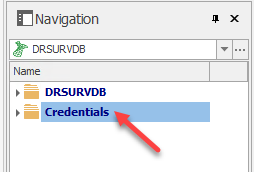
2016-12-01_11-39-48.png
Hello,
The Credentials folder at the bottom like you have is a virtual folder and you cannot set a Security Group on that virtual folder.
For more information on our virtual folders, please consult https://help.remotedesktopmanager.com/kb_understandingourfolderstructure.htm
It's possible to merge the credentials with your remote sessions. This means that the Credentials folder like you see it will no longer be there and your credentials will be merge with your sessions. For some people, it's easier to have the credential entries with the remote sessions. If you are interested to try it, go in File -> Options -> User Interface -> Tree View and check the Merge credential list with sessions option.
Best regards,
Jeff Dagenais
Hi,
I tried this, but I am still unable to to batch edits on the root folder (I click, and nothing happens):
Any ideas on how to fix this without editing each entry manually?
/Andreas
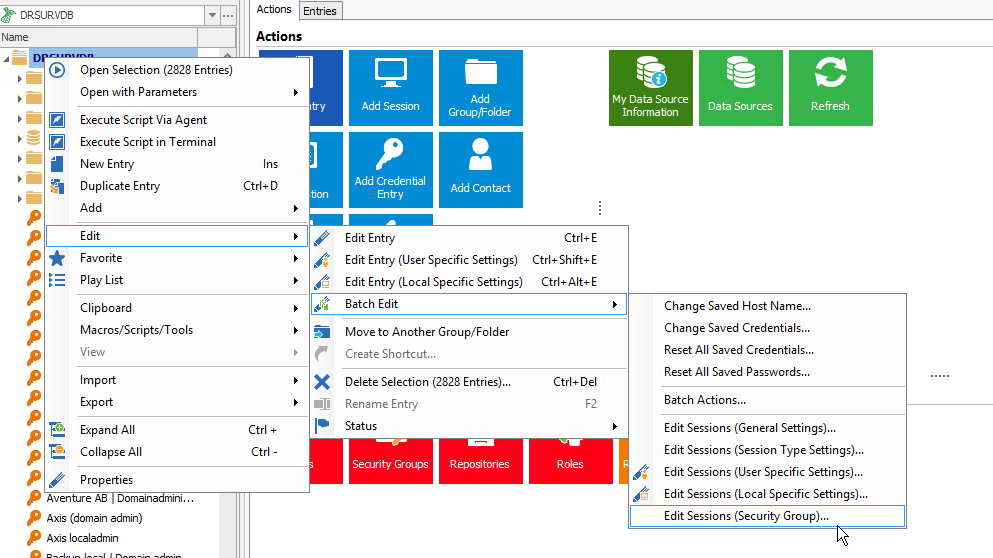
2016-12-01_14-51-40.png
Hello,
As per your first thread, you want to configure a Security Groups directly on your credential entries.
In that case, go in View -> Advanced Search and do a search by Connection Type -> Username / Password. After, it will be possible for you to select your entries and doa right-click -> Edit -> Batch Edit -> Edit Security Groups.
Best regards,
Jeff Dagenais
Excellent, that did the trick!
Thanks, now all looks good :)
/Andreas
Hello,
I wanted to let you know that since it isn't the most user friendly thing to do, we'll also allow to select a root and do a batch edit of security groups on it. It will set the security groups of all groups and all entries in that root (but not the root itself).
I hope with this method if you ever need to batch change security groups it will be easier to do. It should be in the next build of RDM 12.
Regards,
Hubert Mireault