
michaelreiter
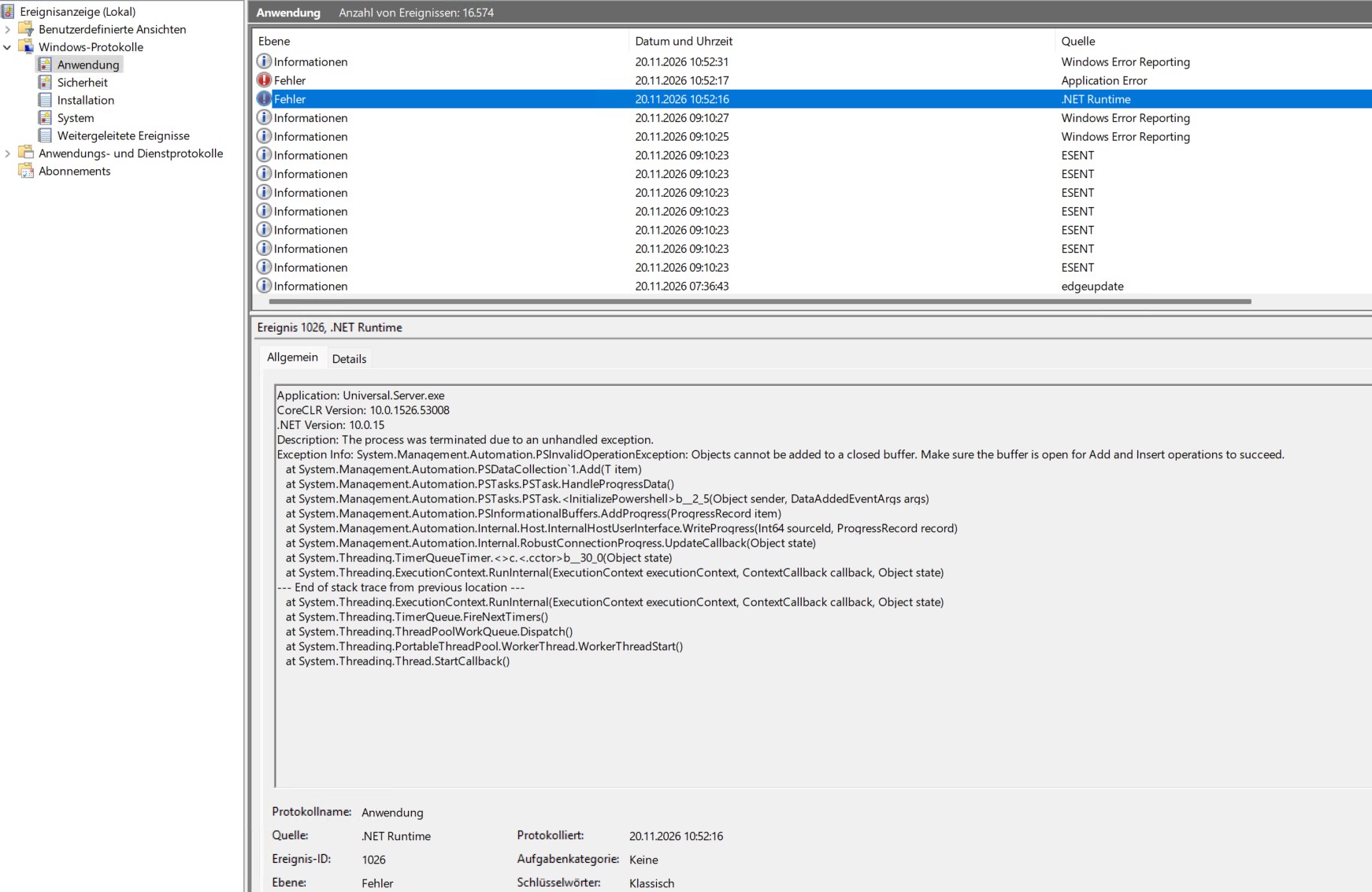
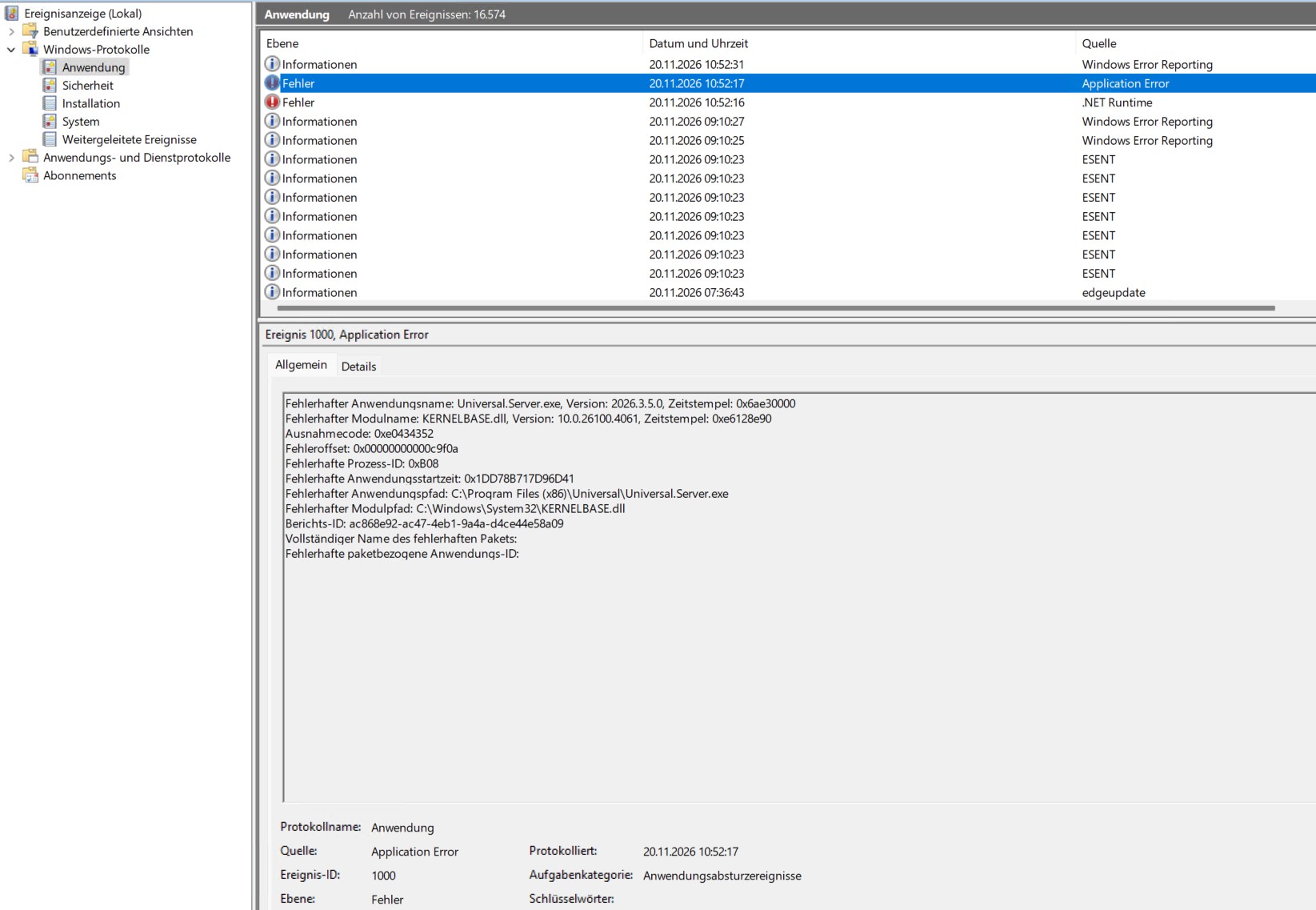
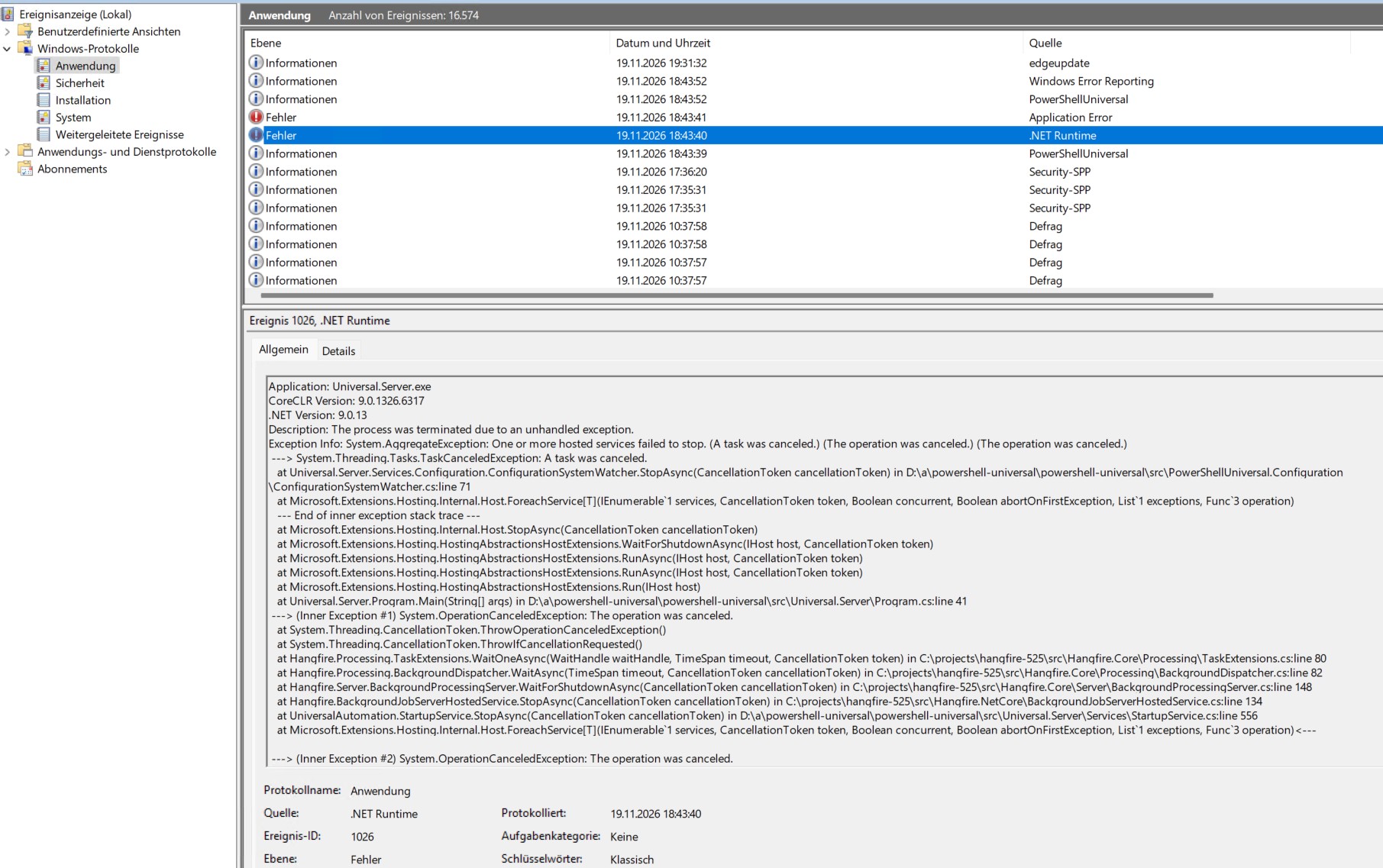
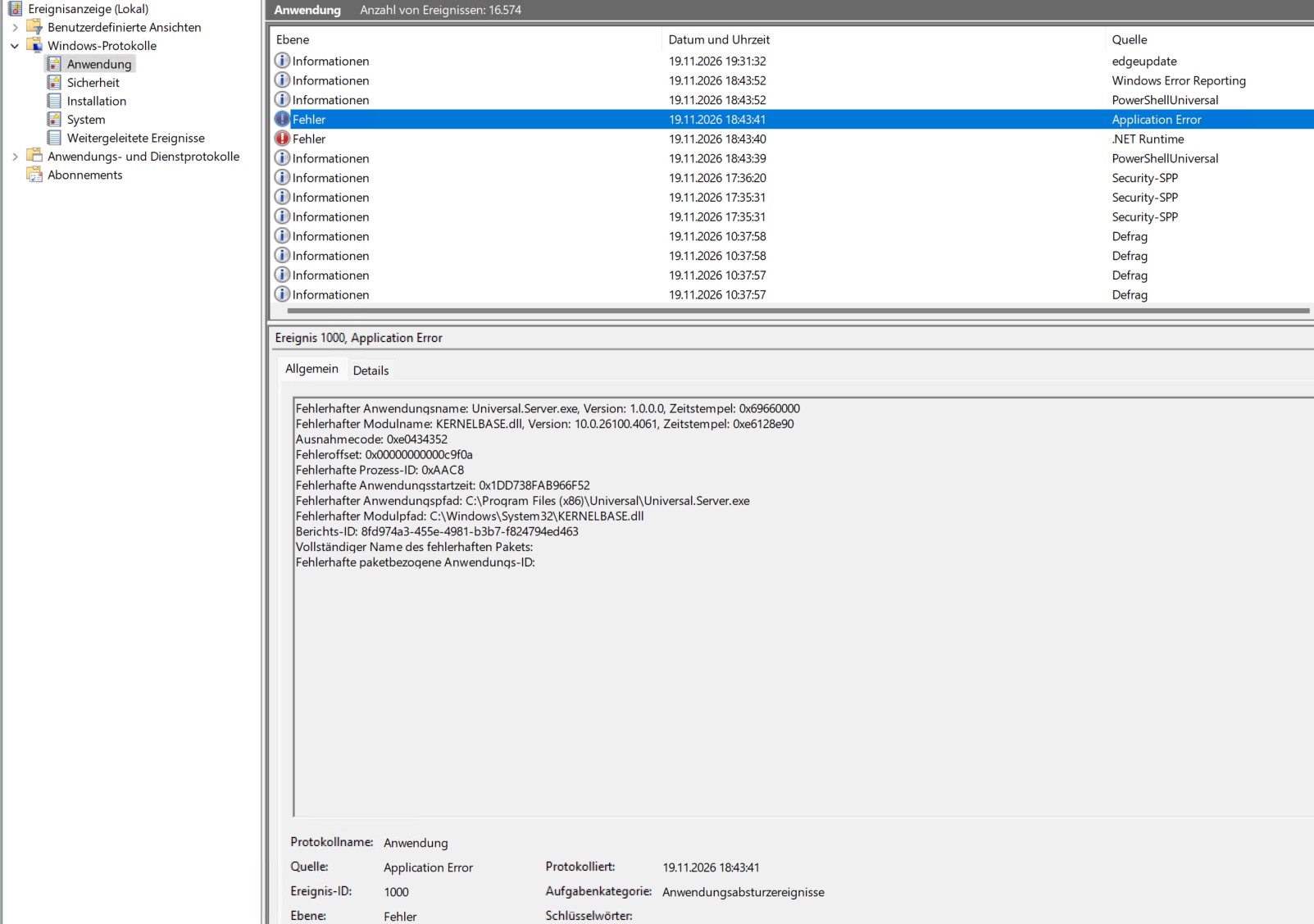
App Crash Version 2026.3.5.0
Hello guys,
today i upgraded from 2026.1.3.0 to Version 2026.3.5.0. Since then i noticed a few Appcrashes.
But it seams they already exist in the old Version too.
What can i do?
THX
Michael
Cannot delete Identity
Remove-PSUIdentity -ComputerName "MyServerName" -AppToken $AppToken -Id "10"

Remove-PSUIdentity: Status(StatusCode="Unknown", Detail="Exception was thrown by handler. DbUpdateException: An error occurred while saving the entity changes. See the inner exception for details. SqliteException: SQLite Error 19: 'FOREIGN KEY constraint failed'.")
Remove-PSUIdentity -ComputerName “MyServerName” -Identity “asdfg” -AppToken $AppToken -Verbose
VERBOSE: Using computer name from parameter.VERBOSE: Computer name does not contain a scheme. Assuming HTTP and port 5000.VERBOSE: Using App Token from parameter.VERBOSE: Using App Token for authentication.VERBOSE: $PSUTrustCertificate:VERBOSE: Using gRPC-Web.VERBOSE: Using insecure channel call credentials.Cannot delete Identity
Hi guys,
i cannot delete this identity. If i click delete it shows a confirmation dialog. i can click on “OK” but nothing happens.
i also tried to rename the account, restartet the PSU Server…
hmmm

Product: PowerShell Universal
Version: 5.6.8Suddenly local account can’t log in anymore
Hi guys,
Months ago, I installed PSU and started writing scripts. So far, so good.
Initially, I created a local administrator account, “PSUAdmin.” I was able to log in with this account without any problems. A few weeks ago, I updated to version 5.6.8. After that, I had a few weeks of vacation. Now, suddenly, I can no longer login with local accounts!
Every time I try to log in with my local administrator account, it seems to redirect to https://localhost/login?returnUrl=/reset-password?username=PSUAdmin
But nothing else happens! There is also no dialog box for changing the password.
Under Settings, General, I set “Password Expiration Days” to 0, but it didn’t help.
Fortunately, I can still log in with my domain user, who is also an administrator. I then changed the password for the local administrator account in the admin console, but that didn’t change anything. I also created a new local administrator account, but the same problem persists!
I’ve been struggling with this for days now. Sometimes I even managed to log in with PSUAdmin – BUT ONLY if I entered a completely wrong password?! Strange!
What the hell is going on here?
    Set-PSUAuthenticationMethod -ScriptBlock {
        param(
            [PSCredential]$Credential
        )

        if ($Credential.UserName -eq 'PSUAdmin') {
            New-PSUAuthenticationResult -Succes -UserName 'PSUAdmin'
        }
        else {
            New-PSUAuthenticationResult -ErrorMessage 'Bad username or password'
        }
}BUG in Version 5.6.8?
Product: PowerShell Universal
Version: 5.6.8
Today I updated from 5.5.4 to the current version 5.6.8.
I create/edit my scripts by connecting a network drive on my PC to the PSU server’s repository.
I then add the drive in VS Code and edit the files.
In the admin console, the switch must now set to “VS Code,” otherwise the web console won’t load the changes. However, if the switch is set to “VS Code,” I can no longer create identities,Permissions,Roles etc., because the button is gone.
Is this intended? It definitely wasn’t like this in 5.5.4!
Best Regards
Michael
Authentication - different Error Messages possible?
Hey Rajan52,
Sorry, not yet. I was still busy writing and implementing small scripts. So, I hadn’t bothered with it any further for the time being and was hoping to get some help here.
Authentication - different Error Messages possible?
Hi guys,
i am playing with the authentication.ps1
I first want to check whether the user is a member of a group. If not, an error message should appear, such as “Access Denied, Not authorized.”
Login should only be possible for members of this group.
But the only error message I see is if I enter incorrect login credentials. Then I get “Bad Username or Password.”
If I enter valid login credentials for a user who is also a member of the group, no message appears at all, and the user isn’t logged in (which is correct).
So is it possible to show different (Error)Messages at login? If yes, what i have to do?
Product: PowerShell Universal
Version: 5.5.4
Set-PSUAuthenticationMethod -Type "Form" -ScriptBlock {
param(
[PSCredential]$Credential
)
$requiredGroup = "PSU_Users"
if ($Credential.UserName -eq 'PSUAdmin')
{
New-PSUAuthenticationResult -UserName 'PSUAdmin' -Success
}
else
{
try {
$members = Get-ADGroupMember -Identity $requiredGroup -Recursive | Where-Object { $_.objectClass -eq 'user' }
$isMember = $members | Where-Object { $_.SamAccountName -eq $Credential.UserName }
if (-not $isMember) {
New-PSUAuthenticationResult -UserName $Credential.UserName -ErrorMessage "Access Denied, Not authorized."
#return
}
$domain = "LDAP://DC=dom,DC=local"
$domainEntry = New-Object System.DirectoryServices.DirectoryEntry($domain, $Credential.UserName, $Credential.GetNetworkCredential().Password)
$null = $domainEntry.NativeObject
New-PSUAuthenticationResult -UserName $Credential.UserName -Success
}
catch {
New-PSUAuthenticationResult -UserName $Credential.UserName -ErrorMessage "Access Denied."
}
}
} -Native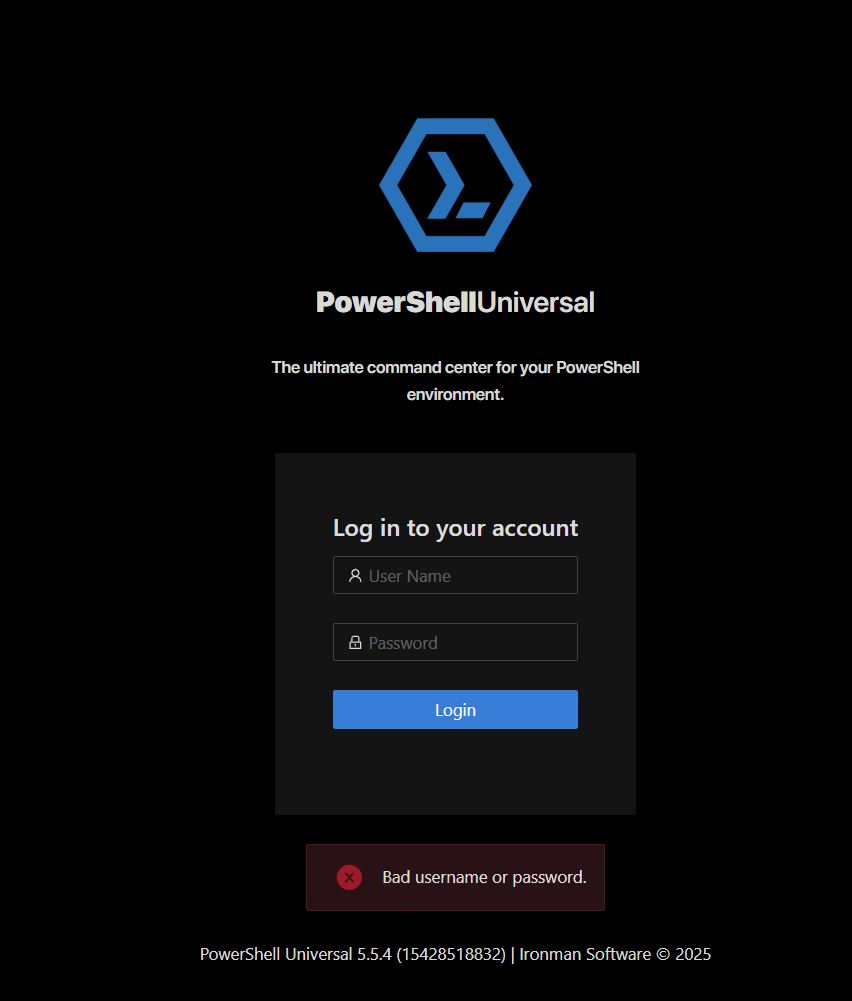
Dynamic Table shows maximum 2 entries only
ple version here that does not need AD to run. It had the same problem, right until I moved the new the new-dynamic to include the New-UDselection. So that seems to have fixed the problem for me.
Try and move your new-uddynamic to include new-udselection and it should also fix your issue. Give it a shot and let me know the outcome.
Works perfect! Thank you so much!
Powershell Universal Configure Proxy Server
Hello everyone,
I’m new to PSU and have installed PSU 5.5.4 (licensed) on a Windows Server 2025. We use a proxy server with authentication in our company network.
How can I configure PSU to use the proxy server for web requests or installing modules from the PSGallery?
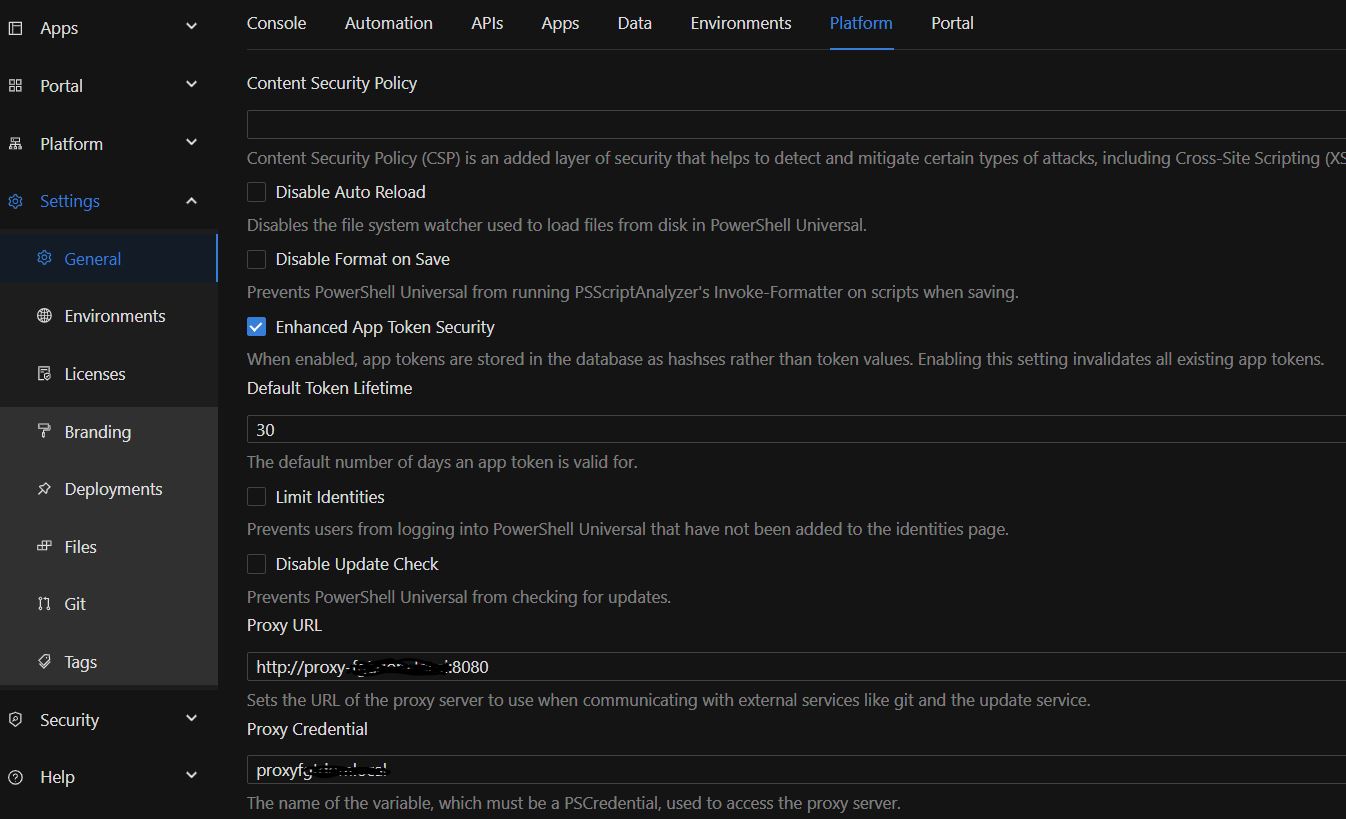
I tried configuring the proxy server under “Settings → General → Platform.”
In the “Proxy URL” field, I entered the proxy URL and port.
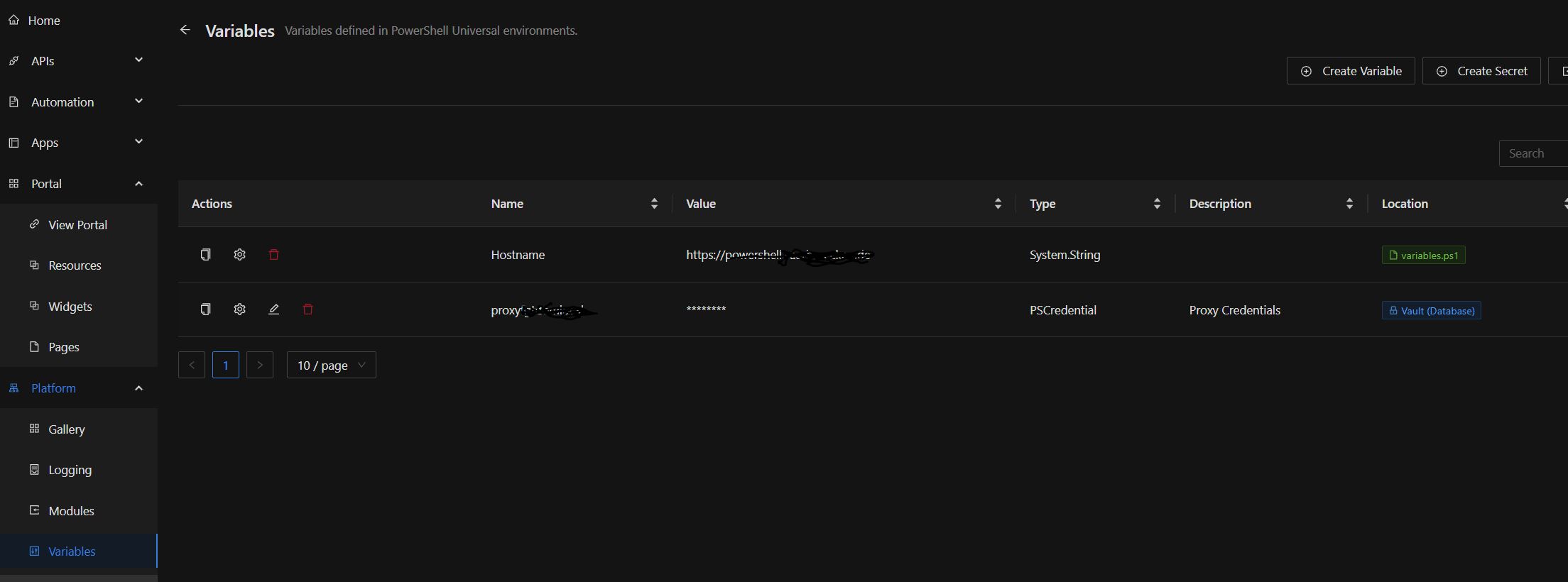
In the “Proxy Credentials” field, I selected a secret that I previously configured under “Platform → Variables.”
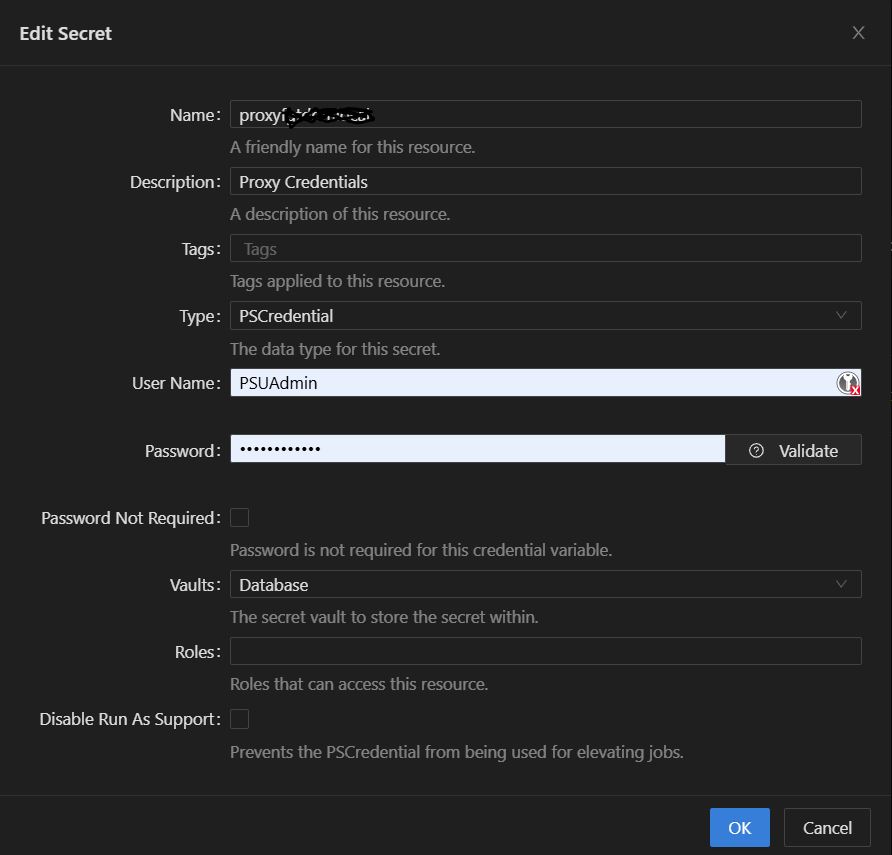
But I’m not sure if I configured the secret correctly! Under Username and Password, I entered the details of a domain account with permission to connect to the proxy/internet. However, when I open the secret again, my local PSU administrator account is displayed as the username?!
When I click “Validate,” the validation always fails (with PSUAdmin and with the service account for accessing the internet). What is it being validated against?
Also, no PSGallery modules are displayed.
Dynamic Table shows maximum 2 entries only
Thanks for your reply. Yeah, i have to learn a lot of thinks because everything is new to me.
No, the variable doesn’t contain any “old” or “invalid” data.
When I output the variable to the log, it contains exactly the data that should be output. But this data isn’t displayed in the table.
I’ve also built in a small counter that counts the array. It also displays the correct number.
$length = $Page:DVS.length
Show-UDToast "$length" -BackgroundColor 'orange' -MessageSize '24' -Duration '5000' -CloseOnClick -Position 'center'
But for some reason, the table is somehow limited to the number of users who are read first.
So if the first group only has 2 members and I then select another group in the select box that has 4 members, only 2 members are displayed in the table - even though the variable/array contains all 4?!
I dont get it! Sitting here for days on such a simple task!
This is not how I imagined it with powershell universal…
If I had to reload the page every time, why would I need a dynamic table? That would be completely insane.
Dynamic Table shows maximum 2 entries only
I figured out where the problem lies.
The problem seems to be the array!
When I run the app for the first time and read a group that has 3 members, the table displays those 3 members. If I then read a group with fewer members, that’s no problem; they are also displayed. But if you then read a group with more than 3 members, a maximum of 3 members are displayed!
So the size of the table depends on the number of users to be displayed in the first run?! WTF!
So if I select a group that has, say, 50 members when I start the app for the first time, the table will only show a maximum of 50 results for subsequent queries
# Load the app theme
$Theme = Get-UDTheme -Name '1984'

New-UDApp -Title 'Suche' -Theme $Theme -Content {

    $SearchBase0 = "OU=abc,OU=xy,DC=DOMAIN,DC=LOCAL"
    $Filter = @('MYFILTER')
     $Alle = [pscustomobject]@{
    Name = 'Alle'
    }
    $OUs = @();
    $OUs += $Alle;
    $OUs += Get-ADOrganizationalUnit -SearchBase $SearchBase0 -SearchScope OneLevel -Filter * | Where-Object {$_.Name -notin $Filter} | Select-Object Name
        New-UDPaper -Elevation 0 -Content {
        New-UDTypography -Text "Blah?"
        }
    New-UDCard -Title 'Suche' -Content {

        New-UDSelect -Id "Auswahl" -MaxWidth '2000' -Option {
            foreach ($item in $OUs) {
                #Write-Host $item.Name
                New-UDSelectOption -Name $item.Name -Value $item.Name
            }
        } -OnChange {
                $DVGroup = @()
                $Page:DVS = @()
                $SelectedAmt = (Get-UDElement -Id "Auswahl").value

                if ($SelectedAmt -eq $Alle.Name) {
                    $DVGroup = @(Get-ADGroup -Filter {Name -like "ABC-XYZ-123-B-*"} | Select-Object Name)
                } else {
                     $Name = "ABC-XYZ-123-B-"+$SelectedAmt
                    $DVGroup = @(Get-ADGroup -Filter {Name -like $Name} | Select-Object Name)
                }
                foreach ($item in $DVGroup){
                        $Members = @(Get-ADGroupMember -Identity $item.Name -ErrorAction SilentlyContinue | get-aduser -property * | Where-Object { ($_.Enabled -like $true)} | Select-Object Enabled, department, GivenName,Surname,sAMAccountName,mail,telephoneNumber,Mobile)
                }

                if (-Not($Members)){
					Sync-UDElement -Id 'dynTable'
                }
                else {
                    $Page:DVS += $Members
                    $length = $Page:DVS.length
                    Show-UDToast "$length" -BackgroundColor 'orange' -MessageSize '24' -Duration '5000' -CloseOnClick -Position 'center'
                    Sync-UDElement -Id 'dynTable'
                }
        }

    }

    New-UDCard -Title 'Tabelle' -TitleAlignment 'center' -Content {
		$Columns = @(
			New-UDTableColumn -Property department -Title "Department" -IncludeInExport -DefaultSortColumn
			New-UDTableColumn -Property Surname -Title "Nachname" -IncludeInExport -DefaultSortColumn
			New-UDTableColumn -Property GivenName -Title "Vorname" -IncludeInExport
			New-UDTableColumn -Property SamAccountName -Title "Anmeldekürzel" -IncludeInExport
			New-UDTableColumn -Property Mail -Title "Mail" -IncludeInExport
			New-UDTableColumn -Property telephoneNumber -Title "Telefon" -IncludeInExport
			New-UDTableColumn -Property Mobile -Title "Mobil" -IncludeInExport
		)
		New-UDDynamic -Id "dynTable" -Content {
			if ($Page:DVS){
				New-UDTable -Id "Test" -Columns $Columns -Data $Page:DVS -Sort -Dense -ShowSelection -OnRowSelection {Sync-UDElement -Id 'Selected'}
			}
		}
	}
} -LoadNavigation (Invoke-RestMethod -Uri $Hostname/Get-PSUNavigation -Method GET) -NavigationLayout permanentDynamic Table shows maximum 2 entries only
Hi guys,
I’m reading group members from an AD group into a variable and want to load them into a dynamic table and display them. This works so far, but the table always only shows maximum two users, even though there are more. If I output the variable with write-output, all the group members are there, but the table still only shows two. I just don’t understand why.
Product: PowerShell Universal
Version: 5.5.3Menu / Navigation Bar
Hey Mike,
After changing the variable name, it works great!
As you mentioned, I also defined the variable $Hostname as a global variable! Good idea.
Thanks so much!
Menu / Navigation Bar
Hey Mike,
thanks for your help/support/work! I couldn’t have done that.
The fact that the code only displays the apps the user has rights to is perfect! That’s exactly how I want it to work later (once the license arrives, which I’ve ordered). Thanks!
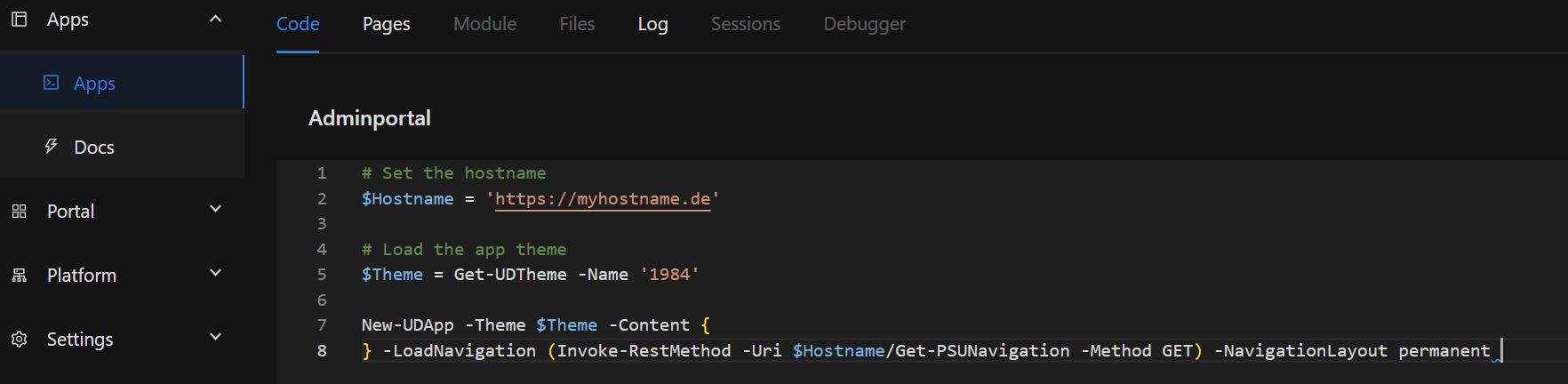
I’ve now created the “Get-PSUNavigation” endpoint API as you described and copied your code into it.
I’ve also added a few lines of code to each app. I’ve tweaked the “LoadNavigation” slightly, as I want the menu to be permanently displayed.
-LoadNavigation (Invoke-RestMethod -Uri $Hostname/Get-PSUNavigation -Method GET) -NavigationLayout permanentNow I can see a list of apps
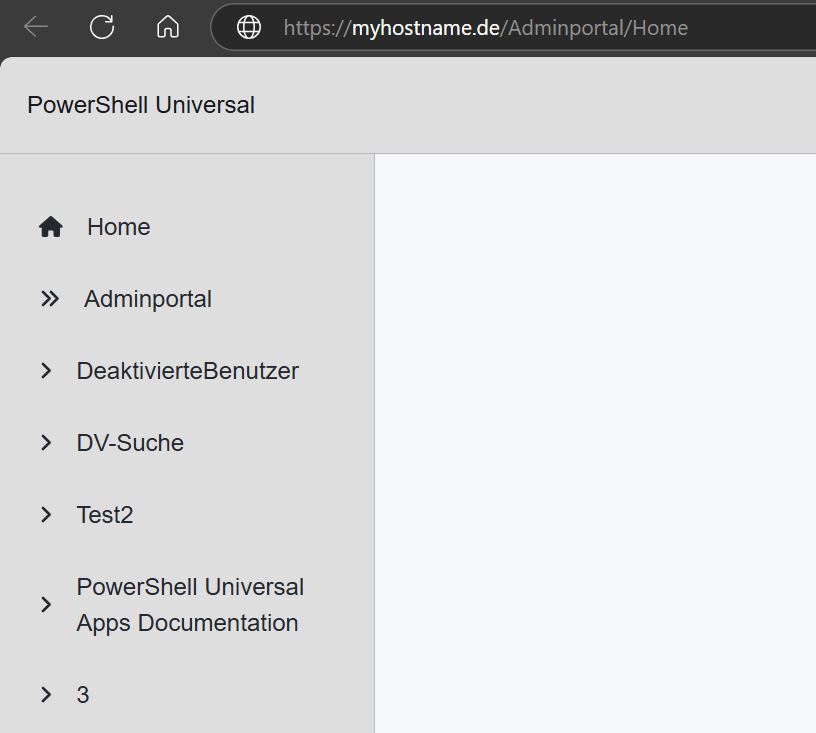
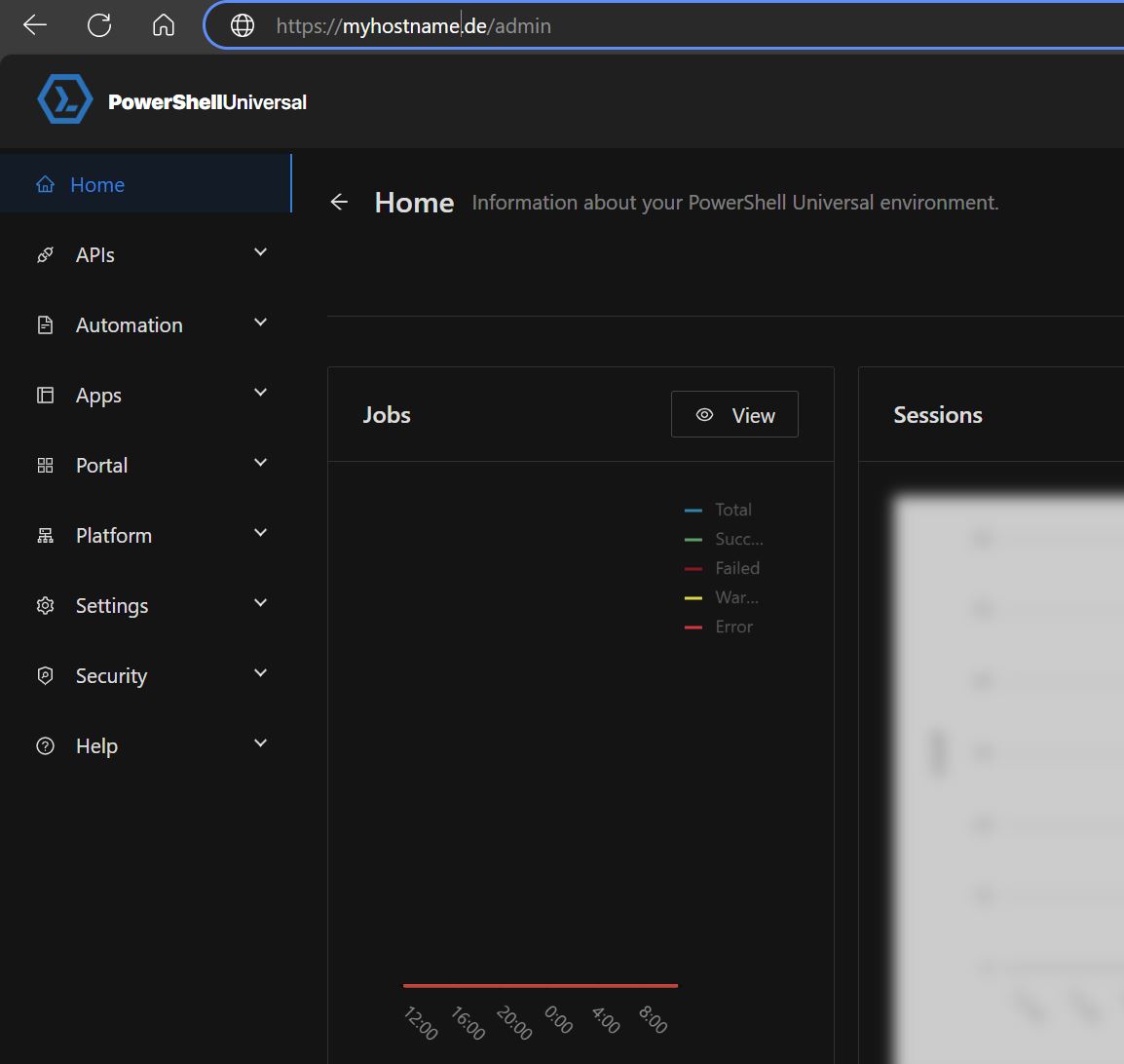
but when I click on any of them I always end up at https://myhostname.de/admin
Menu / Navigation Bar
Hey guys,
I’m new to PowerShell Universal.
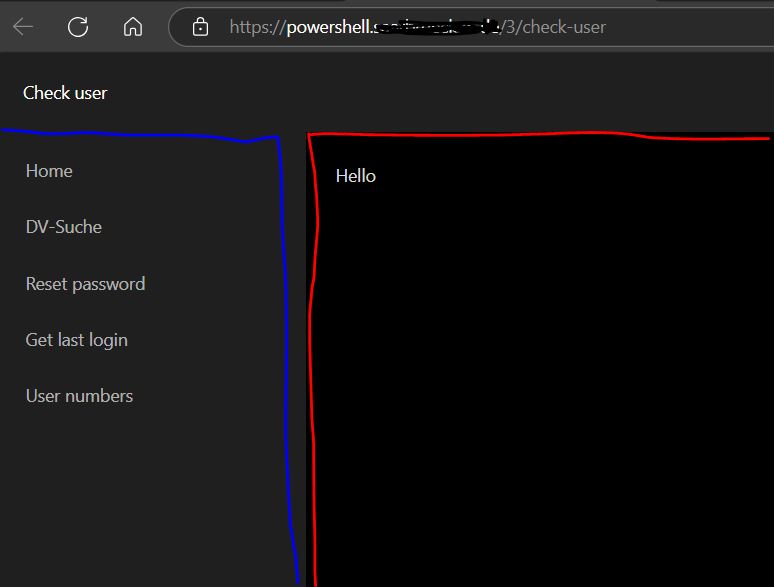
I was thinking about creating a “startpage.” I’d like to have a navigation bar on the left side where I’d link all my apps. When I click on the link in the menu, the respective app would open.
However, I want this navigation bar to always be visible, in every app. So far, I haven’t been able to do this. Can anyone help me?
Product: PowerShell Universal
Version: 5.5.3How to get and process selected rows of a (dynamic) table?
got it
        New-UDCard -Content {
            $Columns = @(
            New-UDTableColumn -Property Surname -Title "Nachname" -IncludeInExport -DefaultSortColumn
            New-UDTableColumn -Property GivenName -Title "Vorname" -IncludeInExport
            New-UDTableColumn -Property SamAccountName -Title "Anmeldekürzel" -IncludeInExport
            New-UDTableColumn -Property Mail -Title "Mail" -IncludeInExport
            New-UDTableColumn -Property telephoneNumber -Title "Telefon" -IncludeInExport
            New-UDTableColumn -Property Mobile -Title "Mobil" -IncludeInExport
            )
            New-UDDynamic -Id "dynTable" -Content {
                if ($Page:DVS){
                    New-UDTable -Id "Test" -Columns $Columns -Data $Page:DVS -Sort -Dense -ShowSelection -OnRowSelection {Sync-UDElement -Id 'Selected'}
                }
            }
            New-UDDynamic -Id "Selected" -Content {
                if ($Page:DVS){
                    $TableData = Get-UDElement -id "Test"
                    $AllMailAddressesInOneString = $TableData.selectedRows.Mail
                    $MailAddresses = @()
                    foreach ($i in $AllMailAddressesInOneString){
                        $MailAddresses += $i+$Delimiter
                    }
                    if ($MailAddresses){
                        New-UDButton -Id "Mailbutton" -Text 'Email senden' -Icon (New-UDIcon -Icon "envelope") -Size "medium" -Style @{ backgroundColor = 'red'} -OnClick { Invoke-UDRedirect -Url "mailto:$MailAddresses" }
                    }
                }
            }
}How to get and process selected rows of a (dynamic) table?
Hi everyone,
I’m new to PSU and have just started testing the product.
I want to write smaller apps/scripts with PowerShell, but make them available via a website. PSU sounds promising in this regard.
Scripts aren’t such a problem. But the interaction between graphical PSU components and the script is something I find very difficult - at the moment.
As a beginner, I lack practical example code to guide me. Therefore, I’m currently finding it very difficult to understand the connections and create the conditions necessary to design an app according to my ideas.
I’ve currently built an app where I can select something from a dropdown field. Based on the selection, group members from the selected AD group are read and displayed in a dynamic table.
Now i can select individual or all entries from the table. But how can I further process the selection? For example, I would like to have a button/link that, when clicked, opens Outlook and sends an email to all selected rows.
Thank you for your help!
       New-UDCard -Content {
            $Columns = @(
<#
            New-UDTableColumn -Property Test -Title "Mail schreiben" -Render{
                $Test = $EventData.mail
                Write-Host $Mail
                New-UDLink -Id "btn$($EventData.Mail)" -Text "Mail schreiben" -Url "mailto:'$Test'" -Style @{ 'color' = 'red' } -Underline "hover"
            }
#>
            New-UDTableColumn -Property Surname -Title "Nachname" -IncludeInExport -DefaultSortColumn
            New-UDTableColumn -Property GivenName -Title "Vorname" -IncludeInExport
            New-UDTableColumn -Property SamAccountName -Title "Anmeldekürzel" -IncludeInExport
            New-UDTableColumn -Property Mail -Title "Mail" -IncludeInExport
            New-UDTableColumn -Property telephoneNumber -Title "Telefon" -IncludeInExport
            New-UDTableColumn -Property Mobile -Title "Mobil" -IncludeInExport
            )
            New-UDDynamic -Id "dynTable" -Content {
                if ($Page:DVS){
                    New-UDTable -Id "Test" -Columns $Columns -Data $Page:DVS -Sort -Dense -ShowSelection -OnRowSelection {Sync-UDElement -Id 'Selected'}
                }
            }
            New-UDDynamic -Id "Selected" -Content {
            $Value = (Get-UDElement -Id 'Test').Value
            Write-Host "Value "$Value
            }
        }
Product: PowerShell Universal
Version: 5.5.3Powershell Universal Export Selected Items from table only
Thanks for your post!
Of course, I’d like to be able to download the selected rows as PDF or XLSX files via the browser - that is very comfortable.
Unfortunately, the link to interaction#downloads doesn’t really help me (as a beginner).
Powershell Universal Export Selected Items from table only
Hi everyone,
I’m brand new to PowerShell Universal. I’m not a Powershell expert, but i’ve already written various PowerShell scripts, but I’m looking for a way to make them available via a website, so I’m currently testing PowerShell Universal.
I’ve created a first app that extracts all deactivated user accounts from Active Directory. Now, using the export function, I can either export all or, if I set a filter on a column, only the current view. What I can’t do is export only selected rows.
How can i do that?
Someone has already asked this question here, but there’s no answer.
In general, I’m still missing some understandable example code from practice.
New-UDApp -Content {
$Data = @()
$Data.Clear()
$SearchBase0 = "OU=ABC,OU=ABC,DC=DOMAIN,DC=LOCAL"
$OU = "USER"
$Filter = @('MYFILTER','MYFILTER2','MYFILTER3')
$OUs = Get-ADOrganizationalUnit -SearchBase $SearchBase0 -SearchScope OneLevel -Filter * | Where-Object {$_.Name -notin $Filter} | Select-Object Name

foreach ($item in $OUs){
    $Amt = $item.Name
    $SearchBase1 = "OU="+$OU+",OU="+$Amt+",OU=ABC,OU=ABC,DC=DOMAIN,DC=LOCAL"

    if ($Amt -like "EGAL") {
        $Users = Get-ADUser -SearchBase $SearchBase1 -SearchScope Subtree -Filter * -Properties Surname, GivenName, SamAccountName, Department, Enabled, DistinguishedName | Where-Object {$_.DistinguishedName -notlike $Filter -and ($_.Enabled -eq $false) } | Select-Object Surname, GivenName, SamAccountName, Department
        $Data = $Data +$Users

    } else {
        $Users = Get-ADUser -SearchBase $SearchBase1 -SearchScope OneLevel -Filter * -Properties Surname, GivenName, SamAccountName, Department, Enabled, DistinguishedName | Where-Object {$_.DistinguishedName -notlike $Filter -and ($_.Enabled -eq $false) } | Select-Object Surname, GivenName, SamAccountName, Department
        $Data = $Data +$Users
    }
}

$Columns = @(
     New-UDTableColumn -Property Surname -Title "Vorname" -ShowFilter -IncludeInExport
     New-UDTableColumn -Property GivenName -Title "Nachname" -ShowFilter -IncludeInExport
     New-UDTableColumn -Property SamAccountName -Title "Anmeldekürzel" -ShowFilter -IncludeInExport
     New-UDTableColumn -Property Department -Title "Amt" -ShowFilter -IncludeInExport -DefaultSortColumn
 )

New-UDTable -Id 'table1' -Data $Data -Columns $Columns -ShowFilter -ShowSort -ShowPagination -ShowSelection -PageSize 100 -ShowExport

}
Product: PowerShell Universal
Version: 5.5.2