
deroppi
Is PSU being abandoned ?
Are you serious?
Looking at 2026.3.x I see the opposite.
Way too many changes and fixes. I can't keep up with testing ;)
To me it seems the use of AI assisted coding added and changed a lot and introduced a lot of bugs.
To me it seems as well that forum posts get handled partially by AI.
It looks like Devolutions has a bigger workforce set on PSU.
And Adam is still keeping after many support calls in the forum.
While the old and nice chit-chat has vanished, there are still many questions and answers (I am subscribed to anything new, and it is a lot)
So while I personally liked the old style much more and I must admit that I am not a big fan of devolutions,
I don't see the project dying at all.
From a business perspective things seem to go the right direction.
Roles/Permissions assignment not working
@deroppi , thanks for clarifying.
One question that may help us compare your setup with the behavior reported by @tt_gopsu
When your role-mapping logic assigns more than one PSU role to the same user, do you see all of those roles applied effectively at the same time?
In particular, are the permissions from the different roles cumulative for Portal resources such as Scripts, or have you seen cases where only one of the assigned roles appears to affect resource visibility or access?
No need to share your full `roles.ps1`. A description of the observed behavior would be enough.
Best regards,
Ruben Tapia
@rubentapia
My setup is rather small.
we only use 5 roles.
these roles match 5 apps.
the apps shown in the PSU portal page fit the roles user got assigned.
same with file access and other actions.
the roles variable is correct as well.
so far I did not experience anything that would make me think role wasn’t applied successfully.
i cannot revert to the old version and setup we had once. All I remember is that using the PSU provided way of assigning roles from a Azure SSO login, always ended up applying only one role.
i changed to my own method, it worked and I did not bother anymore.
we do not use granular permissions.
Roles/Permissions assignment not working
@deroppi thank you for this - so you basically created your own Portal?
no portal.
i just rely on azure for user login and sending the ad group id and user email address in the claims.
then in the roles script I map group id and user email mail to roles.
and I keep a privileged app with only admin access in PSU to edit the files that serve as a config for who gets which role.
Roles/Permissions assignment not working
I had similar issues when I started back then with a way lower version.
I created my own solution, bypassing any PSU automation.
An app page in my PRIV app that let admins define group-ids or email addresses matching roles,
and some code that needs go into the roles.ps1 for each role you have that assigns the proper roles for a user.
The roles code is here: (redacted, hopefully still readable, worked robust so far)
New-PSURole -Name "Local Common" -Policy {
    param(
        [Security.ClaimsPrincipal]$User
    )
    # policy file for roles
    # v1.5
    $localRole = "COMMON"
    #           ^^ set role here

    $allowedFile = "allowed_$($localRole).txt"
    $syslog = @()
    $allowed = @( #dummy entries
        "mail@mail",
        "12345678-aaaa-bbbb-cccc-ffffffffffff"
    )
    $allowed += (Get-Content (Join-Path $repository $allowedFile) | ? { $_ -notmatch "^\s*#|^\s*$" }).trim()

    $mails = ($allowed | ? { $_ -match "@" }).trim()
    #                                    a6699aa7  -0XXb       -XXb8       -81XX       -31eXXXXXaae8
    $groups = $allowed | ? { $_ -match "[a-f0-9]{8}-[a-f0-9]{4}-[a-f0-9]{4}-[a-f0-9]{4}-[a-f0-9]{12}" }
    $claimsGroups = ($User.Claims | ? { $_.type -match "identity/claims/groups" }).value

    $syslog += "$($user.identity.name)"

    $flag = $false
    if ($user.identity.name -in $mails) {
        $flag = $true
        $syslog += "$($flag): $($user.identity.name)"
    }

    $trueGroups = Compare-Object -ReferenceObject $groups -DifferenceObject $claimsGroups -IncludeEqual -ExcludeDifferent
    $outcome = ($trueGroups.sideindicator | Sort-Object -Unique)
    if ( $outcome -eq "==") {
        $flag = $true
        $syslog += "$($flag): $($trueGroups.inputobject -join ',')"
    }

    if ( $flag ) {
        Write-PSULog -Feature "Roles" -Resource "Local $($localRole)" -Message $($syslog -join "|")
    }

    # return flag, true for role granted
    $flag
} VSCode extension for PowerShell Universal, anybody using it?
Sorry,
vscode showed me I should update to:
Identifier devolutionsinc.devolutions-powershell-universal
Version 2026.2.4
I installed and it again has the old interface known from v5
I will go back to
Identifier ironmansoftware.powershell-universal
Version 2026.2.3
as that version works somehow.
Devolutions PowerShell Universal Version 2026.2.4.0 (August 11, 2026)
no issues here, from 2026.2.3 to 2026.2.4 via update-psuserver, (windows, running as service using a local service account)
PS C:\Windows\System32> update-psuserver -verbose -Path "C:\Program Files (x86)\Universal" -LatestVersion
VERBOSE: Version not specified. Using version 2026.2.2 from the Universal module.
VERBOSE: Fetching latest version from Devolutions product info.
VERBOSE: Requested HTTP/1.1 GET with 0-byte payload
VERBOSE: Received HTTP/1.1 response of content type application/json of unknown size
VERBOSE: Latest Devolutions version: 2026.2.4.0
VERBOSE: Downloading version 2026.2.4.0
VERBOSE: Downloading MSI from https://cdn.devolutions.net/download/Devolutions.PowerShellUniversal.2026.2.4.0.msi
VERBOSE: Requested HTTP/1.1 GET with 0-byte payload
VERBOSE: Received HTTP/1.1 185839616-byte response of content type application/x-msi
VERBOSE: File Name: Devolutions.PowerShellUniversal.2026.2.4.0.msi
VERBOSE: Download complete. Installing from MSI.
VSCode extension for PowerShell Universal, anybody using it?
what is going on?
I was kind of happy meanwhile using the ironmansoftware.powershell-universal 2026.2.3
This morning vscode told me the extension is deprecated and I should "Migrate" to the Devolutions version.
So I tried, and got devolutionsinc.devolutions-powershell-universal 2026.1.1
And that version has the old 5.x look and feel again and is not any better.
So I installed the "deprecated" version again, that funny enough holds the highest version number.
code --install-extension ironmansoftware.powershell-universal
VSCode extension for PowerShell Universal, anybody using it?
I wrote that forum entry today, but it happened last week.
I meanwhile have recovered the page and switched back to the older extension.
Most pages most likely have been created through VScode with the old extension.
(I had other issues with creating pages through the web UI. The page would appear automatically in the menu, no matter what I did, and I could not remove it from being displayed. So I found, when creating via Vscode and extension I have no issues)
Git Sync is enabled, Two-Way. But I have to manually commit. Usually I control the changes and spilt into multiple commits, based on what has been changed.
The relative path for all pages is very simple. I don't use any special chars or blanks.
Typical would be a path like:
/dev/remotemtr
/common/netlookup
I will try to recreate that issue on the dev server.
VSCode extension for PowerShell Universal, anybody using it?
Hi,
I used to work with VSCode and the PowerShell Universal Extension version 5.6.2.
My PSU Server meanwhile is on 2026.2.2
The old extension still somewhat works.
I can edit APP code and pages.
I can add a page.
I can restart the APP.
Same for Scripts and Apis.
Now I have tried the new extension 2026.2.2
It is all different, but ok.
The problem is that I can't edit scripts or API (Endpoints).
I can't add app pages.
And it happened that a saved some faulty code by accident, that lead to my page being still on disk, but no longer shown. I could neither delete, nor update.
All in all the new version is not usable for me so I am back to 5.6.2 which does what I need for now.
Anybody else with similar or other experience on that?
GIT sync seemingly not working
@2 the tab is named "settings"
The accessToken field is greyed out.
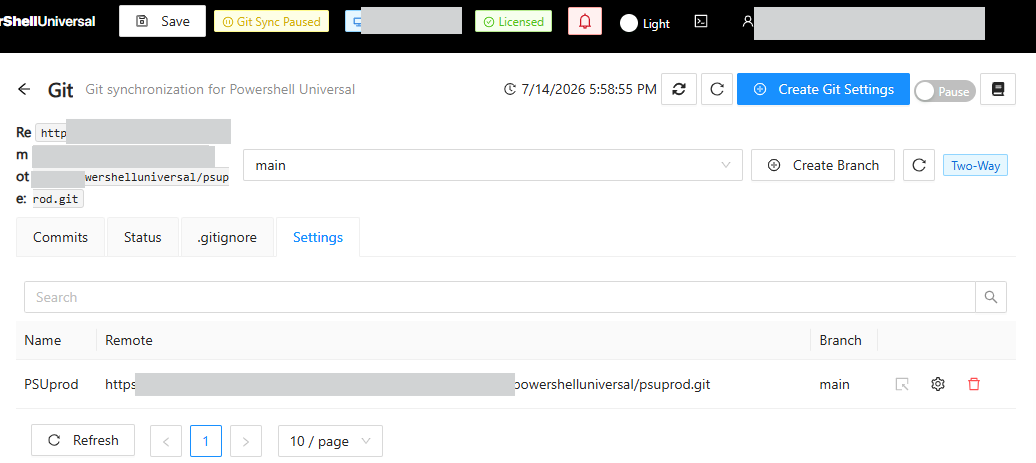
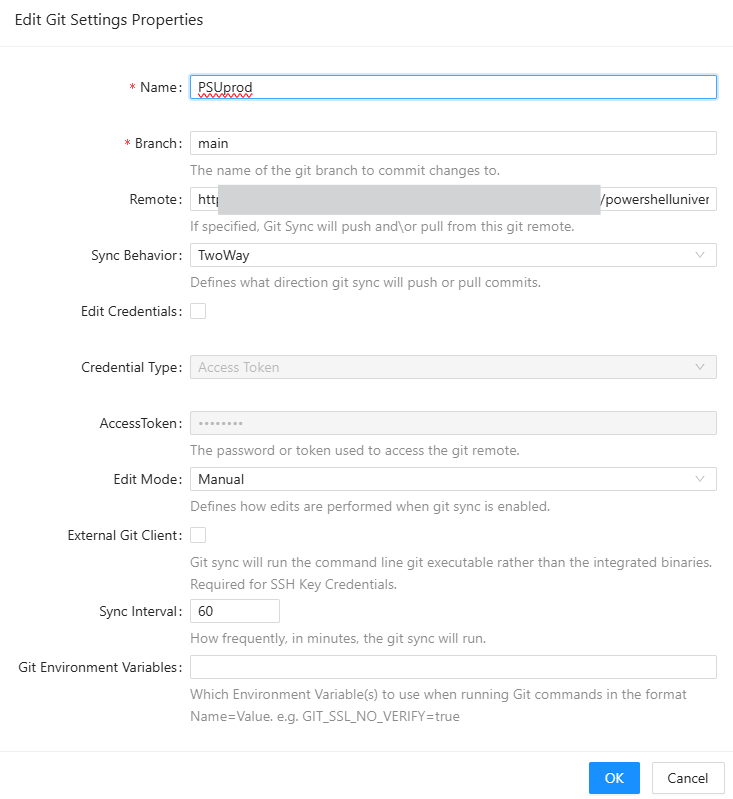
But now that you pointed me to it again,
I see the "edit credentials" check box.
Stupid me...
Thanks.
GIT sync seemingly not working
I was able to fix it.
PSU internal Git used, but GIT is also installed on that server
hXXps://FQDN/path/path/powershelluniversal/psuprod.git
Auth is a project access token
Windows Server 2022 Data Center
MSI installation
PSU version before 2026.1.7
Not much in the logs except this:
2026-07-13 09:02:06.760 +00:00 [ERR][UniversalAutomation.GitSyncService] Failed to sync ("Failed"): server requires authentication that we do not support at LibGit2Sharp.Core.Ensure.HandleError(Int32 result) in /_/LibGit2Sharp/Core/Ensure.cs:line 154
Line 30732: at LibGit2Sharp.Commands.Pull(Repository repository, Signature merger, PullOptions options) in /_/LibGit2Sharp/Commands/Pull.cs:line 19
Line 30733: at PowerShellUniversal.Git.GitService.PullAsync() in D:\a\powershell-universal\powershell-universal\src\PowerShellUniversal.Git\GitService.cs:line 1050
Line 30734: at UniversalAutomation.GitSyncService.TrySync(GitStatus status, GitSettings settings) in D:\a\powershell-universal\powershell-universal\src\PowerShellUniversal.Git\GitSyncService.cs:line 201
Line 30735: at UniversalAutomation.GitSyncService.Sync(Boolean force, Boolean throwOnFailure) in D:\a\powershell-universal\powershell-universal\src\PowerShellUniversal.Git\GitSyncService.cs:line 90
Line 38555: 2026-07-13 10:02:11.401 +00:00 [ERR][UniversalAutomation.GitSyncService] Failed to sync ("Failed"): server requires authentication that we do not support at LibGit2Sharp.Core.Ensure.HandleError(Int32 result) in /_/LibGit2Sharp/Core/Ensure.cs:line 154
I started on the server back then with version 5.
For GIT we used the config in appsettings.json and never touched it except the frequent cycle of tokens.
No issues.
"GitRemote": "hXXps://FQDN/path/path/powershelluniversal/psuprod.git",
"GitUserName": "PSUprod",
"GitPassword": "projectaccesstoken",
"GitBranch": "main",
"GitSyncBehavior": "TwoWay",
"GitInitializeBehavior": "init",
"GitSyncInterval": "60",
"GitSyncTimeout": 30,
It seems that the latest version of PSU uses the UserName/Password in a way so that the GIT instance claims it is a basic auth attempt, which is forbidden.
I removed the GIT settings from the appsettings.json file and restarted the server.
Then I added GIT settings in the GUI.
That worked.
Now the question is:
How can I update the token?
In the GUI I can't edit.
And each time deleting and re-creating the settings is not convenient.
We do frequent token cycles.
In the json file this could be simply done.
GIT sync seemingly not working
I don't know when that started. (EDIT: it started after the 2026.2.1 update)
We are on 2026.2.2 now with DEV and PROD server.
Doing an edit / save in the GUI does not show any error.
Clicking "Synchronize Now" seems to work fine.
But nothing will happen in GIT.
When I click "fetch remote branches" I get this error:

We did not change auth type.
making New-UDTextbox required
stepper is more guided and the user is required to input step by step.
It is a bit more effort but might be the right option to chose depending on your requirements.
It certainly can do the validation as well.
making New-UDTextbox required
Almost.
If you use a form you can validate both.
E.g. each field for syntax or values
and the whole form for being filled completely.
By using an array to define all fields you can be granular.
Using a $page scope variable makes sure the content is available in all UD elements.
New-UDPage -Name "formtest" -Content {

    $page:form=@{
        fields=@(
            @{
                ID="givenName"
                Label="Given Name"
            }
            @{
                ID="lastName"
                Label="Last Name"
            }
            @{
                ID="empID"
                Label="Employee ID"
            }
        )
    }

    New-UDForm -Id 'MultiFieldForm' -Content {
        New-UDStack -Direction Column -Spacing 2 -Children {
            foreach ($field in $page:form.fields) {
                New-UDTextbox -Id "$($field.ID)" -Label "$($field.Label)" -OnValidate {
                        if ([string]::IsNullOrWhiteSpace($EventData)) {
                    New-UDValidationResult -ValidationError "$($field.Label) is required"
                    } else {
                        New-UDValidationResult -Valid
                    }
                }
            }
        }
    } -OnValidate {
        $FormContent=$EventData
        $Errors=@()

        foreach ($field in $page:form.fields) {
            if ([string]::IsNullOrWhiteSpace($FormContent.($field.ID))) { $Errors+="$($FormContent.$field.Label)" }
        }

        if ($Errors.Count -gt 0) {
            New-UDFormValidationResult -ValidationError "Please fill out all required fields: $($Errors -join ", ")"
        } else {
            New-UDFormValidationResult -Valid
        }
    } -OnSubmit {
        Show-UDToast -Message "All fields valid! Submitting: $($EventData | convertto-json )" -Duration 4000
    } -SubmitText "whatever text you like for the submit action" -ButtonVariant outlined
}making New-UDTextbox required
you could use the -onvalidate option.
Either for each input text field, or you wrap all input fields with a form and use -onvalidate on the form. The latter way you would block submission until all required field are filled.
VS Code Extension Powershell Universal
New-PSUEndpoint -Url "/APIgeneric" -Method @('GET') -Authentication -Role @('Local Api') -Path "APIgeneric.ps1" I did a test on my DEV server with just this.
Same error.
VS Code Extension Powershell Universal
I did connect (plug is shown upright), no change.
I don't understand your question about the endpoints.
In the admin console I simply clicked add endpoint, added a role and auth, selected GET or POST method and wrote some script code.
The endpoint works. I can connect via PS or curl, with a token, and get my results back.
VS Code Extension Powershell Universal
Thank you.
I just updated our DEV server 2026.2.0
The errors are the same.
VS Code Extension Powershell Universal
I updated to 2026.2.0, my servers are at 2026.1.7.
I cannot edit endpoint code anymore.
Error: "Endpoint does not have a configuration file path"
Can't edit scripts:
Error: "cannot open psu-legacy://xxx/AD_accounts_notification.ps1?6c0f7c60-0ee5-45f4-b97c-55ef191bf413. Detail: Unable to read file 'psu-legacy://xxx/AD_accounts_notification.ps1?6c0f7c60-0ee5-45f4-b97c-55ef191bf413' (Error: Unable to resolve nonexistent file 'psu-legacy://xxx/AD_accounts_notification.ps1?6c0f7c60-0ee5-45f4-b97c-55ef191bf413')
I worked nicely with the 5.2 extension.
PowerShell Universal - 2026.1.6
did you find some other fix for that?
PowerShell Universal - 2026.1.6
There seems to be an issue in 2026.1.6 with the
git commit page.
On both my servers, the GIT comparison view of changed code lines is distorted and not visible. Just a thin line…
I guess he fixed scrolling caused other issues ?

New-UDTextbox with Monospace font
Product: PowerShell Universal
Version: 2026.1.3
I would like to know how I can use Monospace font in a UDTextbox.
I am aware of wrapping it into
New-UDStyle -Style ‘.MuiInput-root { font-Family : monospace }’ -Content {
New-UDTextbox …
}
But that does not work when using the variant option.
I tried setting monospace font with -style or -sx, but no luck.
I would like to get more control about the width as well.
It is either -fullwidth or some standard width that mostly is too small or too wide…
Thanks.
Local login page no longer accessible?
Branding/Login Page might interfere with loading…?
Or maybe “SecurityModel”: “Permissive”?
New-UDTextbox set text to monofont
This does work,
but no longer when using the -variant option.
Any idea how to use mono-spaced font in an outlined or filled box?
Local login page no longer accessible?
I just checked on my prod instance of 2026.1.3, and I can get to the /login page.
It shows
Login
and
Login with SAML2
Both work.
I have these configured.
Set-PSUAuthenticationMethod -Type “Form” -ScriptBlock {
Set-PSUAuthenticationMethod -Type “Saml2” -CallbackPath "https://