Roles/Permissions assignment not working

We are using Windows SSO Sign-in setup as explained in Windows SSO | Devolutions PowerShell Universal | Product guides & reference (Kestrel)
We have a role for each AD-Group with the Default groups (Administrator, User, ...) defined as nested group.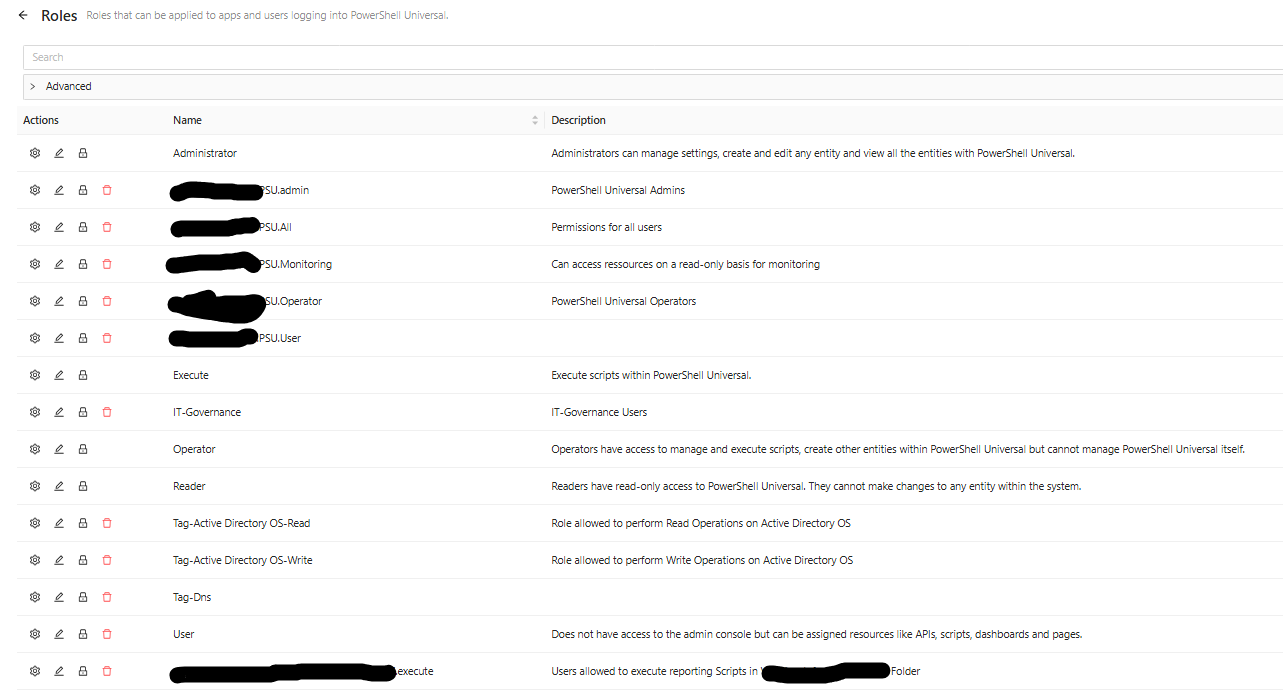
E.g. for the Admins: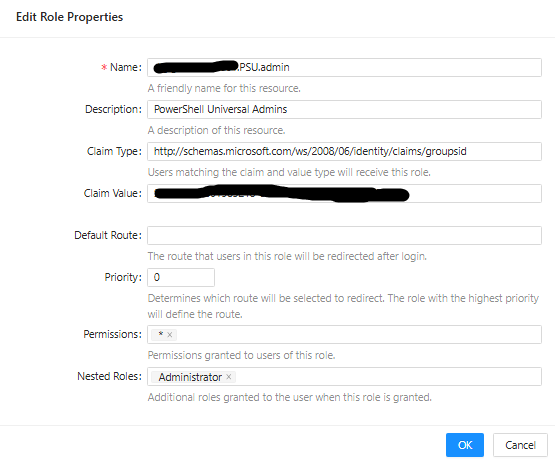
So far this was working fine as we did not have "deeper" permissions other than the admins and the "All" group. (The "All" group basically has access to a single App accessible via the Portal).
The App is assigned using the "Security" tab: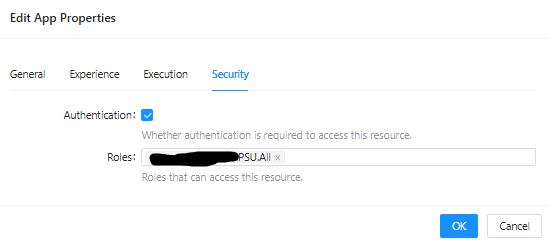
Now we tried giving permissions to the "execute" group (bottom of the screenprint) to some of the scripts, in order for users to manually start these scripts from the Portal.
But so far it does not work - the scripts are not displayed in the portal, only the app accessible to all users.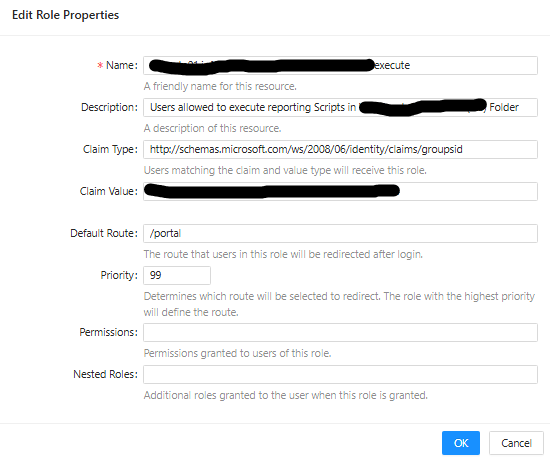 Assignment of the script to the Role: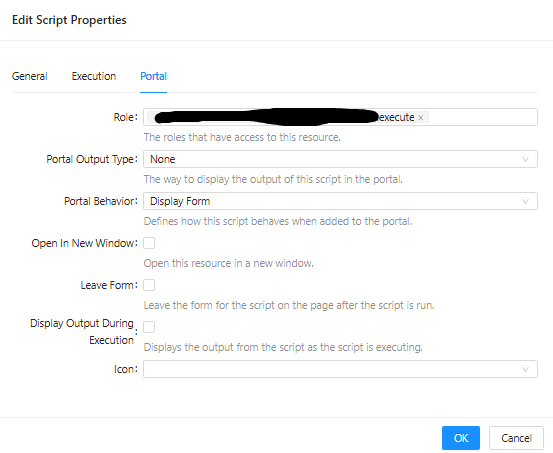
Also assigning the permissions using the "Permissions" page does not work.
I suspect that PSU evaluates the AD groups based on the order defined in permissions.ps1 and only the first group matching is applied and as "Domain Users" is member of the "All" group, everything after the "All" group never is evaluated...
Maybe someone can confirm this and if this is the case - how can we achieve the desired result?
d97e4f0e-4417-4396-b112-d1b458740aeb.png
5db4bda6-a3a0-4e19-99e0-4ec5bd716077.png
9e2349a3-02e5-4a27-86ec-b286eefca2c4.png
99805f7e-b9f4-4b27-8409-3bfe3f52bfb1.png
0f14873e-f2fc-4c52-9ae5-edb423b24846.png
a692ebb8-3b9e-4b6f-8acb-ecb1eae04a04.png
All Comments (23)
I had similar issues when I started back then with a way lower version.
I created my own solution, bypassing any PSU automation.
An app page in my PRIV app that let admins define group-ids or email addresses matching roles,
and some code that needs go into the roles.ps1 for each role you have that assigns the proper roles for a user.
The roles code is here: (redacted, hopefully still readable, worked robust so far)
New-PSURole -Name "Local Common" -Policy {
    param(
        [Security.ClaimsPrincipal]$User
    )
    # policy file for roles
    # v1.5
    $localRole = "COMMON"
    #           ^^ set role here

    $allowedFile = "allowed_$($localRole).txt"
    $syslog = @()
    $allowed = @( #dummy entries
        "mail@mail",
        "12345678-aaaa-bbbb-cccc-ffffffffffff"
    )
    $allowed += (Get-Content (Join-Path $repository $allowedFile) | ? { $_ -notmatch "^\s*#|^\s*$" }).trim()

    $mails = ($allowed | ? { $_ -match "@" }).trim()
    #                                    a6699aa7  -0XXb       -XXb8       -81XX       -31eXXXXXaae8
    $groups = $allowed | ? { $_ -match "[a-f0-9]{8}-[a-f0-9]{4}-[a-f0-9]{4}-[a-f0-9]{4}-[a-f0-9]{12}" }
    $claimsGroups = ($User.Claims | ? { $_.type -match "identity/claims/groups" }).value

    $syslog += "$($user.identity.name)"

    $flag = $false
    if ($user.identity.name -in $mails) {
        $flag = $true
        $syslog += "$($flag): $($user.identity.name)"
    }

    $trueGroups = Compare-Object -ReferenceObject $groups -DifferenceObject $claimsGroups -IncludeEqual -ExcludeDifferent
    $outcome = ($trueGroups.sideindicator | Sort-Object -Unique)
    if ( $outcome -eq "==") {
        $flag = $true
        $syslog += "$($flag): $($trueGroups.inputobject -join ',')"
    }

    if ( $flag ) {
        Write-PSULog -Feature "Roles" -Resource "Local $($localRole)" -Message $($syslog -join "|")
    }

    # return flag, true for role granted
    $flag
} Hello thomaslanger,
Thank you for the detailed explanation and screenshots. I also noted the additional report in this thread describing similar behavior in an older PSU version. At this point, however, I would like to confirm whether both reports have the same underlying cause before treating them as the same issue.
The first step is to separate role assignment from the permissions applied to the script.
Could you please provide the following?
* Your exact PowerShell Universal version and build.
* Does this behavior affect every member of the AD group mapped to the `execute` role, or only certain users?
* For one affected user, can you confirm which PSU roles are effectively assigned after Windows SSO authentication?
* After changing the role assignment, does signing out completely and signing back in change the result?
As an additional test, if possible, please temporarily assign the same `execute` role directly to a test Identity in PSU rather than obtaining it through the Windows SSO group mapping. Then sign out, sign back in, and check whether the assigned script becomes visible in the Portal.
This will help us determine whether the issue is related to the AD group / role evaluation or to the Portal and script permission configuration itself.
If you can also share the relevant sanitized definitions for the broad role and the `execute` role, that would help. We do not need the complete configuration.
Because this is a public forum, please sanitize all evidence before posting. Remove credentials, tokens, license keys, cookies, private keys, full connection strings, email addresses, usernames, customer data, tenant or account identifiers, internal domains, hostnames, IP addresses, and private URLs. Please do not upload unredacted HAR files, memory dumps, database backups, or complete configuration files to this public thread.
References:
https://docs.devolutions.net/powershell-universal/security/authorization
https://docs.devolutions.net/powershell-universal/security/enterprise-security/permissions
https://docs.devolutions.net/powershell-universal/security/enterprise-security/windows-sso
Best regards,
Ruben Tapia
@deroppi thank you for this - so you basically created your own Portal?
Ruben - thank you for your response.
* Your exact PowerShell Universal version and build. --> 2026.1.6
* Does this behavior affect every member of the AD group mapped to the `execute` role, or only certain users? --> all of them
* For one affected user, can you confirm which PSU roles are effectively assigned after Windows SSO authentication?
This is rather interesting - in order to obtain this information, I created a script outputting $UAJob to Json. For the user to be able to execute the script, I had to assign "All" - immediately the script was displayed in the Portal. 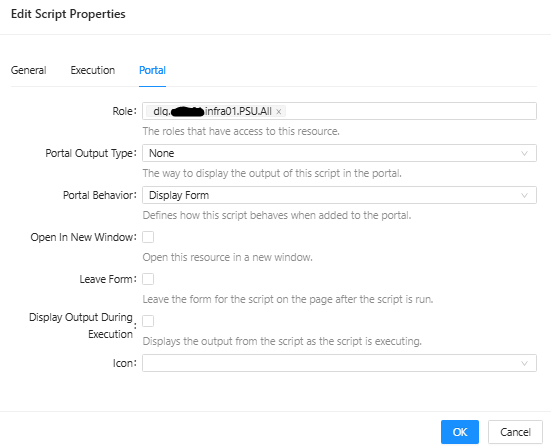
Here are the relevant parts of the $UAJob output. This is interesting, as obviously the AD groups are assigned correctly, however only the first one (dlg.******.infra01.PSU.All) seems to have any effect:
"Identity":  {
                     "Id":  72,
                     "Name":  "******\\ts77184",
                     "Source":  "Git",
                     "RoleName":  null,
                     "Roles":  null,
                     "CredentialVault":  null,
                     "Password":  null,
                     "LocalAccount":  false,
                     "OldPassword":  null,
                     "Settings":  null,
                     "Theme":  "light",
                     "JobColumns":  null,
                     "JobStatuses":  null,
                     "PasswordLastSet":  null,
                     "System":  false,
                     "ExcludedScripts":  null,
                     "SelectedScripts":  null,
                     "DevolutionsAccount":  false
                 },
[...]
"Roles":  "dlg.******.infra01.PSU.All,dlg.******.infra01.PSU.******Infrastructure**.execute",
[...]
"ReadPermission":  "automation.scripts.Get-PSUVars.ps1/read",
As an additional test, if possible, please temporarily assign the same `execute` role directly to a test Identity in PSU rather than obtaining it through the Windows SSO group mapping. Then sign out, sign back in, and check whether the assigned script becomes visible in the Portal.
So I assigned to role directly to the Identity, which leads to nothing being displayed in the portal anymore: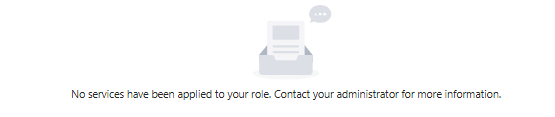
* After changing the role assignment, does signing out completely and signing back in change the result? --> No, also signing off from the Workstation, Private Mode, ... does not change anything.
If you can also share the relevant sanitized definitions for the broad role and the `execute` role, that would help. We do not need the complete configuration. --> (I'm guessing what you mean is the relevant portions of the roles.ps1?)
New-PSURole -Name "dlg.******.infra01.PSU.All" -Description "Permissions for all users" -ClaimType "http://schemas.microsoft.com/ws/2008/06/identity/claims/groupsid" -ClaimValue "S-*-*-**-**********-********-**********-******" -DefaultRoute "/portal" -Priority 99
New-PSURole -Name "dlg.******.infra01.PSU.******Infrastructure**.execute" -Description "Users allowed to execute reporting Scripts in ****** Infrastructure (**) Folder" -ClaimType "http://schemas.micrsooft.com/ws/2008/06/identity/claims/groupsid" -ClaimValue "S-*-*-**-**********-********-**********-******" -DefaultRoute "/portal" -Priority 99
I also did some tests with other users:
"Identity":  {
	 "Id":  73,
	 "Name":  "******\\*******",
	 "Source":  "Git",
	 "RoleName":  null,
	 "Roles":  null,
	 "CredentialVault":  null,
	 "Password":  null,
	 "LocalAccount":  false,
	 "OldPassword":  null,
	 "Settings":  null,
	 "Theme":  null,
	 "JobColumns":  null,
	 "JobStatuses":  null,
	 "PasswordLastSet":  null,
	 "System":  false,
	 "ExcludedScripts":  null,
	 "SelectedScripts":  null,
	 "DevolutionsAccount":  false
 },
[...]
"Roles":  "dlg.******.infra01.PSU.All,dlg.******.infra01.PSU.Operator,Operator",
[...]
"ReadPermission":  "automation.scripts.Get-PSUVars.ps1/read",
--> is able the execute the script in the Portal, has "Operator" permissions in the Admin console
"Identity":  {
	 "Id":  26,
	 "Name":  "******\\**********",
	 "Source":  "Git",
	 "RoleName":  null,
	 "Roles":  null,
	 "CredentialVault":  null,
	 "Password":  null,
	 "LocalAccount":  false,
	 "OldPassword":  null,
	 "Settings":  "{\"AppCodeByDefault\":false,\"ScriptListView\":null,\"SchedulesListView\":null,\"EditorSettings\":{\"ShowLineNumbers\":true,\"ShowWhitespace\":false,\"DisableAnalyzer\":false,\"Minimap\":false,\"Theme\":null},\"PageSize\":100,\"HideModuleHomePageCard\":false}",
	 "Theme":  null,
	 "JobColumns":  [
						"Id",
						"ScriptFullPath",
						"Status",
						"StatusDescription",
						"EndTime"
					],
	 "JobStatuses":  null,
	 "PasswordLastSet":  null,
	 "System":  false,
	 "ExcludedScripts":  [

						 ],
	 "SelectedScripts":  null,
	 "DevolutionsAccount":  false
 },
[...]
"Roles":  "dlg.******.infra01.PSU.admin,Administrator,dlg.******.infra01.PSU.All",
[...]
"ReadPermission":  "automation.scripts.Get-PSUVars.ps1/read",
--> is able to execute the script in the portal, has Admin permissions in the Admin Console
Should we open a support case on this matter?
7cc93465-ecd1-4f07-9ef2-3aa92ed25f2c.png
6a92537d-eb24-4a8e-928a-6f707b32700f.png
Hello tt_gopsu,
Thank you for the detailed update and for running the additional tests. The results are very useful, especially the confirmation that both roles are present in `$UAJob` and that assigning the `execute` role directly to the Identity produces the same behavior.
There is no need to open another support case. We can continue tracking the issue here.
Today, we will be setting up a lab to reproduce the scenario under controlled conditions. We will focus on the role assignment, Portal script visibility, direct Identity assignment, and permission behavior so we can determine whether this is configuration-related or reproducible product behavior.
I will update the thread once we have the lab results.
Best regards,
Ruben Tapia
@deroppi thank you for this - so you basically created your own Portal?
no portal.
i just rely on azure for user login and sending the ad group id and user email address in the claims.
then in the roles script I map group id and user email mail to roles.
and I keep a privileged app with only admin access in PSU to edit the files that serve as a config for who gets which role.
@deroppi , thanks for clarifying.
One question that may help us compare your setup with the behavior reported by @tt_gopsu
When your role-mapping logic assigns more than one PSU role to the same user, do you see all of those roles applied effectively at the same time?
In particular, are the permissions from the different roles cumulative for Portal resources such as Scripts, or have you seen cases where only one of the assigned roles appears to affect resource visibility or access?
No need to share your full `roles.ps1`. A description of the observed behavior would be enough.
Best regards,
Ruben Tapia
Hello @tt_gopsu
Following up on the lab testing I mentioned yesterday, we completed the reproduction work.
We tested the scenario on PowerShell Universal 2026.1.6 build 24196505312, matching your reported version, and also on 2026.2.4 build 31515244301.
In our isolated lab, we were not able to reproduce the issue:
* A user with only the broad role could not see the script assigned to the `execute` role, as expected.
* A user with both the broad and `execute` roles could see and execute the selected script.
* The resulting jobs reported both roles.
* Reversing the role/claim order did not change the behavior.
* Assigning the `execute` role directly to the Identity also made the script visible and executable.
* 2026.2.4 produced the same results.
This suggests that multiple roles can be evaluated cumulatively under the tested conditions, so I would like to focus next on the differences between our working baseline and your environment.
Could you please provide:
* A sanitized list of the effective claims from one affected session.
* The exact sanitized `Portal > Role` assignment for one script that does not appear.
* How the role/permission changes were applied, including whether the PSU configuration or service was reloaded/restarted afterward.
* In the role definition previously posted, the `execute` ClaimType appeared to contain `micrsooft` instead of `microsoft`. Could you confirm whether that typo exists in the actual configuration or was introduced while copying/sanitizing the example?
Our lab did not match your exact Windows SSO, AD nesting, hosting, database, repository mode, browser, or service identity, so the next step will be to introduce relevant differences one at a time into the working baseline.
Best regards,
Ruben Tapia
I am also going to set up a second lab with closer parity to your reported environment so we can compare the behavior under more similar conditions.
Because this setup is more complex to reproduce accurately, I will likely have the results available by the end of the day tomorrow, Friday.
I will update the thread as soon as that testing is complete.
Regards,
Ruben Tapia
@deroppi , thanks for clarifying.
One question that may help us compare your setup with the behavior reported by @tt_gopsu
When your role-mapping logic assigns more than one PSU role to the same user, do you see all of those roles applied effectively at the same time?
In particular, are the permissions from the different roles cumulative for Portal resources such as Scripts, or have you seen cases where only one of the assigned roles appears to affect resource visibility or access?
No need to share your full `roles.ps1`. A description of the observed behavior would be enough.
Best regards,
Ruben Tapia
@rubentapia
My setup is rather small.
we only use 5 roles.
these roles match 5 apps.
the apps shown in the PSU portal page fit the roles user got assigned.
same with file access and other actions.
the roles variable is correct as well.
so far I did not experience anything that would make me think role wasn’t applied successfully.
i cannot revert to the old version and setup we had once. All I remember is that using the PSU provided way of assigning roles from a Azure SSO login, always ended up applying only one role.
i changed to my own method, it worked and I did not bother anymore.
we do not use granular permissions.
Hello @tt_gopsu
One additional update from our testing.
After reviewing the requirements for a second lab, we determined that building a fully equivalent environment would not provide reliable parity with your Windows SSO and AD configuration. The Docker-based comparison would introduce enough differences that the results could be misleading.
The most useful next step is to compare the effective authorization from an affected session with the script configuration.
Could you please capture the output of `/api/v1/identity/claims` while signed in as an affected user, along with the affected script’s exact `Role` assignment from the Portal/script configuration?
Because this information may contain environment-specific identity data, please do not post the raw output publicly. You can send the sanitized information directly to my support email:
ruben.tapia@ironmansoftware.com
Please redact usernames, email addresses, group IDs/SIDs, tokens, and other sensitive values, but preserve the claim types, number of values, role names, and exact spelling/case. This will allow us to compare the effective session authorization directly with the Portal role required by the script.
Best regards,
Ruben Tapia
Hi Ruben, thank you, I will send you the details. BR, Thomas
Hello @tt_gopsu ,
Thank you for sending the requested information by email.
I reviewed the claims output and the script configuration you provided. The evidence confirms that the relevant role and script permissions are being assigned in the affected session, which gives us a much clearer direction for the investigation.
I will now validate the remaining differences against our lab environment, specifically the script path/folder structure and the related Portal authorization behavior.
Once that validation is complete, I will prepare the case for the appropriate escalation with the supporting evidence collected so far.
Thank you again for providing the additional details.
Best regards,
Ruben Tapia
Hello @tt_gopsu ,
I wanted to provide an update following the additional targeted lab validation based on the information you sent privately.
Using PowerShell Universal 2026.1.6 build 24196505312, I recreated the relevant nested script structure, including a customer-equivalent path with spaces and parentheses.
The original symptom was still not reproduced. In the lab, all role-scoped scripts remained visible in the Portal, including both scripts placed under the nested customer-equivalent path.
However, we identified a different and repeatable behavior during this testing. Scripts located at the Portal root opened normally, while scripts located inside nested folders were displayed in the Portal but returned `Not Found` when opened. This occurred 3/3 with both a simple nested folder and the customer-equivalent folder structure.
This is different from your reported behavior, where the scripts are not displayed at all, so I am keeping these findings separate rather than treating the lab result as a reproduction of your issue.
I am completing a final set of controlled comparisons around nested-script authorization, parent-resource permissions, configuration reload/restart behavior, and version comparison. Once those controls are complete, I will consolidate the customer evidence and laboratory findings for the appropriate Development review.
Thank you again for the detailed information you provided. It has been very useful in narrowing the investigation.
Best regards,
Ruben Tapia
Hello Ruben,
Thank you for your investigation so far.
I think I have found the reason for this. I added the role to another script in the same folder and it immediately showed up in the portal. Also adding the role to another script in another folder worked fine.
However, the difference between those is that the two scripts in question have a Tag assigned! And when adding the role to another script that also has the same Tag assigned, it also does not show up in the portal.
So I'm guessing this is by design.
As I do not want to show the user all the scripts that have the Tag, I will now need to find a workaround for this.
BR,
Thomas
So I created a new tag, checked "Display in Portal", assigned the group to the tag and assigned it as an additional tag to the scripts. Now they show up!
Honestly, the documentation is not helpful at all in this regard. That an assigned tag overrules any other permissions set, does not seem to be documented anywhere...
Hello @tt_gopsu
You are absolutely right that this interaction is not clearly explained in the current documentation.
Your workaround using a separate tag with **Display in Portal** enabled is a very good approach for this scenario, especially since it lets you control which tagged scripts should actually be exposed to users.
I will pass this feedback to our Documentation team so they can review whether the interaction between script tags, Portal visibility, and role permissions should be documented more explicitly.
I would not want to assume the current behavior is necessarily by design without further confirmation, but your findings have clearly identified the condition affecting the Portal visibility.
Also, if you have a suggestion for how you would ideally like this behavior to work as a dedicated option or feature for similar use cases, we would be very interested in hearing it.
Thank you for taking the time to isolate the behavior and share the workaround with us.
Best regards,
Ruben Tapia
@deroppi , we found an interesting condition in this case thanks to the additional testing shared by @tt_gopsu .
The affected scripts also had Tags assigned, and those Tags influenced whether the scripts were shown in the Portal. After adjusting the Tag configuration and assigning the appropriate role, the scripts became visible.
If the scripts in your previous setup were also using Tags, this may be worth checking as a possible factor.
@rubentapia this seems like a bug. Consider the following: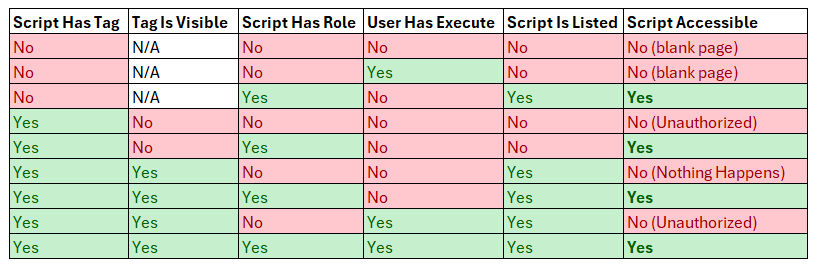
Whether the user has Execute permissions or not on the script seems to be irrelevant. Also, the failure behavior seems to be very inconsistent.
The key contributors seem to be:
- The script has no tag or the tag is visible in the portal
- The script has a role assigned
In the diagram Script Accessible references your ability to navigate directly to the script using `/portal/scripts/{ScriptName}` and execute the script. Script Is Listed refers to the script being listed on the portal home page either directly or via a Tag. Note that the script does not have to be listed to be accessible.
This was tested on 2026.2.5
71417382-50f3-40c5-b9a1-a559ce92940b.png
Hello @tt_gopsu
Thank you for the additional testing and for documenting the different Tag, Role, and Execute combinations.
We have now shared the updated findings directly with the Development team for review. The new results suggest that the interaction between Tags, Portal visibility, script roles, and Execute permissions may require clarification beyond documentation alone.
Your current workaround remains valid for your environment, and the additional matrix you provided is helpful for the ongoing review.
We will update the thread once we receive further guidance from Development.
Best regards,
Ruben Tapia
Hi Ruben,
thank you for the update!
BR
Hello @tt_gopsu
Thank you for the additional testing and for documenting the different Tag, Role, and Execute combinations.
We have now shared the updated findings directly with the Development team for review. The new results suggest that the interaction between Tags, Portal visibility, script roles, and Execute permissions may require clarification beyond documentation alone.
Your current workaround remains valid for your environment, and the additional matrix you provided is helpful for the ongoing review.
We will update the thread once we receive further guidance from Development.
Best regards,
Ruben Tapia
@rubentapia I just want to call out that I'm a separate user with the same issue and not finding that the solution that worked for @tt_gopsu is suitable in my environment. That is what prompted me to create the grid and experiment with the issue.
What really makes me think it's a bug is that the script is still ACCESSIBLE but not visible when it is tagged.
@tt_gopsu
I wanted to follow up with the clarification we received from our internal review.
The current Portal behavior is evaluated in separate stages for listing, opening, and executing a script. In practice, this means that Portal Role, Tag visibility, and Execute permissions each play a different part and do not replace one another.
This explains why your workaround was successful. The documentation has now been updated to make this interaction clearer, especially around how Tags affect whether a script is discoverable in the Portal.
We also opened an internal product story to review whether this authorization model can be made more consistent and easier to understand in the future. This is currently under review, so I do not want to imply any specific product change or timeline.
Thank you again for the detailed testing and for identifying the workaround. Your findings directly helped clarify the documentation gap.
Best regards,
Ruben Tapia
Hello @realslacker
Thank you for clarifying that you are a separate user seeing the same general issue and that the workaround used by tt_gopsu is not suitable for your environment.
Your additional matrix is useful because it highlights a different aspect of the same authorization model: a script can be directly accessible while still not being listed in the Portal, depending on the Tag and Role combination.
We have added your findings to the existing Development review. The documentation has now been updated to explain the current separation between script listing, opening, and execution, and there is also an internal product story tracking a review of how to make this behavior more consistent.
I am keeping your scenario separate from tt_gopsu's workaround so we do not treat that workaround as a universal solution.
Thank you for the additional testing and for documenting the different combinations.
Best regards,