
pss127
macOS has issues rendering when Dark mode is enabled
This resolved the issue, thank you.
macOS has issues rendering when Dark mode is enabled
I am working with my team to test this but thank you so much as this completely makes sense.
PSU Setup for IT and Employee Facing Apps
We use Entra but you could also use Active Directory leveraging role based access. If you are using Entra Id, you can use the role based claims. If using Active Directory have Owner groups or use the managed by attribute on groups to see who can update a group would be my suggestion.
macOS has issues rendering when Dark mode is enabled
I will add also this is a MSI install with a Active Directory service account, Port 443 and backed by a MS SQL database with Entra Authentication and Roles.
macOS has issues rendering when Dark mode is enabled
Here is sanitized code base
$Navigation = @(
    New-UDListItem -Label "Home"
    New-UDListItem -Label "Getting Started" -Children {
        New-UDListItem -Label "DeskSide Support Tools" -Href '/Laps_Lookup'
    }
)

$Pages = @()
$Pages += New-UDPage -Name 'Laps_Lookup'
New-UDApp -Title 'Penn State Identity and Access Management' -Pages $Pages -Navigation $Navigation
# ============================================================
# Sanitized DeskSide Support Tools - PSU PowerShell Universal App
# ADA Title II / WCAG 2.1 AA Improvements Applied
# ============================================================
New-UDPage -Name 'DeskSide Support Tools' -Content {
# ----------------------------------------------------------
# DEBUG FLAG
# ----------------------------------------------------------
$DebugForceD4Admin = $false
# ----------------------------------------------------------
New-UDDynamic -Id 'dynPageContent' -Content {
# --- Mocked Initial Load & Group Resolution ---
if (-not $Session:SessionInitialized) {
New-UDElement -Tag 'div' -Attributes @{
role = 'status'
'aria-live' = 'polite'
'aria-label' = 'Page loading'
style = 'padding: 32px; text-align: center;'
} -Content {
New-UDProgress -Circular
New-UDTypography -Variant 'body1' -Text 'Loading your access groups, please wait...' `
-Style @{ marginTop = '16px'; color = '#555555' }
}
# ==========================================================
# SANITIZATION: Mocking Database, AD, and CyberArk Returns
# Populating default prefix of 'I7'
# ==========================================================
$Session:OwnPrefixes = @('I7')
$Session:UnitPrefixes = @('I7')
$Session:StandardDelegations = @()
$Session:CustomGroupDelegations = @()
$Session:IsD4Admin = $false
$Session:SessionInitialized = $true
Sync-UDElement -Id 'dynPageContent'
return
}
# ----------------------------------------------------------
# LAPS Lookup Section
# ----------------------------------------------------------
New-UDElement -Tag 'section' -Attributes @{ 'aria-label' = 'LAPS Lookup Tool' } -Content {
New-UDTypography -Variant 'h3' -Text 'LAPS Lookup' -Style @{ fontWeight = 'bold' } -GutterBottom
New-UDTypography -Text 'Select your unit, then enter a computer name. Example: i7-foo'
New-UDElement -Tag 'p' -Content {}
# ==========================================================
# PAPER 1: Form Inputs
# ==========================================================
New-UDPaper -Elevation 2 -Style @{
padding = '24px'
marginTop = '8px'
backgroundColor = '#ffffff'
} -Children {
New-UDForm -Content {
New-UDSelect -Label 'Your Unit' -Id 'selectedUnit' -Option {
foreach ($prefix in $Session:UnitPrefixes) {
New-UDSelectOption -Name $prefix -Value $prefix
}
}
New-UDTextbox -Label 'Computer Name' -Id 'computerName' `
-Placeholder 'e.g. i7-foo (max 15 chars)' `
-Style @{ width = '180px' } -OnChange {
if ($EventData.Length -gt 15) { $Session:ComputerNameWarning = $true }
else { $Session:ComputerNameWarning = $false }
Sync-UDElement -Id 'computerNameWarning'
}
New-UDCheckbox -Id 'useLegacyLAPS' -Label 'Lookup macOS LAPS Password' -Checked $false
New-UDTooltip -TooltipContent { 'This checkbox does NOT search JAMF admin passwords, only passwords stored in Active Directory Legacy LAPS attribute for macOS' } -Content {
New-UDIcon -Icon 'InfoCircle' -Style @{
color = '#1976d2'
cursor = 'help'
marginBottom = '2px'
}
}
New-UDDynamic -Id 'computerNameWarning' -Content {
if ($Session:ComputerNameWarning) {
New-UDAlert -Severity 'warning' -Title 'Computer Name Too Long' -Text (
'Computer names cannot exceed 15 characters. This name will not be found as it exceeds the NetBIOS limit.'
)
}
}
} -OnSubmit {
# ==========================================================
# SANITIZATION: Submit Button Disabled
# No Active Directory, Graph, or CyberArk queries will execute.
# ==========================================================
Show-UDToast -Message 'This is a sanitized mock application. Submit actions are disabled.' -Duration 4000 -BackgroundColor '#1976d2' -MessageColor 'white'
}
}
}
} -LoadingComponent {
New-UDProgress -Circular
New-UDTypography -Variant 'body1' `
-Text 'Loading your delegated Unit prefixes, please wait...' `
-Style @{ marginTop = '16px'; color = '#555555' }
}
} -AutoInclude
# ============================================================
# Sanitized DeskSide Support Tools - LAPS Delegation Module
# All Graph API, SQL, CyberArk, and AD calls have been mocked.
# ============================================================

# ------------------------------------------------------------------
# Mocked Active Directory & LAPS Cmdlets
# (Prevents the UI from crashing when it tries to run AD commands)
# ------------------------------------------------------------------

function Get-ADComputer {
    param(
        $Identity, $Filter, $Properties, $Credential, $SearchBase, $SearchScope, $ErrorAction
    )
    # Always return a fake Windows workstation to pass the OS scope checks
    return [PSCustomObject]@{
        Name              = if ($Identity) { $Identity } else { "i7-mock" }
        OperatingSystem   = 'Windows 11 Enterprise'
        DistinguishedName = 'CN=i7-mock,OU=Workstations,OU=ITS-Identity-Services,OU=PSU-IT-Units,DC=AD,DC=PSU,DC=EDU'
    }
}

function Set-ADComputer {
    param($Identity, $Replace, $Credential)
    # Do nothing - mocked for Legacy macOS LAPS expiration update
}

function Get-LAPSADPassword {
    param(
        $Identity, $Credential, $DecryptionCredential, [switch]$AsPlainText, [switch]$IncludeHistory
    )

    # Enforce the i7-* rule for returning dummy data
    if ($Identity -match '(?i)^i7-') {
        return @(
            [PSCustomObject]@{
                ComputerName        = $Identity
                Password            = "foo"
                ExpirationTimestamp = (Get-Date).AddHours(24).ToString("MM/dd/yyyy HH:mm:ss")
                PasswordUpdateTime  = (Get-Date).AddDays(-1).ToString("MM/dd/yyyy HH:mm:ss")
            }
        )
    }

    # Return nothing if it doesn't match the prefix rule
    return $null
}

function Set-LAPSADPasswordExpirationTime {
    param($Identity, $WhenEffective, $Credential)
    # Do nothing - mocked for password expiration updates
}

# ------------------------------------------------------------------
# Mocked Core Module Functions
# ------------------------------------------------------------------

function Get-UserLAPSGroupPrefixes {
    param([string]$UserPrincipalName)
    # Mocking that the user only has the 'I7' unit prefix role
    return [PSCustomObject]@{
        Prefixes  = @('I7')
        IsD4Admin = $false
    }
}

function Get-LAPSDelegation {
    param([string]$UserPrincipalName, [string]$DelegatedOU, [switch]$HasCustomGroup)
    # Return empty array so standard DB delegations are bypassed
    return @()
}

function Get-UserCustomGroupDelegations {
    param([string]$UserPrincipalName)
    # Return empty array so custom DB delegations are bypassed
    return @()
}

function Get-LAPSSFAAccountName {
    param([string]$UnitPrefix)
    # Return a mocked SFA account name based on the prefix requested
    return @("$UnitPrefix-LAPS_MockAdmin")
}

function Get-DelegatedSFAObjectName {
    param([string]$UserPrincipalName, [string]$ComputerName)
    # Return a mocked SFA object name
    return "I7-LAPS_MockAdmin"
}

function Get-CyberArkLAPSCredential {
    param([string]$SFAObjectName)
    # Generate a fake PSCredential so the UI doesn't fail on null credentials
    $securePass = ConvertTo-SecureString "MockPassword123!" -AsPlainText -Force
    return [PSCredential]::new("PSU\MockUser", $securePass)
}

function Test-ComputerInAllowedOU {
    param([string]$ComputerName, [PSCredential]$Credential, [bool]$IsD4Admin = $false, [string]$DelegatedOU = $null)

    # If the computer name starts with i7-, allow it through the mock OU check
    if ($ComputerName -match '(?i)^i7-') {
        return @{ Allowed = $true; Reason = 'ok'; Message = "Computer found in mocked OU." }
    }

    return @{ Allowed = $false; Reason = 'not_in_ou'; Message = "Mock: Computer must start with i7-" }
}

function Test-DelegationScope {
    param([string]$ComputerName, [string]$Scope)
    # Always pass the OS scope check in mock mode
    return $true
}

# ------------------------------------------------------------------
# Stubs for other module functions (prevents "command not found" errors)
# ------------------------------------------------------------------
function Connect-PSUMgGraph { Write-Verbose "Mock Graph Connection" }
function Initialize-LAPSDelegationStore { return $true }
function Sync-LAPSDelegationGroupsCache { Write-Verbose "Mock Sync" }
function Invoke-LAPSDelegationQuery { return @() }
function Grant-LAPSReaderRoleToGroup { Write-Verbose "Mock Grant Role" }
Steps are User on the macOS on any browser goes to the page and enabled dark mode and reloads the page sees nothing like the screenshots above. In light mode in the santized page they can select i7 in the drop down and then type a computer name of i7-foo and submit.
macOS has issues rendering when Dark mode is enabled
Another user:
Microsoft Edge - Version 150.0.4078.83 (Official build) (arm64)
Chrome: Version 150.0.7871.129 (Official Build) (arm64)
Safari: Version 26.5 (21624.2.5.11.4)
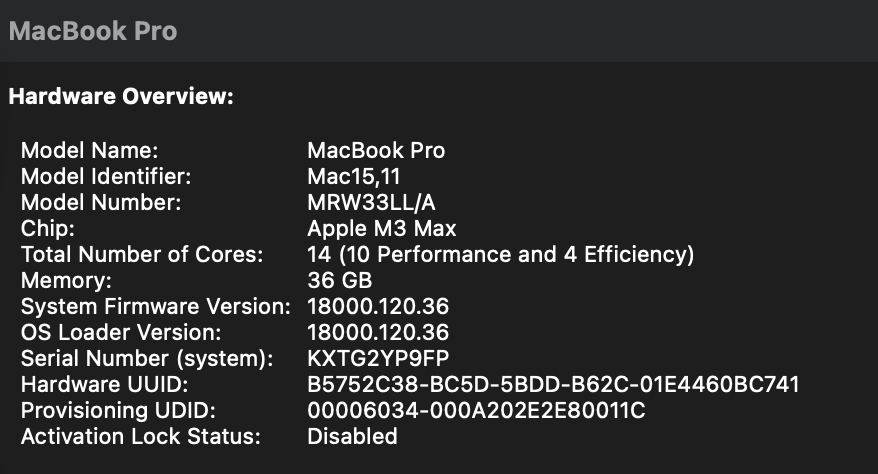
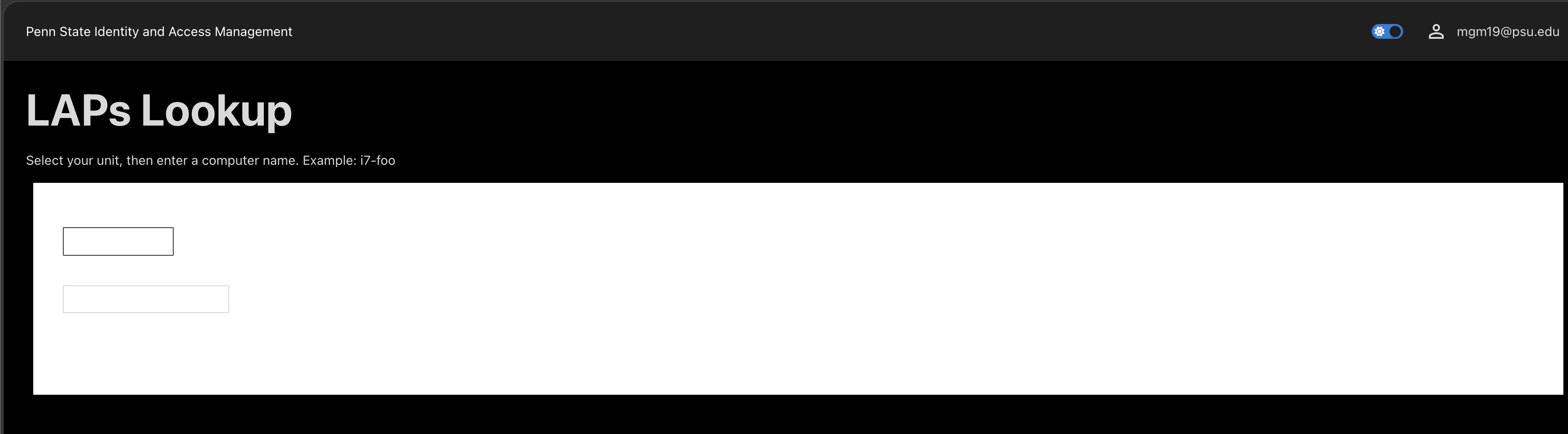
Renders correctly when changing from dark mode to light. Issue only occurs in dark mode.
macOS has issues rendering when Dark mode is enabled
Hello Ruben,
Here is some information:
The exact macOS version and build:
MacOS Tahoe Version 26.5.2
* Whether the Mac uses Intel or Apple silicon:
Apple Silicon
* The browser names and exact versions tested (screenshots attached):
Palo Alto Networks Prisma Browser version 150.33.6.129
Safari version 26.5.2
Chrome Version 150.0.7871.125
Edge Version 150.0.4078.65
Screenshot:
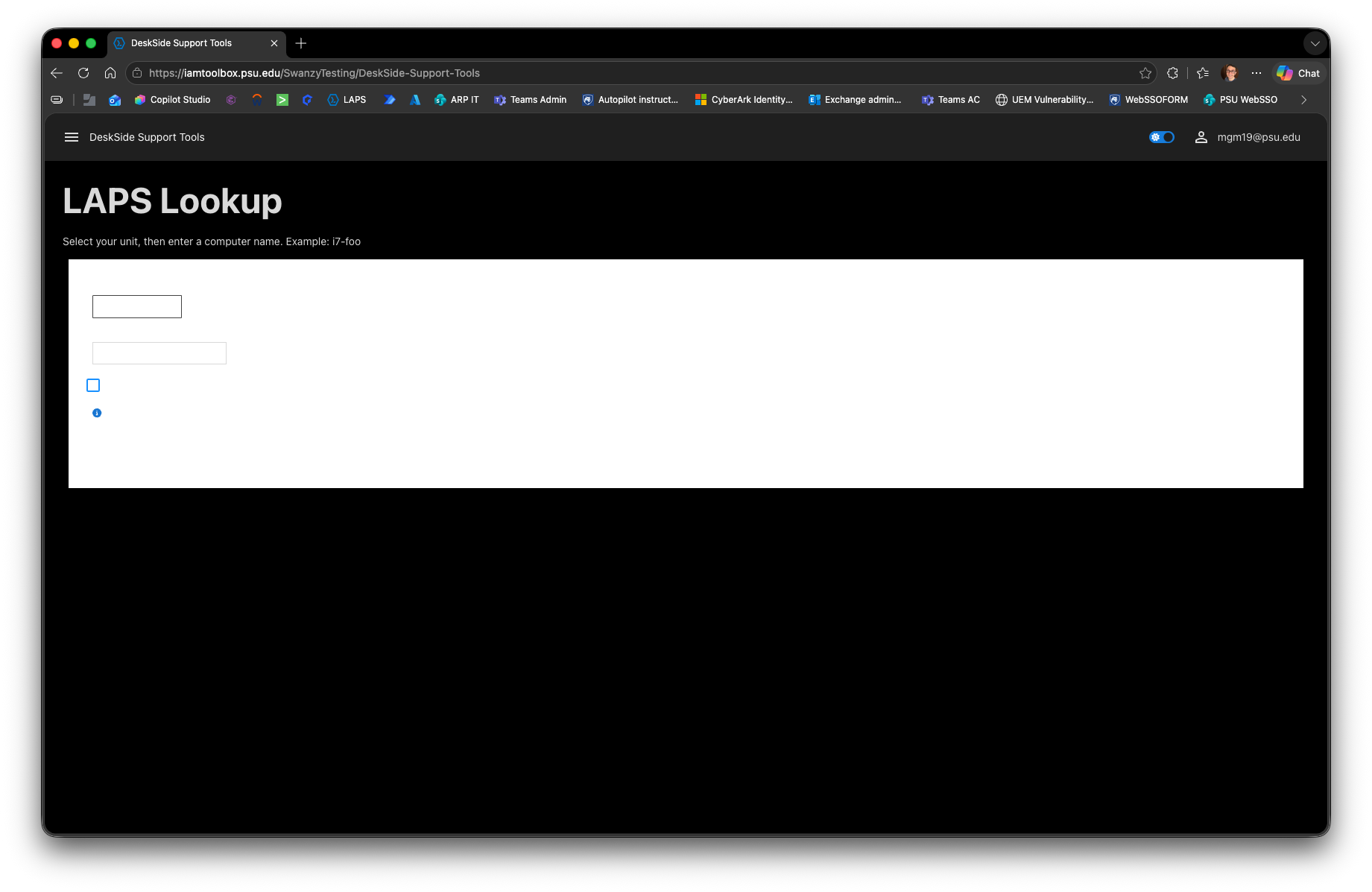
* Whether the same App renders correctly after changing only macOS from Dark Mode to Light Mode –
I do not have a dark mode extension on any browser, but when switching my Mac settings to dark mode, it caused the issue
* Whether the issue also occurs in a private browsing window with extensions disabled.
I tried in a private browser on both Chrome and Safari and it did not make a difference.
macOS has issues rendering when Dark mode is enabled
We are running PSU version 2026.1.1
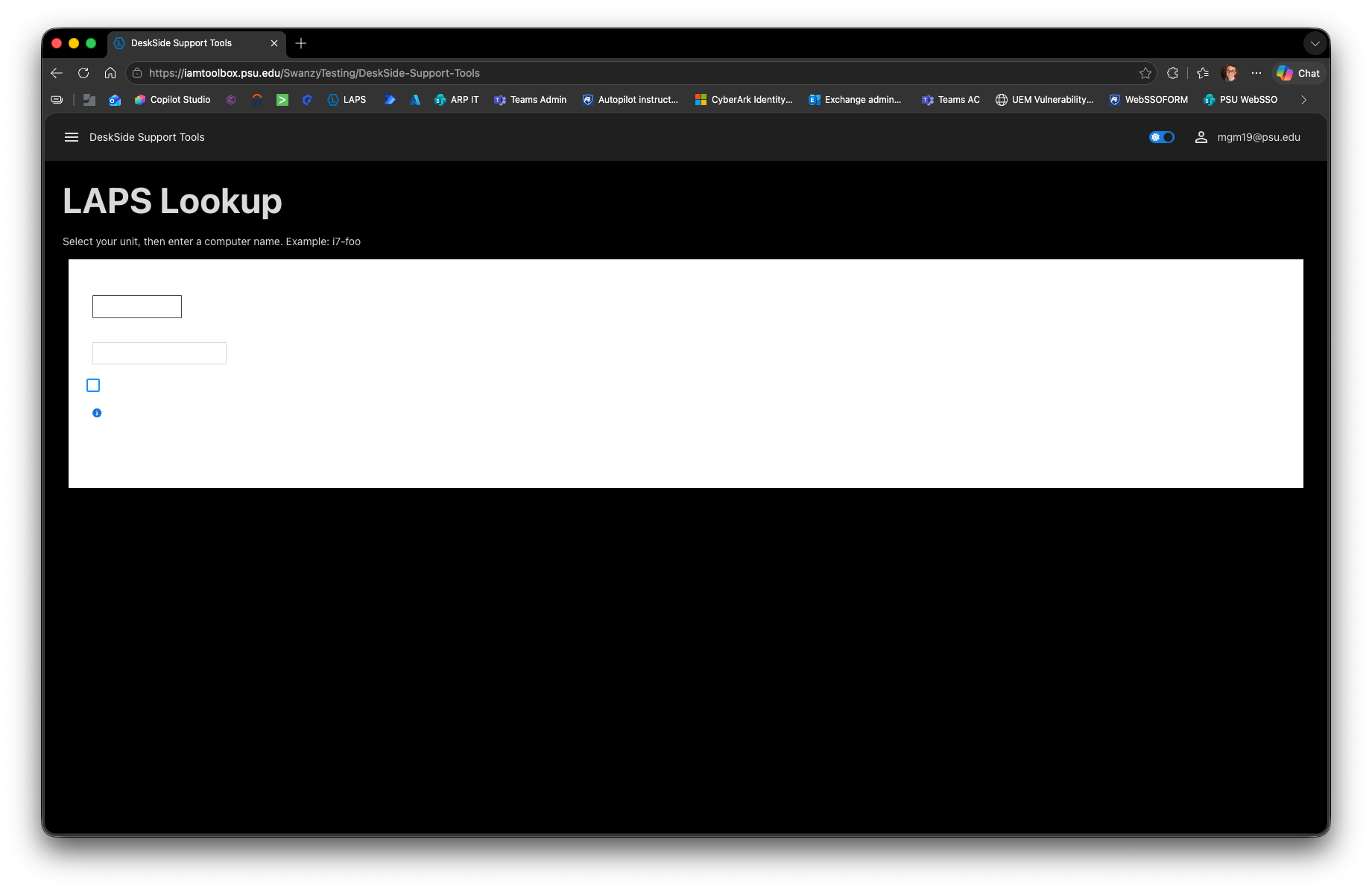
Ran into an issue where on macOS, enabling Dark Mode in any browser caused it to not finish rendering the page? Has anyone else experienced this?
GIT with Powershell Universal help
Hello,
We are running GIT for our production PSU which is 2026.1.1. It is currently configured for PUSH Only. We were curious if anyone has setup a test server and changed the Production to PULL while the "test" server was pushing Production changes? We have never done this before so any guidance from the community would be helpful for us.
PSU API proxy Auth using EntraID
That is what I thought but wanted to make sure I was not missing something obvious. Thank you.
PSU API proxy Auth using EntraID
Product: PowerShell Universal
Version: 2026.1.1
Has anyone tried to protect the PSU API using Entra Proxy Auth instead of Native PSU Auth? Was curious if anyone tried this and successfully got it working or would this not work at all?
Errors around if else and pages and $Roles
I found out the answer was confusion on my part around the UI. I assumed in the UI that variables where available immediately and was informed that is not the case an NEW-UDApp has to be called first before the variables are made available.
Permissions issues with service account
It might have to deal with security context. Does the account have permission to Allow access to this computer from the network? Some of the Group policies by default only allow admins to connect or log on locally from different contexts. I would start there.
Admin role via Azure AD Groups Not working - Powershell Universal Version 5.6.13
Is it because you are expressing the claim as a group and not a role? Just comparing it to my own configuration. Does that match the Entra Claim type as those have to match as well so if it is group here then it needs to be group there.
We use Claim Type: http://schemas.microsoft.com/ws/2008/06/identity/claims/role
Looking at the 2 pics they do not match for claim type, so that’s probably it.
Okta SAML2 Help
I cannot see your metadata but have you tried matching your ACS and Callback? Generally, callback is ACS. Do you have SAML trace? Firefox supports SAML tracer which can be helpful.
Errors around if else and pages and $Roles
Thank you as I tried this but this does not work either as the same issue of the submit button from another form breaks through. UDProtect nor an if Else statements appear to keep a submit input box from coming through from a very specific form.
Errors around if else and pages and $Roles
Doing this suggestion still causes the submit form to break through somehow from the other section. I have tried this but end up with the same issue as a submit dialog from a different form pops up on the screen.
Errors around if else and pages and $Roles
Hosted IIS environment
PSU version 5.6.8
I am having issues starting an App and calling a different page based on an IF Else statement. I cannot get a Role match even though when I output the Roles to a table it is there. Also, the if statement has a submit form inside it but that submit dialog appears when the else page is to be displayed. So, it still loads an input box -onsubmit even though it is not part of the else page form.
If ($Roles -contains $LAPSRole){$Navigation = @( New-UDListItem -Label "LAPSLookup" -OnClick { Invoke-UDRedirect -url "/LAPSLookup"}) $Pages = @() $Pages = Get-UDPage -Name 'LAPSLookup'}Else {$Navigation = @(New-UDListItem -Label "Home" -OnClick { Invoke-UDRedirect -url "/Home"})$Pages = @() $Pages = Get-UDPage -Name 'Home'} New-UDApp -Title 'LAPSLookup' -Pages $Pages -Navigation $NavigationI also tried the bit about using roles for pages.
$Pages = @() $Pages += New-UDPage -Name 'Administrators' -Content { New-UDTypography -Text 'Dashboard for user: $User' } -Role 'Administrator' $Pages += New-UDPage -Name 'Operators' -Content { New-UDTypography -Text 'Dashboard for user: $User' } -Role 'Operator' New-UDApp -Title 'Pages' -Pages $Pages
That did not work either as it does not respect the roles and continues to just whatever page it wants even when i set bogus role values.
Migrating to MS SQL?
This worked for us, thank you so much!
Migrating to MS SQL?
What connection string do you use for SQL? We keep hitting an issue where we are hosting the PSU in IIS and the certificate is not trusted. It is ok though when used with the SQL Studio manager. Thank you for any examples.
VS Code Extension: Connections fails if the API Token has too many roles / the API Token has too many chars?
This is not an inherit bug to VS Code I am thinking. We hit an issue with cookie limit 4093 and group membership. Basically, roles would act the same way. If the persons cookie limit is hit with the return then yeah the claim returned would look empty. You would want to limit the scope of your roles returned.
Converting v4 pages
I personally have had to use New-UDDynamic and Autorefresh on the item to get a continued update. Just a note to use a different ID so different regions do not update with the same data.
Impossible to login via OIDC, fallback to a 502
Generally the call back URL in the OIDC config must match the callback associated with the OIDC authentication service.
So an example for us, we use Entra. So the app registration has a redirect URI that must match the call back URI in the powershell Universal config.
Entra App Registration redirect URI: https:///auth/signin-oidc
OIDC config on PSU value for callback path: /auth/signin-oidc. Hope that helps.
Using Foreach -Parallel generating error on PSU v5.4.4
$internalVariable = $using:externalVariable
I did try that out and looking at the documentation it appears that is based off using secrets. I got an error of “The value of the using variable ‘$using:externalVariable’ cannot be retrieved because it has not been set in the local session.”, which would make sense as no such thing exist and the variable in the code would be $_. Thank you for the suggestion but I am still stuck.
Using Foreach -Parallel generating error on PSU v5.4.4
When running a PSU script as a job. The scripts environment is powershell 7 and PS version is 7.5.1
An error occurs when running
$allGPOs = Get-GPO -All
$unlinkedGPOs = @()
$allGPOs | Foreach-Object -Parallel {$GUID = $.Id; $Report = Get-GPOReport -GUID $GUID.GUID -ReportType XML | Select-String -NotMatch “”; If ($Null -NE $Report){ $unlinkedGPOs += $}} -ThrottleLimit 5
The server does not support the requested critical extension. (Exception from HRESULT: 0x8007202C)
Does PSU not support the parallel flag and only running scripts as jobs?