
sebastiankrnjus
Entry time in ssh
Hello,
Thank you for contacting us regarding this matter.
This option is planned to be included in version 2026.1, which is scheduled for release at the beginning of March.
Best regards,
@Tommy Sanders
Ok thank you!
Best regards,
Sebastian
Entry time in ssh
Hello,
Using the ssh terminal entry i want to use the key stored in the external vault, but there is no option to do that.

Best regards,
Sebastian
Devolutions freezing when trying to connect via file explorer
Hello Sebastian,
Thanks for reaching out to us!
To investigate the freeze when connecting via File Explorer, could you please share more details, including screenshots or a short recording of the behavior?
Which Devolutions product are you using (Remote Desktop Manager / other), and what is the exact version/build?
Your OS version (Windows/macOS) and whether this happens on a single workstation or multiple workstations.
What do you mean by “connect via File Explorer” in your setup?
Once we have this information, we will be able to review and troubleshoot the issue more effectively.
Best regards,
Eduard Sepulveda
Support Technician
@Eduard Sepúlveda López
Hello Eduard,
Unfortunatelly i can't share any screnshoots or videos beacuse of privacy reasons.
I am curentlly using Remote Desktop Manager version 2025.3.30.0
I am using windows 11 and it happens on every computer i have tried.
I am reffering to the entry in you program called file explorer.
Every time i launch file explorer entry the whole program frezzes and in many cases i need to exit the RDM.
Hope this helps, Sebastian.
File trasfer using tightvnc
Hello
At this point it's not implemented. The workaround is to use TightVNC in "external" mode.
However, our next generation VNC integration does support this. It should be added to RDM Windows later this year, although I can't be very precise we would aim for 2026.2 (middle part of the year).
Please let me know if you have any questions, and sorry for the inconvenience
Kind regards,
@Richard Markiewicz
Hello,
Thanks for the quick reply.
I hope it gets added quickly.
Best regards,
Sebastian
File trasfer using tightvnc
Hello,
So i am using a VNC module and encoding Tight.
When using tightvnc viewer i can transfer files but when using the devolutions the transfer filer button (folder icon) is grayed out.
Is there some solution to this or this feature hasnt been implemented yet?
Best regards,
Sebastian
Devolutions freezing when trying to connect via file explorer
Hello,
Everytime i want to connect via file explorer devolutions just freezes and i cant do anything for 4-5 minutes.
Can you look into it?
Best regards,
Sebastian
The RPC server is unavailable.
Hello,
We are usually seeing this error message because of an issue with WMI on your computer.
This documentation should help you with the troubleshooting.
Best regards,
@Jeff Dagenais
Hello,
I tried every step but everything is running as it should but i still get the same error mesagge "Session: The RPC server is unavailable"
Best regards,
Sebastian
Website DNS cache
Hello,
So i would like to request an option when using a website entry.
We have a constant need to change the ip addresses locally so we mostlly use hostanems locally. the problem is that we are on a diffrent subnet so we can't just type in the hostname in the web url so it would be nice if there would be an option in Devolutions that would point a hostname to the ip. basiclly an option that would write in the dns records of the computer.
Best regards,
Sebastian
RustDesk not working with multiple connections
Thank you for your patience. Just to make sure we’re aligned:
>You are currently using Remote Desktop Manager directly with an Azure SQL data source (without DVLS)?
>Connections work correctly for the first two users
>The third connection consistently fails with a “wrong password” error
>This happens every time
Could you please clarify a couple of remaining points:
Are these simultaneous RustDesk connections, or does the issue also occur if the first two sessions are closed before connecting the third?
Do all affected connections use the same RustDesk password, or does each user/machine have its own password?
Which RDM version was the last one where this worked?
This information can help determine whether this is a regression in recent versions or related to connection/session handling.
Elevate your learning - Join the Devolutions Academy !
Kind regards,
Kelly
@Kelly Fortin
Hello,
To clarify it only works for one connection and then fails with the wrong password. Sometimes even happens with the first connection.
When using multiple simultanious connections it fails every time saying wrong password. They all use the same password. I dont know in which version it worked unfortunatelly but definetlly before 3.26.
Best regards,
Sebastian
The RPC server is unavailable.
Hello,
i tried using load from system information.
i got this error mesagge for the first time.
The RPC server is unavailable.
Can you look into it?
Best regards,
Sebastian
RustDesk not working with multiple connections
Thank you for reporting this issue. What it RDM using as a data source?
Kind regards,
Kelly
@Kelly Fortin
Hello,
We are using Azure database as our data source.
Best regerads,
Sebastian
RustDesk not working with multiple connections
So i have encountered an error in which every time i want to connect to more then two users in rust desk it says wrong password.
This has been tested in version 2025.3.25.0 and 2025.3.28.0.
Can you look into this issue?
If you need any additional information please reply to this message.
Best regards,
Sebastian
Unable to scan a computer with "Load from system information"
Hello,
The issue you're receiving was fixed in version 2025.3.17.0.
You can find the latest version here: https://devolutions.net/remote-desktop-manager/
Regards
@Jonathan Del Signore
Hello,
Thank you for a fast response.
The update fixed my problem.
Best regards,
Sebastian
Unable to scan a computer with "Load from system information"
Hello,
My current configuration is that i enabled dynamic RPC ports
Enabled Network discovery
When i try the automatic scan i get an error "Object reference not set to an instance of an object."
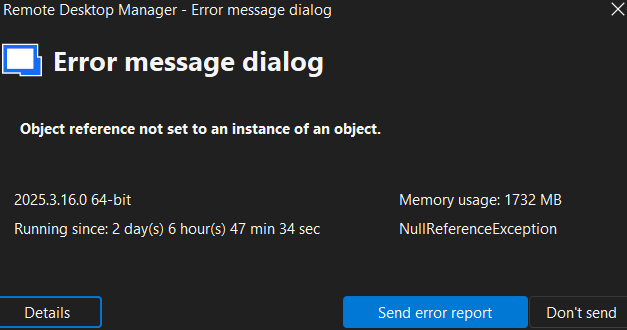
Details:
NullReferenceException - Object reference not set to an instance of an object.
at Devolutions.RemoteDesktopManager.Forms.FreEmbeddedInventoryReport.LoadSystemInformation(Connection connection, InventorySystemInformation information, Boolean forceAssetHostInLoadFromInventory)
at Devolutions.RemoteDesktopManager.Frames.FreAssetInformation.ButLoadFromInventory_Click(Object sender, EventArgs e)
at DevExpress.XtraEditors.BaseButton.OnMouseUp(MouseEventArgs e)
at System.Windows.Forms.Control.WmMouseUp(Message& m, MouseButtons button, Int32 clicks)
at System.Windows.Forms.Control.WndProc(Message& m)
at DevExpress.Utils.Controls.ControlBase.BaseWndProc(Message& m)
at DevExpress.XtraEditors.BaseControl.WndProc(Message& msg)
at System.Windows.Forms.NativeWindow.Callback(HWND hWnd, MessageId msg, WPARAM wparam, LPARAM lparam)
------------------------ extended stack ------------------------
at Devolutions.RemoteDesktopManager.Forms.FrmErrorMessage.ShowErrorMessage(ConnectionEngine engine, Exception exception, String message, String title)
at Devolutions.RemoteDesktopManager.Managers.LogManager.OnThreadException(Object sender, ThreadExceptionEventArgs t)
at System.Windows.Forms.Application.ThreadContext.OnThreadException(Exception ex)
at System.Windows.Forms.NativeWindow.Callback(HWND hWnd, MessageId msg, WPARAM wparam, LPARAM lparam)
at Windows.Win32.PInvoke.DispatchMessage(MSG* lpMsg)
at Windows.Win32.PInvoke.DispatchMessage(MSG* lpMsg)
at System.Windows.Forms.Application.LightThreadContext.FPushMessageLoop(msoloop uReason)
at System.Windows.Forms.Application.ThreadContext.RunMessageLoopInner(msoloop reason, ApplicationContext context)
at System.Windows.Forms.Application.ThreadContext.RunMessageLoop(msoloop reason, ApplicationContext context)
at System.Windows.Forms.Form.ShowDialog(IWin32Window owner)
at Devolutions.RemoteDesktopManager.Managers.ActionManager.EditConnection(ConnectionEngine engine, IConnectionSource source)
at Devolutions.RemoteDesktopManager.Managers.SessionMenuManager.MnuEditConnection_Click(Object sender, EventArgs e)
at DevExpress.XtraBars.Ribbon.Handler.GalleryControlHandlerBase.OnUnpress(DXMouseEventArgs e)
at DevExpress.XtraBars.Ribbon.Handler.GalleryControlHandlerBase.OnMouseUp(DXMouseEventArgs e)
at DevExpress.XtraBars.Ribbon.GalleryControl.OnMouseUp(MouseEventArgs e)
at System.Windows.Forms.Control.WmMouseUp(Message& m, MouseButtons button, Int32 clicks)
at System.Windows.Forms.Control.WndProc(Message& m)
at DevExpress.Utils.Controls.ControlBase.BaseWndProc(Message& m)
at DevExpress.XtraBars.Ribbon.GalleryControl.WndProc(Message& m)
at System.Windows.Forms.NativeWindow.Callback(HWND hWnd, MessageId msg, WPARAM wparam, LPARAM lparam)
at DevExpress.Utils.Drawing.Helpers.NativeMethods.UnsafeNativeMethods.DefSubclassProc(IntPtr hWnd, IntPtr Msg, IntPtr wParam, IntPtr lParam)
at DevExpress.Utils.Drawing.Helpers.NativeMethods.UnsafeNativeMethods.DefSubclassProc(IntPtr hWnd, IntPtr Msg, IntPtr wParam, IntPtr lParam)
at DevExpress.Utils.Drawing.Helpers.Win32SubclasserFactory.Win32Subclasser.SubClassProcInner(IntPtr hWnd, IntPtr Msg, IntPtr wParam, IntPtr lParam, IntPtr uIdSubclass, IntPtr dwRefData)
at Windows.Win32.PInvoke.DispatchMessage(MSG* lpMsg)
at System.Windows.Forms.Application.LightThreadContext.FPushMessageLoop(msoloop uReason)
at System.Windows.Forms.Application.LightThreadContext.RunMessageLoop(msoloop reason, Boolean fullModal)
at System.Windows.Forms.Application.ThreadContext.RunMessageLoopInner(msoloop reason, ApplicationContext context)
at System.Windows.Forms.Application.ThreadContext.RunMessageLoop(msoloop reason, ApplicationContext context)
at Devolutions.RemoteDesktopManager.Program.Main(String[] args)
Devolutions locking
Hello,
Thank you for contacting Devolutions Support.
I recall encountering a similar issue in the past. Could you please let me know which version you’re currently using? If possible, try updating to the beta version and see if the issue persists.
Best regards,
@carl marien
Hello,
I am currently using version 2025.2.29.0 which i think is the latest one.
The issue is still here.
Best regards,
Sebastian
Devolutions locking
Hello,
So when using devolutions i often lock it so no one can access when i am not around and after wanting to log back in it asks me for
windows hello authentication, which i preffer but it always shows up behind all my open windows and till i find it it dosent wanna work, like it dosen't accept my face at all (camera is tested and there is nothing wrong with it). The only way it does work is by PIN. Can you look into it beacuse it would be really helpful to just use my face and not using the PIN.
Best regards,
Sebastian
Wireguard disapearing pre shared key
Hello,
So we have been using wireguard as an VPN and mostly we have been importing the settings via file for it.
Today we have found out a bug where if you change anything like let's say adding a new allowed ip the preshared key is gone.
Now that wouldn't be a big deal if you can just put the preshared key back there but for some reason you cant put the preshared key back there.
You can only put it back there if again import the whole file, which i think its a hassle because you need to edit that file and then put it back in.
Can you please address this issue.
Thank you for your support!
Permission sets disallow rights
Hello Sebastian,
If your goal is to have a user have specific permissions only for a certain time, I would recommend the temporary access feature. You can read more about it in our documentation here, and there is an academy video on the subject as well: https://docs.devolutions.net/rdm/user-interface/content-area/temporary-access/grant-temporary-access-without-request/
Basically, you would give the user the bare minimum permissions on your entries by default. Then, when they need access, either they would make the request (which needs approval) or you would grant them temporary access to specific entries or a folder. The temporary access feature works with the permission sets, meaning it's easy to give them a specific set of permissions in temporary fashion.
Let me know if this helps.
Regards,
Hello @Hubert Mireault,
This helped a lot i thought the option for temporary access was missing in the Azure database.
Thank you!
Permission sets disallow rights
Hello,
I have been experimenting with permission sets and batch grant access and it works perfectly when granting access to another user.
The problem is when i need to deny someone access. I thought the replace all with function will delete the access i granted to an user but it doesn't seem it does that(it only replaces the allow rights). If i grant someone full access and after a day i want to put them back to reader i don't see another way except maunlly giving them deny on everything. Is there a better solution or am i missing something?
Best regards,
-Sebastian
Multiple VPNs for a single host
Hello Sebastian,
If I understand correctly, you would like a new choice in the "Type" section of the VPN/Tunnel/Gateway where you could select multiple VPNs for your current session. Before diving deeper into this possibility, I would like to ask you the following :
Would something like we do for our credentials be appropriate for you?

If you take a look at the picture above, we offer a choice to prompt for a credential when connecting and we also have the blue "All" button below where you can choose a folder as a new "root" in which to find your credentials. This way, you will not be prompted for all the credentials in the vault but only the ones in the selected folder.
The code behind our VPNs is quite complex but I believe we could add this layer of choice to the "Session Link" mode.
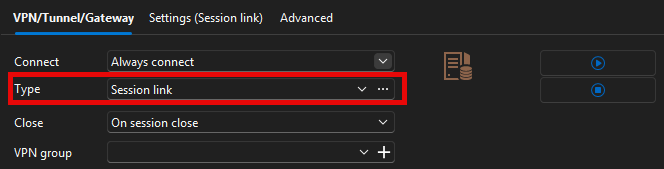
After selecting Session Link, we could add the "--- Prompt on connection ---" choice along with the blue "All" button in the settings here :

Would this be a good enough solution for your case?
Best Regards,
@Michael Beaudin
Hello,
I think it will be suitable to add "prompt on connection" so you can choose which VPN to use
Best regards,
-Sebastian
Permissions
Hello Sebastian,
The permission sets feature allows you to create your own roles in an AzureSQL (or any other advanced) data source.
I assume this is what you're looking for.
Regards,
Min
@Min Destens
Hello,
That was exactly what I needed, thank you!
Best regards,
Sebastian
Permissions
Hello,
So i have noticed a big difference in permissions between Business Hub and a custom AzureSQL database.
When adding permissions in Business Hub you have an option to pick between a dozen premade roles while in Azure database everything is custom. Is it possible to get the same options in Custom database as in the Business Hub.
Thanks in advance!
Multiple VPNs for a single host
Hello,
We are trying to setup a way to access companies hosts with VPN.
The problem is when using built in VPNs is that you can only specify one VPN not multiple.
Is it possible to add multiple VPN to a Host and when connecting it ask the person which VPN it wants.
The reason for doing so is when my college wants to connect to other host in the same company he cant use built in VPN
function rather he needs to manually go to a different VPN.
Kind regards,
Sebastian
Load from system information how to fix a port
Hello,
I have been trying the option "Load from system information" but i have one major problem. So the first time i used it i had a problem beacuse it is never specified which port it needs but i used wireshark to find the port it is using so i thought the job was done. But it seems when i try to communicate with diffrent computers it usess a diffrent port and i dont think its efficent to every time go looking for that one specific port so is there any way i can fix that port so it always uses that one?
For the first computer i needed to open port 61449.
For the second it was 64950.
Thanks in advance!
-Sebastian Krnjus
@sebastiankrnjus
Well i coudn't find a solution to get a fixed port but i found something else. Just paste this command and all of the dynamic RPC ports will get trought firewall. "New-NetFirewallRule -DisplayName "DevolutionsScan" -Direction Inbound -Action Allow -Protocol TCP -LocalPort RPC -Profile Private"
Load from system information how to fix a port
Hello,
I have been trying the option "Load from system information" but i have one major problem. So the first time i used it i had a problem beacuse it is never specified which port it needs but i used wireshark to find the port it is using so i thought the job was done. But it seems when i try to communicate with diffrent computers it usess a diffrent port and i dont think its efficent to every time go looking for that one specific port so is there any way i can fix that port so it always uses that one?
For the first computer i needed to open port 61449.
For the second it was 64950.
Thanks in advance!
-Sebastian Krnjus