Multiple VPNs for a single host
1 vote

Hello,
We are trying to setup a way to access companies hosts with VPN.
The problem is when using built in VPNs is that you can only specify one VPN not multiple.
Is it possible to add multiple VPN to a Host and when connecting it ask the person which VPN it wants.
The reason for doing so is when my college wants to connect to other host in the same company he cant use built in VPN
function rather he needs to manually go to a different VPN.
Kind regards,
Sebastian
All Comments (6)
Hello,
Thank you for reaching out to Devolutions Support.
Currently, there is no option to enable "Choose VPN on connection" within a session. However, I understand how this feature could be useful in your case.
That said, I will forward your request to our Feature Request forum so our developers can review and consider it for future updates.
Best regards,
Carl Marien
Hello Sebastian,
If I understand correctly, you would like a new choice in the "Type" section of the VPN/Tunnel/Gateway where you could select multiple VPNs for your current session. Before diving deeper into this possibility, I would like to ask you the following :
Would something like we do for our credentials be appropriate for you?
If you take a look at the picture above, we offer a choice to prompt for a credential when connecting and we also have the blue "All" button below where you can choose a folder as a new "root" in which to find your credentials. This way, you will not be prompted for all the credentials in the vault but only the ones in the selected folder.
The code behind our VPNs is quite complex but I believe we could add this layer of choice to the "Session Link" mode.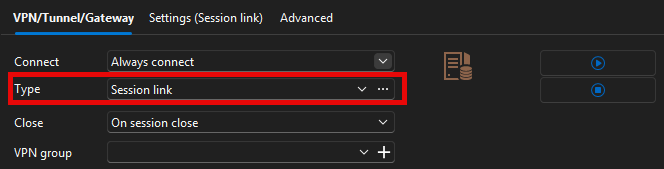
After selecting Session Link, we could add the "--- Prompt on connection ---" choice along with the blue "All" button in the settings here :
Would this be a good enough solution for your case?
Best Regards,
Michaël Beaudin
c180c923-462b-42fc-96ef-1aebcdf67b04.png
66c8481b-ef48-4278-994f-51e32b2485e6.png
dd53c62f-30fc-4185-9436-b33f2eada477.png
Hello Sebastian,
If I understand correctly, you would like a new choice in the "Type" section of the VPN/Tunnel/Gateway where you could select multiple VPNs for your current session. Before diving deeper into this possibility, I would like to ask you the following :
Would something like we do for our credentials be appropriate for you?
If you take a look at the picture above, we offer a choice to prompt for a credential when connecting and we also have the blue "All" button below where you can choose a folder as a new "root" in which to find your credentials. This way, you will not be prompted for all the credentials in the vault but only the ones in the selected folder.
The code behind our VPNs is quite complex but I believe we could add this layer of choice to the "Session Link" mode.
After selecting Session Link, we could add the "--- Prompt on connection ---" choice along with the blue "All" button in the settings here :
Would this be a good enough solution for your case?
Best Regards,
@Michael Beaudin
Hello,
I think it will be suitable to add "prompt on connection" so you can choose which VPN to use
Best regards,
-Sebastian
Hello,
Thank you for the feedback. We will create a ticket internally and will keep you updated on the progress.
Best Regards,
Michaël Beaudin
Hello,
We’ve added the “Prompt on connection” option for linked VPN sessions, similar to what already exists for linked credentials. This means you’ll now be able to choose which VPN to use when connecting.
This should be available starting with the 2026.1.0.0 release.
Regards,
David Godin
Hello,
Thank you for being so patient!
I am pleased to inform you that the feature has been added in version 2026.1.3.0 of Devolutions Server. As of now, the latest version 2026.1.3.0 is only available in Beta. We strongly recommend upgrading your Staging environment before installing this version in the production environment.
https://docs.devolutions.net/server/kb/how-to-articles/create-server-staging-instance
Here are the steps for the upgrade:
https://docs.devolutions.net/server/getting-started/installation/upgrade-server
We also offer free upgrade sessions, during which we will update your Devolutions Server instance together. If you are interested in this, please send an email to service@devolutions.net
Please let us know if this works or if you encounter any issues.
Best regards,
Maxim Robert