Unable to scan a computer with "Load from system information"
Unable to scan a computer with "Load from system information"

Hello,
My current configuration is that i enabled dynamic RPC ports
Enabled Network discovery
When i try the automatic scan i get an error "Object reference not set to an instance of an object."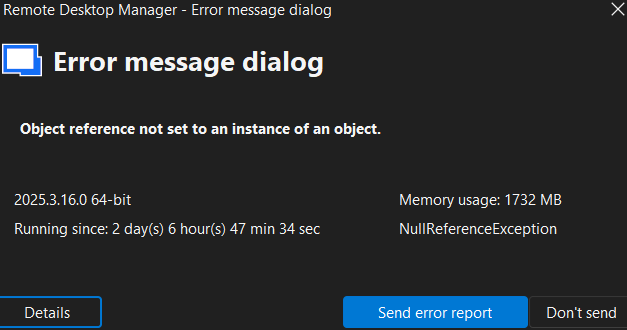
Details:
NullReferenceException - Object reference not set to an instance of an object.
at Devolutions.RemoteDesktopManager.Forms.FreEmbeddedInventoryReport.LoadSystemInformation(Connection connection, InventorySystemInformation information, Boolean forceAssetHostInLoadFromInventory)
at Devolutions.RemoteDesktopManager.Frames.FreAssetInformation.ButLoadFromInventory_Click(Object sender, EventArgs e)
at DevExpress.XtraEditors.BaseButton.OnMouseUp(MouseEventArgs e)
at System.Windows.Forms.Control.WmMouseUp(Message& m, MouseButtons button, Int32 clicks)
at System.Windows.Forms.Control.WndProc(Message& m)
at DevExpress.Utils.Controls.ControlBase.BaseWndProc(Message& m)
at DevExpress.XtraEditors.BaseControl.WndProc(Message& msg)
at System.Windows.Forms.NativeWindow.Callback(HWND hWnd, MessageId msg, WPARAM wparam, LPARAM lparam)
------------------------ extended stack ------------------------
at Devolutions.RemoteDesktopManager.Forms.FrmErrorMessage.ShowErrorMessage(ConnectionEngine engine, Exception exception, String message, String title)
at Devolutions.RemoteDesktopManager.Managers.LogManager.OnThreadException(Object sender, ThreadExceptionEventArgs t)
at System.Windows.Forms.Application.ThreadContext.OnThreadException(Exception ex)
at System.Windows.Forms.NativeWindow.Callback(HWND hWnd, MessageId msg, WPARAM wparam, LPARAM lparam)
at Windows.Win32.PInvoke.DispatchMessage(MSG* lpMsg)
at Windows.Win32.PInvoke.DispatchMessage(MSG* lpMsg)
at System.Windows.Forms.Application.LightThreadContext.FPushMessageLoop(msoloop uReason)
at System.Windows.Forms.Application.ThreadContext.RunMessageLoopInner(msoloop reason, ApplicationContext context)
at System.Windows.Forms.Application.ThreadContext.RunMessageLoop(msoloop reason, ApplicationContext context)
at System.Windows.Forms.Form.ShowDialog(IWin32Window owner)
at Devolutions.RemoteDesktopManager.Managers.ActionManager.EditConnection(ConnectionEngine engine, IConnectionSource source)
at Devolutions.RemoteDesktopManager.Managers.SessionMenuManager.MnuEditConnection_Click(Object sender, EventArgs e)
at DevExpress.XtraBars.Ribbon.Handler.GalleryControlHandlerBase.OnUnpress(DXMouseEventArgs e)
at DevExpress.XtraBars.Ribbon.Handler.GalleryControlHandlerBase.OnMouseUp(DXMouseEventArgs e)
at DevExpress.XtraBars.Ribbon.GalleryControl.OnMouseUp(MouseEventArgs e)
at System.Windows.Forms.Control.WmMouseUp(Message& m, MouseButtons button, Int32 clicks)
at System.Windows.Forms.Control.WndProc(Message& m)
at DevExpress.Utils.Controls.ControlBase.BaseWndProc(Message& m)
at DevExpress.XtraBars.Ribbon.GalleryControl.WndProc(Message& m)
at System.Windows.Forms.NativeWindow.Callback(HWND hWnd, MessageId msg, WPARAM wparam, LPARAM lparam)
at DevExpress.Utils.Drawing.Helpers.NativeMethods.UnsafeNativeMethods.DefSubclassProc(IntPtr hWnd, IntPtr Msg, IntPtr wParam, IntPtr lParam)
at DevExpress.Utils.Drawing.Helpers.NativeMethods.UnsafeNativeMethods.DefSubclassProc(IntPtr hWnd, IntPtr Msg, IntPtr wParam, IntPtr lParam)
at DevExpress.Utils.Drawing.Helpers.Win32SubclasserFactory.Win32Subclasser.SubClassProcInner(IntPtr hWnd, IntPtr Msg, IntPtr wParam, IntPtr lParam, IntPtr uIdSubclass, IntPtr dwRefData)
at Windows.Win32.PInvoke.DispatchMessage(MSG* lpMsg)
at System.Windows.Forms.Application.LightThreadContext.FPushMessageLoop(msoloop uReason)
at System.Windows.Forms.Application.LightThreadContext.RunMessageLoop(msoloop reason, Boolean fullModal)
at System.Windows.Forms.Application.ThreadContext.RunMessageLoopInner(msoloop reason, ApplicationContext context)
at System.Windows.Forms.Application.ThreadContext.RunMessageLoop(msoloop reason, ApplicationContext context)
at Devolutions.RemoteDesktopManager.Program.Main(String[] args)
0781d202-7588-4373-93fd-064132a576d9.png
Recommended Answer
Hello,
The issue you're receiving was fixed in version 2025.3.17.0.
You can find the latest version here: https://devolutions.net/remote-desktop-manager/
Regards
Jonathan Del Signore
All Comments (2)
Hello,
The issue you're receiving was fixed in version 2025.3.17.0.
You can find the latest version here: https://devolutions.net/remote-desktop-manager/
Regards
Jonathan Del Signore
Hello,
The issue you're receiving was fixed in version 2025.3.17.0.
You can find the latest version here: https://devolutions.net/remote-desktop-manager/
Regards
@Jonathan Del Signore
Hello,
Thank you for a fast response.
The update fixed my problem.
Best regards,
Sebastian