
Dion
RDM with offline access to credentials via LastPass Desktop
Thank you for the quick response. We will wait for an update.
RDM with offline access to credentials via LastPass Desktop
Hi Devolutions,
Context: My company will switch from Secret Server to LastPass. We are upgrading to the newest RDM version to get compatibility with LastPass (currently we still use version 11.1)
LastPass has a desktop client which provides offline access to credentials, in case LastPass services are down.
When I test to access a LastPass credential from RDM when my laptop is offline, I get error "Web Exception".
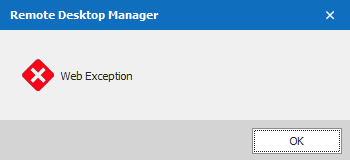
I assume RDM tries to access LastPass via internet.
Is it possible with RDM to access LastPass credentials from the desktop client instead of from the internet?
This could be by default or used only as fallback.
Kind Regards,
Dion
Web Login causes a crash and a .NET error
Hi Alexandre,
Thanks for trying to reproduce the issue.
Reinstalling .NET might not make a lot of difference since this issue occurred on two quite different pc's, my Windows 10 laptop and a Terminal Server 2012, but I will try it anyway.
The common part of both tests may be the database content.
I will also try some time with a new clean test database and see if the problem is caused by any of the database content.
I'll post back when I know more.
Kind Regards,
Dion
Web Login causes a crash and a .NET error
Hi Alexandre,
Today, a very similar error happened on our production environment today.
It runs RDM version 11.1.0.0 (on a Windows Terminal Server 2008 R2).
The database runs on MS SQL 2008 (on a Windows Server 2008 Standard)
I used Chrome (version 71.0.3578.98 64-bits) and the old/matching browser plugin is version 3.0.4.0.
I've sent you an email with the full stack of the error.
Kind Regards,
Dion
Web Login causes a crash and a .NET error
Hi Alexandre,
I've send you the stack via email.
Thank you for looking into the issue.
Kind Regards,
Dion
Web Login causes a crash and a .NET error
I just upgrade my test system to 14.1.1.
Previous version I tested was 14.0.6 which did not seem to have this issue.
Reproduction scenario:
Start RDM
- open some connection that has a linked Secret Server credential
- login to Secret Server
- Everything is still OK at this point
- Start Chrome or Firefox
- Open a webpage that is known in RDM and has the Web browser Extension link enabled.
- use the Browser plugin/extension to request the passwords
This scenario causes the error below to crash RDM.

Our environment:
Windows 10
RDM 32-bit and 64-bit both
Secret Server version 10.4.000000
Chrome 71.0.3578.98 (Official Build) (64-bit)
Firefox 64.0 (64-bit)
Browser extensions version 7.1 in Chrome and Firefox
.NET Error:
See the end of this message for details on invoking
just-in-time (JIT) debugging instead of this dialog box.
************** Exception Text **************
System.InvalidOperationException: DragDrop registration did not succeed. ---> System.Threading.ThreadStateException: Current thread must be set to single thread apartment (STA) mode before OLE calls can be made. Ensure that your Main function has STAThreadAttribute marked on it.
at System.Windows.Forms.Control.SetAcceptDrops(Boolean accept)
--- End of inner exception stack trace ---
at System.Windows.Forms.Control.SetAcceptDrops(Boolean accept)
at System.Windows.Forms.Control.OnHandleCreated(EventArgs e)
at System.Windows.Forms.TreeView.OnHandleCreated(EventArgs e)
at System.Windows.Forms.Control.WmCreate(Message& m)
at System.Windows.Forms.Control.WndProc(Message& m)
at System.Windows.Forms.TreeView.WndProc(Message& m)
at Devolutions.RemoteDesktopManager.Controls.EnhancedTreeView.WndProc(Message& message)
at System.Windows.Forms.Control.ControlNativeWindow.OnMessage(Message& m)
at System.Windows.Forms.Control.ControlNativeWindow.WndProc(Message& m)
at System.Windows.Forms.NativeWindow.Callback(IntPtr hWnd, Int32 msg, IntPtr wparam, IntPtr lparam)
Edit vs. Properties menu
Hi David,
I did not imagine it would be hard to do. I do not know the inside of RDM so I may very well be thinking too easy.
Just thinking, what would happen if you only enable the properties option in the menu for everyone, including people with view only-rights?
Maybe a user could then get the usual properties popup but get an error when trying to modify something.
If this doesn't help, I'll let you figure it out.
Greetings,
Dion
Edit vs. Properties menu
Hi Devolutions,
In RDM there is an Edit menu and a Properties menu which are essentially the same.
We have users which are allowed to change an entry and other users that are only allowed to open/view an entry.
The users that can only open/view an antry, cannot view all the details of an entry (for example the SAPgui SystemNo).
The Edit vs. Properties menu is also mentioned by Christian/Xanacas in thread
https://forum.devolutions.net/topic23831-user-interface.aspx
The solution mentioned is to remove the properties menu.
My counter-suggestion is to make the properties read-only and available to everyone.
The edit option can stay as it is.
This way, there is a possibility for non-change users to view all the information.
Greetings,
Dion
MSSQL users inconsistent since upgrade
Hi Stefane,
Thanks for the sql statement.
I have first check the situation with a select and I noticed that users existed with AuthenticationType = 0 (besides users with value NULL)
The final update statement I used was:
update dbo.UserSecurity
set AuthenticationType = 2
WHERE UserType = 0 AND (AuthenticationType IS NULL
OR AuthenticationType = 0);
The Fix SQL Login via batch worked painless but I'm not sure if that was needed.
We are now able to reset passwords through RDM again :-)
MSSQL users inconsistent since upgrade
Hi Stefane,
We have about 100 users, all of them are database users.
I corrected a few of them to see how long it would take but it's relatively fast.
If you can think of a quick sql update command or something, that would be nice.
Otherwise, it's not necessary to put a lot of effort in it.
I plan to correct the rest of the users in a few days.
MSSQL users inconsistent since upgrade
Thank you Jean-Francois,
That seems to solve the problem.
Is there a way to do this for all users at once or do I have to fix them one at a time?
It's not a big problem to do them one at a time, just wondering.
MSSQL users inconsistent since upgrade
Hi Devolutions,
In the past month we have upgrade our RDM version from 9.2.8 to 11.1.0.0
The RDM database (on MS SQL 2008) was also upgraded from 91 to 252 and all seemed fine.
Recently I noticed that many users cannot change their RDM database passwords, the button is greyed out.
Users that are created after the database upgrade can change their password.
It seems that the database upgrade script did not upgrade the accounts in some way.
In MS SQL 've compared an old user (jong-liang_hu) with a new user (dion_aelen) and I noticed a difference in the Securables.
The screenshot is attached.
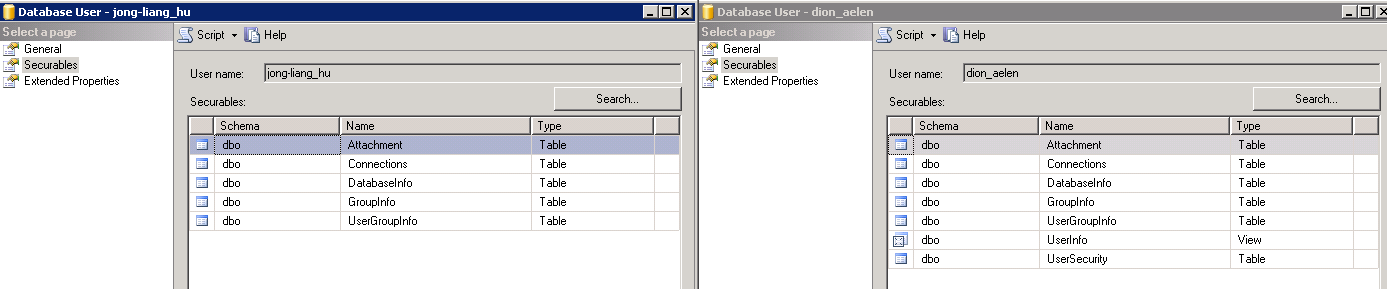
The "Fix SQL login" in RDM's User security management is also greyed out for the problem users.
Do you know of a way to fix these logins?
Invalid digital signature with Custom installer
Thanks a lot Hubert,
Both issues are solved so it's working nicely now.
Invalid digital signature with Custom installer
Thank you Hubert for the fast response.
I've created a new custom installer but the same error appears.
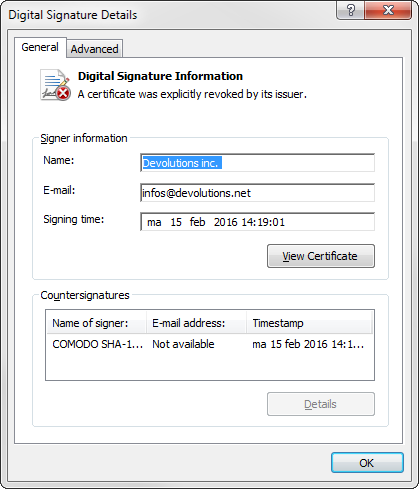
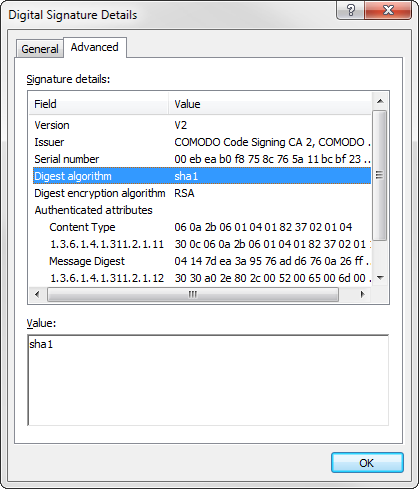
My colleague thinks this is related to a new Microsoft policy effective since the beginning of this year: http://social.technet.microsoft.com/wiki/contents/articles/32288.windows-enforcement-of-authenticode-code-signing-and-timestamping.aspx
If this is correct, then the problem may be caused by the SHA-1 algorithm you use.
Invalid digital signature with Custom installer
I've created a few custom installers last week and today.
I have two prblems with then and I think they are related to eachother.
The first problem occurs when I download the Setup (exe and msi behave the same when downloading).
Internet Explorer 11 gives the following error:
The Signature of Setup.RemoteDesktopManager.11.1.0.0.exe is corrupt or invalid.


I know how to work around it but it's a pain for all the end-users.
The second problem is a bigger problem because it stops the installation.
When I start the Setup and the actual Installation starts, it gives the following error:
A file that is required cannot be installed because the cabinet file C:\Users\Dion Aelen\AppData\Roaming\Devolutions inc\Remote Desktop Manager\install\disk1.cab has an invalid digital signature. This may indicate that the cabinat file is corrupt.
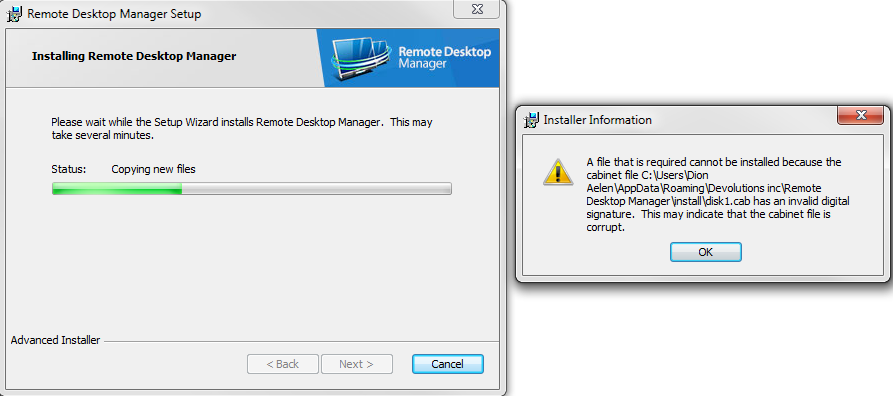
Then the installation stops.
Disable open with Enter key seems inconsistent
This feature is working fine in version 11.1.
Thank you for implementing!
Add "Remember my credentials" to the Database login pop-up
This feature is working fine in version 11.1.
Thank you for implementing!
Notification about expired Secret Server password
Today my Secret Server password expired.
I noticed that RDM gives me a good informative message about it (actually two messages but that's not so important)
This happens when I try to select something via the "Secret Server Credentials list":
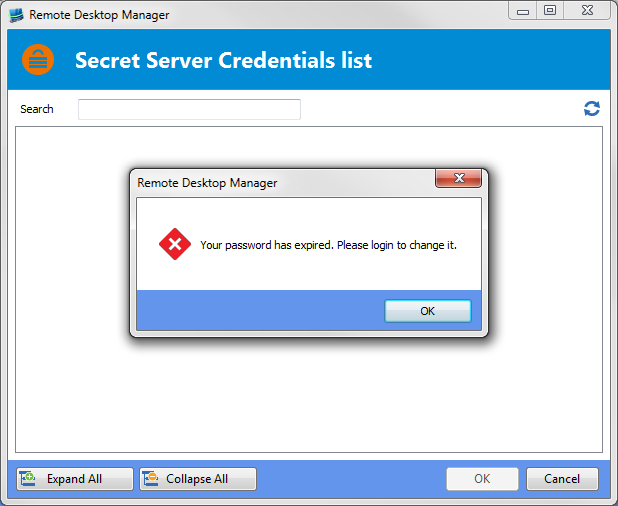
Unfortunately I don't get this message when I try to open an entry which has a Secret Server credentials linked to it.
In that case, I only get an error saying "Credentials not found":
I am using 11.0.14 and I have the Legacy Secret Server option turned on.
I've cleared the application log and then reproduced the error.
The application log below is the result of 2 actions:
1. Opening an entry with a Secret Server password which causes the message "Credentials not found"
2. Trying to select a secret from Secret Server via the credentials list which causes the messages "Your password has expired. Please login to change it." (2 times
Log:
[15-1-2016 17:26:49 - 11.0.14.0 - 32-bit] Error: System.Threading.ThreadAbortException: Thread was being aborted.
at Devolutions.RemoteDesktopManager.Business.HttpBrowserLinker.c36e11a71b2027cacbbca5f70b6ed33df()
at System.Threading.ThreadHelper.ThreadStart_Context(Object state)
at System.Threading.ExecutionContext.RunInternal(ExecutionContext executionContext, ContextCallback callback, Object state, Boolean preserveSyncCtx)
at System.Threading.ExecutionContext.Run(ExecutionContext executionContext, ContextCallback callback, Object state, Boolean preserveSyncCtx)
at System.Threading.ExecutionContext.Run(ExecutionContext executionContext, ContextCallback callback, Object state)
at System.Threading.ThreadHelper.ThreadStart()
[15-1-2016 17:27:38 - 11.0.14.0 - 32-bit] Error Silent: Your password has expired. Please login to change it.
[15-1-2016 17:27:41 - 11.0.14.0 - 32-bit] Error Silent: Your password has expired. Please login to change it.
Is it possible to implement the nice message in both cases?
Disable open with Enter key seems inconsistent
Ok and thanks a lot for the fast support!
Disable open with Enter key seems inconsistent
I think you are right.
When the magnet is grey and the "Disable open with Enter key" option is turned on, I can still open an entry with the Enter key.
At least this goes for version 11.0.14.
I'm still not sure if this is intended but this explanation is good enough for us.
Thanks a lot !
Disable open with Enter key seems inconsistent
I just tested this at a colleagues laptop who is still using our previous version 9.2.8.
That version does obey the "Disable open with Enter key" option in both cases.
So even when the cursor is still in the search/filter field, Enter won't open the entry which is correct in my opinion.
btw, I have been able to reproduce this issue on two different laptops with version 11.0.14
I can test 11.0.18 next week but I rather wait for 11.0.20 (It includes a feature I requested earlier which is unrelated to this).
Disable open with Enter key seems inconsistent
Thanks for the fast response.
We are currently testing 11.0.14.0 with a MS SQL data source.
Disable open with Enter key seems inconsistent
I am not sure if this is a bug or if this is intended behaviour.
When the "Disable open with Enter key" option is checked, entries can still be opened with the Enter key.
This only happens when the cursor is still in the search/filter field.
So, only when an entry is selected in the treeview by mouse or keyboard, then the option is obeyed correctly.
This situation may be related to this thread:
https://forum.devolutions.net/topic24180-disable-open-with-enter-key-during-a-search.aspx
Add "Remember my credentials" to the Database login pop-up
Thanks a lot Hubert and David!
I'll test when the beta is available.
Add "Remember my credentials" to the Database login pop-up
Hi Devolutions,
I am busy making a plan to upgrade all users.
I made a Custom installer including our default Data source.
When users install the update they have to enter their personal database login once to connect to our MS SQL advanced data source.
After that, they have to edit the data source to enter their personal database login once more, to save it permanently in the data source configuration.
The idea to improve this is simple.
Can you add an option to "Remember my credentials" to the Database login pop-up?
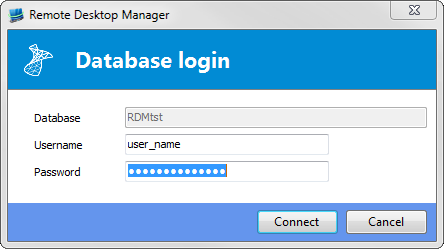
This way, all users only have to enter their credentials once and there is no need for them to edit the data source.
Thanks in advance,
Regards,
Dion