MSSQL users inconsistent since upgrade

Hi Devolutions,
In the past month we have upgrade our RDM version from 9.2.8 to 11.1.0.0
The RDM database (on MS SQL 2008) was also upgraded from 91 to 252 and all seemed fine.
Recently I noticed that many users cannot change their RDM database passwords, the button is greyed out.
Users that are created after the database upgrade can change their password.
It seems that the database upgrade script did not upgrade the accounts in some way.
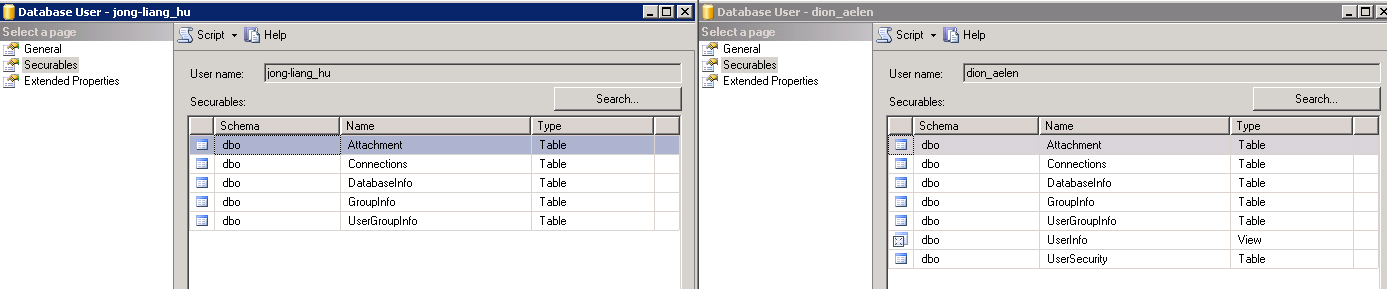
In MS SQL 've compared an old user (jong-liang_hu) with a new user (dion_aelen) and I noticed a difference in the Securables.
The screenshot is attached.
The "Fix SQL login" in RDM's User security management is also greyed out for the problem users.
Do you know of a way to fix these logins?
MSSQL_users_compared.png
All Comments (6)
Hello,
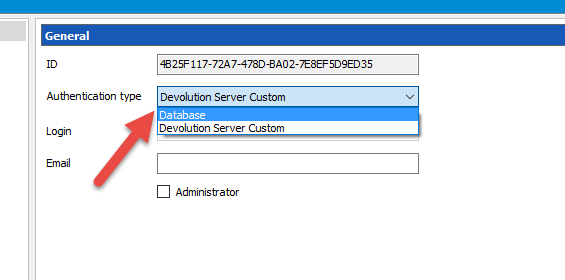
If you edit your user in RDM (Administration -> Users), do you see an Authentication Type field?
If you select Database, you should now have access to do a Fix SQL user and password reset.
Best regards,
Jeff Dagenais
2016-03-09_13-32-16.png
Thank you Jean-Francois,
That seems to solve the problem.
Is there a way to do this for all users at once or do I have to fix them one at a time?
It's not a big problem to do them one at a time, just wondering.
Assuming all users are "Database" then we could easily script the setting of the Authentication Type.
Scripting the Fix SQL user is another story.
How many users do you have to set?
Best regards,
Stéfane Lavergne
Hi Stefane,
We have about 100 users, all of them are database users.
I corrected a few of them to see how long it would take but it's relatively fast.
If you can think of a quick sql update command or something, that would be nice.
Otherwise, it's not necessary to put a lot of effort in it.
I plan to correct the rest of the users in a few days.
Hi Dion,
WARNING! Like with any SQL Script make sure you have a proper working backup prior to executing any SQL statement
WARNING! To anyone else reading this thread, make sure all the conditions mentioned above hold true prior to executing this or any other script provided on this form. If in doubt, check with us first.
Here is the script to set the AuthenticationType to Database.update dbo.UserSecurity set AuthenticationType = 2 -- Databasewhere UserType = 0 and AuthenticationType is null;You can batch edit the SQL Fix Login, simply multi-select the users and hit "Fix.."
Best regards,
Stéfane Lavergne
Hi Stefane,
Thanks for the sql statement.
I have first check the situation with a select and I noticed that users existed with AuthenticationType = 0 (besides users with value NULL)
The final update statement I used was:
update dbo.UserSecurity
set AuthenticationType = 2
WHERE UserType = 0 AND (AuthenticationType IS NULL
OR AuthenticationType = 0);
The Fix SQL Login via batch worked painless but I'm not sure if that was needed.
We are now able to reset passwords through RDM again :-)