Invalid digital signature with Custom installer

I've created a few custom installers last week and today.
I have two prblems with then and I think they are related to eachother.
The first problem occurs when I download the Setup (exe and msi behave the same when downloading).
Internet Explorer 11 gives the following error:
The Signature of Setup.RemoteDesktopManager.11.1.0.0.exe is corrupt or invalid.
I know how to work around it but it's a pain for all the end-users.
The second problem is a bigger problem because it stops the installation.
When I start the Setup and the actual Installation starts, it gives the following error:
A file that is required cannot be installed because the cabinet file C:\Users\Dion Aelen\AppData\Roaming\Devolutions inc\Remote Desktop Manager\install\disk1.cab has an invalid digital signature. This may indicate that the cabinat file is corrupt.
Then the installation stops.


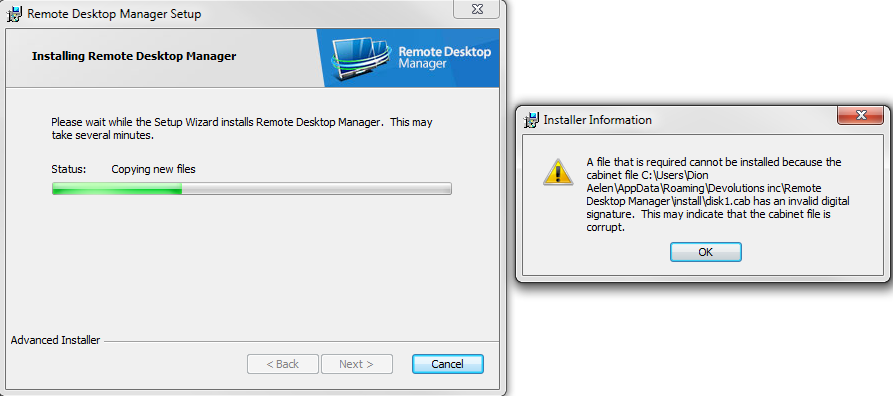
disk1.cab_has_an_invalid_signature.png
Signature_corrupt_or_invalid_IE11_exe.PNG
Signature_corrupt_or_invalid_IE11_msi.PNG
All Comments (6)
Hello,
This issue should be fixed now, I created a custom installer to test and downloading + installing works okay. Could you try it out on your end and see if it works too?
Regards,
Hubert Mireault
Thank you Hubert for the fast response.
I've created a new custom installer but the same error appears.
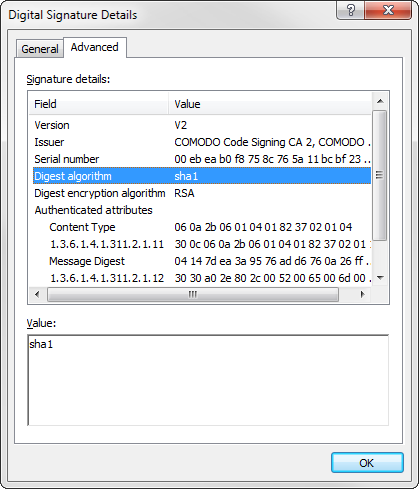
My colleague thinks this is related to a new Microsoft policy effective since the beginning of this year: http://social.technet.microsoft.com/wiki/contents/articles/32288.windows-enforcement-of-authenticode-code-signing-and-timestamping.aspx
If this is correct, then the problem may be caused by the SHA-1 algorithm you use.
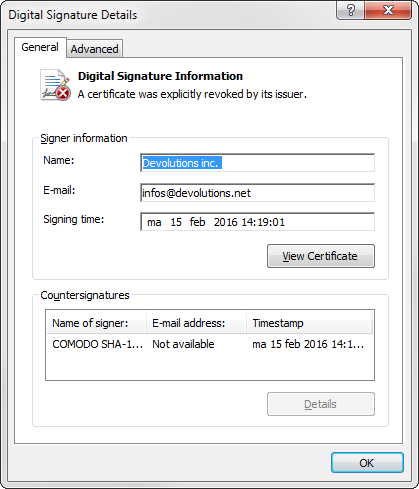
Digital Signature Details-2016-02-15 14_46_14.png
Digital Signature Details-2016-02-15 14_46_44.png
I was using Chrome to test so I hadn't seen this issue, my bad. We changed the certificate recently but we hadn't yet changed it for custom installers. I'll keep you updated.
Regards,
Hubert Mireault
I did some more testing and the certificate should be the right one now. Could you try it again? Sorry for the inconvenience.
Regards,
Hubert Mireault
Thanks a lot Hubert,
Both issues are solved so it's working nicely now.
Happy to see it fixed, and thank you for notifying us about it!
Regards,
Hubert Mireault