Notification about expired Secret Server password

Hi Devolutions,
We use Secret Server as our credentials repository.
I noticed that when the Secret Server password is expired, RDM just keeps asking for your password.
Would it be possible to build a feature that notifies about the expired password when this happens?
It's not a problem to login to Secret Server directly to renew the password.
Just the notification within RDM would solve this isse
All Comments (14)
Hello,
We can't test it in order to reproduce at the moment, but I will open a feature request for that.
Thank you
Maurice
Hi Maurice,
That's ok, i'm looking forward to this fix.
Kind Regards,
Dion
Hi Devolutions,
Our license is about the expire, I am testing the new version (10.0.4) to see if it is worth the time to upgrade.
I see this request to add a notification about an expired Secret Server password is not implemented yet.
Is there a chance that this will get implemented in the next 2-3 months?
Kind Regards,
Dion Aelen
Hi Devolutions,
I am currently testing version 10.1.7 and I like many of the improvements, like the added option to choose one Secret in "Existing Credential Entry" within User-specific settings!
However, there is one request I would still like to see implemented.
It's a notification of an expired Secret Server password.
Currently, RDM just keeps asking for the password over and over again and most of "my users" don't link it to an expired password. If RDM would just give an error saying something is wrong with the password, it would already be a great help.
Even better would be to tell the user that the password is expired or even link to the login page of the configured Secret Server.
Please let me know if this can be implemented because I am waiting for this feature before rolling out an update.
If it can't be done, I won't wait anymore.
Thank you in advance,
Dion Aelen
Hello,
Indeed, I could improve the part about failed logins, at least show a proper message. I will implement that quickly, but I need to get approval for the rest.
Best regards,
Maurice
Thank you Maurice,
It would be great to have the proper message quickly.
The rest is just a nice-to-have for us.
Kind Regards,
Dion
I am very happy to see an update (Minor fixes) on the Secret Server integration in version 10.5.2.0 (April 8th 2015)
I am currently downloading to test and see if this issue has improved.
This is the first time that I hope my Secret Server password will expire soon.
edited by Dion on 4/15/2015
My password has not expired yet but I asked my colleague to disable my SecretServer account to test.
Disabling my account does not give any notification in RDM when I try to login.
RDM just comes back with the same login screen for SecretServer over and over.
Is it possible to implement an error message when the SecretServer login fails in the near future?
Hello,
I have implemented the code to limit to three attempts.
About indicating the error message, I need to confirm if I receive a localized message beforehand. Sadly it is not an error code but a string. I want to make sure I choose the best implementation.
Today's code should be in our next build.
Best regards,
Maurice
Hello,
Today, I ran RDM version 10.0.13 while my Secret Server password was expired.
When I entered my expired password, RDM only gave me the error "Credentials not found".
Is it possible to implement an error message that says that the password is expired?
PS. At this moment, we are are using the legacy Secret Server version 7.8.
If an error message is already implemented for newer Secret Server version, please let me now.
Kind Regards,
Dion
Hello,
Sadly our SecretServer licence expired just last friday, therefore I cannot test this scenario.
Could you send us your application log so I can see if there's an error code I could trap?
Best regards,
Maurice
That's very unfortunate.
In the RemoteDesktopManager.log I found:
[14-12-2015 9:25:03]INFO SecretServerWebReader::Login failed.
There is nothing else in the log which mentions Secret Server or Thycotic.
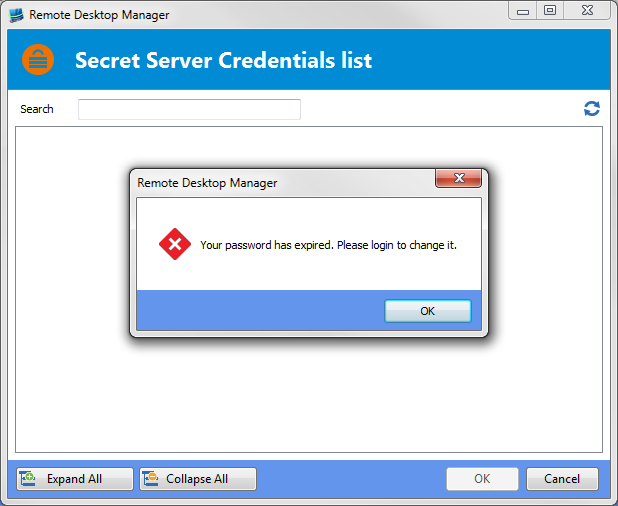
Today my Secret Server password expired.
I noticed that RDM gives me a good informative message about it (actually two messages but that's not so important)
This happens when I try to select something via the "Secret Server Credentials list":
Unfortunately I don't get this message when I try to open an entry which has a Secret Server credentials linked to it.
In that case, I only get an error saying "Credentials not found":
I am using 11.0.14 and I have the Legacy Secret Server option turned on.
I've cleared the application log and then reproduced the error.
The application log below is the result of 2 actions:
1. Opening an entry with a Secret Server password which causes the message "Credentials not found"
2. Trying to select a secret from Secret Server via the credentials list which causes the messages "Your password has expired. Please login to change it." (2 times
Log:
[15-1-2016 17:26:49 - 11.0.14.0 - 32-bit] Error: System.Threading.ThreadAbortException: Thread was being aborted.
at Devolutions.RemoteDesktopManager.Business.HttpBrowserLinker.c36e11a71b2027cacbbca5f70b6ed33df()
at System.Threading.ThreadHelper.ThreadStart_Context(Object state)
at System.Threading.ExecutionContext.RunInternal(ExecutionContext executionContext, ContextCallback callback, Object state, Boolean preserveSyncCtx)
at System.Threading.ExecutionContext.Run(ExecutionContext executionContext, ContextCallback callback, Object state, Boolean preserveSyncCtx)
at System.Threading.ExecutionContext.Run(ExecutionContext executionContext, ContextCallback callback, Object state)
at System.Threading.ThreadHelper.ThreadStart()
[15-1-2016 17:27:38 - 11.0.14.0 - 32-bit] Error Silent: Your password has expired. Please login to change it.
[15-1-2016 17:27:41 - 11.0.14.0 - 32-bit] Error Silent: Your password has expired. Please login to change it.
Is it possible to implement the nice message in both cases?
Credentials not found.png
Secret Server Credentials list- password expired.png
Hello,
I will look into this.
Best regards,
Maurice