
Ben
Backup error after upgrade to Server 5.0.2.0
ok works. Seems that it needs to be a domainuser with database privilege.
Backup error after upgrade to Server 5.0.2.0
with which account muss the schedule service run? LocalServer or a DomainUser?
Backup error after upgrade to Server 5.0.2.0
yes, there is a email address configured for the users.
On production server notification works until i upgraded from 4.7.0.0 to 5.0.2.0. Didn#change anything and i cannot find the problem.
BR,
Ben
Backup error after upgrade to Server 5.0.2.0
No doesn't help :(
I've setup a new server to investigate our performance issues. And on this fresh installation with Devolutions Server 5.0.2.0 und SQL 2017 i also dont recieve notifications.
Maybe im doing something wrong..... or its a bug.
Backup error after upgrade to Server 5.0.2.0
I installed a new Server and migrated the SQL database to the new server. Backups are working fine now.
But i have some other problems:
I dont recieve any notification emails.
Emailing is configured correctly, i recieve the test email, error emails are working too. And i get notified when i change a emailaddress from a user. But no notifications... scheduler is activated
When I try to activate User --> Add Checkbox it will not save this change.

Another thing is, that authentication takes very long. But we had this also before on the old server.
Very long means on windows machine around 30 seconds. And on MacOS sometimes a few minutes.
Do you have any advise where to begin troubleshooting this?
We have over 4500 entries in the database and use AD Groups excessive (over 200 AD Groups).
Thanks,
Ben
Backup error after upgrade to Server 5.0.2.0
Ok, thx.
Error Uploading Attachment with 500KB
Great!! Thank You!!
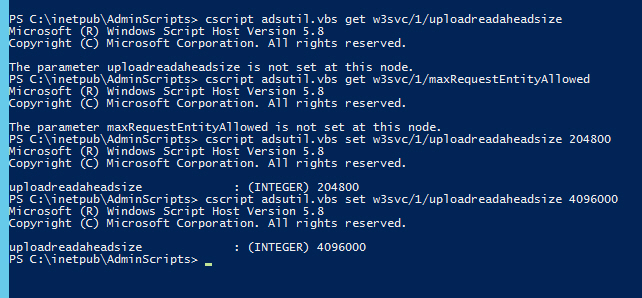
The Values were not set. So i set the value from the Technet.
After that i could upload files biggen than 35KB but not bigger than the 200KB.
So i changed the value again to 4096000, i think 4MB is a good limit.
regards,
Benjamin
Error Uploading Attachment with 500KB
Hi,
I tried it on a Folder with the FolderType Software/Serials and a Session. I alway went to properties --> Attachment --> New Attachment.
Now, I also tried on both Folder and Session "Add Document" and "Add Attachment" but everytime i got 413 Entity too large.
My Testfile is a Licensefile (xml) with 500KB.
regards,
Benjamin
Error Uploading Attachment with 500KB
I think I have a second Problem...
I can upload files with a size of 35KB. A 40KB file is failing. I always got the 413 Entity too large. I also tried bigger files: 10MB, 40MB, 50MB all of them failing with 413.
Please let me know if i can try something....
regards,
Benjamin
Error Uploading Attachment with 500KB
Ohh, I didn't see it too :) Thanks!
Ok, its corrected now and I have restarted IIS, but i get same error:
413 Entity too large.
Do I have to restart Devolutions-Server?
Error Uploading Attachment with 500KB
Hello,
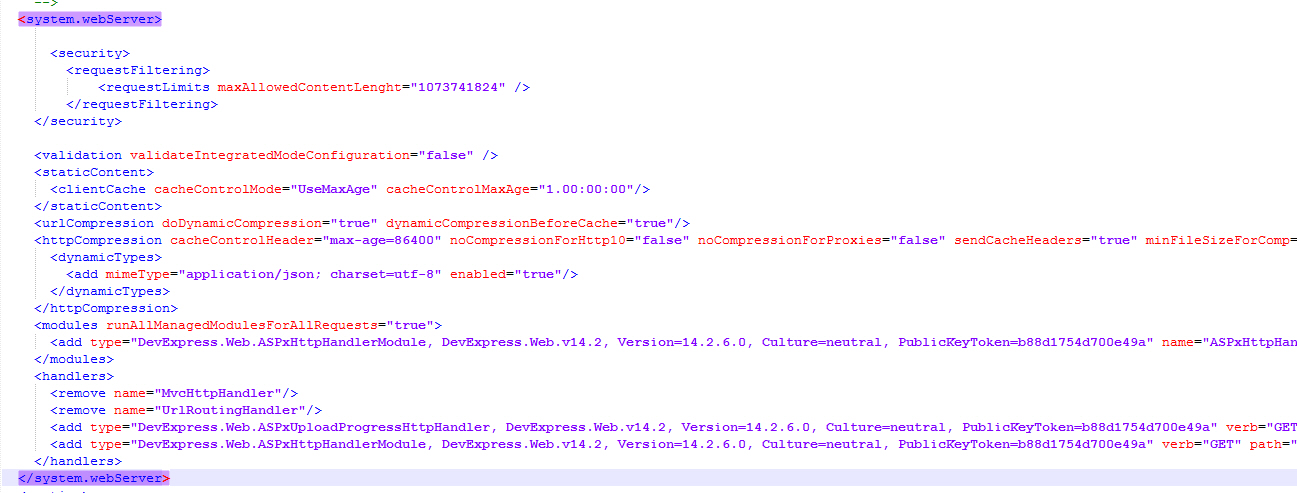
when i put this part in the web.config then Devolutions-Server is not respronding anymore....
regards,
Benjamin
Devolutions Server 4.0 - Nested Groups dont work anymore
Hi,
sure, I've already done this.
Then I'm waiting for the next Update.
Thanks,
Benjamin
Devolutions Server 4.0 - Nested Groups dont work anymore
Hi Erica,
here is what i did:
- Updating Devolutions Server to Version 4.0.1.0
- Updateing RDM to Version 12.0.2.0
- Clicking Edit on the Devolutions Server Tab

- Prompting for Credentials (Credentials were correct)


- Next Windows opens after reauthentication and clicking OK
- Tried Connection successfully (Logged on Account and specific AD-Account worked)

- Checked the Diagnostic and installed IIS Rewrite Module

- Authentication does not really work at all

- Here the Setting Pane

- Server throws these Exceptions:
Error:
NullReferenceException - Object reference not set to an instance of an object. at Devolutions.Server.TokenManager.IsTokenValid(String token) in c:\Dev\devolutions11_5\Websites\Server\Common\Managers\TokenManager.cs:line 174 at Devolutions.Server.Controllers.APIControllers.v2.RDMSApiController.ValidateSession(HttpRequestMessage request) in c:\Dev\devolutions11_5\Websites\Server\Website\Controllers\APIControllers\RDMSApiController.cs:line 103 at Devolutions.Server.Controllers.APIControllers.v2.RDMSApiController.KeepAlive(HttpRequestMessage request) in c:\Dev\devolutions11_5\Websites\Server\Website\Controllers\APIControllers\RDMSApiController.Connection.cs:line 322 at lambda_method(Closure , Object , Object[] ) at System.Web.Http.Controllers.ReflectedHttpActionDescriptor.ActionExecutor.<>c__DisplayClass10.b__9(Object instance, Object[] methodParameters) at System.Web.Http.Controllers.ReflectedHttpActionDescriptor.ExecuteAsync(HttpControllerContext controllerContext, IDictionary`2 arguments, CancellationToken cancellationToken) --- End of stack trace from previous location where exception was thrown --- at System.Runtime.CompilerServices.TaskAwaiter.ThrowForNonSuccess(Task task) at System.Runtime.CompilerServices.TaskAwaiter.HandleNonSuccessAndDebuggerNotification(Task task) at System.Web.Http.Controllers.ApiControllerActionInvoker.d__0.MoveNext() --- End of stack trace from previous location where exception was thrown --- at System.Runtime.CompilerServices.TaskAwaiter.ThrowForNonSuccess(Task task) at System.Runtime.CompilerServices.TaskAwaiter.HandleNonSuccessAndDebuggerNotification(Task task) at System.Web.Http.Filters.ActionFilterAttribute.d__5.MoveNext() --- End of stack trace from previous location where exception was thrown --- at System.Web.Http.Filters.ActionFilterAttribute.d__5.MoveNext() --- End of stack trace from previous location where exception was thrown --- at System.Runtime.CompilerServices.TaskAwaiter.ThrowForNonSuccess(Task task) at System.Runtime.CompilerServices.TaskAwaiter.HandleNonSuccessAndDebuggerNotification(Task task) at System.Web.Http.Filters.ActionFilterAttribute.d__0.MoveNext() --- End of stack trace from previous location where exception was thrown --- at System.Runtime.CompilerServices.TaskAwaiter.ThrowForNonSuccess(Task task) at System.Runtime.CompilerServices.TaskAwaiter.HandleNonSuccessAndDebuggerNotification(Task task) at System.Web.Http.Controllers.ActionFilterResult.d__2.MoveNext() --- End of stack trace from previous location where exception was thrown --- at System.Runtime.CompilerServices.TaskAwaiter.ThrowForNonSuccess(Task task) at System.Runtime.CompilerServices.TaskAwaiter.HandleNonSuccessAndDebuggerNotification(Task task) at System.Web.Http.Filters.AuthorizationFilterAttribute.d__2.MoveNext() --- End of stack trace from previous location where exception was thrown --- at System.Runtime.CompilerServices.TaskAwaiter.ThrowForNonSuccess(Task task) at System.Runtime.CompilerServices.TaskAwaiter.HandleNonSuccessAndDebuggerNotification(Task task) at System.Web.Http.Controllers.ExceptionFilterResult.d__0.MoveNext() --- Default
Source:
Devolutions.Server.Common
Error:
COMException - Multiple connections to a server or shared resource by the same user, using more than one user name, are not allowed. Disconnect all previous connections to the server or shared resource and try again. at System.DirectoryServices.DirectoryEntry.RefreshCache() at System.DirectoryServices.AccountManagement.PrincipalContext.DoMachineInit() at System.DirectoryServices.AccountManagement.PrincipalContext.Initialize() at System.DirectoryServices.AccountManagement.PrincipalContext.get_QueryCtx() at System.DirectoryServices.AccountManagement.Principal.FindByIdentityWithTypeHelper(PrincipalContext context, Type principalType, Nullable`1 identityType, String identityValue, DateTime refDate) at System.DirectoryServices.AccountManagement.Principal.FindByIdentityWithType(PrincipalContext context, Type principalType, IdentityType identityType, String identityValue) at System.DirectoryServices.AccountManagement.GroupPrincipal.FindByIdentity(PrincipalContext context, IdentityType identityType, String identityValue) at System.DirectoryServices.AccountManagement.AuthZSet.get_CurrentAsPrincipal() at System.DirectoryServices.AccountManagement.FindResultEnumerator`1.get_Current() at System.DirectoryServices.AccountManagement.FindResultEnumerator`1.System.Collections.IEnumerator.get_Current() at System.Linq.Enumerable.d__94`1.MoveNext() at System.Collections.Generic.List`1..ctor(IEnumerable`1 collection) at Devolutions.RemoteDesktopManager.Business.DirectoryServicesGetUserDetailsResult.AssignFromPrincipalSearchResult(Principal principal, PrincipalSearchResult`1 directoryGroups) in c:\Dev\devolutions\RemoteDesktopManager\Business\Results\DirectoryServicesGetUserDetailsResult.cs:line 63 at Devolutions.RemoteDesktopManager.Managers.DirectoryServicesManager.GetUserDetails(String fullName, DirectoryServicesQueryParameter directoryServicesQueryParameter, Boolean isMultiDomain, Boolean isNested, RoleInfoEntity[] roleNames) in c:\Dev\devolutions\RemoteDesktopManager\Business\Managers\DirectoryServicesManager.cs:line 367 at Devolutions.Server.Providers.RDMSMembershipProvider.CheckPasswordActiveDirectoryMultiDomain(String username, String password, MembershipLoginData membershipLoginData) in c:\Dev\devolutions\Websites\Server\Providers\RDMSMembershipProvider.cs:line 849 at Devolutions.Server.Providers.RDMSMembershipProvider.DoValidateUserAgainstDomain(UserInfoEntity userInfoEntity, String password, MembershipLoginData membershipLoginData, Boolean addLoginData) in c:\Dev\devolutions\Websites\Server\Providers\RDMSMembershipProvider.cs:line 1078 at Devolutions.Server.Providers.RDMSMembershipProvider.DoValidateUser(String username, String password, MembershipLoginData loginData, UserData userData, Boolean addLoginData) in c:\Dev\devolutions\Websites\Server\Providers\RDMSMembershipProvider.cs:line 1043 at Devolutions.Server.Providers.RDMSMembershipProvider.DoValidateUser(String username, String password, MembershipLoginData loginData) in c:\Dev\devolutions\Websites\Server\Providers\RDMSMembershipProvider.cs:line 998 at Devolutions.Server.Providers.RDMSMembershipProvider.AuthenticateUser(MembershipLoginData loginData, String userName, String password) in c:\Dev\devolutions\Websites\Server\Providers\RDMSMembershipProvider.cs:line 754 at Devolutions.Server.Providers.RDMSMembershipProvider.DoValidateUserFull(String userName, String password, MembershipLoginData loginData) in c:\Dev\devolutions\Websites\Server\Providers\RDMSMembershipProvider.cs:line 1183 at Devolutions.Server.Controllers.APIControllers.v2.RDMSApiController.DoLogin(HttpRequestMessage request, String userName, String password, ClientApplicationInfo clientApplicationInfo, String twoFactorID, TwoFactorInfo twoFactorInfo, String publicIPAddress, Byte[] sessionKey, String repositoryId, Boolean partialMode) in c:\Dev\devolutions\Websites\Server\Website\Controllers\APIControllers\RDMSApiController.Login.cs:line 888 at Devolutions.Server.Controllers.APIControllers.v2.RDMSApiController.Login2(HttpRequestMessage request, JObject requestData, Boolean partialMode) in c:\Dev\devolutions\Websites\Server\Website\Controllers\APIControllers\RDMSApiController.Login.cs:line 312 at lambda_method(Closure , Object , Object[] ) at System.Web.Http.Controllers.ReflectedHttpActionDescriptor.ActionExecutor.<>c__DisplayClass10.b__9(Object instance, Object[] methodParameters) at System.Web.Http.Controllers.ReflectedHttpActionDescriptor.ExecuteAsync(HttpControllerContext controllerContext, IDictionary`2 arguments, CancellationToken cancellationToken) --- End of stack trace from previous location where exception was thrown --- at System.Runtime.CompilerServices.TaskAwaiter.ThrowForNonSuccess(Task task) at System.Runtime.CompilerServices.TaskAwaiter.HandleNonSuccessAndDebuggerNotification(Task task) at System.Web.Http.Controllers.ApiControllerActionInvoker.d__0.MoveNext() --- End of stack trace from previous location where exception was thrown --- at System.Runtime.CompilerServices.TaskAwaiter.ThrowForNonSuccess(Task task) at System.Runtime.CompilerServices.TaskAwaiter.HandleNonSuccessAndDebuggerNotification(Task task) at System.Web.Http.Filters.ActionFilterAttribute.d__5.MoveNext() --- End of stack trace from previous location where exception was thrown --- at System.Web.Http.Filters.ActionFilterAttribute.d__5.MoveNext() --- End of stack trace from previous location where exception was thrown --- at System.Runtime.CompilerServices.TaskAwaiter.ThrowForNonSuccess(Task task) at System.Runtime.CompilerServices.TaskAwaiter.HandleNonSuccessAndDebuggerNotification(Task task) at System.Web.Http.Filters.ActionFilterAttribute.d__0.MoveNext() --- End of stack trace from previous location where exception was thrown --- at System.Runtime.CompilerServices.TaskAwaiter.ThrowForNonSuccess(Task task) at System.Runtime.CompilerServices.TaskAwaiter.HandleNonSuccessAndDebuggerNotification(Task task) at System.Web.Http.Controllers.ActionFilterResult.d__2.MoveNext() --- End of stack trace from previous location where exception was thrown --- at System.Runtime.CompilerServices.TaskAwaiter.ThrowForNonSuccess(Task task) at System.Runtime.CompilerServices.TaskAwaiter.HandleNonSuccessAndDebuggerNotification(Task task) at System.Web.Http.Controllers.ExceptionFilterResult.d__0.MoveNext() --- Default
Source:
Active Directory
I think this exception was during the Server Update...
Error:
HttpException - Cannot redirect after HTTP headers have been sent. at System.Web.HttpResponse.Redirect(String url, Boolean endResponse, Boolean permanent) at System.Web.Security.FormsAuthenticationModule.OnLeave(Object source, EventArgs eventArgs) at System.Web.HttpApplication.SyncEventExecutionStep.System.Web.HttpApplication.IExecutionStep.Execute() at System.Web.HttpApplication.ExecuteStep(IExecutionStep step, Boolean& completedSynchronously) --- Default
Source:
System.Web
Then I hab an idea:
It felt like, that the credentials used in RDM are passed to the SQL-Database. And there they are not allowed to login.
I created a user / group with no specific rights and tried again.

Authentication for this group / user worked well. No errors anymore.
But RDM loads only the elements with direct permission in AD. For the nested group elements I need to press STRG + F5.
Its alway the same behavior when restarting RDM. Only after pressing STRG + F5 I see the elements for nested groups.
Hope that helps to identify the issue.
regards,
Benjamin
Devolutions Server 4.0 - Nested Groups dont work anymore
Hi,
its not fixed! At all its worse than before.
After the Update to Version 4.0.1.0 I was able to connect with local Admin-Account (type: Custom (Devolutions)).
Domain-Accounts work sometimes. I got the following errors:

Credentials were definitive correct
A lot of upcoming Authentication-Windows (ca. 5 times)

And after a few tries to refresh with STRG + F5 I got this

Sometimes (very rarely) I could connect with a Domain Account. Then I saw the entries where the permissions come from nested groups, but not the entries where my account was granded access directly in an AD-Group.
Server thows the following Errors:
The following error was received by a user at 11/30/2016 10:22:22 AM
Error:
COMException - Multiple connections to a server or shared resource by the same user, using more than one user name, are not allowed. Disconnect all previous connections to the server or shared resource and try again. at System.DirectoryServices.DirectoryEntry.RefreshCache() at System.DirectoryServices.AccountManagement.PrincipalContext.DoMachineInit() at System.DirectoryServices.AccountManagement.PrincipalContext.Initialize() at System.DirectoryServices.AccountManagement.PrincipalContext.get_QueryCtx() at System.DirectoryServices.AccountManagement.Principal.FindByIdentityWithTypeHelper(PrincipalContext context, Type principalType, Nullable`1 identityType, String identityValue, DateTime refDate) at System.DirectoryServices.AccountManagement.Principal.FindByIdentityWithType(PrincipalContext context, Type principalType, IdentityType identityType, String identityValue) at System.DirectoryServices.AccountManagement.GroupPrincipal.FindByIdentity(PrincipalContext context, IdentityType identityType, String identityValue) at System.DirectoryServices.AccountManagement.AuthZSet.get_CurrentAsPrincipal() at System.DirectoryServices.AccountManagement.FindResultEnumerator`1.get_Current() at System.DirectoryServices.AccountManagement.FindResultEnumerator`1.System.Collections.IEnumerator.get_Current() at System.Linq.Enumerable.d__94`1.MoveNext() at System.Collections.Generic.List`1..ctor(IEnumerable`1 collection) at Devolutions.RemoteDesktopManager.Business.DirectoryServicesGetUserDetailsResult.AssignFromPrincipalSearchResult(Principal principal, PrincipalSearchResult`1 directoryGroups) in c:\Dev\devolutions\RemoteDesktopManager\Business\Results\DirectoryServicesGetUserDetailsResult.cs:line 63 at Devolutions.RemoteDesktopManager.Managers.DirectoryServicesManager.GetUserDetails(String fullName, DirectoryServicesQueryParameter directoryServicesQueryParameter, Boolean isMultiDomain, Boolean isNested, RoleInfoEntity[] roleNames) in c:\Dev\devolutions\RemoteDesktopManager\Business\Managers\DirectoryServicesManager.cs:line 367 at Devolutions.Server.Providers.RDMSMembershipProvider.CheckPasswordActiveDirectoryMultiDomain(String username, String password, MembershipLoginData membershipLoginData) in c:\Dev\devolutions\Websites\Server\Providers\RDMSMembershipProvider.cs:line 849 at Devolutions.Server.Providers.RDMSMembershipProvider.DoValidateUserAgainstDomain(UserInfoEntity userInfoEntity, String password, MembershipLoginData membershipLoginData, Boolean addLoginData) in c:\Dev\devolutions\Websites\Server\Providers\RDMSMembershipProvider.cs:line 1078 at Devolutions.Server.Providers.RDMSMembershipProvider.DoValidateUser(String username, String password, MembershipLoginData loginData, UserData userData, Boolean addLoginData) in c:\Dev\devolutions\Websites\Server\Providers\RDMSMembershipProvider.cs:line 1043 at Devolutions.Server.Providers.RDMSMembershipProvider.DoValidateUser(String username, String password, MembershipLoginData loginData) in c:\Dev\devolutions\Websites\Server\Providers\RDMSMembershipProvider.cs:line 998 at Devolutions.Server.Providers.RDMSMembershipProvider.AuthenticateUser(MembershipLoginData loginData, String userName, String password) in c:\Dev\devolutions\Websites\Server\Providers\RDMSMembershipProvider.cs:line 754 at Devolutions.Server.Providers.RDMSMembershipProvider.DoValidateUserFull(String userName, String password, MembershipLoginData loginData) in c:\Dev\devolutions\Websites\Server\Providers\RDMSMembershipProvider.cs:line 1183 at Devolutions.Server.Controllers.APIControllers.v2.RDMSApiController.DoLogin(HttpRequestMessage request, String userName, String password, ClientApplicationInfo clientApplicationInfo, String twoFactorID, TwoFactorInfo twoFactorInfo, String publicIPAddress, Byte[] sessionKey, String repositoryId, Boolean partialMode) in c:\Dev\devolutions\Websites\Server\Website\Controllers\APIControllers\RDMSApiController.Login.cs:line 888 at Devolutions.Server.Controllers.APIControllers.v2.RDMSApiController.Login2(HttpRequestMessage request, JObject requestData, Boolean partialMode) in c:\Dev\devolutions\Websites\Server\Website\Controllers\APIControllers\RDMSApiController.Login.cs:line 312 at lambda_method(Closure , Object , Object[] ) at System.Web.Http.Controllers.ReflectedHttpActionDescriptor.ActionExecutor.<>c__DisplayClass10.b__9(Object instance, Object[] methodParameters) at System.Web.Http.Controllers.ReflectedHttpActionDescriptor.ExecuteAsync(HttpControllerContext controllerContext, IDictionary`2 arguments, CancellationToken cancellationToken) --- End of stack trace from previous location where exception was thrown --- at System.Runtime.CompilerServices.TaskAwaiter.ThrowForNonSuccess(Task task) at System.Runtime.CompilerServices.TaskAwaiter.HandleNonSuccessAndDebuggerNotification(Task task) at System.Web.Http.Controllers.ApiControllerActionInvoker.d__0.MoveNext() --- End of stack trace from previous location where exception was thrown --- at System.Runtime.CompilerServices.TaskAwaiter.ThrowForNonSuccess(Task task) at System.Runtime.CompilerServices.TaskAwaiter.HandleNonSuccessAndDebuggerNotification(Task task) at System.Web.Http.Filters.ActionFilterAttribute.d__5.MoveNext() --- End of stack trace from previous location where exception was thrown --- at System.Web.Http.Filters.ActionFilterAttribute.d__5.MoveNext() --- End of stack trace from previous location where exception was thrown --- at System.Runtime.CompilerServices.TaskAwaiter.ThrowForNonSuccess(Task task) at System.Runtime.CompilerServices.TaskAwaiter.HandleNonSuccessAndDebuggerNotification(Task task) at System.Web.Http.Filters.ActionFilterAttribute.d__0.MoveNext() --- End of stack trace from previous location where exception was thrown --- at System.Runtime.CompilerServices.TaskAwaiter.ThrowForNonSuccess(Task task) at System.Runtime.CompilerServices.TaskAwaiter.HandleNonSuccessAndDebuggerNotification(Task task) at System.Web.Http.Controllers.ActionFilterResult.d__2.MoveNext() --- End of stack trace from previous location where exception was thrown --- at System.Runtime.CompilerServices.TaskAwaiter.ThrowForNonSuccess(Task task) at System.Runtime.CompilerServices.TaskAwaiter.HandleNonSuccessAndDebuggerNotification(Task task) at System.Web.Http.Controllers.ExceptionFilterResult.d__0.MoveNext() --- Default
Source:
Active Directory
The following error was received by a user at 11/30/2016 10:25:40 AM
Error:
HttpException - Cannot redirect after HTTP headers have been sent. at System.Web.HttpResponse.Redirect(String url, Boolean endResponse, Boolean permanent) at System.Web.Security.FormsAuthenticationModule.OnLeave(Object source, EventArgs eventArgs) at System.Web.HttpApplication.SyncEventExecutionStep.System.Web.HttpApplication.IExecutionStep.Execute() at System.Web.HttpApplication.ExecuteStep(IExecutionStep step, Boolean& completedSynchronously) --- Default
Source:
System.Web
I hope this helps you troubleshooting the issues.
Benjamin Schrupp
Only Admins can change SecurityGroup on Folders and Sessions
Great! Thanks!
What about xulrunner?
Thanks, this works.
But when I start a website it takes over 20 sseconds until the new windows opens. In previous versions (8.x) the reaction was nearly instant.
I run RDM with other credentials than I'm loggoed on on windows.
Regards,
Ben
What about xulrunner?
After a crash, this is found in the event viewer.
Source: Application Error
Event-ID: 1000
Name der fehlerhaften Anwendung: RemoteDesktopManager.exe, Version: 9.0.6.0, Zeitstempel: 0x528437c3
Name des fehlerhaften Moduls: mscorwks.dll, Version: 2.0.50727.5472, Zeitstempel: 0x5174dd69
Ausnahmecode: 0xc0000005
Fehleroffset: 0x00167ee0
ID des fehlerhaften Prozesses: 0x%9
Startzeit der fehlerhaften Anwendung: 0x%10
Pfad der fehlerhaften Anwendung: %11
Pfad des fehlerhaften Moduls: %12
Berichtskennung: %13
And
Source: .NET Runtime
Event-ID: 1023
.NET Runtime version 2.0.50727.5472 - Fatal Execution Engine Error (6AA7F7AE) (80131506)
Is there a log file somewhere, where I can get more infos about the problem?
Thanks,
Ben.
What about xulrunner?
When I try to open a Website embedded with firefox I get an empty page. Somtimes RDM crashes.
I didn't change anything in the configuration before I updated to 9.0.6.
any ideas?
thanks,
Ben.
What about xulrunner?
Hello,
after installing the new version 9.0.6.0 I'm not able to open Website embedded with Firefox.
In the optionmenu the settings to the path of xulrunner are gone.
So, whats to do, that I can open Websites embedded with firefox again?
Thanks,
Ben
vmrc works against ESXHost but not against vCenter
If I connect manually its the same. Against a ESX-Host with 4.1 or 5.0 works fine (actually I dont have a ESX-Host on 5.1).
Against vCenter 5.1 same error.
The Link you postet is exactly what i said in my first post. But this thread was postet 5 month ago and there is no solution or workaround.
... and it seems that there were more changes on 5.1 than the command line options...
Even when starting v5.1 with no parameters it will fail.
Does vmware-vmrc.exe work in your lab on 5.1? I can't find any post about that.
Ben
vmrc works against ESXHost but not against vCenter
Hello Stefane,
hier is the screen:

Maybe its a problem with the different versions.
The vmrc-Plugin 5.1 does generally not work (when starting, it says VMWare Player is not proberly installed). So i use the 5.0 plugin.
The ESX-Hosts are currently on 4.1 and 5.0. vCenter is on 5.1.
Connecting to ESX-Hosts with 4.1 and 5.0 running works fine, but connecting to vcenter 5.1 brings the error i descripted earlier.
The Plugin 5.0 tries to etablish a connection on TCP Port 902 but vCenter 5.1 is listening on UDP Port 902.
Hopefully there is a solution :)
Regards,
Ben
vmrc works against ESXHost but not against vCenter
Hello,
i'm trying to get vmware-vmrc.exe working.
If I connect against a ESX-Host it works perfectly, but when I try to connect against a vCenter i got the following error:
Connection failure: A new connection cannot be made for the remote virtual machine "[path] my/machine.vmx" on host "myHost" - The request refers to an unexpected or unknown type.
I did make some analysis and I found out, that the Esx-Hosts are accepting connection on Port 902 TCP. But my vCenter only accepts connection on Port 902 UDP.
Is there some configuration I might do to get this working? Or does anyone know about this issue?
thanks,
Ben