Error Uploading Attachment with 500KB

Hi Support,
I try to upload an attachment and get the following error.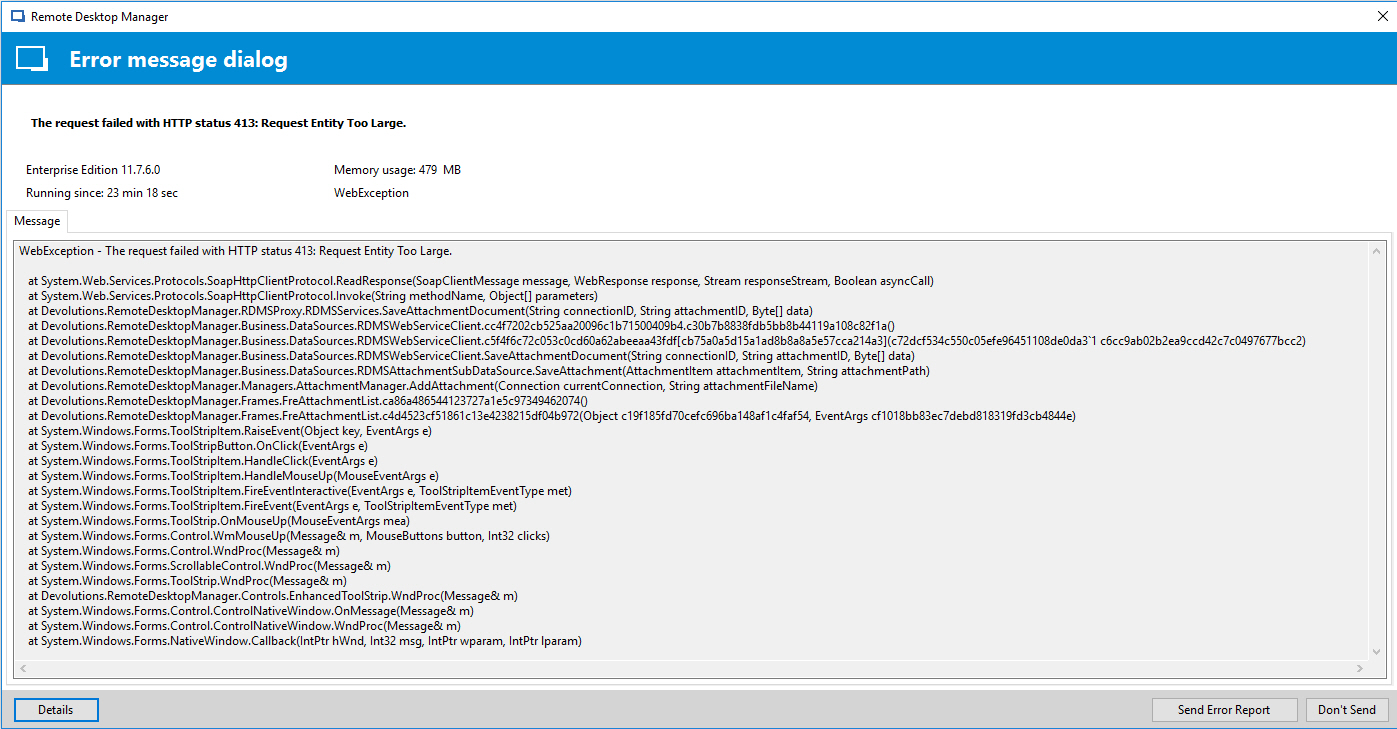
What can I do to increase the max file size?
I'm using Devolutions-Server.
thanks,
Benjamin
All Comments (14)
Hello,
You can increase the maxRequestLength value in the web.config file. You will find this file in the web application folder on the server where your DVLS instance is hosted (i.e.: c:\inetpub\wwwroot\DVLS\).<httpRuntime maxRequestLength="51200" executionTimeout="600"/>
Best regards,
Érica Poirier
Hello,
I set the maxrequestlength to
<httpRuntime maxRequestLength="5120000" executionTimeout="600"/>
But this does not work even after restarting IIS, Devolutions-Server and RDM.
what am i doing wrong?
regards,
Benjamin
Hello,
Could you please add this part anywhere between the tags <system.webServer> ... </system.webServer> in the web.config file?<security> <requestFiltering> <requestLimits maxAllowedContentLenght="1073741824" /> </requestFiltering></security>
The value is in bytes instead of the other one, maxRequestLenght that it is in kilobytes.
After the file has been saved, you can just recycle your IIS application.
Best regards,
Érica Poirier
Hello,
when i put this part in the web.config then Devolutions-Server is not respronding anymore....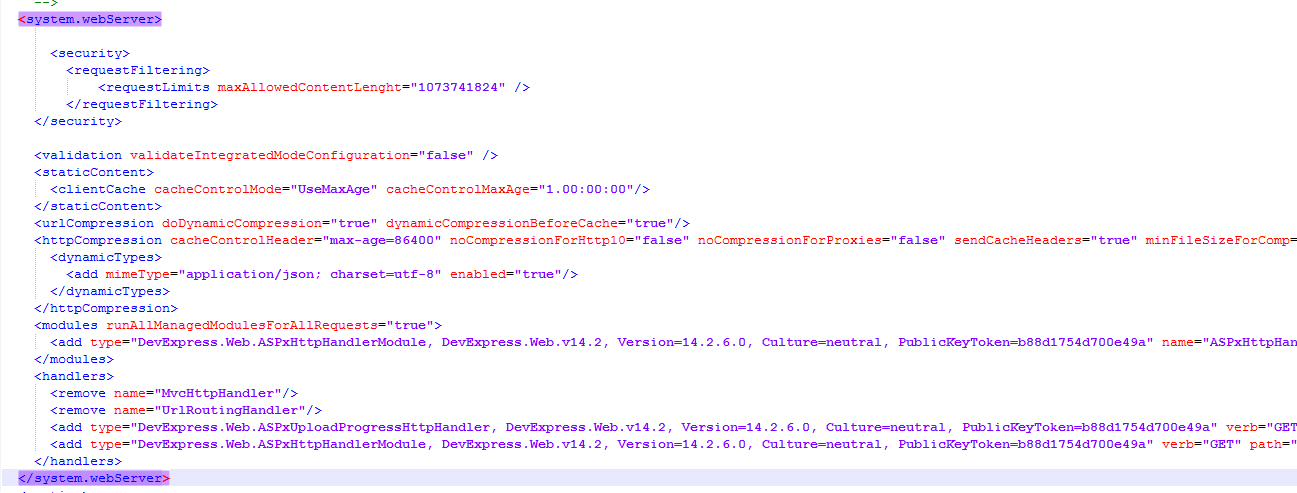
regards,
Benjamin
Sorry, typo in the last post "maxAllowedContentLength". My bad I had sent the text to Erica.<security> ... <requestFiltering> <requestLimits maxAllowedContentLenght="1073741824" /> </requestFiltering> ...</security>
Also double check the maxRequestLength, should be 51200 (50MB)<system.web> ... <httpRuntime maxRequestLength="51200" /> ...</system.web>
Stéfane Lavergne
Ohh, I didn't see it too :) Thanks!
Ok, its corrected now and I have restarted IIS, but i get same error:
413 Entity too large.
Do I have to restart Devolutions-Server?
You don't need to restart IIS since when changing the web.config IIS will automatically restart (web.config is special, IIS will monitors the file changes)
Odd, I'm testing further at the moment and can upload a 37MB file using the following values in my web.config
100MB on both values<httpRuntime maxRequestLength="102400" executionTimeout="600"/> <requestLimits maxAllowedContentLength="104857600" />
The odd thing is if I use 10MB the app crashes but not with 413 but rather a 404, very intriguing
FYI, getting the files back out of the database is another thing. At the moment it fails, I'm investigating...
Best regards,
Stéfane Lavergne
Ok, after some investigating it looks like if the file is big enough you will get out-of-memory exceptions when trying to save it back to disk or even uploading a new one. We will to streamline the attachment upload/download process. This will take some time. However if you keep files under a few MB all should be fine.
Best regards,
Stéfane Lavergne
I think I have a second Problem...
I can upload files with a size of 35KB. A 40KB file is failing. I always got the 413 Entity too large. I also tried bigger files: 10MB, 40MB, 50MB all of them failing with 413.
Please let me know if i can try something....
regards,
Benjamin
How exactly are you uploading the attachments? Session attachment? Add Document?
Best regards,
Stéfane Lavergne
Hi,
I tried it on a Folder with the FolderType Software/Serials and a Session. I alway went to properties --> Attachment --> New Attachment.
Now, I also tried on both Folder and Session "Add Document" and "Add Attachment" but everytime i got 413 Entity too large.
My Testfile is a Licensefile (xml) with 500KB.
regards,
Benjamin
I think I finally found the issue. I was looking at our code both client and server with no luck. Looking at IIS type issues I found this stackexchange thread that I believe has the correct solution.
Following instructions from: https://blogs.msdn.microsoft.com/jiruss/2007/04/13/http-413-request-entity-too-large-cant-upload-large-files-using-iis6/
This should solve the issue (adsutil.vbs should be in C:\inetpub\AdminScripts folder). Make sure you are running elevated privileges to run the command or it will fail. I don't believe you need to restart IIS, it should be automatic.
First read the current value (post the values/response, the properties may not exist)cscript adsutil.vbs get w3svc/1/uploadreadaheadsizecscript adsutil.vbs get w3svc/1/maxRequestEntityAllowedUpdate the valuecscript adsutil.vbs set w3svc/1/uploadreadaheadsize 204800
Other link: https://www.iis.net/configreference/system.webserver/serverruntime
With all that I'm still not able to reproduce the 413 errors you are getting. No clue why!
Please let me know if this resolves the issue.
Best regards,
Stéfane Lavergne
Great!! Thank You!!
The Values were not set. So i set the value from the Technet.
After that i could upload files biggen than 35KB but not bigger than the 200KB.
So i changed the value again to 4096000, i think 4MB is a good limit.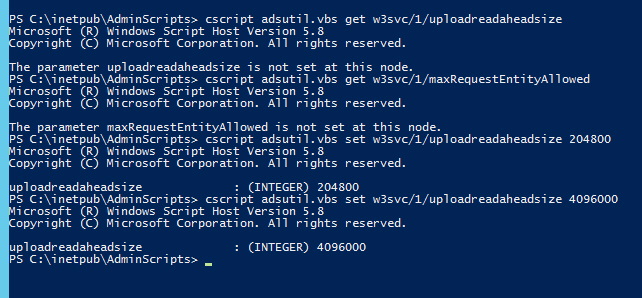
regards,
Benjamin
WOW it worked, amazing
We will update our documentation to help others that encounter this issue.
Best regards,
Stéfane Lavergne