What about xulrunner?

Hello,
after installing the new version 9.0.6.0 I'm not able to open Website embedded with Firefox.
In the optionmenu the settings to the path of xulrunner are gone.
So, whats to do, that I can open Websites embedded with firefox again?
Thanks,
Ben
All Comments (22)
We now include it by default. You don't need to install it anymore. Do you get an error? Have you tried the 32 bit version of RDM?
David Hervieux
When I try to open a Website embedded with firefox I get an empty page. Somtimes RDM crashes.
I didn't change anything in the configuration before I updated to 9.0.6.
any ideas?
thanks,
Ben.
After a crash, this is found in the event viewer.
Source: Application Error
Event-ID: 1000
Name der fehlerhaften Anwendung: RemoteDesktopManager.exe, Version: 9.0.6.0, Zeitstempel: 0x528437c3
Name des fehlerhaften Moduls: mscorwks.dll, Version: 2.0.50727.5472, Zeitstempel: 0x5174dd69
Ausnahmecode: 0xc0000005
Fehleroffset: 0x00167ee0
ID des fehlerhaften Prozesses: 0x%9
Startzeit der fehlerhaften Anwendung: 0x%10
Pfad der fehlerhaften Anwendung: %11
Pfad des fehlerhaften Moduls: %12
Berichtskennung: %13
And
Source: .NET Runtime
Event-ID: 1023
.NET Runtime version 2.0.50727.5472 - Fatal Execution Engine Error (6AA7F7AE) (80131506)
Is there a log file somewhere, where I can get more infos about the problem?
Thanks,
Ben.
I will verify with the third party we use.
David Hervieux
Hey David,
Just wanted to let you know that I am getting the exact same errors in my event viewer. Both the application error and the .NET error. The frequency of crashes is frustrating.
Could you try to use embedded IE?
David Hervieux
Does it crash on a single web site or multiple? Are/Is the web site public (could you post the url(s) for testing)?
Stéfane Lavergne
They are not public websites, just http sites that are web interfaces for hardware we have on our internal network. Usually happens when I have multiple sites open. They unfortunately don't work very well in IE, which is why we are using them with Firefox. I'm on Windows 8.1 x64 using the 32-bit client with the newest version of RDM installed.
I have just upgraded to 9.0.6 from 8.2 and I also see that my firefox websites are crushing RDM. Sorry I can't provide a link since most of these are internal applications. IE seems to work (where it used to work). When I attempt to open a site with Firefox in embedded mode nothing is displayed. An attempt to re-open the site crushes RDM. As I said IE is not having this issue.
We will try to check with the third party we use. I can't guarantee you a solution soon. We will do our best.
David Hervieux
Thanks David. I see RDM also crushes when I use chrome on those same sites. For example, since I am now unable to use FF I changed these sites to use chrome and some others (where possible to use IE). This likewise crushed RDM several times within the last 10 min. RDM has NEVER been this unstable. Please address asap - this is a show stopper now when many many apps are web based and IE is not an option in many cases (IE has its own demons and many web based apps just don't work with it well which leaves us with FF and Chrome.
I don't understand you're crash since Chrome is not supported in embedded mode. Do you have any logs or error message?
David Hervieux
I have tried to paste the log here but it returns an error. So I sent it to infos@devolutions.net
As to embedded chrome here is the trick I used:
1. Create a normal browser session using Display = External and selecting Chrome as the web browser.
2. In the navigation panel right-click on the newly created entry and select "Edit Entry Local Machine Specific Settings"
3. Check display box and select "Embedded"
This embeds crom as a tab
Wow I've never tried to embed Chrome. I will check what we can do for that.
David Hervieux
Hi,
I have verified and Chrome can't be embedded. It falls back to IE. Could you try to the Emulation mode in File->Options | Session Type -> Web
You could pick IE10 to see if it's more stable. Please make sure to use RDM 32 bits.
David Hervieux
I see what you mean. Because the tab displayed Chrome's Favicon I thought it was Chrome... in fact it seem that it was using IE. Actually running IE in IE10 emulation mode seems to help. Haven't crushed so far. Still as I said some apps don't work under IE at all so it would be great if you could give it a priority. Thanks Ed
Sorry David, but the product is unusable (not sure if this has to do with the fact that is running under windows 8). It crushes not only FF but also IE sessions. How can I roll to the older version until you sort out the crushing issue?
What version do you currently use?
You can find the previous versions here:
http://remotedesktopmanager.com/Home/PreviousVersion
David Hervieux
was using 9.0.7 - just rolled back to 8.4 - which works fine
The latest version (v9.0.12.0) now introduces the capability of specifying the Firefox engine (MozNET vs Skybound geckofx) to use when embedded.
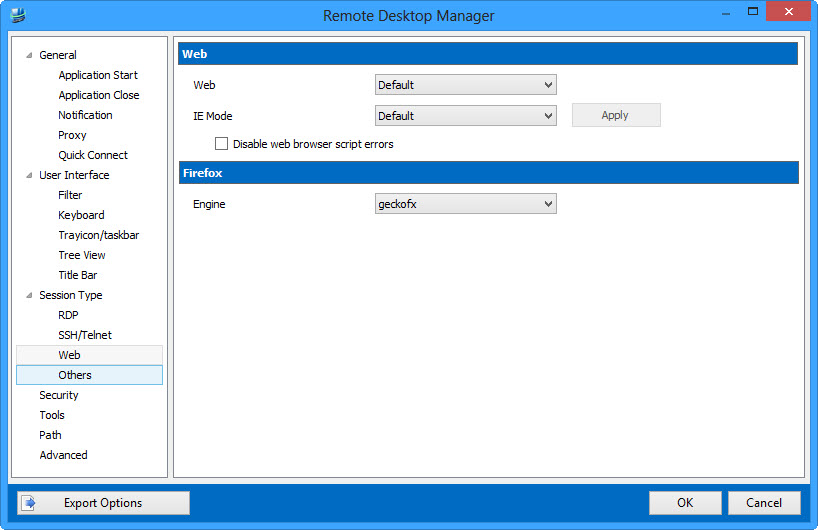
You can configure the default engine in File -> Options -> Web. The default is MozNET.
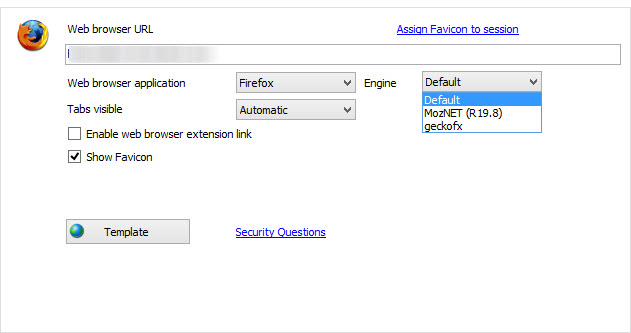
When you create a session you can specify "Default" or override the default with the engine of your choosing.
In your case, set it to geckofx. Then on run if XulRunner is not yet configured you will be prompted and all should work in v9 like it did in v8.
Download from here, simply extract the files within the installation folder.
http://download.devolutions.net/Devolutions.RemoteDesktopManager.Bin.9.0.12.0.zip
Regards,
Stéfane Lavergne
12-17-2013 12-10-00 PM[1].jpg
12-17-2013 12-05-34 PM[1].jpg
Thanks, this works.
But when I start a website it takes over 20 sseconds until the new windows opens. In previous versions (8.x) the reaction was nearly instant.
I run RDM with other credentials than I'm loggoed on on windows.
Regards,
Ben
@Ben - Thank you for the update.
20 seconds seems somewhat high in comparisons to our own tests, but yes it is slower in v9. This is due to the fact that we now start a separate process to handle embedded Firefox. This allows us to handle booth Firefox engines (geckofx & MozNET) along with both x86 & x64 and at the same time isolate from any issues the browser might encounter (crash or hangs for example). Therefore every time you start a new session the engine must load XulRunner and other supporting dlls. We will see if there is anything we can do to speed it up.
Stéfane Lavergne