
msrbui
SQL Datasource - "Set-RDMSession: Your connection is not ready"
Hello,
Could you let us know which data source you are using?
Additionally, after the error occurs, please run the following command and share the output:
$Error[0].TargetObject
This will help us reproduce and troubleshoot the issue more effectively.
Best regards,
Maxime
hello -
the issue seems to come and go for no apparent rhyme or reason. There are no changes to environment between failed incidents and successful one. Case in point - scripted changes were successful about 24 hours after i posted the initial query
SQL Datasource - "Set-RDMSession: Your connection is not ready"
Hello Thomas,
Can you try using Update-RDMEntries before calling Set-RDMSession? This should eliminate cache-related issues and help us determine if caching is the problem.
Best regards,
Maxime
Winner winner, chicken dinner!
Thanks for your help!
Have same issue of "your connection is not ready"; stopped working after 1st week of march, 2025.
Update-RDMEntries before calling Set-RDMSession does resolve the issue
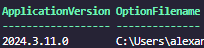
Devolutions.PowerShell module ver: 2024..3.11
OS running PS commands: windows 11
Get-RDMDiagnostic

Get-RDMInstance
enable multi factor auth on application
Want to be prompted for 2 factor auth (2-FA) only one time once devolutions remote connection initiates.
Using okta for 2-FA
The workflow:
** open devolutions application
** start a connection to server1 with authentication mode set to SAML - prompted for 2-FA
** close connection to server1 - keep devolutions application open
** start a new connection to server1 and prompted for 2-FA --- is there a way to avoid the repetitive 2-FA prompt?
Set default custom keyboard config for CMD/CTRL for all RDP connections
Have a similar question.
Editing credential object in bulk. Looking to edit the following items:
** 'Web Services URL'
** 'Authentication mode'
Can the bulk edit be completed via the GUI or PowerShell?
Edit credentials in bulk via PS devolutions module:
# Get all credential objects:
$DevoSessions = Get-RDMSession -GroupName '$YourDevoFolder' -IncludeSubFolders
# Update Web Services URL; authentication mode
$zOldCyberURL = 'Current web services URL'
$zNewCyberURL = 'New web services URL'
$zNewAuth = 'New authentication mode'
foreach ($Session in $DevoSessions) {
if ($Session.Credentials.CyberArkUrl -eq $zOldCyberURL){
try{
$Session.Credentials.CyberArkUrl = $zNewCyberURL
$Session.Credentials.CyberArkAuthenticationMode = $zNewAuth
Write-Output ("Setting session: {0}" -format $Session.'Name')
Set-RDMSession -Session $Session -ErrorAction Stop -Refresh
}catch{
Write-Warning ("Error setting session: {0}" -format $Session.'Name')
}
Write-Host ("Modified session: {0}" -format $Session.'Name') -ForegroundColor Green
}
}
Set default custom keyboard config for CMD/CTRL for all RDP connections
Have a similar question.
Editing credential object in bulk. Looking to edit the following items:
** 'Web Services URL'
** 'Authentication mode'
Can the bulk edit be completed via the GUI or PowerShell?
Able to locate 'Web Services URL' via PowerShell with this snippet - but how to change\update it?
$DevoSessions = Get-RMDSession -GroupName 'contoso' -IncludeSubFolders
($DevoSessions | where { $_.name -eq 'MyCredential' }).credentials | select CyberArkUrl
What is the PS property for 'Authentication mode', and how to update with PS?
using PS Devolutions.PowerShell module ver 2024.3.11
Now just need the PS update statements - please\thank you
# Web Services URL information
($DevoSessions | where { $_.name -eq 'MyCredential' }).credentials | select CyberArkUrl
# Authentication mode
($DevoSessions | where { $_.name -eq 'MyCredential' }).credentials | select CyberArkAuthenticationMode
********
********
to get credential name, web services URL, Authentication Mode via PS
$DevoSessions | select-object name -ExpandProperty credentials | select-object name,cyberArkURL,CyberArkAuthenticationMode
hoping to figure out how to make update statement
********
********
Set default custom keyboard config for CMD/CTRL for all RDP connections
Have a similar question.
Editing credential object in bulk. Looking to edit the following items:
** 'Web Services URL'
** 'Authentication mode'
Can the bulk edit be completed via the GUI or PowerShell?
Able to locate 'Web Services URL' via PowerShell with this snippet - but how to change\update it?
$DevoSessions = Get-RMDSession -GroupName 'contoso' -IncludeSubFolders
($DevoSessions | where { $_.name -eq 'MyCredential' }).credentials | select CyberArkUrl
What is the PS property for 'Authentication mode', and how to update with PS?
using PS Devolutions.PowerShell module ver 2024.3.11
Now just need the PS update statements - please\thank you
# Web Services URL information
($DevoSessions | where { $_.name -eq 'MyCredential' }).credentials | select CyberArkUrl
# Authentication mode
($DevoSessions | where { $_.name -eq 'MyCredential' }).credentials | select CyberArkAuthenticationMode
Set default custom keyboard config for CMD/CTRL for all RDP connections
Have a similar question.
Editing credential object in bulk. Looking to edit the following items:
** 'Web Services URL'
** 'Authentication mode'
Can the bulk edit be completed via the GUI or PowerShell?
Able to locate 'Web Services URL' via PowerShell with this snippet - but how to change\update it?
$DevoSessions = Get-RMDSession -GroupName 'contoso' -IncludeSubFolders
($DevoSessions | where { $_.name -eq 'MyCredential' }).credentials | select CyberArkUrl
What is the PS property for 'Authentication mode', and how to update with PS?
PowerShell connect to password protected vault
Hello,
I am unable to reproduce the issue. The behavior you described suggests that an invalid password may have been used. Could you try using a new password? I will continue testing to determine whether certain characters might be causing issues. Could you also specify which data source you are trying to connect to (DVLS, MSSQL, etc.)?
Best regards,
Maxime
thanks for the reply.
looks like issue was an anomoly and has fixed itself after a password reset
PowerShell connect to password protected vault
hi - using PS Devolutions.PowerShell module ver 2024.3.11
get prompted for password when executing below snippet, but the password never seems to get passed as the snippet repeatedly prompts for the password
There doesn't seem to be a way to pass credentials into Get-RDMSession
Get-RDMSession -GroupName 'SomeGroup' -IncludeSubFolders