Set default custom keyboard config for CMD/CTRL for all RDP connections
Set default custom keyboard config for CMD/CTRL for all RDP connections

In the below screenshot, it is showing how I've configured Command = CTRL and CTRL = Windows/GUI for a single RDP connection. I have two questions:
- How can I do this for all existing RDP connections in bulk?
- How can I make it the default for all new RDP connections made going forward?
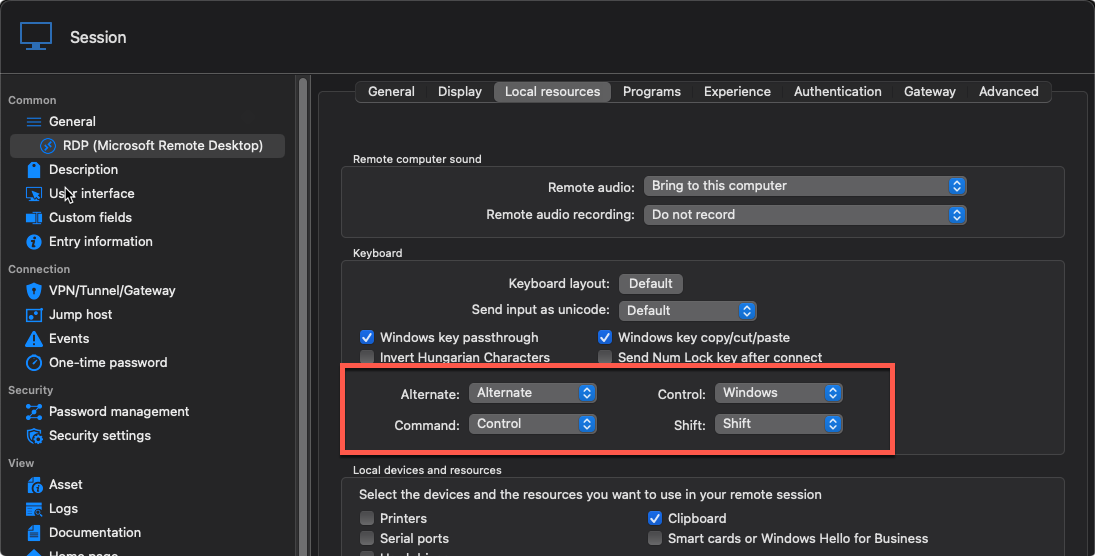
2025-01-16_09-49-09.png
All Comments (6)
Hello,
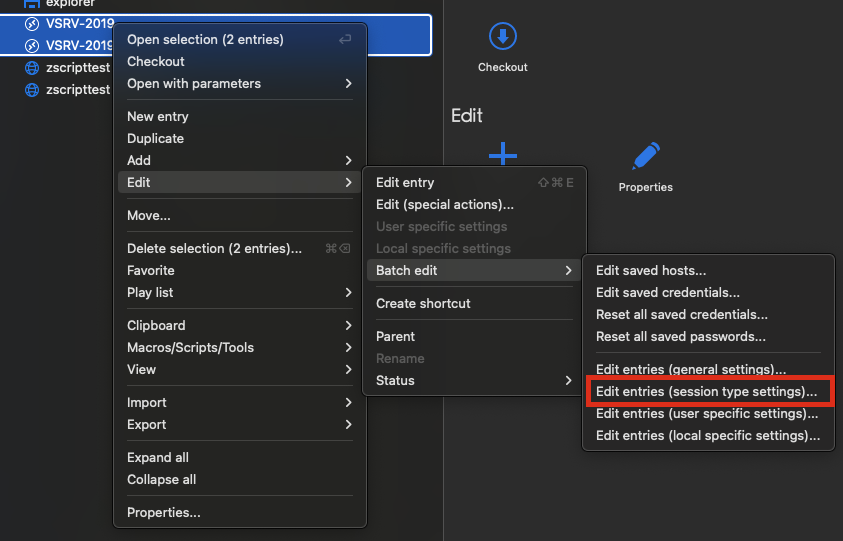
To set those settings for many RDP sessions at once, you can follow these steps:
- Select all the RDP sessions you want to set this setting on
- Right click
- Go to Edit -> Batch edit -> Edit entries ( session type settings )
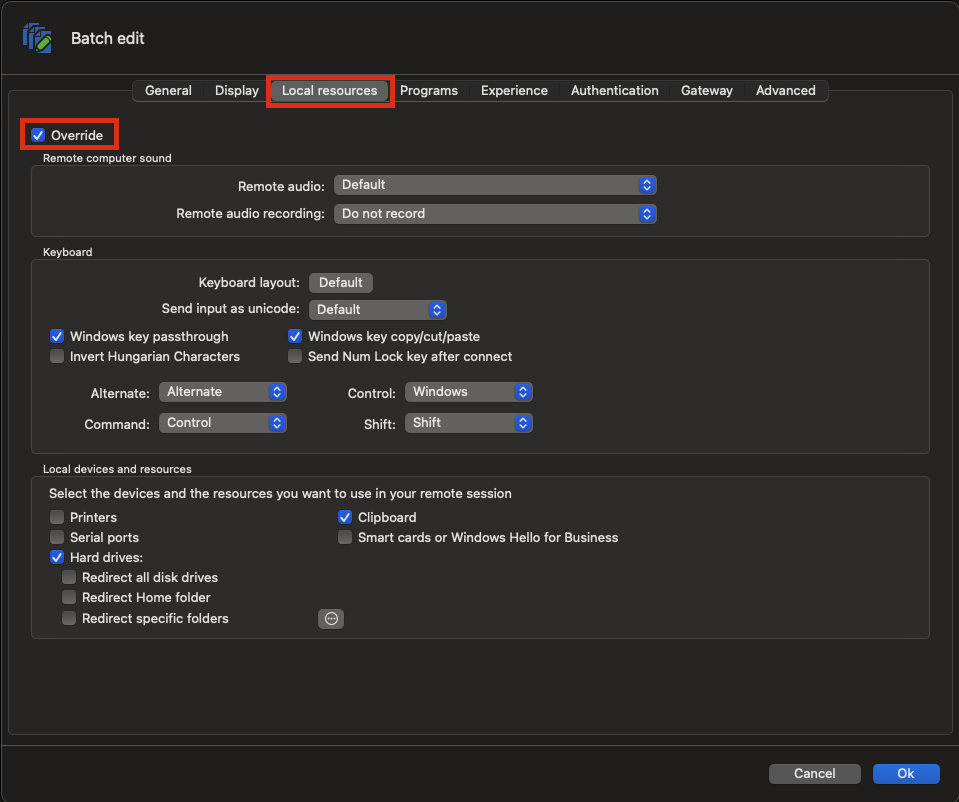
- Go to Local resources
- Check "Override"
- Set the settings you want
- Click "Ok"
To make it the new default for RDP sessions, follow these steps:
- Go to File -> Templates -> Default session settings
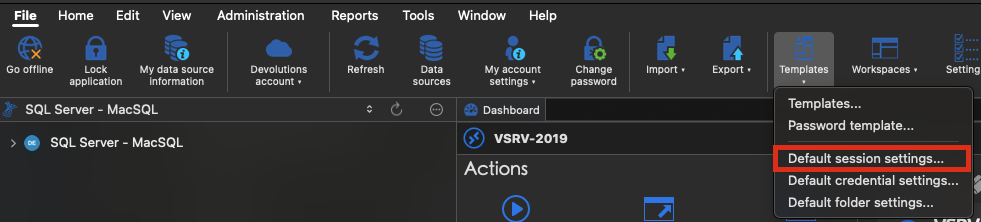
- Select RDP
- Go in the settings
- Set the settings you want
- Save
New RDP sessions will have those settings by default
I hope that is what you are looking for. Please let me know if you have more questions or if something isn't working correctly.
Best regards,
Maxim Buisson
fd9a37f9-bdb3-48e8-b276-0d5d79ccb405.png
e2ce6c4c-ca09-4548-8487-71cd4839a81b.png
3acdec8e-6271-4ebf-b7f1-ad3b4ff94a64.png
Screenshot 2025-01-16 at 8.04.13 AM.png
Screenshot 2025-01-16 at 8.00.20 AM.png
Screenshot 2025-01-16 at 7.58.55 AM.png
Have a similar question.
Editing credential object in bulk. Looking to edit the following items:
** 'Web Services URL'
** 'Authentication mode'
Can the bulk edit be completed via the GUI or PowerShell?
Able to locate 'Web Services URL' via PowerShell with this snippet - but how to change\update it?
$DevoSessions = Get-RMDSession -GroupName 'contoso' -IncludeSubFolders
($DevoSessions | where { $_.name -eq 'MyCredential' }).credentials | select CyberArkUrl
What is the PS property for 'Authentication mode', and how to update with PS?
Have a similar question.
Editing credential object in bulk. Looking to edit the following items:
** 'Web Services URL'
** 'Authentication mode'
Can the bulk edit be completed via the GUI or PowerShell?
Able to locate 'Web Services URL' via PowerShell with this snippet - but how to change\update it?
$DevoSessions = Get-RMDSession -GroupName 'contoso' -IncludeSubFolders
($DevoSessions | where { $_.name -eq 'MyCredential' }).credentials | select CyberArkUrl
What is the PS property for 'Authentication mode', and how to update with PS?
using PS Devolutions.PowerShell module ver 2024.3.11
Now just need the PS update statements - please\thank you
# Web Services URL information
($DevoSessions | where { $_.name -eq 'MyCredential' }).credentials | select CyberArkUrl
# Authentication mode
($DevoSessions | where { $_.name -eq 'MyCredential' }).credentials | select CyberArkAuthenticationMode
Have a similar question.
Editing credential object in bulk. Looking to edit the following items:
** 'Web Services URL'
** 'Authentication mode'
Can the bulk edit be completed via the GUI or PowerShell?
Able to locate 'Web Services URL' via PowerShell with this snippet - but how to change\update it?
$DevoSessions = Get-RMDSession -GroupName 'contoso' -IncludeSubFolders
($DevoSessions | where { $_.name -eq 'MyCredential' }).credentials | select CyberArkUrl
What is the PS property for 'Authentication mode', and how to update with PS?
using PS Devolutions.PowerShell module ver 2024.3.11
Now just need the PS update statements - please\thank you
# Web Services URL information
($DevoSessions | where { $_.name -eq 'MyCredential' }).credentials | select CyberArkUrl
# Authentication mode
($DevoSessions | where { $_.name -eq 'MyCredential' }).credentials | select CyberArkAuthenticationMode
********
********
to get credential name, web services URL, Authentication Mode via PS
$DevoSessions | select-object name -ExpandProperty credentials | select-object name,cyberArkURL,CyberArkAuthenticationMode
hoping to figure out how to make update statement
********
********
Hello,
In the Devolutions.PowerShell module, to locate a property in the PSConnection object, you can refer to this documentation.
To update the two specified properties, follow these steps:
# Retrieve the session entry by name (ensure the name is unique or add additional filters)
$entry = Get-RDMSession -Name 'MyCredential'

# Update CyberArk properties
$entry.Credentials.CyberArkUrl = 'https://my.url.com'
$entry.Credentials.CyberArkAuthenticationMode = 'NewModeHere'

# Save the updated session entry
Set-RDMSession -Session $entry

# Refresh the session list after all modifications
Update-RDMEntries

# If you need to update the UI of a running RDM
Update-RDMUI
Let us know if you need anything else.
Best regards,
Maxime
Have a similar question.
Editing credential object in bulk. Looking to edit the following items:
** 'Web Services URL'
** 'Authentication mode'
Can the bulk edit be completed via the GUI or PowerShell?
Edit credentials in bulk via PS devolutions module:
# Get all credential objects:
$DevoSessions = Get-RDMSession -GroupName '$YourDevoFolder' -IncludeSubFolders
# Update Web Services URL; authentication mode
$zOldCyberURL = 'Current web services URL'
$zNewCyberURL = 'New web services URL'
$zNewAuth = 'New authentication mode'
foreach ($Session in $DevoSessions) {
if ($Session.Credentials.CyberArkUrl -eq $zOldCyberURL){
try{
$Session.Credentials.CyberArkUrl = $zNewCyberURL
$Session.Credentials.CyberArkAuthenticationMode = $zNewAuth
Write-Output ("Setting session: {0}" -format $Session.'Name')
Set-RDMSession -Session $Session -ErrorAction Stop -Refresh
}catch{
Write-Warning ("Error setting session: {0}" -format $Session.'Name')
}
Write-Host ("Modified session: {0}" -format $Session.'Name') -ForegroundColor Green
}
}