
pmacpherson
RDM 2026.2.1.2 freeze on loading connection after upgrade from 2026.1.12.6 on MacOsX Ventura 13.7.8
Hi... I noticed the same problem on my mac after updating it to the latest version of RDM as well. I will roll it back, but will this issue be fixed in future versions?
Password macro fails if password contains a special character - on Windows host only
Thanks Richard. Cant wait to try it out.
Password macro fails if password contains a special character - on Windows host only
Hi
I do apologize for the continued radio silence here. I've been trying to address this on-and-off for a while, but I never did find a solution I was happy with and the work has been mixed in with other demands.
To understand the problem: keyboard macros in RDM are "generic" in a way that should let them work anywhere. We parse the macro and the parts that are text or keyboard events (like "{TAB}") are converted into synthetic key presses - that is to say, we "type" programmatically and then Windows handles that input.
This approach actually isn't great for things like our VNC integration (which Apple Screen Sharing is a variant of). Because what happens is, the inputs are converted to keyboard events and injected into the system, then the VNC control gets that "typed" input and now has to convert it back to a symbolic representation, then send it to the server as individual "down" and "up" key symbols; which the server then has to convert back to synthetic key input and inject into the remote system. What we find is that this is very timing dependent: if the key events happen too quickly (or too slowly!) on either side of that chain, it might become lossy or events happen out of order. In your specific case that's what's happening; RDM is injecting the macro properly but certain events are getting dropped.
So, I've decided to take half of that out of the loop - when we're talking to a VNC control, we need RDM to just hand off the parsed macro which we can interpret directly for the server, without having to simulate any typing in this case. That's the same pattern our SSH integration follows and I think it will be much more robust. It's also a bigger chunk of work than just trying to fix these specific timing issues.
In terms of the current status; I've made the changes on the VNC side (and just tested it yesterday against macOS) and that will be bundled up this week alongside another group of fixes. What remains is to tie it into RDM which is much more simple (as the code already exists for SSH sessions). I hope to have that wrapped up by the end of the week and you can expect this inside the next couple of minor updates.
I hope my explanation is clear, and appreciate your patience. This turned out to be a bigger problem than initially thought (at least to make a real fix, rather than just patch the symptoms).
Let me know any questions
Kind regards,
@Richard Markiewicz
Thanks for that detailed explanation... race conditions can be a nightmare! Looking forward to being able to use that macro functionality!
Password macro fails if password contains a special character - on Windows host only
hi Richard, any joy on fixing the password/macro issue?
Password macro fails if password contains a special character - on Windows host only
Hi Richard... I can only seem to reproduce the issue on Macs brining up other macs remotely. Windows always displays the mac fully. The issue seems to always occur at first, but then after a few times reconnecting it seems to work (maybe 1 out of 5 times).
Password macro fails if password contains a special character - on Windows host only
thanks Jacob. Let me know if theres any logs/etc... I can provide.
One other thing, a new thing... with the latest update (2025.3.7.3), something strange is happening when connecting to Mac. Intermittently the screen display (which is set to be scaled) only shows up as a smaller scaled screen vs filling the entire window. I've attached two pics - one showing what the issue and the other showing correct behavior - no config changes have been made. This never happened before this last release to my knowledge, so maybe its a recent change?
thanks
@pmacpherson
Hi... just inquiring about these two issues, any fixes on the horizon?
Password macro fails if password contains a special character - on Windows host only
thanks Jacob. Let me know if theres any logs/etc... I can provide.
One other thing, a new thing... with the latest update (2025.3.7.3), something strange is happening when connecting to Mac. Intermittently the screen display (which is set to be scaled) only shows up as a smaller scaled screen vs filling the entire window. I've attached two pics - one showing what the issue and the other showing correct behavior - no config changes have been made. This never happened before this last release to my knowledge, so maybe its a recent change?
thanks
Password macro fails if password contains a special character - on Windows host only
hi Jacob. I tried your ask, my password came back in the display, no issue. my keyboard langauge is English US. Its the same on the Mac as well. I try to stay away from the Canadian keyboards as they usually introduce accents which I barely ever use.
Password macro fails if password contains a special character - on Windows host only
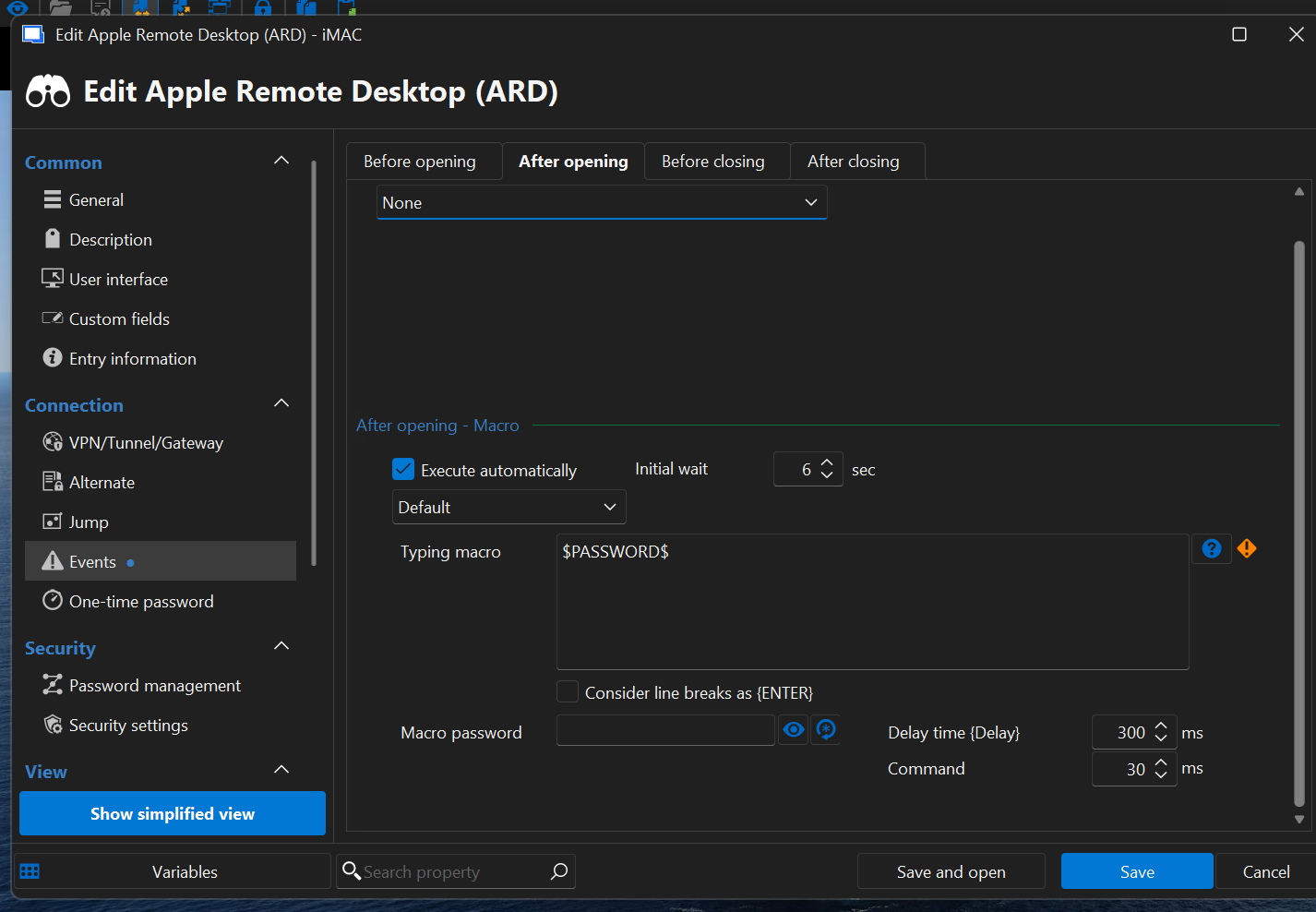
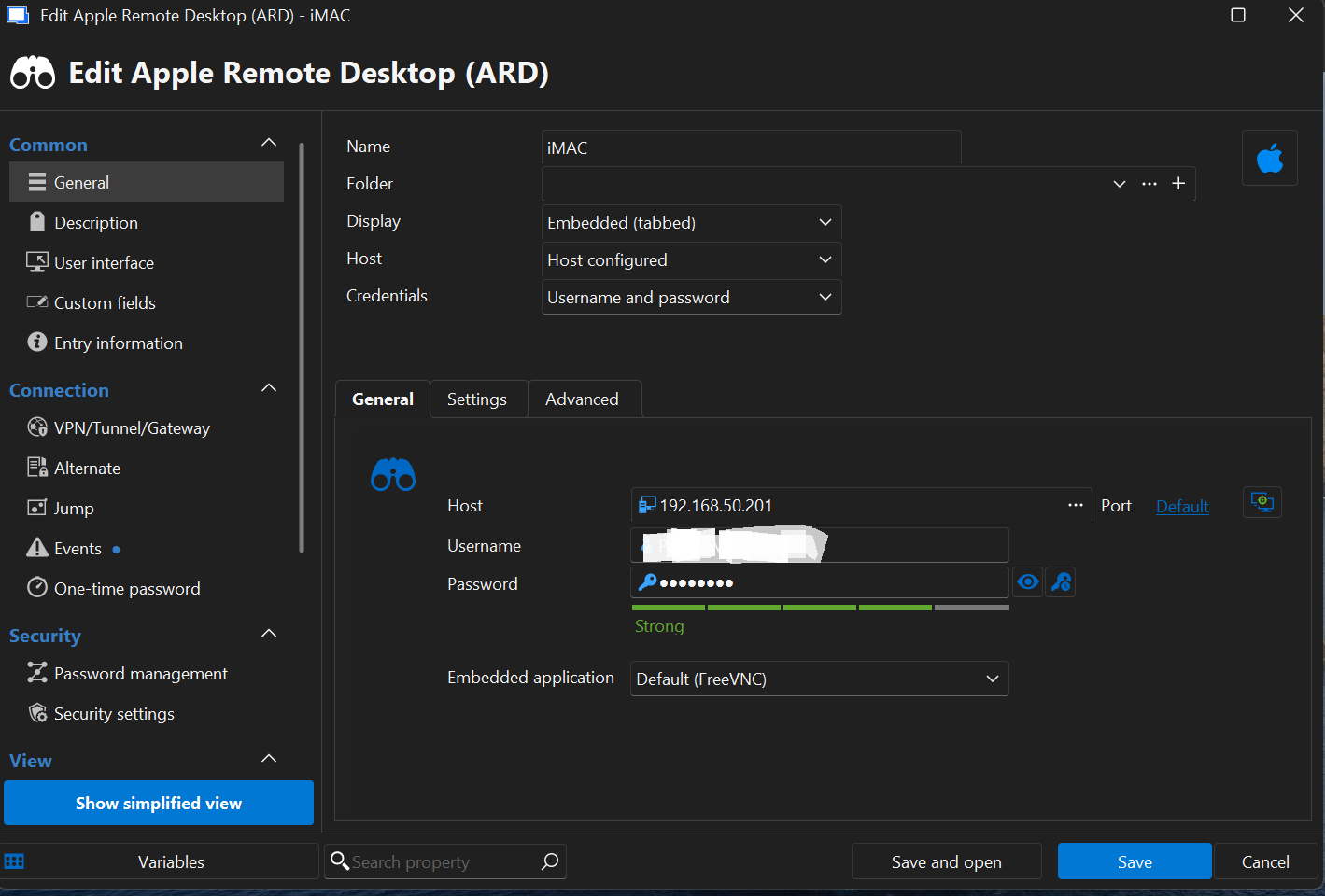
Hi Jacob, here's the two screenshots... im just using the built-in after opening macro - nothing special... screenshots attached. let me know if you need any more info.
Password macro fails if password contains a special character - on Windows host only
Hi Jacob. no joy. I tried the mobile version and same behavior. BTW, this is reproducible on multiple Windows PCs. I know that they worked before, just started failing most recently (maybe last version update or two ago). Any other ideas?
@pmacpherson
Ive included a link to video I have made that shows the issue:https://share.icloud.com/photos/096QD7ayRwjA6YnK4myNXPcAw
Password macro fails if password contains a special character - on Windows host only
Hi Jacob. no joy. I tried the mobile version and same behavior. BTW, this is reproducible on multiple Windows PCs. I know that they worked before, just started failing most recently (maybe last version update or two ago). Any other ideas?
Password macro fails if password contains a special character - on Windows host only
hi Jacob,
here's what I have: RDM v2025.3.22.0 64bit (JIT)
.net 9.0.11
The data source I am using is Devolutions Hub Personal and the source is happening on multiple of my machines (I have 3 macs, i use the same password on all machines to log in). the macro I am using is just the built in one (Under Events, after opening, - execute macro automatically after an inital wait of 6sec. The typing macro is $PASSWORD$ and when I connect to one of these three macs from another mac, no problem - it enters the password correctly and I just hit Enter and Im in. However when I attempt to launch from a windows pc, I can see the macro fire and it types in the password, but its always one character short and login fails (Im not positive, but i believe its the @ symbol in the password, because the @ symbol is the third last character in my password and if just delete the last two characters and add in the @ followed by the final 2 chars, im able to login.
Its very strange. I also tried setting up a different macro and use the $MACRO_PASSWORD$ and filled in the macro password field, again works fine for Macs, but fails for PC.
I also tried retyping the password field on the windows PC and reconnected, same behavior (the password is a total of 10 characters)
theres nothing special about the password, its just a combination of letters, numbers and the @ symbol.
let me know if theres any other info i can provide.
cheers
Patrick
Password macro fails if password contains a special character - on Windows host only
hi.. I have a macro which i call after connection to type in my password on a mac machine. If I run that macro from a Mac PC it works fine, however if I run the same macro on a Windows PC it seems one character is dropped from the password, and I think its the special character (an '@' symbol).
ARD Connection with credentials but Mac still asks for password
Hi
It's normal behaviour, and a fundamental difference between ARD (which is a VNC derivative) and RDP. With ARD/VNC, you're connected directly to the console of the remote machine; and if there is no account logged in (or there is a logged in session, but the screen is locked), you'll land on the login screen.
You should be able to use the "type username" and/or "type password" shortcuts to prevent needing to type the credentials. It might also be possible to use a typing macro to automate the session login, but how you set that up would depend on how you have the login screen configured. But unfortunately, seeing the login screen in these cases is unavoidable.
Please, let me know if something isn't clear or you have further questions
Kind regards
I will give those suggestions a try. thank you for the assist! Love this product btw.. its really amazing, ive been looking for this exact software for years, but never came across it before now. I wish I would have, would have saved me so much frustration and time!
ARD Connection with credentials but Mac still asks for password
Hi there...
I have two macs that I use RDM to connect with. I specify the credentisls in each session profile, and i am able to connect to each mac, however even though i provided a valid password in the credentials, when i connect to the mac using RDM, instead of seeing the desktop I get the lock screende and im prompted to enter a password. my question is this normal behavior? I was expecting it to behave like windows RDP, (ie. I just connect and am authenticated using the credentials and am not prompted for password)