Password macro fails if password contains a special character - on Windows host only
Password macro fails if password contains a special character - on Windows host only

hi.. I have a macro which i call after connection to type in my password on a mac machine. If I run that macro from a Mac PC it works fine, however if I run the same macro on a Windows PC it seems one character is dropped from the password, and I think its the special character (an '@' symbol).
All Comments (21)
Hello,
Thank you for reaching out on this matter.
I’ve tested the behavior on my end and was unable to reproduce the issue when using a password that contains the "@" character.
To help me investigate further, could you please provide the following details:
- The version of Remote Desktop Manager you’re currently using
- The data source in use
- The specific macro you’re using, so I can try to replicate the scenario more accurately
I look forward to your reply.
Best regards,
Jacob Lafrenière
hi Jacob,
here's what I have: RDM v2025.3.22.0 64bit (JIT)
.net 9.0.11
The data source I am using is Devolutions Hub Personal and the source is happening on multiple of my machines (I have 3 macs, i use the same password on all machines to log in). the macro I am using is just the built in one (Under Events, after opening, - execute macro automatically after an inital wait of 6sec. The typing macro is $PASSWORD$ and when I connect to one of these three macs from another mac, no problem - it enters the password correctly and I just hit Enter and Im in. However when I attempt to launch from a windows pc, I can see the macro fire and it types in the password, but its always one character short and login fails (Im not positive, but i believe its the @ symbol in the password, because the @ symbol is the third last character in my password and if just delete the last two characters and add in the @ followed by the final 2 chars, im able to login.
Its very strange. I also tried setting up a different macro and use the $MACRO_PASSWORD$ and filled in the macro password field, again works fine for Macs, but fails for PC.
I also tried retyping the password field on the windows PC and reconnected, same behavior (the password is a total of 10 characters)
theres nothing special about the password, its just a combination of letters, numbers and the @ symbol.
let me know if theres any other info i can provide.
cheers
Patrick
Hello,
Thank you for the follow-up.
This does seem quite unusual, I'm unable to reproduce the issue exactly as you described it.
Could you try using the portable version of RDM? Here’s how to set it up:
https://docs.devolutions.net/rdm/kb/how-to-articles/portable-rdm-installation/
I suspect there may be something wrong with your current local RDM instance.
With the portable version, you’ll be able to use a local data source strictly for testing purposes. Please try creating a new ARD entry from scratch and configure the macro accordingly.
Make sure to allow macros in passwords under the Security tab in the entry properties before testing.
Could you let me know if this resolves the issue?
I look forward to your reply.
Best regards,
Jacob Lafrenière
Hi Jacob. no joy. I tried the mobile version and same behavior. BTW, this is reproducible on multiple Windows PCs. I know that they worked before, just started failing most recently (maybe last version update or two ago). Any other ideas?
Hi Jacob. no joy. I tried the mobile version and same behavior. BTW, this is reproducible on multiple Windows PCs. I know that they worked before, just started failing most recently (maybe last version update or two ago). Any other ideas?
@pmacpherson
Ive included a link to video I have made that shows the issue:https://share.icloud.com/photos/096QD7ayRwjA6YnK4myNXPcAw
Hello,
Thank you for the follow-up.
I’m still unable to reproduce the issue on my end, everything appears to be working as expected.
Could you please share some screenshots showing how your macro is configured?
I look forward to your response.
Best regards,
Jacob Lafrenière
Hi Jacob, here's the two screenshots... im just using the built-in after opening macro - nothing special... screenshots attached. let me know if you need any more info.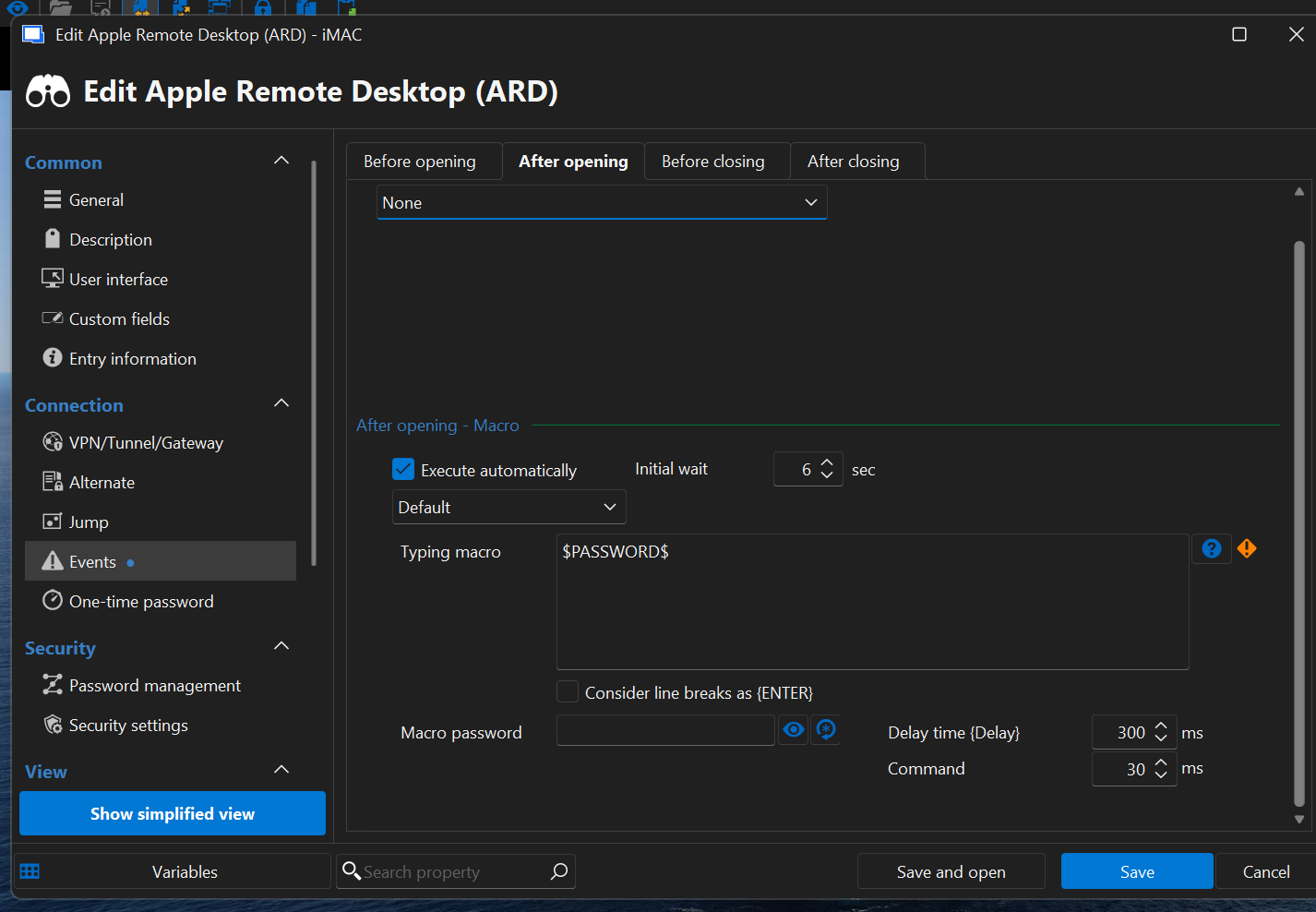
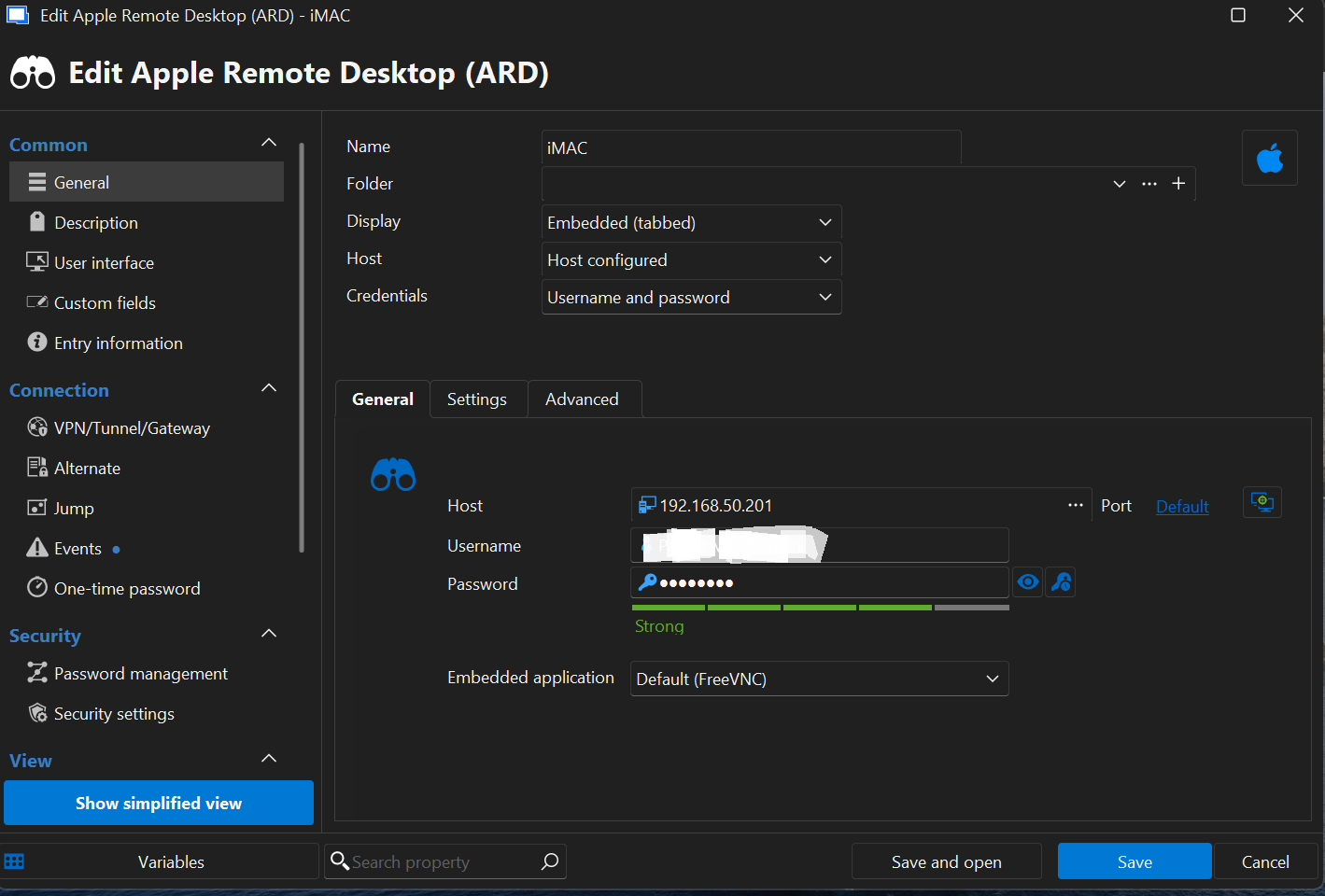
Screenshot 2025-11-26 100502.png
Screenshot 2025-11-26 100557.png
Hello,
Thank you for the follow-up.
Could you please test something for me? From the same Events menu, try configuring a Before Opening macro with $PASSWORD$ in the Prompt Message field.
Here's how I have mine configured: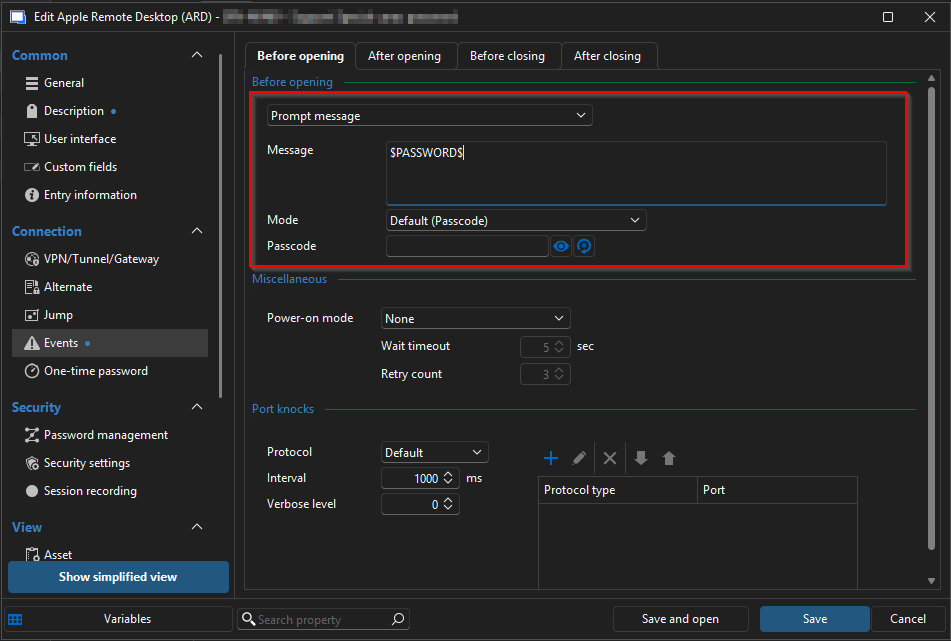
When opening the entry, you should receive a prompt displaying your full password.
Can you confirm whether the password appears correctly in this case?
Additionally, could you let me know the keyboard language you're using on both your local machine and the remote Mac? This will help us narrow down any potential input issues.
I look forward to your reply.
Best regards,
Jacob Lafrenière
17c5df63-b7ec-4c97-8cb8-7005363d2116.png
hi Jacob. I tried your ask, my password came back in the display, no issue. my keyboard langauge is English US. Its the same on the Mac as well. I try to stay away from the Canadian keyboards as they usually introduce accents which I barely ever use.
Hello,
Thank you for the follow-up.
I discussed this issue with the development team, and they suspect that there may be something on our side that needs to be addressed to resolve the problem. I will open a case with them and keep you updated on their progress. I will follow up as soon as a fix is released in a future update.
Best regards,
Jacob Lafrenière
thanks Jacob. Let me know if theres any logs/etc... I can provide.
One other thing, a new thing... with the latest update (2025.3.7.3), something strange is happening when connecting to Mac. Intermittently the screen display (which is set to be scaled) only shows up as a smaller scaled screen vs filling the entire window. I've attached two pics - one showing what the issue and the other showing correct behavior - no config changes have been made. This never happened before this last release to my knowledge, so maybe its a recent change?
thanks
Screenshots.zip
thanks Jacob. Let me know if theres any logs/etc... I can provide.
One other thing, a new thing... with the latest update (2025.3.7.3), something strange is happening when connecting to Mac. Intermittently the screen display (which is set to be scaled) only shows up as a smaller scaled screen vs filling the entire window. I've attached two pics - one showing what the issue and the other showing correct behavior - no config changes have been made. This never happened before this last release to my knowledge, so maybe its a recent change?
thanks
@pmacpherson
Hi... just inquiring about these two issues, any fixes on the horizon?
Hello
For the macro issue, I believe I understand the problem but haven't had time to work on it yet with the holidays. I'll try to address that this week.
I was not able to reproduce the issue with scaling. When that happens, is there some interaction you can make that "fixes" it? i.e. resize RDM or the tab containing the session? Is it simply the case that if you connect, say, a second or third time, the issue self-corrects?
Thanks and kind regards,
Richard Markievicz
Hi Richard... I can only seem to reproduce the issue on Macs brining up other macs remotely. Windows always displays the mac fully. The issue seems to always occur at first, but then after a few times reconnecting it seems to work (maybe 1 out of 5 times).
Hello
I'm still working on the macro issue.
I wanted to let you know I was able to reproduce the issue with the improperly sized display from the Mac client. I could only reproduce it intermittently, and only on a release build, which suggests some kind of race condition in how the layout is calculated.
I've opened a separate ticket for that with the RDM Mac team; someone on that side will have to investigate this further. I've linked the ticket to this forum post so you can be updated when there is some news.
Thanks for your patience
Kind regards,
Richard Markievicz
hi Richard, any joy on fixing the password/macro issue?
Hello,
I contacted our development team via the ticket opened to them.
I will get back you when they will get back to me.
Best regards,
Jeff Dagenais
Hi
I do apologize for the continued radio silence here. I've been trying to address this on-and-off for a while, but I never did find a solution I was happy with and the work has been mixed in with other demands.
To understand the problem: keyboard macros in RDM are "generic" in a way that should let them work anywhere. We parse the macro and the parts that are text or keyboard events (like "{TAB}") are converted into synthetic key presses - that is to say, we "type" programmatically and then Windows handles that input.
This approach actually isn't great for things like our VNC integration (which Apple Screen Sharing is a variant of). Because what happens is, the inputs are converted to keyboard events and injected into the system, then the VNC control gets that "typed" input and now has to convert it back to a symbolic representation, then send it to the server as individual "down" and "up" key symbols; which the server then has to convert back to synthetic key input and inject into the remote system. What we find is that this is very timing dependent: if the key events happen too quickly (or too slowly!) on either side of that chain, it might become lossy or events happen out of order. In your specific case that's what's happening; RDM is injecting the macro properly but certain events are getting dropped.
So, I've decided to take half of that out of the loop - when we're talking to a VNC control, we need RDM to just hand off the parsed macro which we can interpret directly for the server, without having to simulate any typing in this case. That's the same pattern our SSH integration follows and I think it will be much more robust. It's also a bigger chunk of work than just trying to fix these specific timing issues.
In terms of the current status; I've made the changes on the VNC side (and just tested it yesterday against macOS) and that will be bundled up this week alongside another group of fixes. What remains is to tie it into RDM which is much more simple (as the code already exists for SSH sessions). I hope to have that wrapped up by the end of the week and you can expect this inside the next couple of minor updates.
I hope my explanation is clear, and appreciate your patience. This turned out to be a bigger problem than initially thought (at least to make a real fix, rather than just patch the symptoms).
Let me know any questions
Kind regards,
Richard Markievicz
Hi
I do apologize for the continued radio silence here. I've been trying to address this on-and-off for a while, but I never did find a solution I was happy with and the work has been mixed in with other demands.
To understand the problem: keyboard macros in RDM are "generic" in a way that should let them work anywhere. We parse the macro and the parts that are text or keyboard events (like "{TAB}") are converted into synthetic key presses - that is to say, we "type" programmatically and then Windows handles that input.
This approach actually isn't great for things like our VNC integration (which Apple Screen Sharing is a variant of). Because what happens is, the inputs are converted to keyboard events and injected into the system, then the VNC control gets that "typed" input and now has to convert it back to a symbolic representation, then send it to the server as individual "down" and "up" key symbols; which the server then has to convert back to synthetic key input and inject into the remote system. What we find is that this is very timing dependent: if the key events happen too quickly (or too slowly!) on either side of that chain, it might become lossy or events happen out of order. In your specific case that's what's happening; RDM is injecting the macro properly but certain events are getting dropped.
So, I've decided to take half of that out of the loop - when we're talking to a VNC control, we need RDM to just hand off the parsed macro which we can interpret directly for the server, without having to simulate any typing in this case. That's the same pattern our SSH integration follows and I think it will be much more robust. It's also a bigger chunk of work than just trying to fix these specific timing issues.
In terms of the current status; I've made the changes on the VNC side (and just tested it yesterday against macOS) and that will be bundled up this week alongside another group of fixes. What remains is to tie it into RDM which is much more simple (as the code already exists for SSH sessions). I hope to have that wrapped up by the end of the week and you can expect this inside the next couple of minor updates.
I hope my explanation is clear, and appreciate your patience. This turned out to be a bigger problem than initially thought (at least to make a real fix, rather than just patch the symptoms).
Let me know any questions
Kind regards,
@Richard Markiewicz
Thanks for that detailed explanation... race conditions can be a nightmare! Looking forward to being able to use that macro functionality!
Hello
I did commit the reimplementation for keyboard macros for VNC (and it's derivatives, like Apple Screen Sharing) but I'm afraid it came too late for the upcoming minor update (2026.1.16). It should be on the next release after that which will be 2026.1.17 or later, and should not be too long (within the next few weeks).
I've also checked on the status of your other ticket (the incorrect screen size on initial connection on macOS) and see it's status is "reviewing"; which means that the developer resolved the issue internally but it still needs to pass code review and QA. But just to let you know that it is being worked on.
Thanks again for your patience in this, and please don't hesitate with further questions or comments
Kind regards,
Richard Markievicz
Thanks Richard. Cant wait to try it out.