
simone9
Batch edit for user-specific settings
Hello Jafran,
Great, thank you! :)
Best regards,
Simone
Batch edit for user-specific settings
Hi,
We updated RDM from 2026.1.23.0 to 2026.2.11.0 and Devolutions Server to Version 2026.2.7.0. Since the update, the batch edit feature for user-specific settings no longer works properly. We use this feature to store our individual credentials from PAM or the User Vault (override credentials) for RDP session entries. For single entries, the credentials can still be successfully stored. When using batch edit, the credentials are successfully stored for one of the selected entries, but not for any of the other entries that were selected. Thank you for your support.
Kind regards, Simone
PAM checkout takes a long time and/or returns error
Hello William,
the "already checked out" and the delay problem with PAM has been solved. Various adjustments, none of which really helped on their own, solved the problem when combined. Thank you for your support.
The problem with lost user-specific settings still exists. This is not related to the PAM problem. Should I create a separate post for this in the RDM forum?
Thank you and best regards,
Simone
PAM checkout takes a long time and/or returns error
Hi William,
We tried both options: using only the domain in the provider so that the domain controller is selected automatically, and using a fixed DC. Unfortunately, it makes no difference.
From the password server, all DCs can be contacted via PowerShell Test on port 636 without delay and in less than a second. The delay only seems to exist via RDM. And only with PAM accounts.
Unfortunately, a JIT replication delay does not improve the situation either; the whole process just takes longer. So you have the faulty delay plus the JIT delay.
Thanks,
Simone
PAM checkout takes a long time and/or returns error
Hi William,
thank you for your answer.
There is no latency configured in the providers.
All the employees have their own PAM vaults with personal PAM accounts. We don't use shared PAM accounts so every check out is initiated by only one person. The PAM accounts are marked and shown as checked in before and checked out after. This is the log file entry on these events.

I believe that a delay in the provider connections plays a role. When testing the connection to the providers or performing a heartbeat test on the PAM accounts, it sometimes takes a long time (but is successful), and when another heartbeat check is performed immediately afterwards, it is fast. If a heartbeat test is performed on the PAM account immediately before check-out, the check-out problem does not occur. Therefore, we reduced the heartbeat on the providers to 15 minutes for testing purposes, but this did not help.
There are also more of these messages in the data source log, but it is not clear whether this is related to the problem.
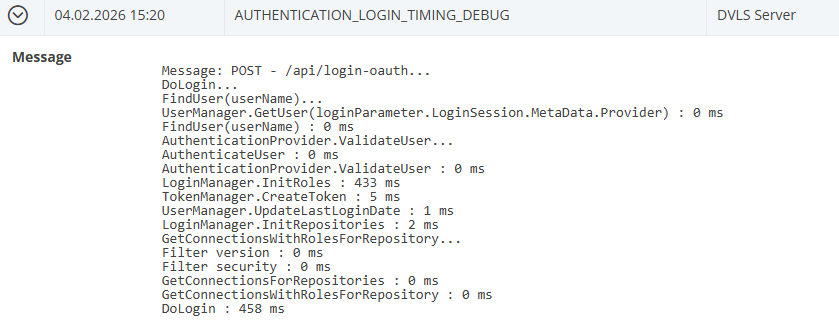
Could we please schedule another appointment to look at it if you don't recognize the problem right away? We would be grateful.
Thank you and kind regards,
Simone
PAM checkout takes a long time and/or returns error
Hello,
we are currently experiencing significant issues with RDM and hope that you can assist us.
When connecting a session with PAM credentials, the checkout dialog with JIT group appears, but shortly thereafter we receive a message that the account is already checked out. Prior to this connection attempt, the user was checked in. And even if it was checked out, the connection could be established directly without the checkout dialog. A few points at a glance:
- Current versions: RDM 2025.3.29.0 / DVLS 2025.3.14.0. The problem has only existed since 2025.3.x, but it is unclear exactly since which version, approx. 8 weeks.
- All users use the same RDM version, some locally, some via RDS.
- The problem occurs with different PAM providers, but not always and not with all users.
- When connecting to a session, the PAM checkout dialog appears immediately, but then it takes a long time to establish the session, up to 17 seconds, even for successful logins without error messages.
- Logins are fast with non-PAM credentials.
- Manual checkout of accounts (in the PAM vault) also takes a long time.
- From time to time, employees lose their user-specific settings, and all stored credentials are then gone, leaving the list empty. This also affects some users more often than others.
Thank you and kind regards,
Simone
PAM account names reset to SAM account name after update
Hi,
Everything works now with RDM 2025.3.25.0 and DVLS 2025.3.10.0.
Thanks and best regards,
Simone
PAM account names reset to SAM account name after update
Hi @Luc Fauvel
Thanks and tell me if I should answer somewhere or someone else.
Yes, the RDP session works before upgrading and the same error appears on many (probably all) RDP sessions after the upgrade. Same vault but different subfolders. No known difference to default sessions, only the tab group is additionally configured but this shouldn't be the problem ;)
Thanks.
Simone
PAM account names reset to SAM account name after update
Hi @Luc Fauvel,
I updated again last night to test. New (dublicated) RDP session entry with a manually checked out pam user directly attached (not in user specific settings), same error. Then tried with "promt for credentials" and with the pam account, same error message. And last I tried with a local account instead of pam, same error. Please tell me if I can test something else.
Cheers,
Simone
PAM account names reset to SAM account name after update
Hi @Luc Fauvel
We have updated to 2025.3.8 and RDM 2025.3.23 (and tried also 3.22). The rename problem is solved, thank you!
However, there is a new problem. RDP sessions can no longer be connected. PAM accounts are stored in the user-specific settings. The PAM check-out wizard is displayed and the check-out works, but the following error is then displayed: Remote access to the server is not enabled.

What could be the cause of this?
Thanks and best regards,
Simone
PAM account names reset to SAM account name after update
Hi @Luc Fauvel,
It hasn't been fixed in version 2025.3.6 yet, right? I haven't tried it since 2025.3.5.
Thanks.
PAM account names reset to SAM account name after update
Hi Luc,
I tried again and this is the recap:
With DVLS 2025.3.5.0 and RDM 2025.3.20.0 the issue with disappeared PAM vaults is solved, the PAM vaults are displayed in the vaults menu now.
The PAM license is ok and valid
The usernames in the PAM vaults are okay until the first sync after the update. Once synchronization was running (configuration scan), the accounts in PAM were reset to the sam account name.
In the latest version, at least the associated domain names are now displayed in the dashboard. That's why I renamed some users manually back to our usernames. But after the next sync, they were reset back to sam account name.
It seems as if every scan overwrites the PAM usernames and resets them to sam account. So manual renaming is not an option either.
I hope this information helps to identify and resolve the problem. Thanks @Luc Fauvel
Happy weekend and best regards,
Simone
PAM account names reset to SAM account name after update
Interesting, others seem to have the same or a similar problem. Thanks freddy1 for your comment.
@Luc Fauvel: I could run the update again over the weekend and provide any useful logs or screenshots if you like. If that would help, just let me know exactly what you need.
PAM account names reset to SAM account name after update
Thank you Luc, for your answer.
In this case, the PAM vaults were indeed not displayed; we had checked this menu. Only the regular vaults were in this list.
We had updated to 2025.3.3 a week earlier, where we had the same issues with renamed PAM accounts and disappeard PAM vaults, then went back and updated to 2025.3.4 last Sunday. Because the same two issues persisted, we reverted back to the old version (2025.2.14), each time using Hyper-V checkpoint. I just saw there is a new server version available again. I'll try again and let you know how it goes.
Best regards, Simone
PAM account names reset to SAM account name after update
Hi,
We have two issues after the updates from RDM 2025.2.30.0 to 2025.3.20.0 and DVLS 2025.2.14.0 to 2025.3.4.0.
- Our PAM vaults disappeared from RDM (client installation). I found this comment in your blog post: "PAM vaults now appear alongside standard vaults in a single selector, eliminating the need to switch between views." Can you please provide a screenshot where to find the PAM vaults, we couldn't find it anymore ;-) Thanks.
- With the new DVLS version but the old RDM version we are still able to see the PAM vaults but after the first PAM synchronization (from scan configurations) all the account display names in the PAM vaults are set to the SAM account names. We have renamed the accounts so that we can see at a glance which customer or domain the user belongs to. With the new Devolutions server version, the display names have been reset to the SAM account names, and even in the dashboard, the associated domains are no longer visible. This makes it impossible to identify which account it is.
Thank you for your help and kind regards,
Simone
Check in PAM Accounts when RDM is closed
Hello Hubert,
Exactly, that's how it was meant.
Thank you!
Kind regards,
Simone
Check in PAM Accounts when RDM is closed
Hi,
There is already an option to automatically check-in PAM accounts when a RDP session is closed, which is great. It would also be helpful if this option were available when the application (RDM) is closed. This would allow the accounts to remain checked out during work, but in the evening when RDM is closed, all PAM accounts would also be checked back in automatically or after confirmation. The best would be if this could be configured separately for each PAM vault.
Thanks and kind regards,
Simone
Export to KeePass
Hi,
We try to export a folder with credentials from RDM to a KeePass file as an emergency offline copy. The csv format from RDM does not include credentials and the other formats are not supported from KeePass (or only from other sources like Bitwarden etc.). How can we export the credentials to KeePass or KeePassXC?
Thank you and kind regards,
Simone