PAM checkout takes a long time and/or returns error

Hello,
we are currently experiencing significant issues with RDM and hope that you can assist us.
When connecting a session with PAM credentials, the checkout dialog with JIT group appears, but shortly thereafter we receive a message that the account is already checked out. Prior to this connection attempt, the user was checked in. And even if it was checked out, the connection could be established directly without the checkout dialog. A few points at a glance:
- Current versions: RDM 2025.3.29.0 / DVLS 2025.3.14.0. The problem has only existed since 2025.3.x, but it is unclear exactly since which version, approx. 8 weeks.
- All users use the same RDM version, some locally, some via RDS.
- The problem occurs with different PAM providers, but not always and not with all users.
- When connecting to a session, the PAM checkout dialog appears immediately, but then it takes a long time to establish the session, up to 17 seconds, even for successful logins without error messages.
- Logins are fast with non-PAM credentials.
- Manual checkout of accounts (in the PAM vault) also takes a long time.
- From time to time, employees lose their user-specific settings, and all stored credentials are then gone, leaving the list empty. This also affects some users more often than others.
Thank you and kind regards,
Simone
All Comments (7)
Hello,
Thank you for reaching out!
My name is William and I'm here to assist you in any way I can.
Would it be possible to confirm if you have a replication latency configured in your PAM Provider with JiT Elevation?
This might be the cause of the delay when opening a session using a PAM account.
As for the accounts that are showing as already checked out, can you confirm if they are actually marked as checked out in the web interface of your Devolutions Server?
Note that only one person can check out an account at a time.
Best regards,
5060a9ef-7b66-43b5-b0b3-16e90a8163ac.png
Hi William,
thank you for your answer.
There is no latency configured in the providers.
All the employees have their own PAM vaults with personal PAM accounts. We don't use shared PAM accounts so every check out is initiated by only one person. The PAM accounts are marked and shown as checked in before and checked out after. This is the log file entry on these events.
I believe that a delay in the provider connections plays a role. When testing the connection to the providers or performing a heartbeat test on the PAM accounts, it sometimes takes a long time (but is successful), and when another heartbeat check is performed immediately afterwards, it is fast. If a heartbeat test is performed on the PAM account immediately before check-out, the check-out problem does not occur. Therefore, we reduced the heartbeat on the providers to 15 minutes for testing purposes, but this did not help.
There are also more of these messages in the data source log, but it is not clear whether this is related to the problem.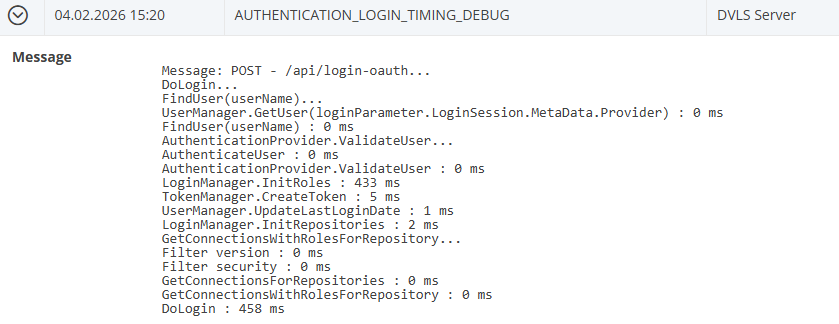
Could we please schedule another appointment to look at it if you don't recognize the problem right away? We would be grateful.
Thank you and kind regards,
Simone
382c11c9-f459-42ad-87db-5cf49250f9d4.png
133b193f-2254-4038-9874-b7363555df6d.png
Hello,
Thank you for the confirmation. It looks like the PAM provider is having issues contacting the DC to perform the JIT Elevation. Would it be possible to confirm if you have a DC configured in the Provider configuration? If you do, could you confirm whether the Devolutions Server can properly contact this DC without any lag or delay? You can test this through PowerShell on the Devolutions Server host directly.
If you have multiple DCs in your environment, adding a replication delay on the provider can also prevent any issues when opening a session. The replication delay ensures that the JIT elevation is properly replicated across all DCs before any connection is established.
Best regards,
Hi William,
We tried both options: using only the domain in the provider so that the domain controller is selected automatically, and using a fixed DC. Unfortunately, it makes no difference.
From the password server, all DCs can be contacted via PowerShell Test on port 636 without delay and in less than a second. The delay only seems to exist via RDM. And only with PAM accounts.
Unfortunately, a JIT replication delay does not improve the situation either; the whole process just takes longer. So you have the faulty delay plus the JIT delay.
Thanks,
Simone
Hello Simone,
Thank you for the additional details.
Since we are unable to reproduce the behaviour internally, the next step is to analyze the server-side execution flow during the PAM checkout process. For this, we will need the detailed Devolutions Server logs.
Could you please enable Log4Net logging on your Devolutions Server by following this guide:
https://docs.devolutions.net/server/kb/how-to-articles/enable-server-log4net-log/
Once enabled, please collect the DPS_Main.log files covering two distinct scenarios:
- A PAM checkout that takes a long time and/or returns the “credential is already checked out” error
- A PAM checkout that completes quickly and successfully
For each test, please note the exact date and time (including timezone) when the checkout was performed. This is important, as the log files can be quite large and the timestamps will allow us to identify the relevant sections quickly.
Once collected, please send the log files by email to service@devolutions.net and use the following subject line: FO-52052
Thank you for your cooperation. With these logs, we’ll be able to compare execution paths between the slow and fast checkouts and proceed with a deeper investigation.
Best regards,
Hello William,
the "already checked out" and the delay problem with PAM has been solved. Various adjustments, none of which really helped on their own, solved the problem when combined. Thank you for your support.
The problem with lost user-specific settings still exists. This is not related to the PAM problem. Should I create a separate post for this in the RDM forum?
Thank you and best regards,
Simone
Hello,
Thank you for the feedback.
Instead of opening a new thread on the forum, I took the liberty to open you a support case with us because we will need to retrieve some logs.
I will mark this thread as resolved and contact you by email in our support case.
Best regards,