
s31teg
RDP Multi monitor
The entry shows the following which is for the old app
open -a "/Applications/Windows App.app" "rdm://open?DataSource=13547a84-be7a-4d4a-a91a-804660936437&Session=c1779ece-b335-4fe2-84c0-628b1ff42196"
The location/name of the correct app is:
'/Applications/Windows App.app'
See attached screenshots plus I did try options in program tab with no luck
RDP Multi monitor
ty
RDP Multi monitor
Thanks. I did try external also but still opened in embedded
RDP Multi monitor
Ahh so on windows it open the native RDP client which is missing on mac.
It is now called windows-app. Tested and multimonitor support works :)
https://apps.apple.com/us/app/windows-app/id1295203466?mt=12
Any chance the functionally from windows can be passed to mac via the windows-app?
RDP Multi monitor
Hey Guys,
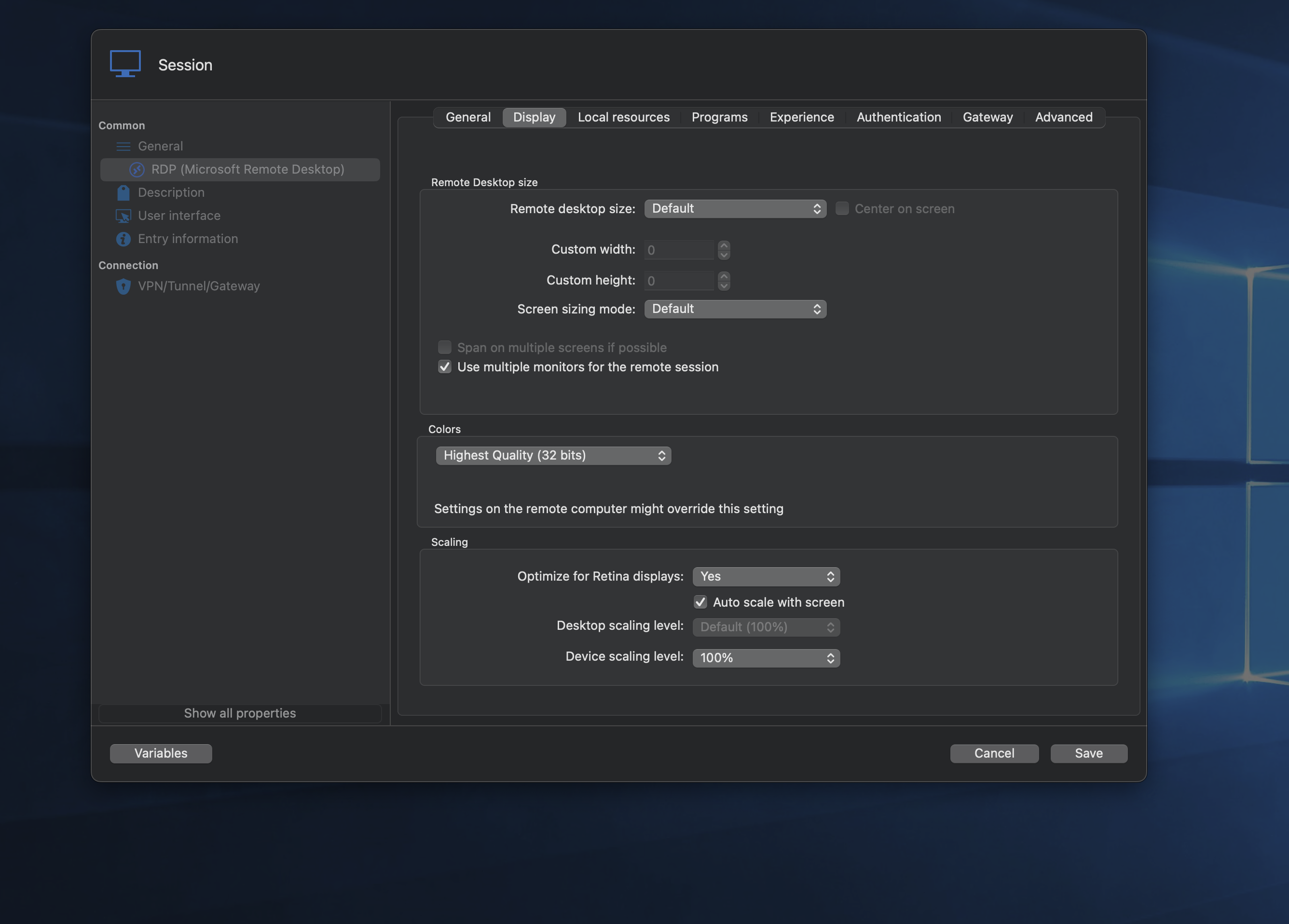
I can't seem to get multi monitor working on RDP
The guide here says to enable span on multiple monitors but this is not an option for me https://docs.devolutions.net/rdm/kb/how-to-articles/display-rdp-multiple-monitors/
I've tried a few options but nothing seems to work.
Any ideas?
TIA :
Send windows key on VNC & fileshare
Thanks for this:

Would it be possible to add the start/windows key like the ultra vnc native windows option?

Send windows key on VNC & fileshare
I see it on the downloads page but not in updated within RDM.
This is from my other machine that has an older version and shows a missmatch


Send windows key on VNC & fileshare
Thanks. I don't see the update available within RDM yet but will check tomorrow
Do you want to restore the last opened sessions
Yes this is what I was looking for :)
Use TouchID or App Password to unlock
TY
Use TouchID or App Password to unlock
Hello
Would it be possible to use TouchID or App Password to unlock?
It's common for me to use laptop in clampshell mode and like to use TouchID for connivence but TouchID not available when in clampshell mode.
TIA
S
TouchID to unlock
Ahh nevermind. You can have this with, these options

TouchID to unlock
Is it possible to have TouchID only to unlock the app instead of Pass+TouchID?
TIA
S
Do you want to restore the last opened sessions
I'm sure on Windows, there is an option to prevent the 'Do you want to restore the last opened sessions' window from opening on start.
Could you look to implement it on Mac?
TIA as always :)
S
Google Drive as data source asks for FULL access to ALL user's files on Drive
As far as I know, only access to the whole drive is possible as a limitation from Google. the only workaround I know is to have a business account then then a specific user access to a certain folder...
Send windows key on VNC & fileshare
Yes, I always use Ultra as the server, so the file transfer would work in my example.
Sending the Windows key and having it a little toolbar would be awesome instead of having to go into the tab in the ribbon. Like the native ultravnc works on windows
TIA
Website Auto Refresh
Thanks for this. Working as expected:)
Send windows key on VNC & fileshare
UltraVNC was the best option when using Windows as this gave the most options, but this is not supported on Mac
Is there another way to send the Windows key and use the file transfer function?
It's possible to send Ctrl-Escape atm from the actions bar, but sending the Windows key specifically would be beneficial.
Ty
S
Website Auto Refresh
Hey, thanks. It seems the script is needed more on Windows, and on Mac, it's not required as much with the above info you shared.
Is it possible to implement the auto-refresh?
.png)
Website Auto Refresh
Hey Michel
Thanks for this. I can see it but it seems not to work as expected. Can you confirm for me
An example code would be that works on windows.
$(document).ready(function() {
   // Place your existing code here

   // Simulate clicking the password field and submitting the form after a delay
   setTimeout(function() {
       submitClicked();
   }, 250); // Adjust the delay as needed
});

function submitClicked() {
    // Find the password field by its ID or other selector
    var passwordField = document.getElementById('passwd');

    // Check if the password field exists
    if (passwordField) {
        // Simulate clicking the password field to give it focus
        passwordField.click();

        // Find the submit button by its ID or other selector
        var submitButton = document.querySelector("input[type='submit']");

        // Check if the submit button exists
        if (submitButton) {
            // Simulate clicking the submit button
            submitButton.click();
        } else {
            console.error("Submit button not found");
        }
    } else {
        console.error("Password field not found");
    }
}Communication breakdowns when moving networks
Hey Maxim
Quite easy to repeat. I just tested this and will show the error
Have an active connection to VNC. Turn off wifi. Press refresh next to devolution hub at top left
S
Communication breakdowns when moving networks
Hello
I get the attached error when moving networks generally. Only way to recover is to close RDM and reopen.
I'm using a devloutions hub for my datasource
S
Website Auto Refresh
ty :)
Mac: Copy multiple files to and from remote desktop on Windows Server
If it helps what I do is map a local mac folder to a drive in windows via local resources-hardrives-specific folder then you can pass multiple files back and forth
Website Auto Refresh
Also is login - script possible one mac also?