
gielenstijn
Issue with credentials promp on connection
Hello @Alexis Beauparlant ,
Your folder now shows Linked (user vault) with Prompt on connection, and this mode does not offer the option to limit the prompt to one folder.
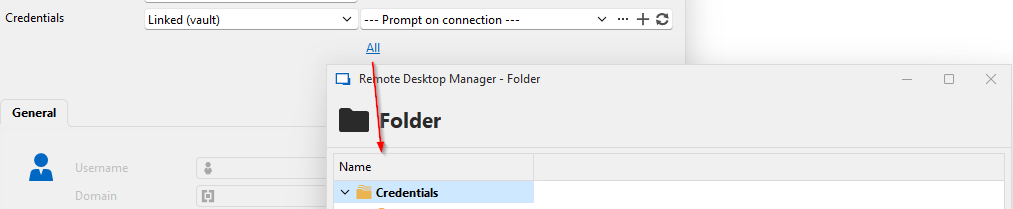
Yes it does, this is a screenshot that I had from an older version.
Below "prompt on connection" there is a button "All" where you can select the folder where the credentials are stored.
This is what is missing now, and probably generating the error because it's still in the stored configuration.
Issue with credentials promp on connection
@Alexis Beauparlant : hello,
I'm using 2026.3.13.0.
Workspace is: Devolutions Hub Personal.
RDM window goees to background when a RDP error occurs
2026.3.13 here. Same issue as before. After logging out of a RDP-Session, the last active App gets in focus again (for example chrome).
If Chrome was directly in the background of RDM, it covers RDM completely.
Very annoying and frustrating that this issue is still not fixed.
Using RDP-Engine "Aktuell" (I think "Current" in English).
This issue does not occur when using FreeRDP as the engine but has other issues as well.
Remote Desktop Manager 2026.3.13.0 64-bit (PreJIT)
Laufzeit: .NET 10.0.12
Plattform: Microsoft Windows 10.0.26200
Workspace: Azure SQL
cc @xelso
@Hubert Mireault : I also just updated and not fixed for me either. My rdp version is set to "Latest".
Issue with credentials promp on connection
I have configured credentials with "promp on connection" on the folder, the RDP has inherited.
What I noticed now is on starting the connection it is missing an underscore from the username.
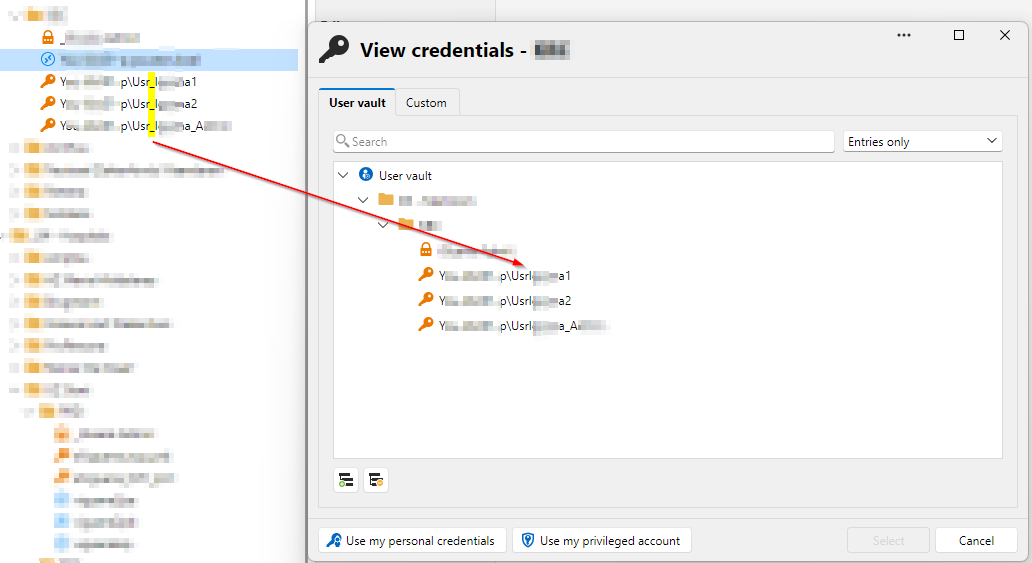
So I went to check the settings on the folder, but I get this error:
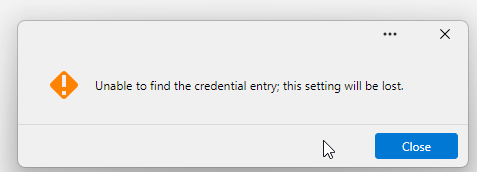
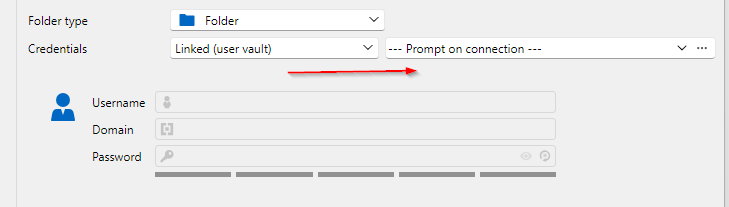
After I click close, the settings open. But here it does not show anymore select a folder.
In this post there is a screenshot where it shows how it used to be.
Compact Layout
Hello,
Thanks for reporting this. I can see our UI migration definitely played with some margins and sizing. We'll open a ticket and see if we can bring it back a bit more like it was before. We will keep you updated on any progress.
As a side note, if having more space is a big concern of yours, you could try our new "toolbar" mode. You should be able to change to it by clicking on your user icon in the top right of RDM.
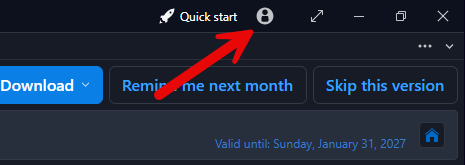
This will make the menu even smaller than before with every option still accessible in the first "hamburger/ collapsible menu" button. You can even right click -> customize it to make any action you want accessible in the title bar for quick access like the other icons you already see available there.
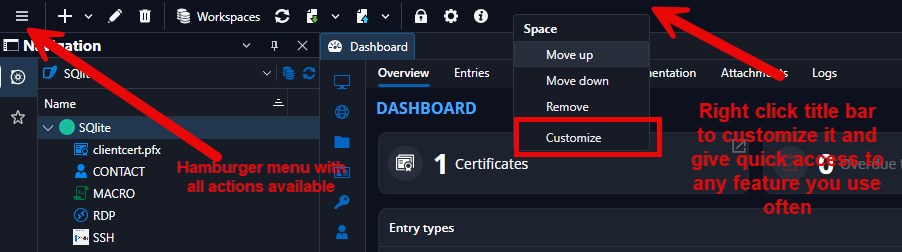
Best Regards,
@Michael Beaudin
Hello, thanks for this suggestion.
I'll have a look and test this.
But keep the ticket, because I noticed that the context menu's etc also have the same increase of padding, which seems "to much" for me.
Compact Layout
I did an update to the newest version. But I noticed now that the UI, everything is a lot bigger.
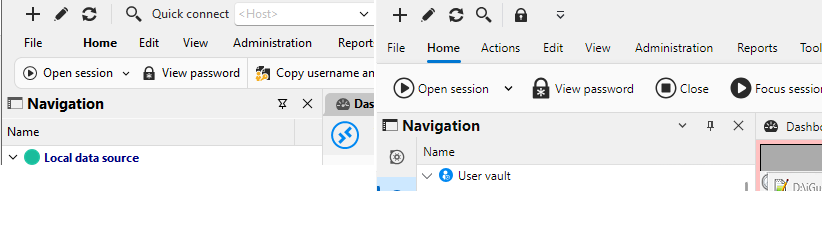
Below is a screenshot of the previous version.
With this increase, I have less pixels available in my remote session.
Is it possible to revert this? Or to have a setting "compact ui"?
I already use the simplified ribbon to have it as small as possible. But this version increased the height a lot.
Application crash when changing credentials for RDP to inherited
I tried to change my RDP connection credentials to "inherited".
But after that the full application crashes.
On the folder I have set "Linked (vault)" "Prompt on connection".
And then selected a folder with credentials. This is the same folder.


Event Viewer has:
Faulting application name: RemoteDesktopManager.exe, version: 2025.2.30.0, time stamp: 0x68a40000
Faulting module name: unknown, version: 0.0.0.0, time stamp: 0x00000000
Exception code: 0xc00000fd
Fault offset: 0x00007fff807d6d44
Faulting process id: 0x3C38
Faulting application start time: 0x1DC336D1D5D3349
Faulting application path: C:\Program Files\Devolutions\Remote Desktop Manager\RemoteDesktopManager.exe
Faulting module path: unknown
Report Id: abad461c-5abb-421e-852b-893169f2a0d2
Faulting package full name:
Faulting package-relative application ID:
I'm on the newest version, 2025.2.30.0
Configure entry Type action for credential
I have set the action to "Copy password" for "Credential entry action" in:
Settings > Entry types > Actions.
But I'm using both "Secret" and "Username and password" type.
Is it possible to configure so for a "Secret" it copies the secret. And for "Username and password" it copies both. Similar as the "Copy username and password" from the ribbon.
RDM GUI fuzzy on windows scaling 150%
I'm using Windows 11 and I have 2 monitors.
My primary monitor is on 100% scaling. The secondary (laptop) is on 150%.
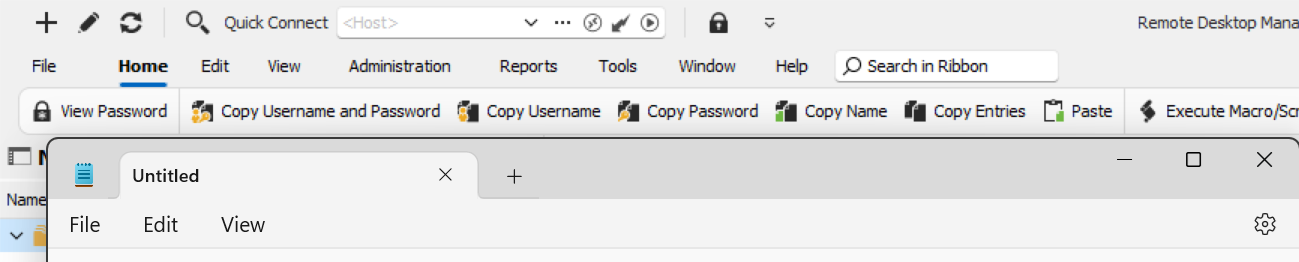
On my main monitor the GUI of RDM is correct, but as soon as I move the RDM window to my other screen it gets "fuzzy".
I also tested by directly opening it on my secondary monitor, but then its still fuzzy. Like its zoomed instead of scaled.
On my secondary monitor, other applications like notepad are correctly shown.
See the attached screenshot of RDM and notepad on my secondary monitor.
This is about the GUI of RDM itself.
The connected session shows the same, but might be related to each other.
Open Session / Select Credential Entry
Hello,
I was trying to do this in the latest version. But I'm unable to find the screen where you could select the folder where the credentials are.
I can only select 1 specific credential, or prompt on connect where I can search over all credentials.