
freddy1
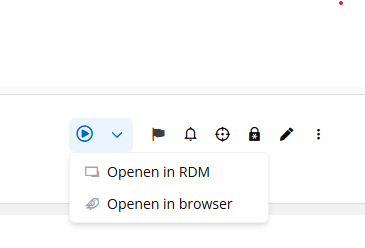
DVLS Web - http-jump in browser
At the moment, we can initiate RDP sessions to servers directly from the DVLS website through the DVLS Gateway using PAM. Wonderful!
Would it also be possible to access HTML websites through a web browser via the DVLS Gateway using PAM?
Data limit for (website) entries through the Devolutions Gateway
we have the same problem that uploads are very slow. Is there a update of this problem?
Default PAM JIT group assingment
Thanks!
The way it's implemented is exactly the way I meant. We Well test it soon on our environment.

2026.1 Proxy based credential injection
Thanks! It was for me not clear that I had to create a ruleset.
We wil test it.
2026.1 Proxy based credential injection
In the rease notes of version 2026.1 there is a entry of proxy bassed credential injection. But I can't find the place where I can configure it.
Where can I find this option?
Inject credentials securely with RDP proxy-based injection
Devolutions Gateway can now inject RDP credentials from the Gateway rather than sending them to the client, significantly reducing credential exposure by keeping secrets closer to the private network.
It also supports RDP reconnections by retaining the password only as long as needed, and is enabled by default for new Gateways (disabled for existing Gateways to avoid upgrade impact), and controlled via a ruleset toggle with logs indicating when it’s active.
Sync one entry in Devolution Vault to other folder
thanks Alexis,
The vendor and IT-department use the same vault only the vendor has it's own folder and can't see entries in the IT-folder. The linked account can be a the way but we have than set the rights good on the password entry so the can use it. We will test this.
Sync one entry in Devolution Vault to other folder
Hi,
We have a vault with different folders. One folder is only accessibele by our supplier.
Is it possible to sync one password entry in our IT Department folder to the supplier folder? Or make a symbolic link so that we have only one entry.
The reason is that the password is not in sync anymore. The IT department users can also see the entry's in the supplier folder.
IT Department
-- entry server1: username password
Supplier1
-- entry server1: username password
Default PAM JIT group assingment
Hi Luc,
Your proposal is pretty much in line with our needs, but if I understand correctly, the sysadmin can determine the default checkout JIT role during checkout. In my experience, some administrators then simply select "DomainAdmin" by default so he has always the maximum rights. Because that's convenient. That's why I wanted to set it as DVLS administrator and not the RDM end-user.
Perhaps it's an option to prevent certain JIT groups from being selected as the default checkout group. That is perhaps the best of both worlds.
Default PAM JIT group assingment
Hello Luc,
We've discussed your proposal internally, but we believe it doesn't fully align with our desired workflow.
For your information, each administrator has a personal PAM account (adm-username). This account is member of the AD-group sysadmin_task which provides sufficient rights for daily normal activities.
When a user starts working, they always check out their personal PAM account (adm-freddy). They usually don't need to become a "domain admin," so they can start working without checking anything in the checkout screen. No one needs to grant permission for a PAM checkout either.
Our preference is that when someone checks out from their admin-username account, they automatically become a member of the sysadmin_task group. This group is removed upon checkin. If someone needs "domain admin" rights, they can check this box themselves.
We would therefore like to set a default checkout group at the user level, not at the jump item level.
The main reason is that the admin-freddy account no longer has any rights by default. By linking the sysadmin-task group to JIT at checkout, it temporarily gains the correct rights. We can configurate it right now with JIT but I see that the user than always choise "domain admin" rights because imagine if you ever need this during the day.
We would like to configure this at the user level a default checkout group.
Default PAM JIT group assingment
Hello,
At the moment, we have version 2025.3 installed, and I was hoping there would be an option to set a default checkout JIT group. I can’t seem to find this option.
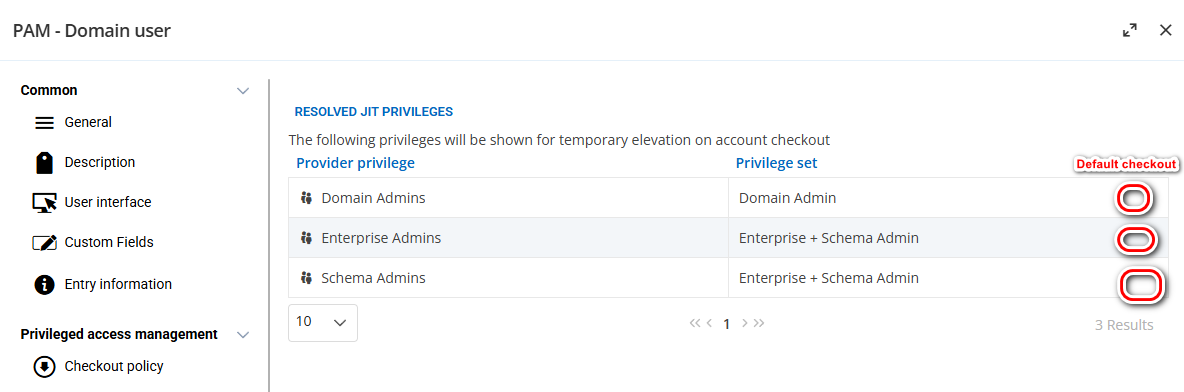
As an example, here’s a screenshot showing how it can be configured at the user level — maybe this could be an idea?
In this example, when “Domain Admins” is selected, the user would always be checked out with these rights by default. If necessary, the user could still select a different group during checkout, such as “Schema Admins.”
RDM stop working when internet / Entra is not availible
Hi Michel,
Thanks for the clear answer!
RDM stop working when internet / Entra is not availible
We use a DLVS and RDM with authentication via Entra ID. When a user start RDM they has to authenticate once a day (9 hours) by Entra. This works fine when everything is normal.
Today we had an internet outage so Entra was inaccessible. The problem is that users can’t use RDM anymore, it looks it depends on internet. We expected RDM to continue working because the user was already authorized when he starts working.
The client's refresh token is set to 9 hours so we expect that after initial authentication the user can work in RDM without authenticate the next 9 hours.
It appears that RDM checks Entra every time you start a jump to a server. If the internet/Entra is unavailable, you cannot jump to an internal host. This is expected because you are already authorized.
PAM account names reset to SAM account name after update
Hello, We did yesterday the update van DVLS 2025.3.5 and RDM to 2025.3.20. The problem was that PAM not work at al. When we wan't to check-out a account it look it doesn't go to the PAM module. It looks that it's not avaible in the RDM client. Because the users can't work we dit a rollback to 2025.2 and had no time to troubleshoot the update. It looks that the PAM module is broken in the last update.
Unable to check in or unlock PAM account
We did yesterday the update van DVLS 2025.3.5 and RDM to 2025.3.20. The problem was that PAM not work at al. When we wan't to check-out a account it look it doesn't go to the PAM module. It looks that it's not avaible in the RDM client. Because the users can't work we dit a rollback to 2025.2 and had no time to troubleshoot the update. It looks that the PAM module is broken in the last update.
Emergency scenario export DVLS vault(s) protected with password
Hello,
Authentication works wel, I can get a list of all vaults or PAM users with this accounts so the connection to DLVS is good with the follow commands:
Get-DSPamAccount -AsBasicInformation
Get-DSVault -all
But when I make a export of the vault with this command:
Set-RDMCurrentRepository -ID xxx
Export-RDMVault -ID xxx -Path "D:\Export\xx.rdx" -IncludeAttachments -IncludeCredentials -IncludeDocumentation -IncludeFavorite -Password $secure
I get the following error:
Export-RDMRepository: Command available with an advanced data source onlyIt looks that the Export-RDMRepository only looks to a local datasource and not the New-DSSession -Credential $Creds -BaseURI $DVLSUrl -AsApplication
Get-RDMDataSource

ID          : 242739bc-6503-4f9f-9fd5-b177dc1fa799
IsConnected : True
IsOffline   : False
Name        : Local data source
Type        : SQLite
Our do I make a mistake?
Emergency scenario export DVLS vault(s) protected with password
Hello,
DVLS with RDM is very important to us; it contains all our jump items and passwords. In the event of an emergency, we use special emergency PCs with an export of our most important data so that we have the necessary patient and system information available.
Currently, we manually create a password-protected export of the vault from RDM and place it on this PC.
Is it also possible to automatically create an export of the vault (password-protected) so we can distribute it to the emergency PCs?
On the emergency PC's we use the portable version of RDM and it's no problem that we import it manualy. This wil part of our procedure.
Password rotation not working in version 2025.2.4.0
Hello,
problem is solved after installing DVLS 2025.2.8.
Best regards,
Freddy
Password rotation not working in version 2025.2.4.0
Hello,
Can you give a update of this problem?
For compliance reasons we need password rotation. This is one of the main reasons we bought the PAM module and when it's working it's great feature.
Best regards,
Freddy
Risk of allow password in $PASSWORD$ variable
We have scripts which need input with username and password. Now is the only way to run the script correct is to use the variable $USERNAME$ and $PASSWORD$
Out of the box the setting "allow password in variable" is disabled of the DVLS privileged account.
What is the risk when we allow password to be saved in a variable?
Update order DVLS and RDM
Hi,
the problem we had was that we can checkout a account in PAM but can't select a extra right such as DomainAdmin.
We have now update the client and the server so the problem is gone.
The next time we first update the server and after that the client
Report filter on JIT and add this to scheduled report in separate colomn.
Hello Fracois,
Can you give a update of this feature request? Is't on the roadmap for perhaps 2025.3?
Best regards,
Freddy
Update order DVLS and RDM
Hi,
when we update RDM the first the datasource in DVLS is going into read-only mode. I understand it to keep the database consistent. Basically this means that you have to update the DVLS right after the client update or visa versa.

Update order DVLS and RDM
We are using DVLS (with PAM), Gateway, and RDM. The RDM client runs in a VDI session. According to the release notes [1], RDM 2025.2.x requires DVLS 2025.2.x, which also includes a database update.
Additionally, the compatibility list [2] shows that DVLS 2025.2 is not compatible with RDM 2025.1 and vice versa.
It’s challenging to update all components at the same time. Is there an upgrade scenario where, for example, we can update RDM first to 2025.2 and update DVLS a day later?
[1] https://devolutions.net/remote-desktop-manager/release-notes/
[2] https://docs.devolutions.net/rdm/kb/knowledge-base/version-schema-compatibility-rdm-server/
Default PAM JIT group assingment
We use JIT (Just-In-Time) access for temporary Domain Admin, Schema Admin, and Enterprise Admin rights. This works well, as these elevated rights are only needed occasionally. It's not an issue for users to manually check the checkbox when these rights are required.
In the future, we plan to add our ServerOperators group to JIT as well, since this group is necessary for the daily work of our system administrators.
Question:
Is it possible to automatically assign a group (right) when a user checks out an account via PAM?
Use case:
User-X does not have any special group memberships by default, only Domain Users.
User-X checks out an account via PAM.
JIT automatically assigns a group (e.g., ServerOperators) without requiring the user to manually select it during checkout—ideally, the group is pre-selected by default.
Rationale:
The idea is that the account should function as a normal user by default. For example, the user works only 2 days abd need elevated permissions (e.g., ServerOperators) two days per week.
During the remaining days, if the account were to be compromised, it would only have standard user rights (Domain Users), thus reducing the attack surface.

Reason that JIT use tempory groups
What is the philosophy for using temporary groups in the JIT configuration?
We monitor our priviliged groups like Domain Admins and now we see only that a tempory group group is added, PAM-<GUIDnR> and not direct the added users. So our monitor reporting doesn't give direct the user who is added to the group.