Unable to check in or unlock PAM account

Hello,
How does one unlock or force a check in of a locked Domain User PAM account in a Hub datasource? I have one account that wont check in using RDM, and in the web UI (while logged in as an administrator) there is no force check in or unlock options displayed. In RDM 2025.3.20 it also displays a red banner saying 'The credential has been locked due to the inability to revoke privileged rights during check-in.'
Please let me know if you would like any additional info.
Thanks
Joe


cd2b4ea5-8803-4ac0-a346-1910b3bbb9e5.png
1afd4bea-31d2-433f-9503-117ae8463ecf.png
7e0ed2c7-2a9f-493e-b5df-5ee18626a12a.png
c2f48b77-9a7d-423f-960f-9ab5046fb47c.png
All Comments (9)
Hello,
Thank you for reaching out to us regarding this,
From RDM, if you go under the "Opened Sessions" section and change the filter to "Entry states" with the option "Show entries from all users," do you see the checked-out entry in this list?
If so, you can try doing a "Right-click" -> "Force check-in".
Let me know,
Best regards,
Samuel Dery
35483ac8-6da6-4664-88c4-cc6faea5f773.png
Hi Samuel,
Managed to unlock it by closing all the RDM connections using the credential, then relaunching one which prompted to do a new checkout. After that I could force check in, and then unlock via web ui.
Regarding the Open Session Entry States approach, I have the PAM entry checked out currently, but its not shown in that list even after multiple refreshes.
Joe
Hi Samuel,
This has happened again, although slightly different behavior.
Multiple types of PAM accounts locked due to failed check in. All can be unlocked via WebUI, but none are listed in RDM Open Session Entry States view.
Coincidently, all the domain user type PAM accounts are now showing a json string instead of actual passwords in both RDM and WebUI, even though their password hasn't changed in either Active Directory or in the PAM entry. Heartbeats are also failing with the message 'Privileged account isn't accessible or doesn't exist. (Unknown Error: Could not authenticate with credentials: LDAP Connection failed to dc.domain.local LDAP result code: 49. If I click the 'test connection' button for the respective PAM provider, it succeeds, so I think the gateway is working ok. The local Hub PAM service also seems to be running fine.
EntraID type PAM credentials are still showing the correct password when viewing (as opposed to a json string).
Not sure what the specific steps are to recreate this behavior, but I recently enabled automatic PAM check-in in RDM which is probably triggering the underlying issue.
Pls let me know if you would like any additional info.
Joe



5bff393d-580a-4f4a-8ff5-4a7615a8292c.png
f7773725-e6e3-4697-85e3-be98e6d5f37c.png
0be59280-703a-4a95-b6f7-dcc989339d4e.png
7369dddf-a2a5-45ea-81c3-19cd4cb8889d.png
We did yesterday the update van DVLS 2025.3.5 and RDM to 2025.3.20. The problem was that PAM not work at al. When we wan't to check-out a account it look it doesn't go to the PAM module. It looks that it's not avaible in the RDM client. Because the users can't work we dit a rollback to 2025.2 and had no time to troubleshoot the update. It looks that the PAM module is broken in the last update.
Hi @jm2,
Like the error message says, this usually happens when the PAM service is unable to revoke the privileged rights on the user. The account becomes locked to prevent any unauthorized elevated access. Are there any errors in the PAM service relating to the revocation of elevated permissions?
Hi @freddy1,
I see you posted in an other thread with a more similar issue, I will reply in that thread.
Best regards,
Luc Fauvel
Hi Luc,
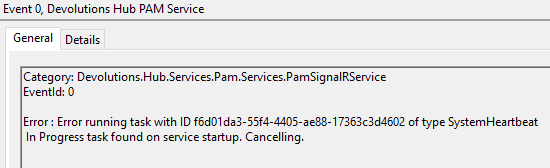
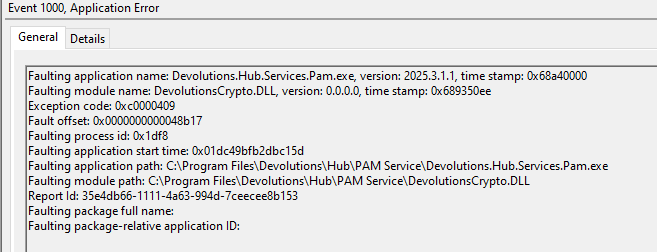
The errors below are showing in the windows event log of the server hosting the PAM service. Would these be causing the password to be being shown as a json string in both WebUI and RDM? Currently I cannot retrieve the password for any of the domain user PAM entries that were recorded.
Pls let me know if you would like more info.
Joe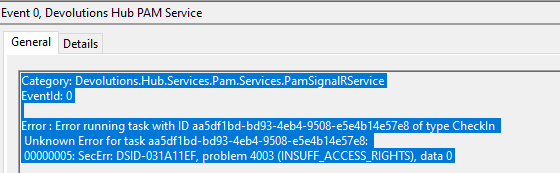
742dcfe3-6a1d-4941-afeb-591ce8166105.png
2b19b482-7996-42e7-b03f-1deb2382d450.png
5801512a-ff77-4e38-b65b-8c56a5d86cc2.png
Hi Joe,
Apologies for the delay. So it seems the AD user you are using as a provider doesn't have the proper privileges to revoke the permissions.
As for the JSON appearing instead of the password, this happens when the password cannot be decrypted either because the client doesn't have the necessary key or there is a mismatch between the key and the entry. In this case it's most likely the former as the entry is locked due to the unrevoked privileges.
Let us know if you need help to set the proper permissions.
Cheers,
Luc Fauvel
Hi Luc,
Is there documentation on the permission requirement for the AD account? If so I can probably follow that and hopefully resolve the issue.
Regarding the key mismatch, how do I fix that as the password cannot be decrypted in either RDM or WebUI on multiple computers?
Thanks
Joe
Yes you can use the same privileges as the AD provider for Devolutions Server found here: https://docs.devolutions.net/pam/kb/how-to-articles/least-permission-jit-group-elevation/
To fix the corrupted passwords, since these are PAM accounts you can manually rotate the password and it should fix the issue.
Let us know if that doesn’t work.
Cheers,
Luc Fauvel