
jamesvoll
Expiring credential Notification
I upgraded the server previously mentioned to 2025.2.30 and the notifications now appear to be working as expected.
Thus I have 2 examples of 2025.2.30 addressing the issue, and one example where it did not . . . not entirely conclusive in either direction.
Unfortunately, almost none of my user base for RDM have installation rights on their own devices, so it will take some time to get an updated version packaged and deployed internally.
Expiring credential Notification
I updated to 2025.2.30 and my notifications appear fine now. I actually get the red bubble notification for Shared and User Vault entries, regardless of which vault I am in, i don't remember this being true before; would need to go into User Vault to get notifications for credentials in that vault.
My Colleague rebooted their computer and the previously mentioned behavior persists (picture attached showing frames from a video of the 'flash')
I also installed 2025.2.22 on a new server, and the notifications are working fine for the Shared Vault, getting notifications for expiring credential in the shared vault, regardless of whether i am currently in the shared Vault or the User Vault. NOT getting notification on expiring credentials in the User Vault.
I have asked a few other colleagues to investigate and let me know the behavior they are observing (they all have 2025.2.22).
Expiring credential Notification
Shared Vault
Expired - yes, red bubble in bottom right task bar on the action center icon
Expiring Soon - yes, red bubble in bottom right task bar on the action center icon
User Vault
Expired - no red bubble
Expiring Soon - no red bubble
the Action Center is empty when opening it into the popup window
When highlighting the "User Vault" in the navigation pane and opening the Dashboard tab, Expired and Expiring entries are correctly shown
A colleague upgrade to 2025.2.30 and reported "notification issue is still there, but it VERY VERY briefly flashes like its trying to notify"
Expiring credential Notification
Hello,
Thank you for reaching out to us regarding this,
Could you please specify the version of RDM you are currently using?
What type of data source are you using?
Additionally, if you go under "File" -> "Settings" -> "User Interface" -> "Taskbar/Tray Icon" is the "Show Notification badge in taskbar" option enabled?
Let me know,
Best regards,
@Samuel Dery
V2025.2.22.0 64b
SQL Server Source
yes the Show Notification Badge option is (has been) enabled.
Expiring credential Notification
Recently moved from 2024.3 to Version 2025.2.22.0
Feels like I've lost the ability to have a red bubble notification in the bottom right tray when on the user Vault for expiring credentials. The setting for this in the Action Center appears to only affect the list of expiring credentials in the Dashboard of the User Vault.
Was this item removed? Is there a bug? am I just missing it and can't find the setting?
How to configure a connection to Azure Virtual Desktop
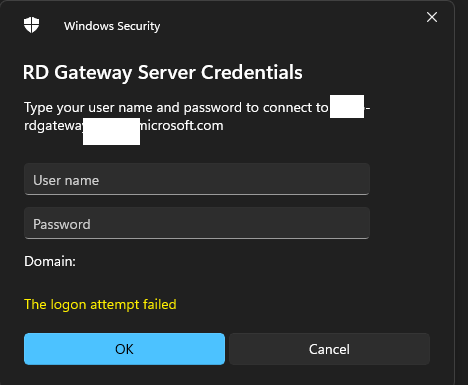
yes I have tried with that checkbox checked AND unchecked. It get prompted by an *rdgateway*microsoft.com.
I am not overly concerned with the lack of credential injection, prompting for credentials is fine. However the obvious desire is to have any assets we remotely connect to be represented within the RDM structure. As it is, this asset cannot be organized there, so it becomes an outlier to the overall organization and upkeep of our assets.
How to configure a connection to Azure Virtual Desktop
I did reimport the RDP file. Display is set to External, RDP Version is set to MSRDC. No credentials configured for gateway. No credentials configured in general section. I have tried with AzureAD checked and unchecked. I am unable to get past the credential prompt for the RD Gateway Server
How to configure a connection to Azure Virtual Desktop
So 2024.2.19 version is out now and we did get the datbaase updated, so I am on that latest version now. Did those changes make it into one of the last 2 releases?
It is unclear to me whether you are saying i just need to RE-export the rdp file from MS RDC and import it back to devolutions? or whether you have specific properties that needed manually changed in the file prior to import.
Combine multiple data sources
no, i'm curious of the method for combining two different instances of RDM that use separate SQL servers. Our license is split and each user is assigned to a license using only one of the SQL servers.
Adding all the vaults from one to another (including any credentials in those vaults) appears simple enough . . . export/import the rdm file
What I don't see how to handle is getting user vaults migrated over. At the moment it would appear that each user would need to take their own export of their personal vault with their credentials, and then import it back again once they are connected to the other instance
Add Ctrl+Alt+End to Special Commands
I did try with a macro and could not get it to work . . . however i'm rather new and ignorant to macros so theres a possiblity i set it up wrong or with wrong settings. The macro itself was merely {CTRL-ALT-END}.
And the need is similar to what others have said, we do end up having a not-insignificant number of nested RDP sessions, and currently it appears the only way to get to the typical crtl+alt+del screen is to bring up the onscreen keyboard on the nest RDP machine . . . so rather cumbersome.
Combine multiple data sources
Can I resurface this topic, as it is rather old. The doucmentation link is no longer valid. I also don't see a mention of about the private vault and credentials. How would we combine SQL data sources and maintain each users credential entries?
Add Ctrl+Alt+End to Special Commands
just to be clear
not possible to send crtl+alt+del to the nested RDP? which i would not expect to be possible
or
not possible to send crtl+alt+end to the primary RDP? which seems like it should be doable.
Add Ctrl+Alt+End to Special Commands
Was this never resolved, the ability to send ctrl+alt+end to the RDP session?
I have tried typing macros to no avail
How to configure a connection to Azure Virtual Desktop
I initially had MSRDC installed a year or two ago, and I THINK that was using the msi, as that is what the instructions state that were given with the AVD. When I upgraded to the latest version (per my previous comment) that was using the msi. Microsoft App Store is blocked within our network.
How to configure a connection to Azure Virtual Desktop
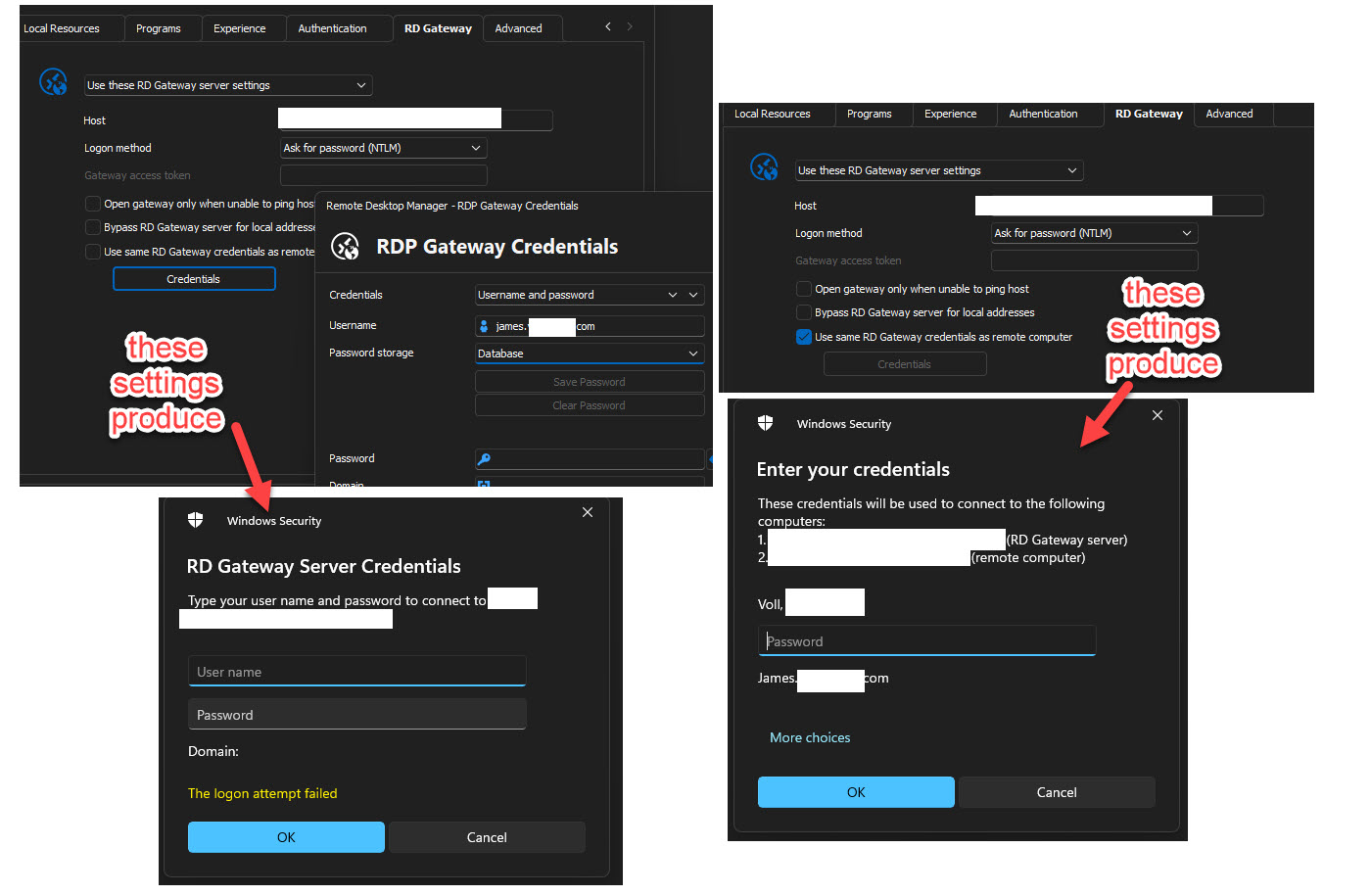
I have referenced https://forum.devolutions.net/topics/34709/azure-wvd-client again (assuming you meant Marc-Andrea Moreau's post and series of pictures). I do not get the Microsoft/Azure style popup he shows in picture 4. I am only getting the Windows Sercurity popup that I assume is devolutions credential pop up. I have tried all sorts of combination of credential options on the Gateway tab, as he suggests in Picture 5 and 6, none successsful.
Yes I have MSRDC installed (as I am able to successfully connect using it), Version 1.2.5454.0 (x64).
i think i may be a bit ignorant on what 'domain joined' really means. My laptop is on our business domain and I am using AD credentials to login into the machine. I use identical credentials with Microsoft SSO when access the AVF using MSRDC. Microsoft SSO wants email, most other prompts within the domain wnat AD account, but they are all the same password. I think that means the answer is yes . . .?maybe?
I have sent and rdp file both from msrdc and from devolutions (keeping in mind that I have been tinkering relentlessly on the devolution RDP settings, so they may deviate a bit from some of the suggestions in this thread and others.
How to configure a connection to Azure Virtual Desktop
Can we revisit Jane's issue. I am stuck at the same place.
i've imported the the rdp file from the rdclientwpf folder, Display is set to External, RDP version is set to MSRDC, my rdm version is
2021.1.12.02024.1.12I continue to get 'logon attempt failed' on the windows sercurity credential prompt.
When I ustilize the Microsoft Remote Desktop application the credential prompt is with my email and my microsoft/AD password. When I try to launch from RDM, the prompt wants a username, domain, password
You're on a really old version. Update to the latest first and then test again. No point reporting bugs in an old version from years ago, when they probably already got fixed in the latest. One of the issues I had with AVD login was because I was on an older version.
my apologies . . . slip of the finger . . . RDM version 2024.1.12
(yes, bug reporting on that old of a version is dumb ;) )
How to configure a connection to Azure Virtual Desktop
Can we revisit Jane's issue. I am stuck at the same place.
i've imported the the rdp file from the rdclientwpf folder, Display is set to External, RDP version is set to MSRDC, my rdm version is 2021.1.12.0
I continue to get 'logon attempt failed' on the windows sercurity credential prompt.
When I ustilize the Microsoft Remote Desktop application the credential prompt is with my email and my microsoft/AD password. When I try to launch from RDM, the prompt wants a username, domain, password