Azure WVD client
0 vote

Hi,
It will be cool if we can add sessions entry with WVD client (Azure Windows Virtual Desktop)
Is it on the roadmap to support the WVD client in RDM ?
Thanks for the feedback
All Comments (36)
Unfortunately it's not on our roadmap. We have no idea how we could do that for now.
Regards
David Hervieux
Has this changed? Is there really no plan to add workspace style managed resources to RDM?
Hello,
It still an undocumented feature from Microsoft but are making progress. I can promise you anything but it's one of ou R&D project.
Regards
David Hervieux
Hello,
Any progress here will be great to hear. We are now having multiple WVD's to be accessed and have to use other tool and love to see Devolutions RDM to have the feature.
thanks
Same here. Kind of surprised it wasn't already in there. Hope you are making progress with Microsoft!
Unfortunately we haven't made any progress. There is not documentation available.
Regards
David Hervieux
Hi,
I've inquired about possible AVD integration with RDM with someone who works at Microsoft, and while there would still be a lot of research work on our side (starting with setting up a test environment!) this is something I could investigate soon.
Simply put, it's all undocumented, so we'd have to figure it out ourselves. One thing I was told, however, is that the .RDP files fetched by msrdcw.exe (the simple UI that connects to the AVD webfeed) should remain the same over a long period of time, and msrdc.exe should do its own connection to Azure with a separate prompt.
This means it should be possible in theory to copy the .RDP files and use connection entries either linked to the file on disk, or imported from the .RDP file, and launch them with MSRDC.
We now support MSRDC in RDM, so we are getting closer to a possible integration: https://blog.devolutions.net/2022/03/msrdc-is-now-supported-in-remote-desktop-manager/
I don't know where the .RDP files are stored locally by msrdcw.exe yet but that would be a first step. Try using the .RDP file link option in RDM, this should work, and then try importing the .RDP files. We would likely need to add support for a few MSRDC-specific options to make it work properly for import/export from an RDP file.
Last but not least, connecting to the webfeed and fetching the .RDP files within RDM would require us to decompile the original app and figure out the calls it makes to Azure. It's possible, but there's an unknown effort associated with it, so if what I described above would fit your needs, I say we start with that.
Best regards,
Marc-André Moreau
We'd love this too, but gut feel is Microsoft aren't going to release any documentation on this
Hi,
We are well aware of the demand for Azure Virtual Desktop support, and have been working hard on a solution, despite the lack of documentation or exposed interface from Microsoft. We've at least made some significant progress last week, with a first AVD connection launched from RDM with MSRDC in external mode. There's still a lot of work to be done, but simply put, it means we've at least got the .RDP file import/export for all the newer AVD options working, and managed to force MSRDC to accept a locally-modified .RDP file for AVD through API hooking: https://twitter.com/awakecoding/status/1553099268805869568
AVD RDP files are signed and published by a web feed, and contain all the .RDP client options. As you have probably noticed, the MSRDC UI provides very little client-side settings: that's because they cannot be controlled client-side. MSRDC rejects .RDP files for AVD connections that aren't signed, and since the original AVD RDP files are fully signed, nothing in them can be modified. Since RDM creates a temporary .RDP file locally to launch connections, I had to find a way to work around that. This slowed us down by a week of additional research, but at least we've got over it through API hooking.
We still have to expose all the newer AVD RDP options in our UI, fix credential injection for AVD connections, prepare the RDP API hooking module to be enabled by default, etc. The current focus is to at least get AVD connections working with MSRDC in external mode with credential injection for the target RDP server for the next major release, 2022.3. Injecting or managing the first login to Azure will be a project in itself, so you'll still need to select which account to use from the embedded web login that MSRDC shows on startup. As for supporting AVD connections in embedded mode, I'll try and emulate what MSRDC does internally, but I wouldn't be surprised to hit blockers there as well.
Best regards,
Marc-André Moreau
Hi,
Here is an update on our progress with Azure Virtual Desktop in Remote Desktop Manager:
https://blog.devolutions.net/2022/08/extending-the-microsoft-rdp-client-with-api-hooking/
Best regards,
Marc-André Moreau
Hi Guys,
Really appreciate your work on this! Would it be possible for us to get an update on the teams latest progress?
Kind Regards,
Jake
Hey Folks,
I, too, would love to hear about any progress on this!
Cheers...
Cary
Also keen on an update here
Hi,
We definitely need to make proper documentation for AVD support in RDM, but in the meantime, here's a summary of the current level of support.
The very first thing you need is to use MSRDC to connect to the AVD webfeed using your Azure AD account. This part is not handled by RDM, and it is required to grab a copy of the AVD .RDP file with all the right parameters (do not try and configure it from scratch, there are too many internal options you can't just figure out by other means):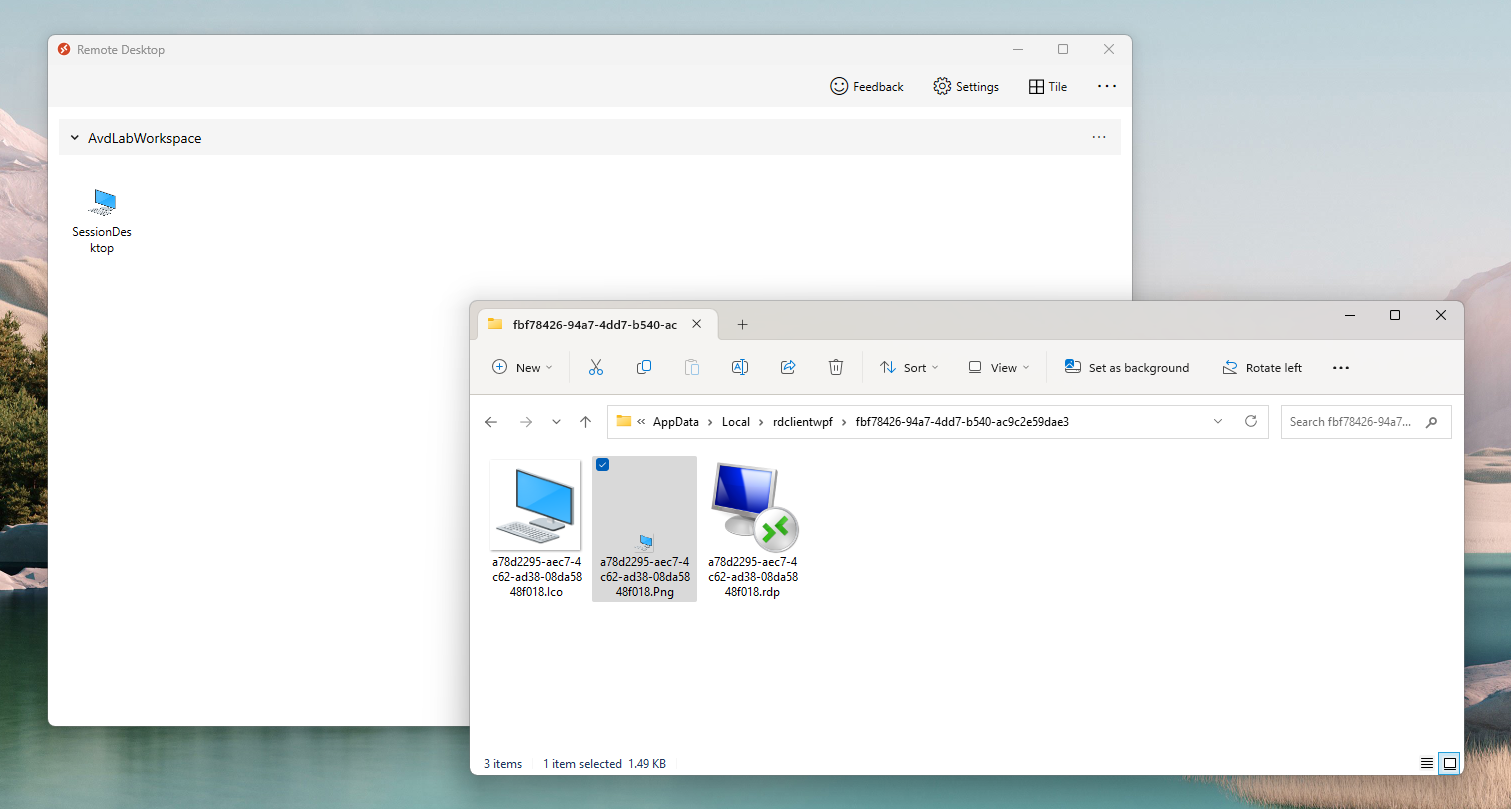
Once you have the webfeed loaded in MSRDC, go to %LocalAppData%\rdclientwpf, you will see a list of GUID-named directories with .RDP files in them, this is what you need to import in RDM: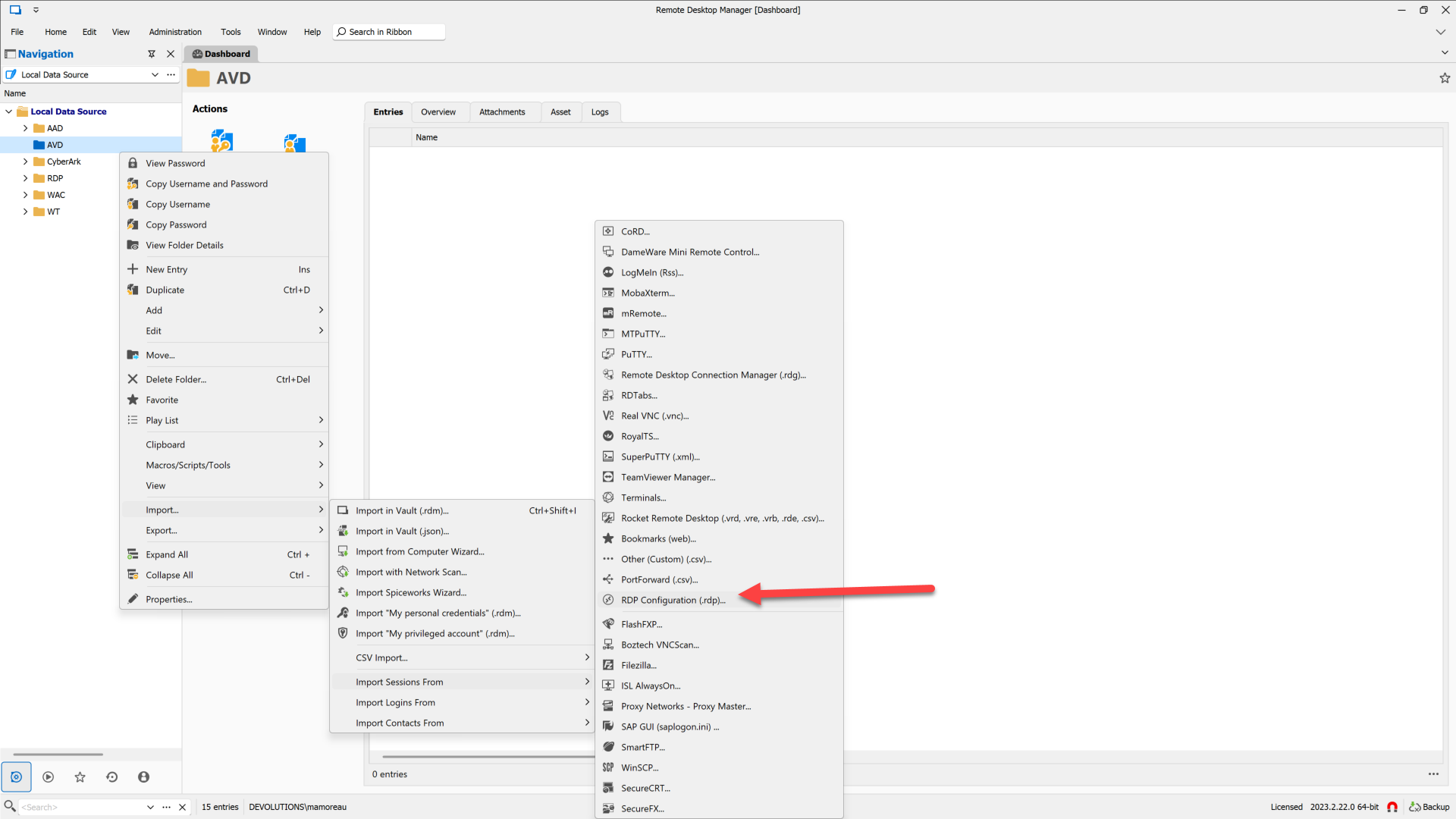
Once the entry is imported, you can rename it (it'll use the file name GUID as the initial name, so not very useful, unfortunately), then go in the Advanced tab to set "RDP Version" to "MSRDC". Also, double-check that the Display mode is set to "External": AVD connections are *not* supported with the embedded mode because of the lack of support for third-party AVD integration by Microsoft: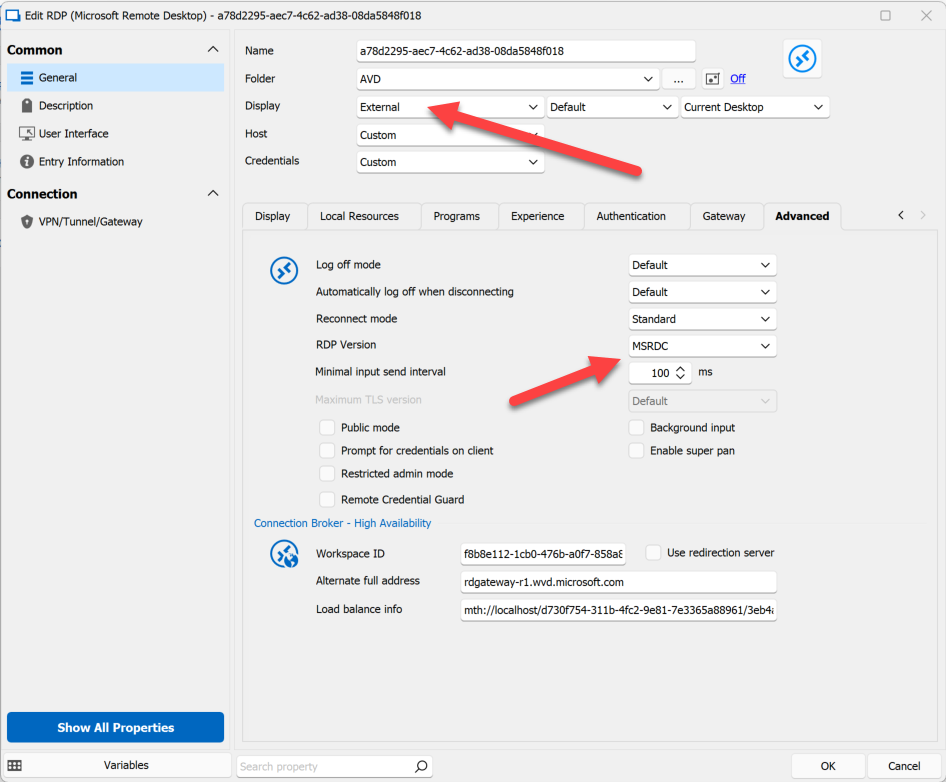
Try to launch the AVD connection with MSRDC - you should normally see a prompt to select the Azure AD user for the AVD connection: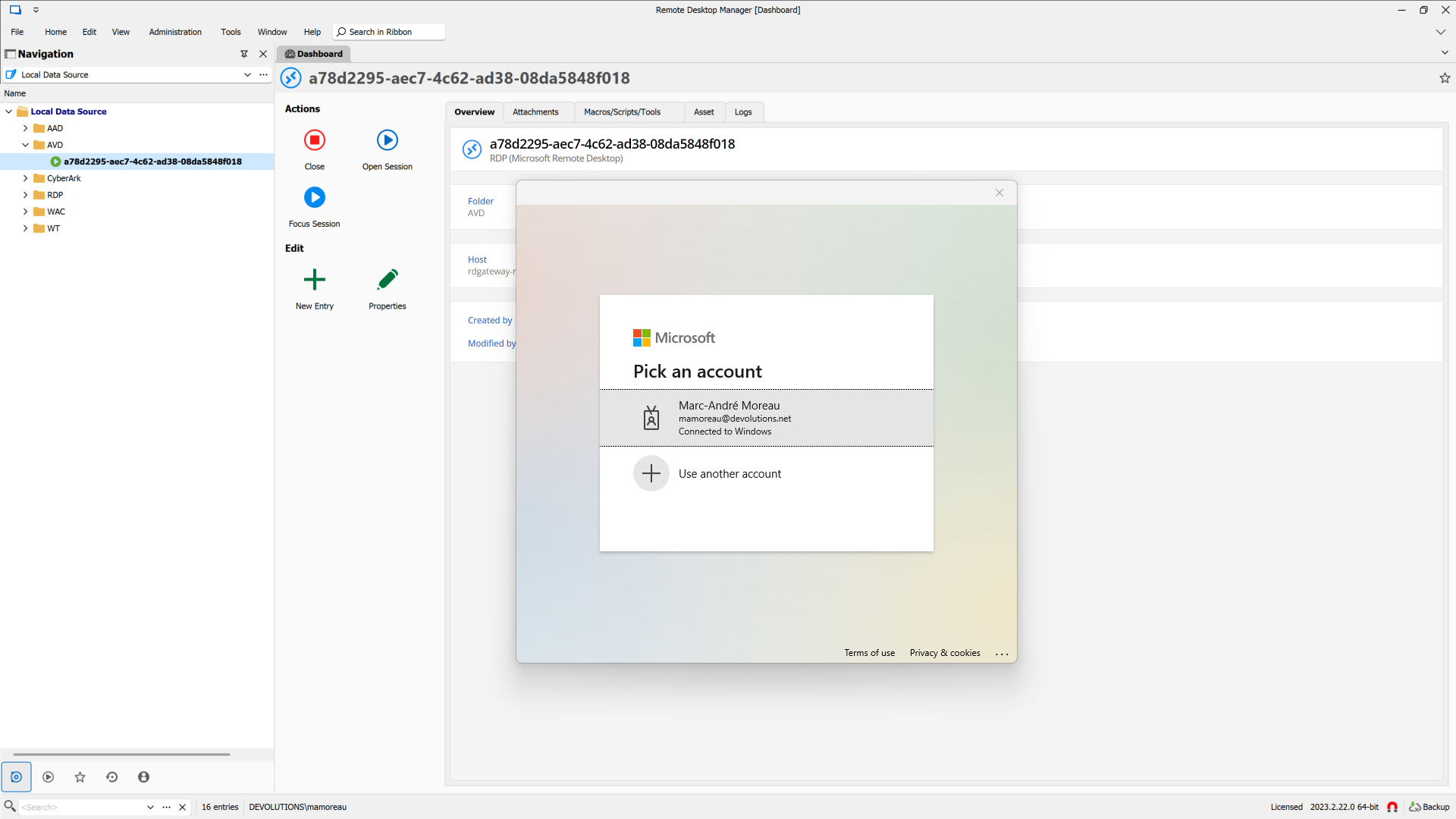
Now while there is no way for RDM to manage this Azure AD authentication context or automate the login from injected credentials, it was a bit annoying to manually select the account every time. This is why I have at least made it possible to pre-select the account with RDP Gateway credentials where you set the username but no password (it'll be ignored anyway if you try to use it):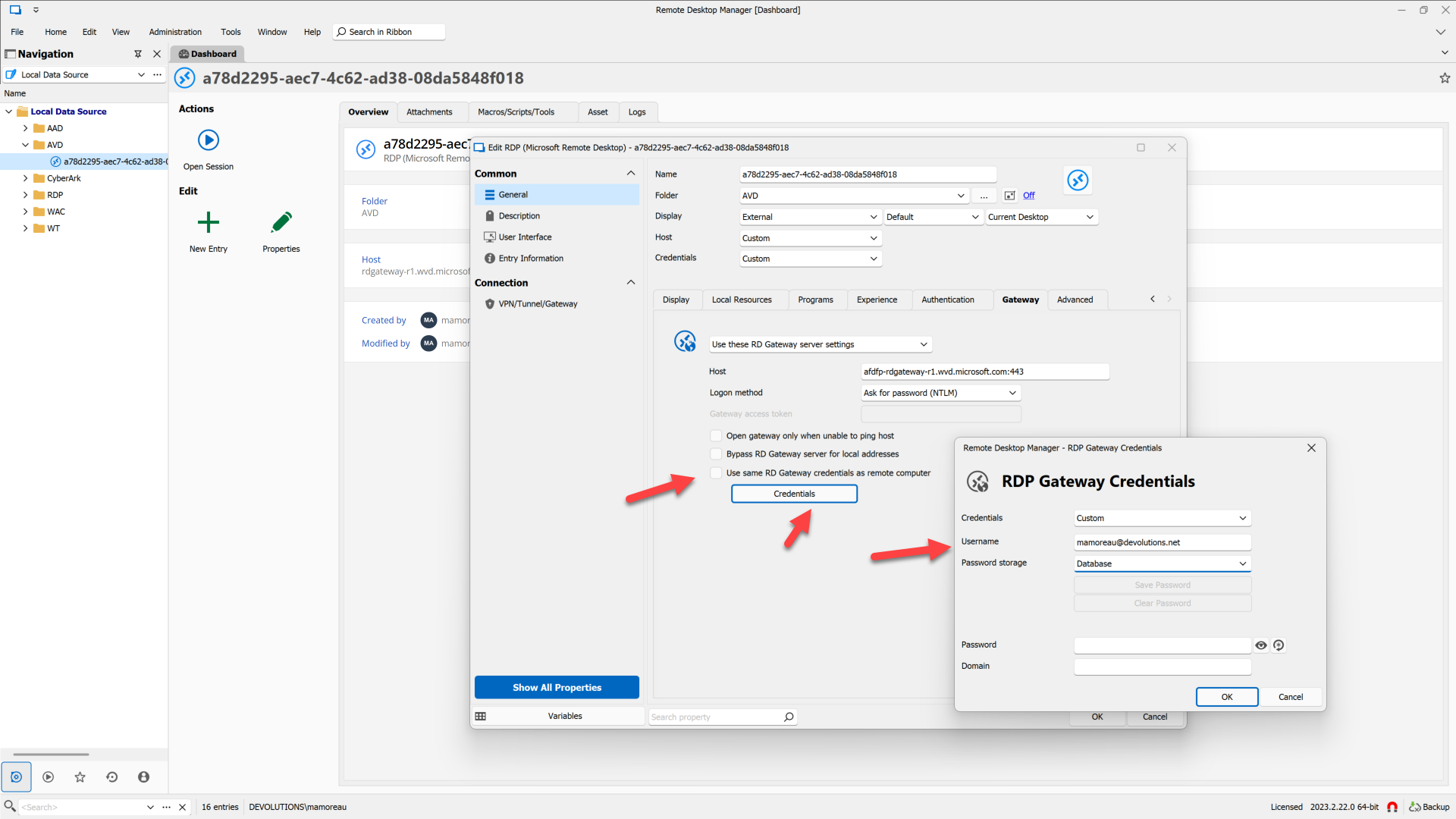
AVD is really a fancy RD Gateway in Azure that requires an Azure AD account to talk to in order to open a connection tunnel. By setting the username there, we just pass it on as a command-line argument to msrdc.exe to pre-select the account to use, but we have no control beyond that.
Last but not least, you can then set credentials for the RDP connection itself in the regular way. If you have non-Azure AD accounts on the target machine, it should work out of the box, but if it's Azure AD, you'll need to check that "Azure AD host" checkbox and go through the same level of pain required to get Azure AD + RDP NLA to work without AVD (that's an entirely different topic, unfortunately):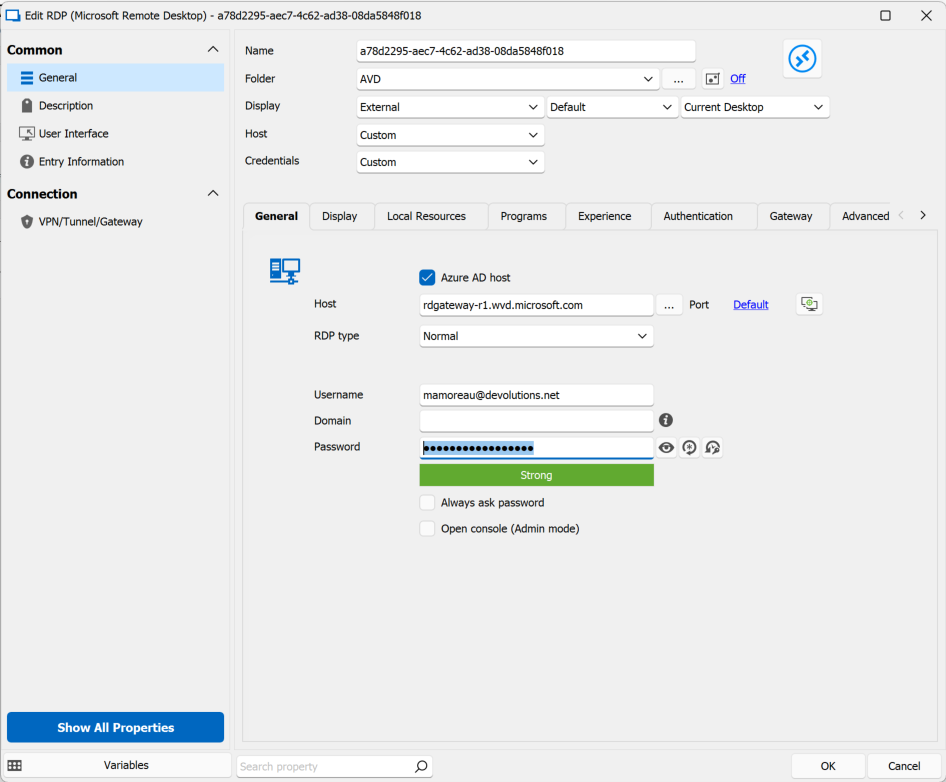
Best regards,
Marc-André Moreau
18f451ac-f1f3-4dde-94c0-75f4284475fd.png
6a7f9927-a56c-450b-b6a1-7c35419ecf4d.png
98b975ec-711a-4ede-9572-dc6df7d80d59.png
90dd5a84-1c4b-48aa-ba71-b82690fbcaca.png
cc4d5743-d9ed-4cd4-bc70-5d24a407fce9.png
0d34dcb5-1fed-4107-88b9-1db493cf4967.png
Thanks for the update, Marc-André
Unfortunately, I can't find the folder rdclientwpf in local appdata, even after reinstalling the MSRDC app from the windows store, and readding my workspace.
I'm wondering if MS have changed something? or am I being an idiot?
Hi,
I'm wondering if MS have changed something? or am I being an idiot?
It's not you, it's Microsoft ;)
Don't use the Microsoft Remote Desktop application from the Windows Store, it is confusingly similar to MSRDC, but it is MSIX-installed, uses weird paths like %LocalAppData%\Packages\Microsoft.RemoteDesktop_8wekyb3d8bbwe for internal storage, and worst of all, we can't integrate it because of MSIX application virtualization that prevents us from loading the RDP ActiveX DLL directly (rdclientax.dll in MSRDC).
Instead, install the real MSRDC, the one not distributed through the Windows Store and that can be installed with an MSI installer instead of MSIX:
https://learn.microsoft.com/en-us/azure/virtual-desktop/users/connect-windows
I just tried the Windows Store client again for comparison, and noticed that even for AVD you need to give it the full URL (https://rdweb.wvd.microsoft.com/api/arm/feeddiscovery) while you can skip this step with MSRDC, so not all is lost.
Best regards,
Marc-André Moreau
Thanks Marc,
Sadly, after following all of your steps, I can connect to the AVD, but just end up with a black screen. BUT - I can see the logging in screen for a few seconds before it all goes black.
c733fbbc-aff4-49d7-8315-553b6acc559c.png
Hi,
Well, the good news is that it connects, so obviously you've done it right, but the bad news is you're now getting a black screen post-logon, which could really be anything.
Can you reproduce the black screen issue with MSRDC separately from RDM?
Best regards,
Marc-André Moreau
Yeah, everything works fine outside of RDM, and I've tested with a session already logged in, and with a blank, fresh session.
And the basic stuff, like rebooting my PC, RDM, and AVD
Hi,
Can you tell me which version of MSRDC you are currently using?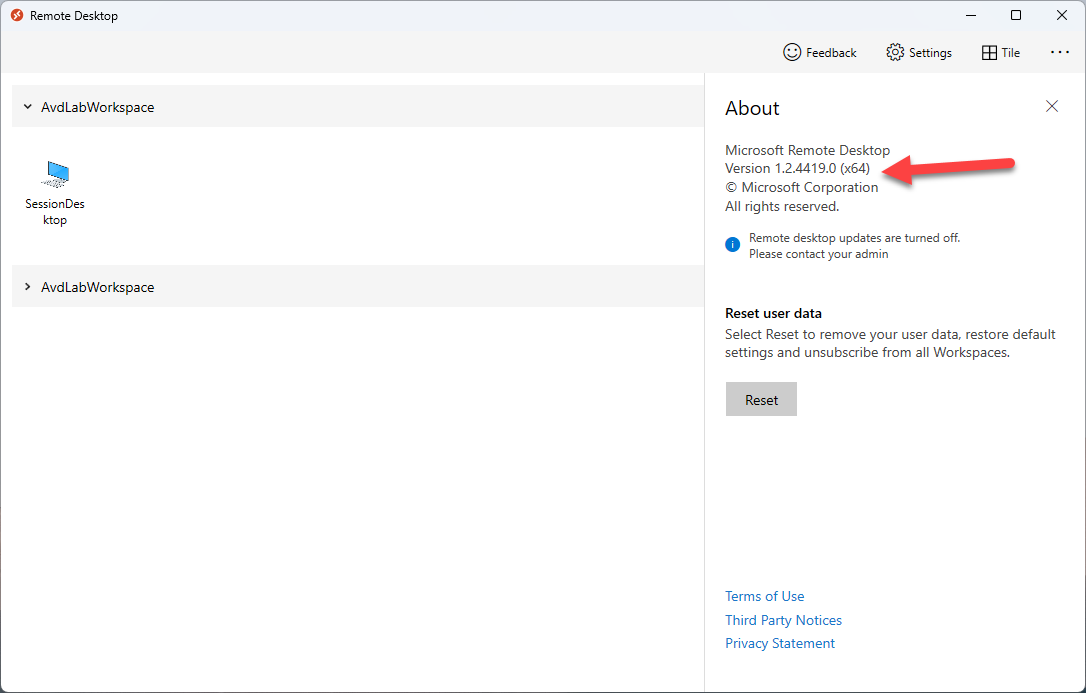
One thing you could try is disabling MSRDC auto-update + downgrading MSRDC to previous versions to see if the issue would go away:
https://learn.microsoft.com/EN-us/azure/virtual-desktop/users/client-features-windows#update-behavior
Best regards,
Marc-André Moreau
bc9c04a9-8dd0-454d-a78b-2a68e9214bf2.png
Hello,
thank you for this implementation. I did also get the black screen, but I traced it to another problem: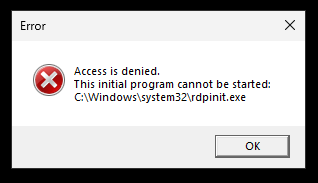
This happens on the first login. If I then close the RDP session and restart it, the screen will go black as described above.
I can still connect normally via "MS Remote Desktop Client".
Any ideas what this is doing?
e432a491-cb14-40df-ad2f-1a5347590a11.png
Hi,
The error you're getting on the first login is definitely weird. All I can say is that rdpinit.exe is one of the processes launched automatically within an RDP session, but that's a server-side problem, unrelated to the RDP client (well, in theory).
Is it working properly with the external mode using MSRDC after the initial session?
Best regards,
Marc-André Moreau
Hi,
I still have to do more tests, like from one day to another, because Azure turns off the machines automatically, so some get restarted, and I don't always land on the same one. But they are all the same, from a deployed image.
Today I made some tests:
I started the session from RDM and got the rdpinit.exe error. Then I closed the sessions and opened once again from RDM, this time I only had a black screen. Then I started the session from MSRDC, and successfully connected and were able to see the desktop. I just closed the session and opened yet again from RDM, this time I had no black screen and all seemed OK.
I can report with more tests maybe next week.
Have a nice weekend,
Srdan
Hello,
I think I know why I get rdpinit sometimes: we use MFA for the administrative login into Azure, and usually need a daily activation, sometimes twice, when starting the session with MSRDCW. Not sure what happens when starting the session with RDP-File directly, I will have to check that. If the behaviour is the same, then the issue is not with RDM itself, but the fact, that RDM doesn't "do" everything that MSRDCW does (and you've mentioned it, that MS doesn't make it easy for you).
BR
Srdan
Hi Marc-André,
Is there a similar process to make it work with the macOS version of Remote Desktop Manager?
Thank you!
Zberg
Hi,
Unfortunately, there is no AVD integration on non-Windows, for the simple reason that the Microsoft first-party client is not exposed for third-party integration. Even on Windows, the way we've managed to integrate the first-party AVD client is not officially supported by Microsoft.
Best regards,
Marc-André Moreau
Hi,
Unfortunately, there is no AVD integration on non-Windows, for the simple reason that the Microsoft first-party client is not exposed for third-party integration. Even on Windows, the way we've managed to integrate the first-party AVD client is not officially supported by Microsoft.
Best regards,
Thank you for this update!
Hi,
I have worked through Marc-Andre's post above. Sadly, I don't get the MS SSO pop-up; instead I get this: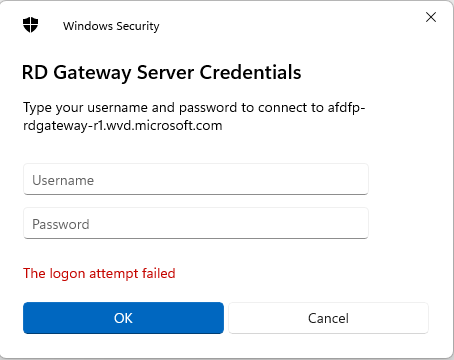
No combination of username and password gets me to the next step. If I set up an External Application it works fine with:
Any suggestions?
Adam.
f056b4b0-afc1-4ced-8cd4-183b1d377ab3.png
6cfd1566-1ca5-4526-962e-9992573ff2b6.png
Hi,
Azure Virtual Desktop is only supported with MSRDC, on Windows, with the external mode. Your screenshot for the RD Gateway server credentials is what I'd expect to see if you try launching it as an embedded session anyway - the capabilities to do the AVD pre-orchestration calls to Azure (a special kind of RD Gateway) are simply missing from the RDP ActiveX, and results in this prompt instead. Microsoft is not interested at this point in properly exposing their first-party AVD client for third-party integration, the integration we've done is unofficially supported, and the best we could achieve through API hooking.
Best regards,
Marc-André Moreau
When I try to import the .rdp file into my RDM, it doesn't populate any of the stuff shown in your screenshot. Property attributes such as Workspace ID, Alternate full address etc do not show up.
After I manually enter them in and launched the session, I expected to see the AAD Broker prompting me to login, but it doesn't. I followed everything exactly and I'm using MSRDC as the connection method.
If I open the .rdp file with MSRDC, it works fine. Using latest x64 bit MSRDC. For RDM, I'm using 2023.3.32.
UPDATE:
Never mind, I got it to work after updating to the latest RDM 2024 version. The import now captures everything needed (which looks to be the same as what I had before), but now it's able to start the AVD session whereas before it couldn't.
One issue I've noticed is that when using RDM to connect to my AVD session, it launches the session in fullscreen on one monitor. However, using MSRDC, it maximizes the window but doesn't make it go fullscreen, which means I can still see the taskbar of my local machine and that's exactly what I want. If I look at the .rdp file, it's configured correctly:
remoteapplicationmode:i:0
drivestoredirect:s:
audiomode:i:0
videoplaybackmode:i:1
redirectclipboard:i:1
redirectprinters:i:1
devicestoredirect:s:
redirectcomports:i:1
redirectsmartcards:i:1
usbdevicestoredirect:s:*
enablecredsspsupport:i:1
redirectwebauthn:i:1
use multimon:i:0
enablerdsaadauth:i:1
audiocapturemode:i:1
encode redirected video capture:i:1
redirected video capture encoding quality:i:0
camerastoredirect:s:*
keyboardhook:i:1
smart sizing:i:1
screen mode id:i:1
singlemoninwindowedmode:i:1
I don't see why RDM would make the session go fullscreen and completely cover my primary monitor. It doesn't respect the screen mode in the RDP file at all. I had to change the session in RDM to use current work area size under Display to fix this issue.
The other issue is that I have to enter my password twice when using RDM. I think one is for the RD Gateway prompt and the other is for something else that I'm not sure of. But with MSRDC, I just had to login once. Even when I disconnect my session, I can connect back to it without needing to provide my username and password at all. With RDM, this is a required step all the time.
--------------------------------------------------------------------------------------------------------------------
I'm always using the latest beta RDM x64 version.
Local data source.
Hi,
Unfortunately, Microsoft provides no way for third-parties to control the first authentication with Azure Virtual Desktop. I see that your .RDP file also uses enablerdsaadauth:i:1 (RDS AAD auth), which is unfortunately also something Microsoft doesn't give us control over beyond just enabling it. I wish we could integrate this better in RDM, but that's pretty much what can be done given how Microsoft is not helping us in any way to integrate AVD in RDM.
This being said, there is a command-line argument that msrdc.exe accepts to select the user account for AVD authentication. I mapped it to the RD Gateway username, even if we can't inject the credentials. Maybe try setting it and see if it helps? Without this option, you normally have to select which account to use manually for AVD authentication: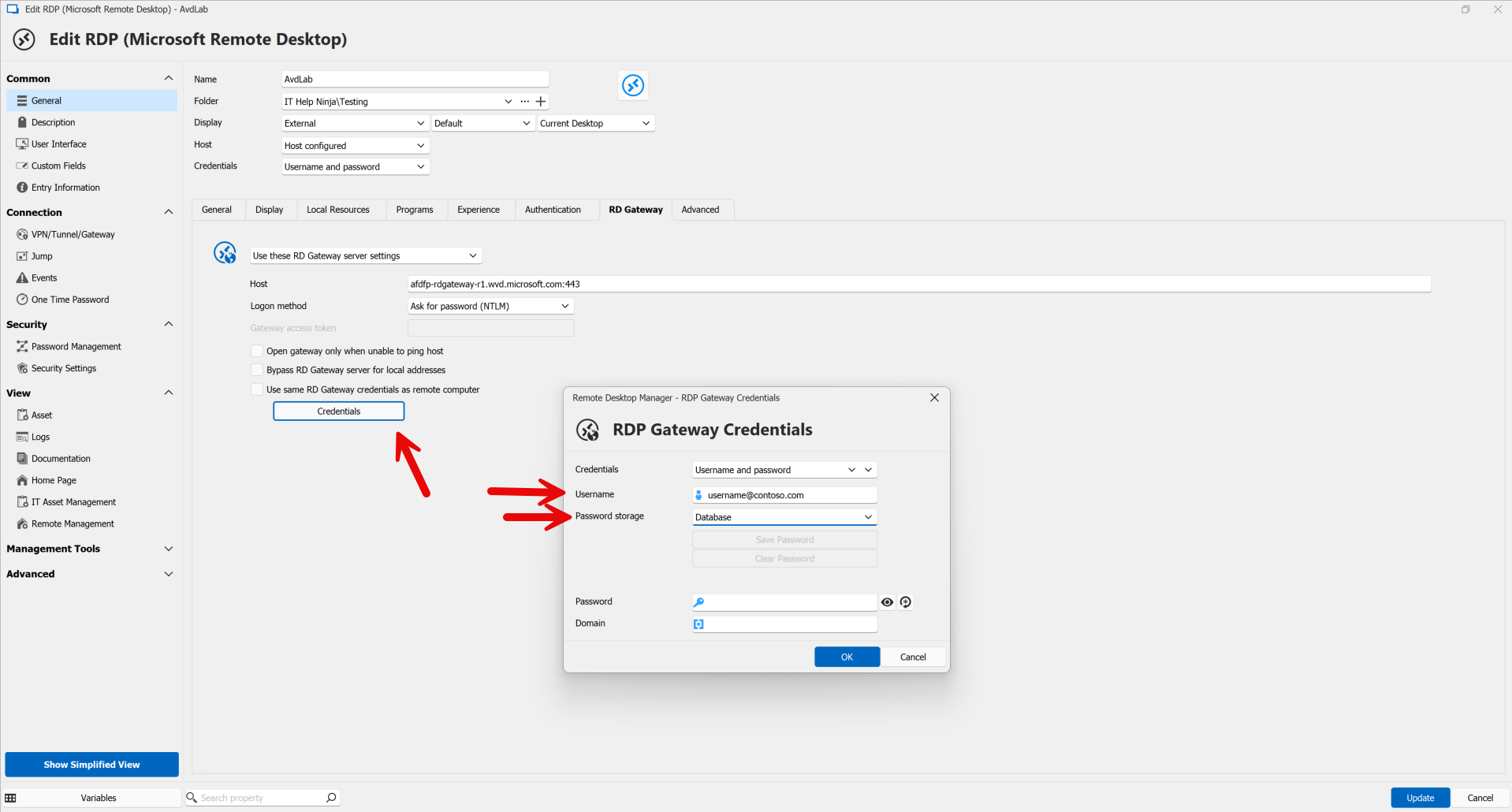
Marc-André Moreau
4261a1de-9084-44c4-8332-fc9147706f07.png
Hi,
Unfortunately, Microsoft provides no way for third-parties to control the first authentication with Azure Virtual Desktop. I see that your .RDP file also uses enablerdsaadauth:i:1 (RDS AAD auth), which is unfortunately also something Microsoft doesn't give us control over beyond just enabling it. I wish we could integrate this better in RDM, but that's pretty much what can be done given how Microsoft is not helping us in any way to integrate AVD in RDM.
This being said, there is a command-line argument that msrdc.exe accepts to select the user account for AVD authentication. I mapped it to the RD Gateway username, even if we can't inject the credentials. Maybe try setting it and see if it helps? Without this option, you normally have to select which account to use manually for AVD authentication:
Thanks for your reply. Yes, I'm using that already. I don't get the modern prompt popup to enter email + password, I just get a RDM prompt to put in my password, as the email address is already pre-filled based on the setup in RDP Gateway Credentials. But this is the issue that I was referring to in my previous post, I still have to put in the password in the first popup prompt, then after that there's a slightly different prompt where I need to put in the password again.
With MSRDC, I log in once in the morning and the rest of the day I can just connect to the AVD session without ANY prompt whatsoever, no password input required. Hopefully, you guys will find a workaround to address this issue one day, but AVD is currently not really useable with RDM because after all, it just does external display and requires additional password input from the user, making it rather annoying to use.
--------------------------------------------------------------------------------------------------------------------
I'm always using the latest beta RDM x64 version.
Local data source.
Hello
Thanks for the update.
Superficially this sounds like it might be a regression on the RDM side: it may be making the initial prompt because it sees the missing password and wants to obtain it upfront (even though in this case, it cannot be passed through). It's possible some logic got changed here and this specific scenario wasn't considered. It might also just be a certain combination of settings that causes that, maybe not a code change - I'll have to investigate on my side.
What would really help, would be if you can provide us with a sample .rdp file from MSRDC (one untouched by RDM) because I'd also like to check if there are some options in there that we're not mapping or importing properly. If you don't want to share that file publicly you could send to me by a forum PM or to service@devolutions.net (mentioning this forum thread in the message so that the support team knows where to route it).
Please, let me know if you have further questions or comments
Kind regards,
Richard Markievicz
Hello chaoscreator
Just a follow up to this, I am still looking into this issue but currently I'm blocked on some difficulties with our own AVD deployment. We're working to address that before I can make any further progress. Thanks for your patience, and I'll update this topic once I have some more information.
Thanks and kind regards,
Richard Markievicz
Hello again
Ok, so on my side I've reproduced some issues here. In my case, the problem was a missing mapping for the property `targetisaadjoined` which is necessary in the environment I'm using, because my client does not exist in the same domain as the target server. I've noticed there are other missing mappings however, the most interesting is `aadtenantid` which in my case didn't change anything, but I can see that interacting with the `enablerdsaadauth` that you have.
I didn't recreate your scenario exactly, could you take screenshots of _both_ the login prompts you get and attach them here? Obfuscating any details of course: I just want to see what the prompt dialogs look like, to help determine where they are coming from.
That being said, you wrote
but AVD is currently not really useable with RDM because after all, it just does external display and requires additional password input from the user, making it rather annoying to use.
Sadly, the external mode and at least one additional password input is not something we can currently workaround, due to the limitations on the client side imposed by Microsoft. So there will always be friction here however much we're able to polish things (and as I think you can tell, the progress made so far has been an uphill struggle).
As an aside, I do know that FreeRDP (which is possible to use as an alternative to MS RDP on RDM Windows) has made significant progress towards AVD integration but as far as I know it's incomplete, probably buggy and fragile. I do think we need to reassess the progress on that project and see if it's something we can look at starting to integrate on our side: it may offer a better (though likely still far from perfect) experience.
I'll likely be adding the missing property mappings mentioned above although I'm unsure how much it will help. If you want to continue following through with this, please send the screenshots that I mentioned up above.
As always - let me know any questions or additional feedback
Thanks and kind regards,
Richard Markievicz
Hi. I am getting the 'This initial program cannot be started: C:\Windows\system32\rdpinit.exe' error on the target VM that was reported further above. Has anyone managed to get past this?
Thanks!