How to configure a connection to Azure Virtual Desktop
Hi, I need help with configuring a connection using the "Remote Desktop" (https://learn.microsoft.com/de-de/azure/virtual-desktop/virtual-desktop-fall-2019/connect-windows-2019#install-the-windows-desktop-client) to connect to a Azure Virtual Desktop.
Thanks and Regards,
Torsten
All Comments (48)
Hello,
Thank you for reaching out to us regarding this,
I have a few questions which you can hopefully answer.
- Which version of RDM are you using?
- Which type of data source are you using?
That being said, I would like to confirm how you are connecting to this remote host outside RDM?
Let me know,
Best regards,
Samuel Dery
Hi Samuel,
I am using latest version of RDM 2022.3.35.0 64-bit. I am using an RDP (Microsoft Remote Desktop) with RDP Version = MSRDC in the advanced settings. I read this somewhere. My problem is, that I don't know what to set for the "Host". With the Microsoft-Remotedesktop App I am simply entering my Azure AD User and Passwort, nothing more is needed here.
Regards,
Torsten
here is a tutorial to access VM: https://www.anyviewer.com/how-to/remote-access-virtual-machine-0427.html
This does not solve my question. I am not looking for an RDP connection, I want to connect to an Azure Virtual Desktop from within RDM.
Hello,
Thank you for your reply,
I see, I'm wondering if the following is of help to you in this case:
https://blog.devolutions.net/2022/03/msrdc-is-now-supported-in-remote-desktop-manager/
From my understanding, the Host field would normally be the workstation IP have you already attempted this?
Let me know,
Best regards,
Samuel Dery
Hi Samuel,
I found exactly that link. The problem is, that I do not have an IP nor a FQDN, using Microsoft Remote Desktop I am just using my Azure AD Login, nothing more.
Regards,
Torsten
Hello,
Do you have any way of exporting the session ?
If you do, what's the file format when it is exported ?
Best Regards,
Hello, no, the remote desktop does not offer any way of exporting the session. The only information I have inside the remote desktop is the name of the workspace and its URL and of course my username.
Regards,
Torsten
Hello,
I've spoken to our engineers, and they were wondering if you could attempt to import your .rdp files from your %LocalAppData%/rdclientwpf ?
According to them, this is where the AVD webfeed's local cache is stored.
Let me know if this works !
Best Regards,
Hi Samuel, congrats, that trick did the job. The only thing I have to check, is what happens tomorrow, once I have to submit my 2FA.
Regards,
Torsten
Hello,
My pleasure !
If you have further issues when submitting your 2FA, let us know !
Best Regards,
Hi i found the RDP file and imported it but the usrename and password are not being processed correctly. Any ideas?
Hello,
I've spoken to our engineers, and they were wondering if you could attempt to import your .rdp files from your %LocalAppData%/rdclientwpf ?
According to them, this is where the AVD webfeed's local cache is stored.
Let me know if this works !
Best Regards,
Hi,
Can you elaborate on how you got this to work? I imported the RDP settings and changed the RDP type to MSRDC but my username and password is not working when they do work in the RDP client.
Thanks
Hi Samuel, congrats, that trick did the job. The only thing I have to check, is what happens tomorrow, once I have to submit my 2FA.
Regards,
Torsten
Hello Jeremy,
Thank you for reaching out to us regarding this,
Could you confirm your version of RDM and your date source type?
I'm also wondering if you could provide us with a screenshot of the error you're receiving.
Let me know,
Best regards,
Samuel Dery
2023.1.20.0 64-bit and the data source is local
Hello Jeremy,
Thank you for reaching out to us regarding this,
Could you confirm your version of RDM and your date source type?
I'm also wondering if you could provide us with a screenshot of the error you're receiving.
Let me know,
Best regards,
Hello Jeremy,
Thank you for your reply,
I see, could you confirm the error you're receiving when attempting the connection?
Perhaps provide us with a screenshot,
Let me know.
Best regards,
Samuel Dery
I know it's been a couple months since the last entry but I to was trying to do the same thing here. I read the thread and followed the instructions. I imported in my RDP sessions from my AVD, change the RDP Version to MSRDC but when I try and log in it's just a cyclical error about the login attempt failing. If I go right to the actual MS RDP application I can log right in.
Just looking for a solution if there is one. 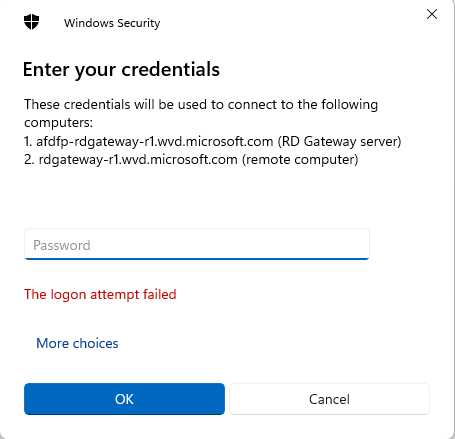
dev_error.png
Hello,
Thank you for reaching out to us regarding this,
I have a few questions which you can hopefully answer.
1- Which version of RDM are you using?
2- Which type of data source are you using?
I would also like to confirm if this was working for you previously?
Let me know,
Best regards,
Samuel Dery
I am using version 2023.2.5.1 for MacOS. And I'm using just a local data source. No, this is something new I was trying to get to work. I have an AVD that I use for work. I created a new RDP session then imported in the working config from the Microsoft Remote Desktop. From what I read through this thread that seemed to be the correct way to do it.
All prior attempts failed, but once I configured it this way I can actually make the connection, but as I mention the login is just in a failure loop.
Hi,
Azure Virtual Desktop is supported in RDM through MSRDC if you import the .RDP file from the AVD webfeed, but it only works with the *external* mode, not with the embedded mode. There's no way for a third-party to take control of the AVD connection process correctly with the RDP ActiveX, the best we could do was make the MSRDC external process work through API hooking. Microsoft doesn't offer third-party integration for their first-party AVD client, unfortunately.
Best regards,
Marc-André Moreau
I completely understand and I had all those settings, except for the "external" mode set. Once I changed that it is now working thank you. I understand the hook, it's just nice being able to launch the session from within RDM instead of having to explicitly start MS Remote Desktop and launch the connection. Thanks again.
Hello,
Thank you for your reply,
Perfect, I'm glad to hear that it is now working!
If you have further questions feel free to let me know,
Best regards,
Samuel Dery

Hi,
I'm trying to achieve the same (and failing miserably). User/password is never recognized, and keeps asking for authentications. I never reached 2FA step and I'm not sure what to check.
What I did so far:
- Imported RDP from the feed from %LocalAppData%/rdclientwpf/[guid]/[guid].rdp
- Changed to MSRDC following Devolutions Blog
- Tried different authentication methods with no luck.
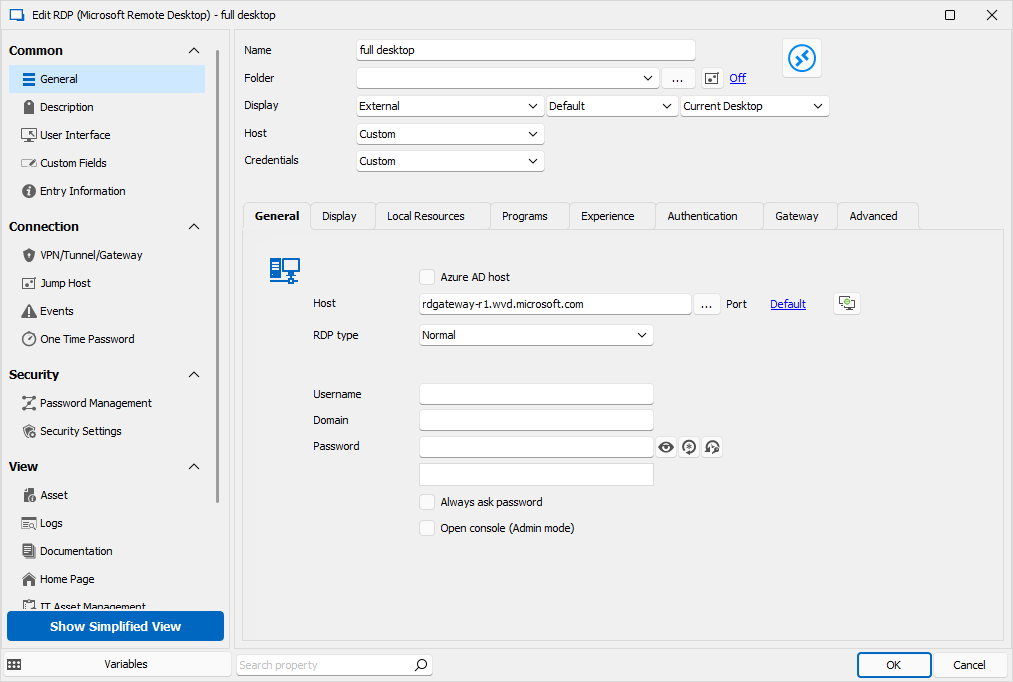
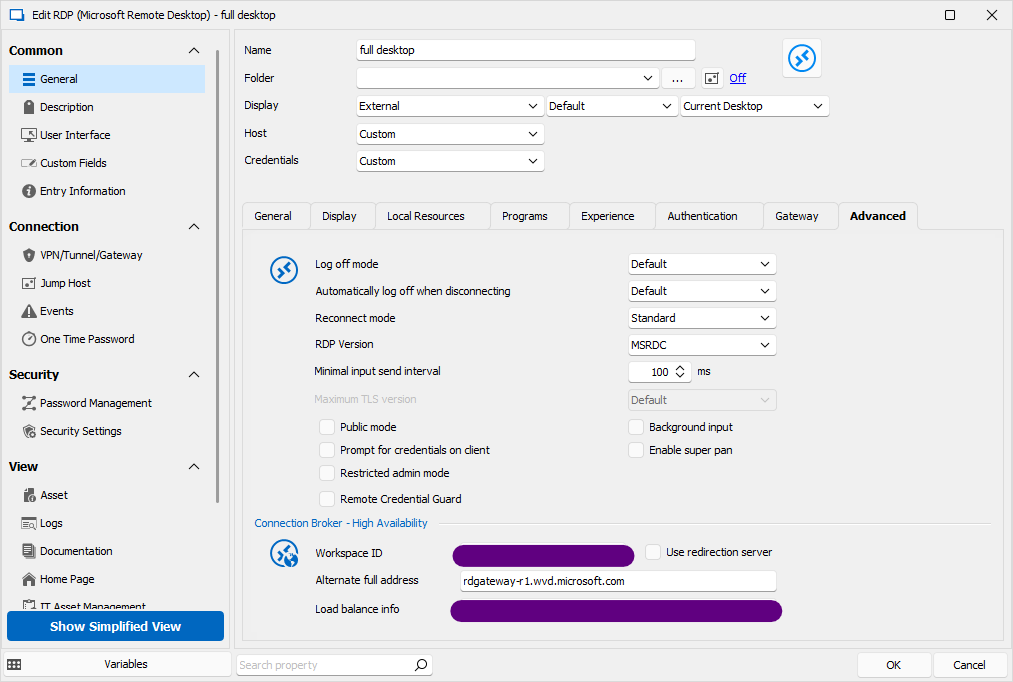
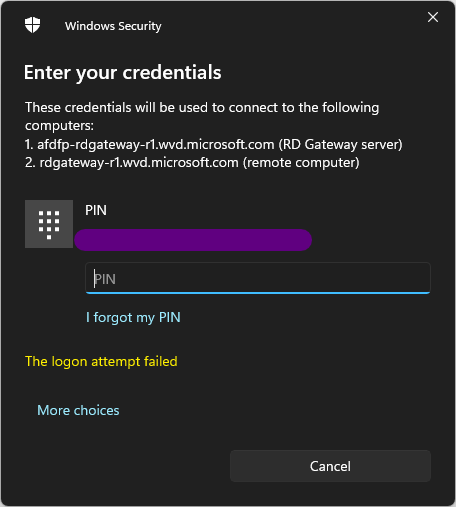
Thanks!
2ab7fe5c-9a03-48e9-a3d1-c7ed02d65ab1.png
461c7b85-e475-4431-8c97-ca22ccbb28e6.png
84ad56b2-6bf2-42ff-a9c2-5c9326804fc0.png
Hello Jane,
Thank you for your reply and my apologies for the delay,
Could you confirm which version of RDM you're currently using?
Let me know,
Best regards,
Samuel Dery
Hi Samuel.
Thanks for your reply. I'm using the latest version available, 2023.3.37.0
Cheers
Hello Jane,
Thank you for your reply,
I see, I'm unsure, perhaps there is an issue with the configuration itself? Was this configuration working without issues outside RDM?
Let me know,
Best regards,
Samuel Dery
Hello Jane
Is the remote machine Azure AD joined? If so, is it hybrid-joined (HAADJ) or pure Azure AD joined (AADJ)? Is your local workstation joined to the same domain?
Please let me know if something isn't clear
Kind regards,
Richard Markievicz
I'd like to revisit this topic... I also have some machines in Azure that I would like to connect to from RDM if possible. Currently connecting via Remote Desktop application (msrdcw.exe) but if I import the RDP file, I change the type to MSRDC, and if I leave it on "External", it works the same way as it does with msrdcw.exe. However, going embedded, there is no windows authentication window any more, there is a generic windows login popup and that's it.
Any way to get it to work with embedded?
(RDM 3.39 with DVLS .13)
Thanks
Hi,
Unfortunately, there is no way to get the Azure AD login prompt for Azure Virtual Desktop with the embedded mode, it is only supported through msrdc.exe with the external mode. I've looked into ways we could somehow make this work unofficially through API hooking, but the code is baked deep into the internals of msrdc.exe, with no trick I could find to get it working from the RDP ActiveX. I've brought this up with Microsoft several times, but they don't seem to understand why third-party integration of their first-party client is important.
Best regards,
Marc-André Moreau
Typically Microsoft, they don't care about anything or anyone but themselves. And thank you for trying.
I can't get RDM to connect to AVD at all.
Firstly, the local machine I'm on is not AAD or Hybrid-Joined to the tenant. It's just a personal home laptop.
I have the Remote Desktop (MSRDC) app installed, latest x64 bit version. I also have the Azure Virtual Desktop Preview modern app installed. Both of these can be found under here:
https://learn.microsoft.com/en-us/azure/virtual-desktop/virtual-desktop-fall-2019/connect-windows-2019#install-the-windows-desktop-client
If I use either Remote Desktop (MSRDC) or Azure Virtual Desktop Preview, or even the Windows App (modern app) to connect to AVD, it works fine. If I look at the connection using Process Explorer, I get this:
Windows App (modern app) result:
"C:\Program Files\WindowsApps\MicrosoftCorporationII.Windows365_1.3.252.0_x64__8wekyb3d8bbwe\msrdc\msrdc.exe" "C:\\Users\\Ricky\\AppData\\Local\\Packages\\MicrosoftCorporationII.Windows365_8wekyb3d8bbwe\\LocalCache\\LaunchFiles\\dbcce29b-d270-48fb-e8b2-08dc3b3eaa2e.rdp" /settingsfile:"C:\\Users\\Ricky\\AppData\\Local\\Packages\\MicrosoftCorporationII.Windows365_8wekyb3d8bbwe\\LocalCache\\LaunchFiles\\dbcce29b-d270-48fb-e8b2-08dc3b3eaa2e.json"
Remote Desktop (MSRDC) result:
"C:\Program Files\Remote Desktop\msrdc.exe" "C:\Users\Ricky\AppData\Local\rdclientwpf\0fd20809-4e51-41c1-b9ea-d0eeb6b7b5ad\dbcce29b-d270-48fb-e8b2-08dc3b3eaa2e.rdp " /settingsfile:*1.9bf5ad11-e73f-47e3-a220-d99ebcd70000.06172024-030616-163.json
If I try to import the .rdp file from either of the above, then change the RDP version to MSRDC, then try to connect, it will not work.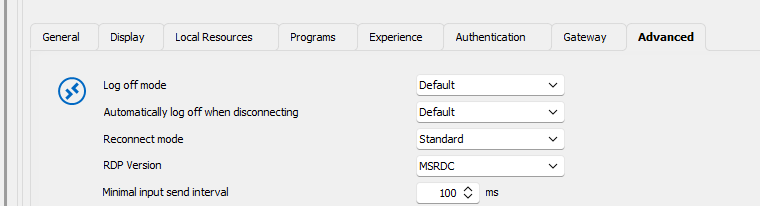
The error I'll get is this:
There was a problem connecting to the remote resource. Ask your network administrator for help.
My RDM version is 2023.3.32.0
--------------------------------------------------------------------------------------------------------------------
I'm always using the latest beta RDM x64 version.
Local data source.
308b3b27-b4b6-4155-a0a5-73d6ad170aee.png
Hello
I'm sorry to hear this isn't working quite right for you.
Can you confirm a couple of things?
As per an earlier post, did you install MSRDC from the App Store, or using the standalone .msi installer?
Your RDM version is pretty old - have you tried this on a more recent version? 2024.1 has been released for several months already and as of today we're now on to 2024.2. There have been changes to the library that integrates these features in that timeframe.
Please, let me know if something isn't clear
Thanks and kind regards,
Richard Markievicz
Hello
I'm sorry to hear this isn't working quite right for you.
Can you confirm a couple of things?
As per an earlier post, did you install MSRDC from the App Store, or using the standalone .msi installer?
Your RDM version is pretty old - have you tried this on a more recent version? 2024.1 has been released for several months already and as of today we're now on to 2024.2. There have been changes to the library that integrates these features in that timeframe.
Please, let me know if something isn't clear
Thanks and kind regards,
Hi, yes I ended up getting it working by updating to the latest RDM version. However, I still had to provide my password twice, whereas with MSRDC I only had to login once. Any subsequent connections will just be established straight away without any further credential prompts.
--------------------------------------------------------------------------------------------------------------------
I'm always using the latest beta RDM x64 version.
Local data source.
Can we revisit Jane's issue. I am stuck at the same place.
i've imported the the rdp file from the rdclientwpf folder, Display is set to External, RDP version is set to MSRDC, my rdm version is 2021.1.12.0
I continue to get 'logon attempt failed' on the windows sercurity credential prompt.
When I ustilize the Microsoft Remote Desktop application the credential prompt is with my email and my microsoft/AD password. When I try to launch from RDM, the prompt wants a username, domain, password
Can we revisit Jane's issue. I am stuck at the same place.
i've imported the the rdp file from the rdclientwpf folder, Display is set to External, RDP version is set to MSRDC, my rdm version is 2021.1.12.0
I continue to get 'logon attempt failed' on the windows sercurity credential prompt.
When I ustilize the Microsoft Remote Desktop application the credential prompt is with my email and my microsoft/AD password. When I try to launch from RDM, the prompt wants a username, domain, password
You're on a really old version. Update to the latest first and then test again. No point reporting bugs in an old version from years ago, when they probably already got fixed in the latest. One of the issues I had with AVD login was because I was on an older version.
--------------------------------------------------------------------------------------------------------------------
I'm always using the latest beta RDM x64 version.
Local data source.
Can we revisit Jane's issue. I am stuck at the same place.
i've imported the the rdp file from the rdclientwpf folder, Display is set to External, RDP version is set to MSRDC, my rdm version is2021.1.12.02024.1.12
I continue to get 'logon attempt failed' on the windows sercurity credential prompt.
When I ustilize the Microsoft Remote Desktop application the credential prompt is with my email and my microsoft/AD password. When I try to launch from RDM, the prompt wants a username, domain, password
You're on a really old version. Update to the latest first and then test again. No point reporting bugs in an old version from years ago, when they probably already got fixed in the latest. One of the issues I had with AVD login was because I was on an older version.
my apologies . . . slip of the finger . . . RDM version 2024.1.12
(yes, bug reporting on that old of a version is dumb ;) )
Hi James
Can you confirm a couple of things?
Did you install MSRDC from the Microsoft App Store, or by running the .msi available from the web?
Are any of the machines (the client or the host) domain joined?
Can you send us one of the working (in MS RDC) .rdp files for us to ensure we're not missing any settings? You can send by PM to myself or to service@devolutions.net, mentioning this forum thread.
Please let me know if something isn't clear or you have other questions
Kind regards,
Richard Markievicz
You might also want to check the instructions here:
https://forum.devolutions.net/topics/34709/azure-wvd-client
--------------------------------------------------------------------------------------------------------------------
I'm always using the latest beta RDM x64 version.
Local data source.
I have referenced https://forum.devolutions.net/topics/34709/azure-wvd-client again (assuming you meant Marc-Andrea Moreau's post and series of pictures). I do not get the Microsoft/Azure style popup he shows in picture 4. I am only getting the Windows Sercurity popup that I assume is devolutions credential pop up. I have tried all sorts of combination of credential options on the Gateway tab, as he suggests in Picture 5 and 6, none successsful.
Yes I have MSRDC installed (as I am able to successfully connect using it), Version 1.2.5454.0 (x64).
i think i may be a bit ignorant on what 'domain joined' really means. My laptop is on our business domain and I am using AD credentials to login into the machine. I use identical credentials with Microsoft SSO when access the AVF using MSRDC. Microsoft SSO wants email, most other prompts within the domain wnat AD account, but they are all the same password. I think that means the answer is yes . . .?maybe?
I have sent and rdp file both from msrdc and from devolutions (keeping in mind that I have been tinkering relentlessly on the devolution RDP settings, so they may deviate a bit from some of the suggestions in this thread and others.
Hello
Just a follow up to this, I am still looking into this issue but currently I'm blocked on some difficulties with our own AVD deployment. We're working to address that before I can make any further progress. Thanks for your patience, and I'll update this topic once I have some more information.
Thanks and kind regards,
Richard Markievicz
Hello again
I was able to resolve the connection issues I was having: it was necessary to map the missing property `targetisaadjoined`, which is needed if the client machine is not joined to Active Directory. It’s not the case for you.
Apart from that, I’ve noticed a couple of other properties in your .rdp file that aren’t mapped. One of them (aadtenantid) does seem relevant, but I don’t have a way to check it on my side. I’m going to add the mapping for the missing properties and we can see if it helps.
You never confirmed this before, but did you install MS RDC from the Microsoft App Store or using the .msi?
Can you screenshot the password dialog you get and post it? You can obfuscate any details, I just want to see what the dialog looks like and confirm if it’s coming from MS RDC or from RDM.
Please, let me know if something isn’t clear or you have further questions
Thanks and kind regards,
Richard Markievicz
I initially had MSRDC installed a year or two ago, and I THINK that was using the msi, as that is what the instructions state that were given with the AVD. When I upgraded to the latest version (per my previous comment) that was using the msi. Microsoft App Store is blocked within our network.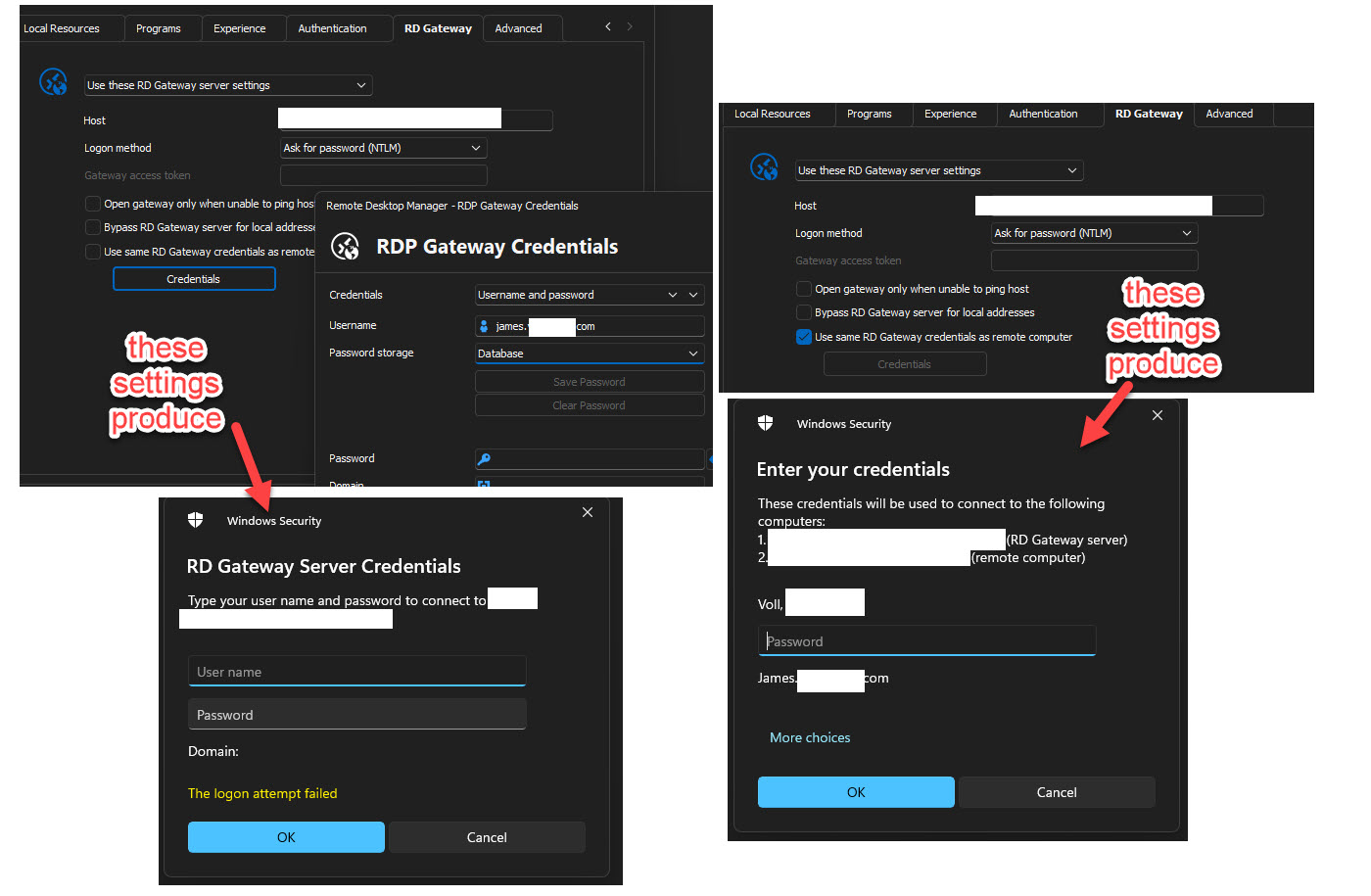
2024-07-04_7-33-42.jpg
Hi James
Thanks for your patience.
I'm still not exactly sure about the issue you're having, but going through the information I have I identified 2 properties that we were not mapping from the AVD generated .rdp file. I've added these, and at the same time I came across a regression in our .rdp file parser that might affect other properties from the imported .rdp file.
Sadly I've just missed the 2024.2.17 release today but those changes should be in the next release. You'll need to re-import your .rdp file(s) - I'd suggest trying just one of them once you get the next version and let us know if anything changes for you.
In the meantime, please let me know any further questions or comments
Kind regards,
Richard Markievicz
So 2024.2.19 version is out now and we did get the datbaase updated, so I am on that latest version now. Did those changes make it into one of the last 2 releases?
It is unclear to me whether you are saying i just need to RE-export the rdp file from MS RDC and import it back to devolutions? or whether you have specific properties that needed manually changed in the file prior to import.
I did reimport the RDP file. Display is set to External, RDP Version is set to MSRDC. No credentials configured for gateway. No credentials configured in general section. I have tried with AzureAD checked and unchecked. I am unable to get past the credential prompt for the RD Gateway Server
Hello again
Sorry for the delay in response, we are still in the busy summer vacation time for a lot of team members.
Indeed, I meant re-importing the .rdp file into RDM; but it sounds like the property parsing fixes we added have not helped.
I will need to bring this back to my colleague who's much better versed in AVD than me - we will discuss this issue this week and see what else can be done. Thanks for your patience, I'll post back with an update.
Kind regards,
Richard Markievicz
Hi,
Can you uncheck "Use same RD Gateway credentials as remote computer" and see where that gets you? From what I understand from you said previously, you are using the same credentials for both the AVD connection and the destination RDP server. However, the AVD connection uses the Microsoft SSO, which is unfortunately *completely* different from the kind of authentication done with the destination RDP server. In other words, they should be treated separately, and the option to use the same credentials for both logins is likely causing problems here. The only case where I think it *might* work is if you're using RDS AAD authentication, but I don't think that's the case here.
There is very little we can do about the AVD authentication, the only credentials we can truly inject are those used for the destination RDP server. We should try to configure the entry to avoid trying to make it reuse the same credentials for both, because we can't inject the first set of credentials. This is probably why you have the credential prompt, as it fails to authenticate with AVD using the "regular" credential prompt that is incompatible with it.
Best regards,
Marc-André Moreau
yes I have tried with that checkbox checked AND unchecked. It get prompted by an *rdgateway*microsoft.com.
I am not overly concerned with the lack of credential injection, prompting for credentials is fine. However the obvious desire is to have any assets we remotely connect to be represented within the RDM structure. As it is, this asset cannot be organized there, so it becomes an outlier to the overall organization and upkeep of our assets.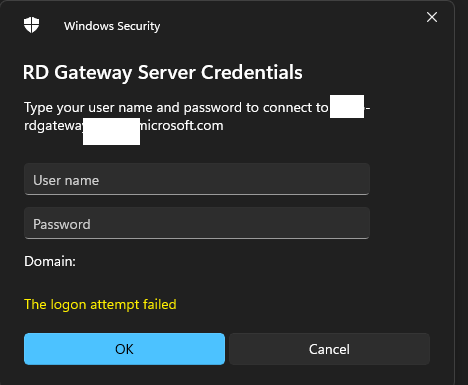
3b454572-d963-4c33-b6d3-996a5e4d3fef.png
Hi James,
I totally understand the desire to manage AVD connection entries in RDM despite the limited credential injection that can be done. I got my hands on a working AVD lab environment today that uses the same Entra ID account for both the AVD connection and the destination RDP server - something similar to what you described. However, I am unable to reproduce the issue, as I always get the Azure login prompt, and never get the "Windows Security" prompt for the AVD connection, even if I leave "Use same RD Gateway credentials as remote computer" checked.
The *only* way I can get the Windows Security prompt for an AVD connection is if I launched it with anything other than MSRDC with "External" for the display mode (expected behavior), but you've mentioned checking this setting already:
The only "RDP version" supported is MSRDC - changing to "latest" or a specific RDP version with the embedded mode should also trigger the Windows Security prompt. Launching mstsc externally for an AVD connection just triggers an internal error which you haven't reported, so this most likely isn't it.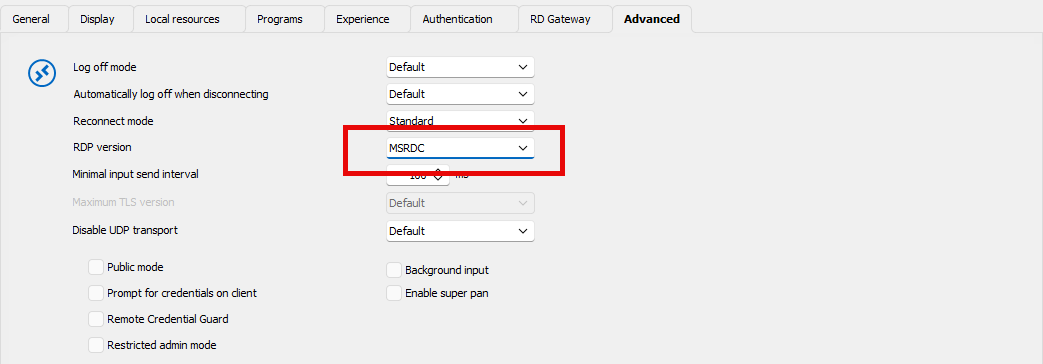
I've got the latest version of MSRDC installed: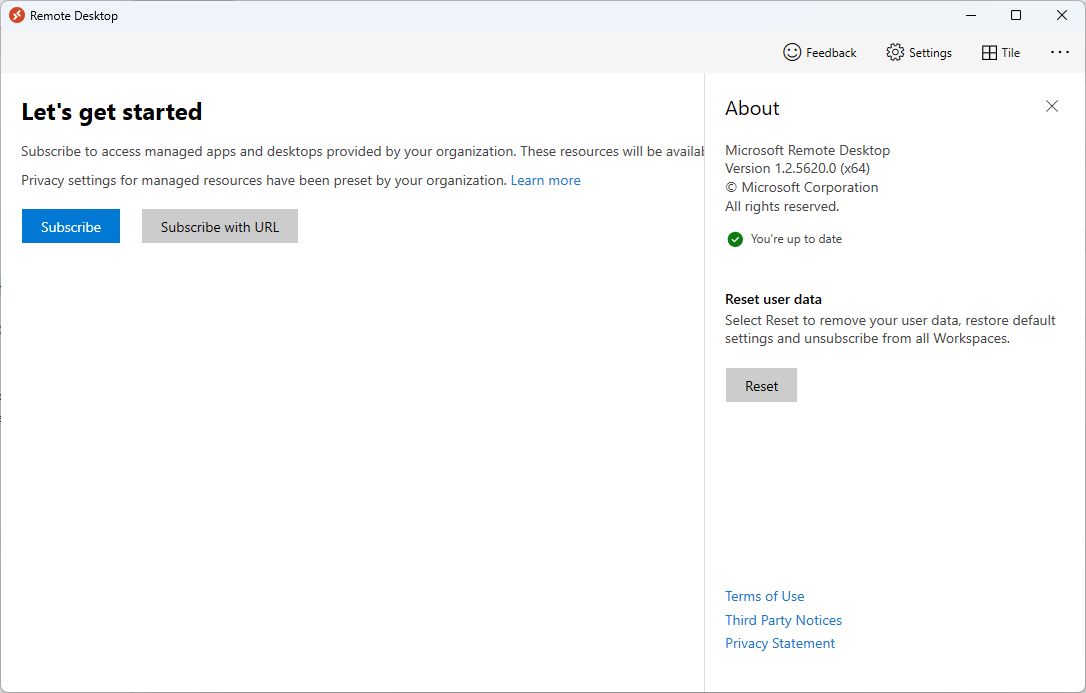
Basically, what you did *should* normally work, but for reasons unknown, it somehow uses the "classic" Windows Security prompt for AVD when it definitely shouldn't. I'm unsure how to properly diagnose this. Maybe one thing would be to use Process Monitor to confirm without a reasonable doubt that msrdc.exe *is* launched by RDM, along with the command line it used? There's still a chance that there's a bug that prevents RDM from launching the right thing: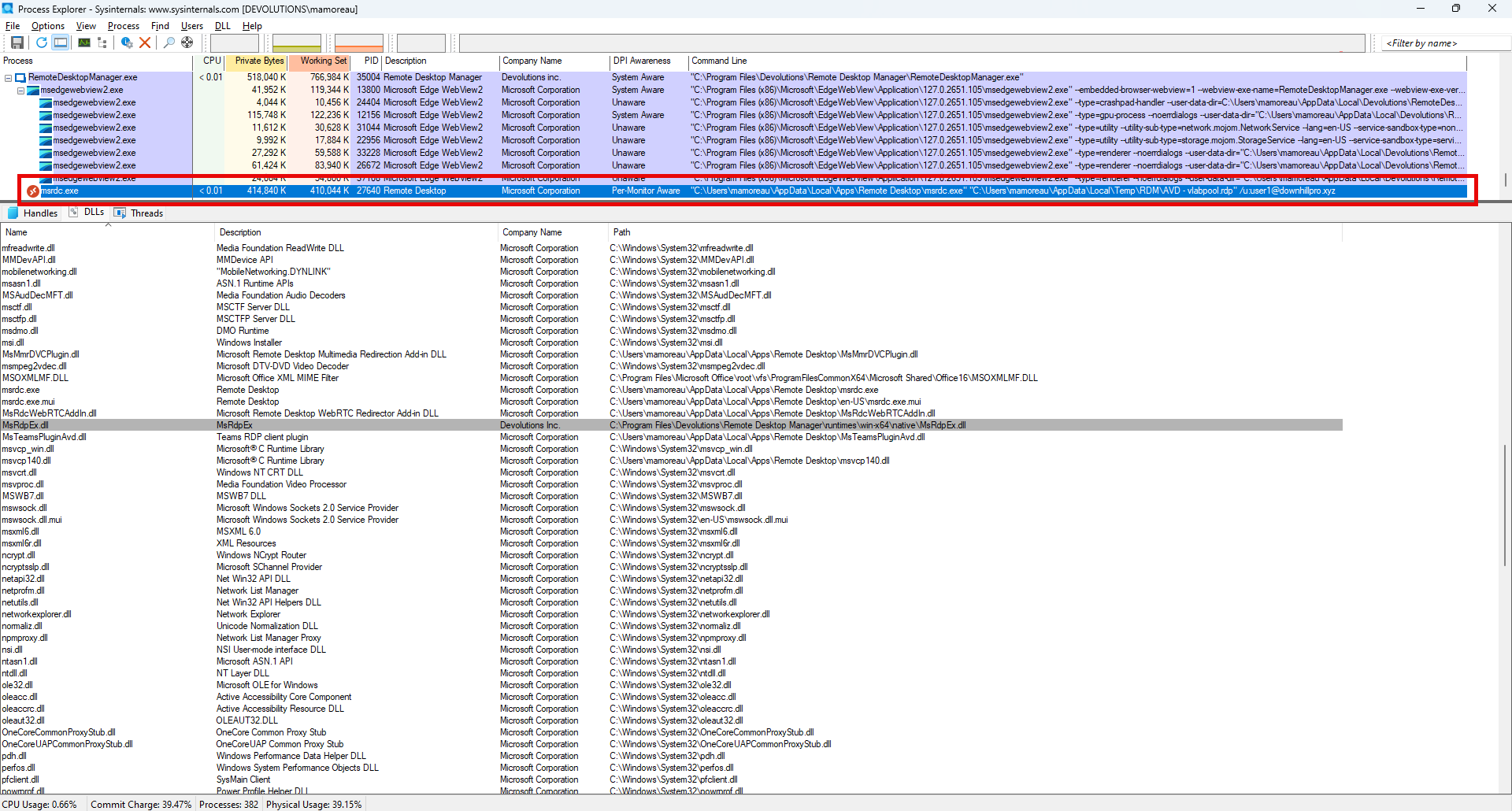
To get the "command-line" column, just right-click on the column titles and use "select columns". Some command-line arguments are derived from the username in the RD Gateway information from the RDM connection entry, and used to pre-select a specific user in the Azure prompt.
Can you use ProcMon to confirm that RDM is truly launching MSRDC as an external process, and confirm what the command-line is, such that we can see if there's anything special we might have missed?
Best regards,
Marc-André Moreau
2b500fea-2417-44f6-a7e0-0cc85f75eff5.png
18fe17ca-409a-4880-8bdc-0aabfa44fef9.png
249bb472-556c-4673-af62-9efabf585f43.png
31c8a3ba-e8bd-4fa1-98c6-f64b7d2ec9ff.png