
joebruns
@ sign pollution on tab switching
3.16 took care of it.
;)
@ sign pollution on tab switching
Running 2026.03.13
When I have 2 windows sessions open and if I click on one, then click on the other, an "@" sign is sent to one of the windows open sessions.
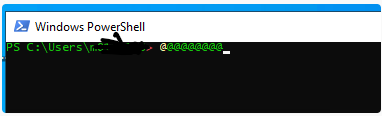
If it matters, the polluted session is windows server 2022 and the source is 2016. The 2016 session is fine.
@joebruns
I see 3.16 is out, let me see if that changes anything.
@ sign pollution on tab switching
Running 2026.03.13
When I have 2 windows sessions open and if I click on one, then click on the other, an "@" sign is sent to one of the windows open sessions.
If it matters, the polluted session is windows server 2022 and the source is 2016. The 2016 session is fine.
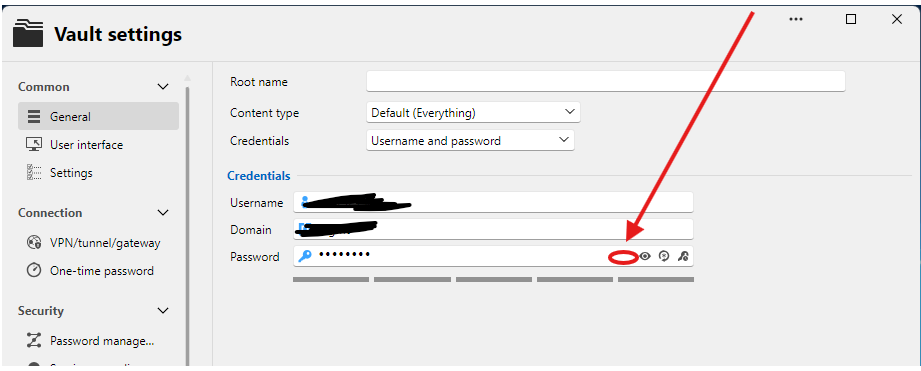
Allow a browse to a text file for password
What that would do is allow me to do a file browse to a txt file and the only value in that text file is my password and this would be stored securely of course.
Copyright screen in Windows
Grab focus on connect was it.
Please consider making this a default setting.
Thanks.
Copyright screen in Windows
Pressing enter on copyright RDP logon screen does nothing, enter is not being processed.
I do have "On the remote computer" set for Apply Windows key combinations.
I know there is a config someplace that handles this, can't find it.
Please help.
Confirmations off and on
Is there a way to export all settings? I see "Export settings" off of settings, but does that capture tweaks like we are talking about in this thread?
Confirmations off and on
Duh, found it.
Lots of options in this tool for sure.
I can see why you put in a search options.
Confirmations off and on
Don't see that first option assuming the list is sorted, which it appears to be.

Confirmations off and on
When a person selects multiple sessions at once and wants to open them all or logoff of them all, today we see a prompt asking us if we really want to do this.
Add an option to shut off that prompt.
RDP Timeout
This is likely going to be one of those forum entries that we never see the resolution on. Too many variables involved here, like network, routing and VPN clients. We can leave this as it is for now.
RDP Timeout
The funny thing is when I see the:
[Content]
This computer can't connect to the remote computer.
Try connecting again. If the problem continues, contact the owner of the remote computer or your network administrator.
[V] See details [OK]
[Expanded Information]
Error code: 0x904
Extended error code: 0x7
Timestamp (UTC): 07/01/24 03:16:42 PM
pop-up after 20-25s, I can hop on over to mRemoteNG and I can get connected without issues to same endpoint that RDM can't.
So, mRemoteNG is doing something (God knows what) that RDM isn't and that makes RDM fail.
RDP Timeout
We connect by FDQN
We use Zscaler for VPN.
When the connection is more responsive, it will be harder to t-shoot this because mRemoteNG and RDM both respond in 3-5s. When there is a delay, mRemoteNG will wait up to 60s, RDM fails around 23-25s.
RDP Timeout
When I see the timeout issue, detailed here:
[Content]
This computer can't connect to the remote computer.
Try connecting again. If the problem continues, contact the owner of the remote computer or your network administrator.
[V] See details [OK]
[Expanded Information]
Error code: 0x904
Extended error code: 0x7
Timestamp (UTC): 07/01/24 03:16:42 PM
It takes around 23-25s to appear.
RDP Timeout
MS RDP ActiveX that we use does have an "overall connection timeout" property
that?
RDP Timeout
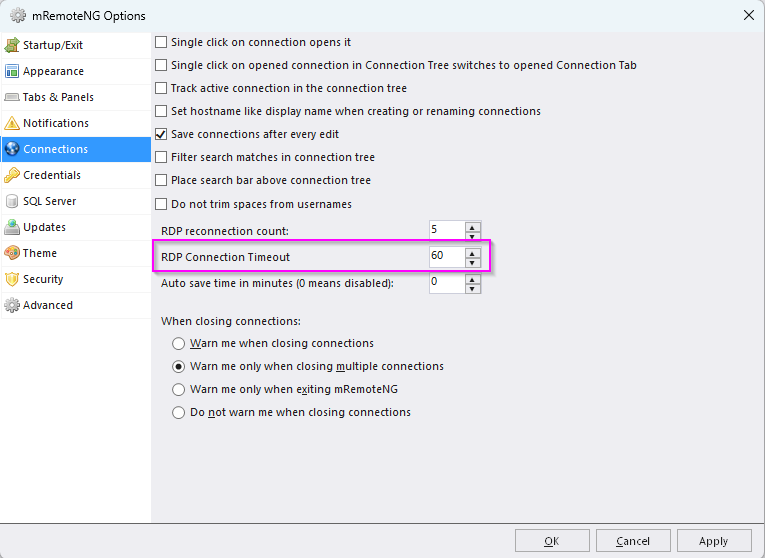
This is the value in mRemoteNG that would make mRemoteNG wait longer before giving up.
RDP Timeout
It's around 30s, so it's related to something else.
mRemoteNG has/had a setting that allowed mstsc to wait longer.
I will have to investigate more and will get back to you.
RDP Timeout
Not sure I made myself clear.
This timeout I refer to is initial RDP connection. Not after I am logged on.
RDP Timeout
Looking for the timeout for RDP connections. We have some slow networks and RDM gives up too fast.
Ribbon Bar size
Reset didn't change anything but ribbon style > simplified did.
Thx
Ribbon Bar size
Allow me to set the ribbon bar to a condensed version so it is not as high or thick as it is now. The latest version made it fatter/taller and not sure I like the real estate theft.
Hide Dashboard permanently?
Super, worked great.
Ty
Hide Dashboard permanently?
No way to just do it in the UI?
Hide Dashboard permanently?
Any progress on this?
Want to hide the Dashboard permanently.
Running version 2024.1.28.0 64-bit
Send keys to remote session fails for enter key
Roger that.
Thanks for the time and effort.