RDP Timeout

Looking for the timeout for RDP connections. We have some slow networks and RDM gives up too fast.
All Comments (14)
Hello Joe,
Thank you for contacting the Devolutions support team.
Could you activate the Keep Alive feature and set it to the value that should fit your disconnection?
This setting is under the entry properties -> General -> Experience -> Keep Alive.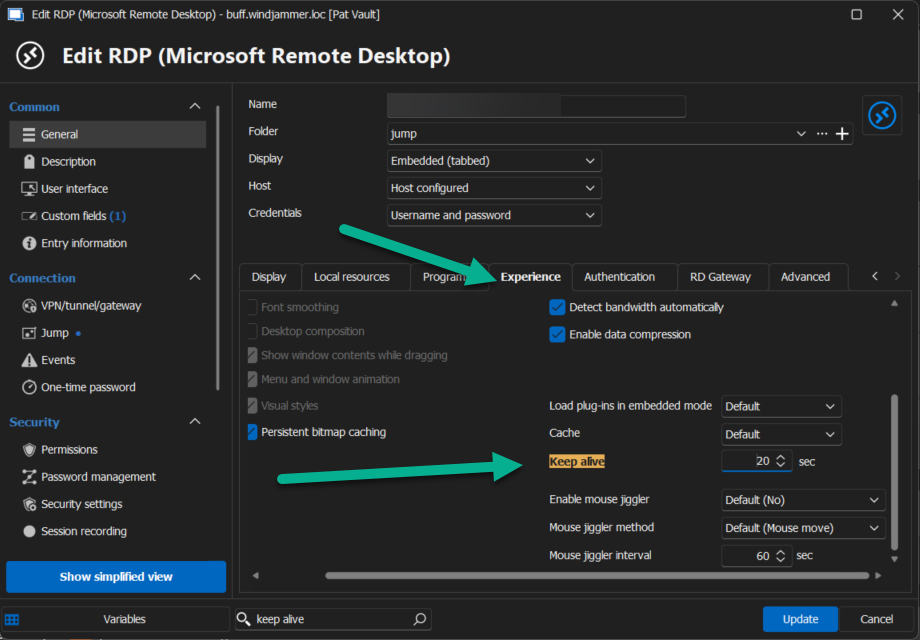
Best regards,
Patrick Ouimet
keepalive.png
Not sure I made myself clear.
This timeout I refer to is initial RDP connection. Not after I am logged on.
Hello
I'm guessing that you're using the embedded RDP? I took a look at this, and the MS RDP ActiveX that we use does have an "overall connection timeout" property that we don't currently expose in any way through the application.
I did check what that property returns on my machine for a default value, and it uses 900 seconds (15 minutes). Confusingly, that's higher than the maximum value that the documentation declares (600 seconds / 10 minutes).
Approximately how long is the connection attempted for in your case? Do you know that it's timing out - what actually happens when the connection fails?
Does it connect with the "external" mode (using mstsc)? How long does the connection or timeout failure take in the case?
My feeling is that the timeout is already configured to the maximum possible, which is quite high, and I wonder if it's actually something else going on.
Please, let me know if something isn't clear or you have other questions
Kind regards,
Richard Markievicz
It's around 30s, so it's related to something else.
mRemoteNG has/had a setting that allowed mstsc to wait longer.
I will have to investigate more and will get back to you.
This is the value in mRemoteNG that would make mRemoteNG wait longer before giving up.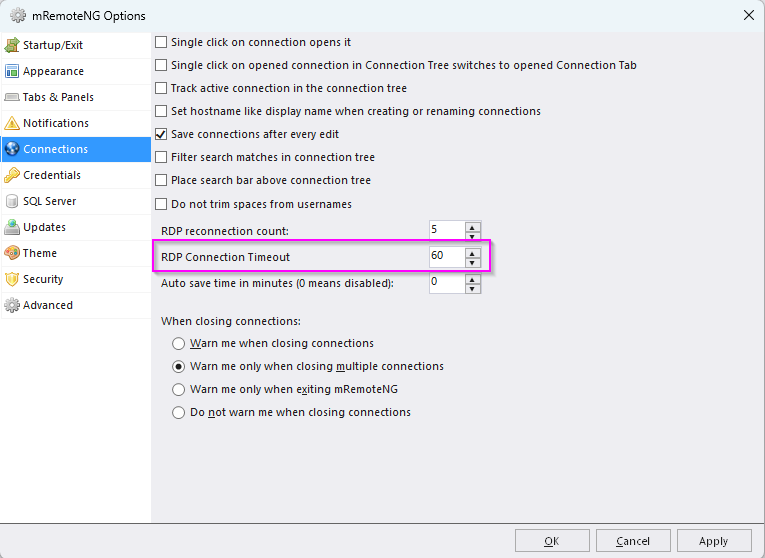
8ee92d77-2eb5-43fc-be60-f420735df451.png
Hello
Thanks for the information. I did check what remoteNG is doing, and that setting corresponds to the property I mentioned in my earlier post.
So, I'm not quite sure what's going on there with regards to the default value, but it's possible a per-machine or environmental default.
Since configuring that makes things work for you with remoteNG, I don't think there's a reason that we can't do the same thing. I'm creating a feature request for this and we'll circle back to this ticket once there's an update. It shouldn't be challenging to add. In the meantime I'm afraid I don't have a workaround to suggest.
Please don't hesitate with any further questions or comments
Kind regards,
Richard Markievicz
MS RDP ActiveX that we use does have an "overall connection timeout" property
that?
Hello
Correct. It's the same control used by remoteNG, and that's what they're doing. I just don't understand why (on my machine) that property has a default value of 15 minutes; which obviously doesn't match what you're seeing.
Thanks and kind regards,
Richard Markievicz
When I see the timeout issue, detailed here:
[Content]
This computer can't connect to the remote computer.
Try connecting again. If the problem continues, contact the owner of the remote computer or your network administrator.
[V] See details [OK]
[Expanded Information]
Error code: 0x904
Extended error code: 0x7
Timestamp (UTC): 07/01/24 03:16:42 PM
It takes around 23-25s to appear.
Hello
That error is definitely network related. Is it solidly reliable with remoteNG with the increased timeout? Do you connect by hostname, or IP address? Is it a direct connection or somehow over the WAN (VPN, tunnel, etc)?
Thanks and kind regards
Richard Markievicz
We connect by FDQN
We use Zscaler for VPN.
When the connection is more responsive, it will be harder to t-shoot this because mRemoteNG and RDM both respond in 3-5s. When there is a delay, mRemoteNG will wait up to 60s, RDM fails around 23-25s.
The funny thing is when I see the:
[Content]
This computer can't connect to the remote computer.
Try connecting again. If the problem continues, contact the owner of the remote computer or your network administrator.
[V] See details [OK]
[Expanded Information]
Error code: 0x904
Extended error code: 0x7
Timestamp (UTC): 07/01/24 03:16:42 PM
pop-up after 20-25s, I can hop on over to mRemoteNG and I can get connected without issues to same endpoint that RDM can't.
So, mRemoteNG is doing something (God knows what) that RDM isn't and that makes RDM fail.
Hello
It almost sounds like on the first connection, it's slower to establish the link but on the second connection it's much faster? Once you switch to remoteNG, the connection or some kind of cache is warm and then it goes straight through?
Is the reverse true? If you set an arbitrarily low timeout on remoteNG, and try it first - after it times out, does RDM connect without trouble?
I'm not familiar with zscaler so I don't know how that part works.
Thanks and kind regards
Richard Markievicz
This is likely going to be one of those forum entries that we never see the resolution on. Too many variables involved here, like network, routing and VPN clients. We can leave this as it is for now.