Copyright screen in Windows

Pressing enter on copyright RDP logon screen does nothing, enter is not being processed.
I do have "On the remote computer" set for Apply Windows key combinations.
I know there is a config someplace that handles this, can't find it.
Please help.
All Comments (4)
Hello,
Thank you for reaching out.
To make sure I understand the issue correctly, could you please confirm the following?
- The logon screen: Is the "copyright" screen the legal notice that appears before the Windows sign-in, with a message and an OK button? If possible, please send a screenshot of it.
- How the session is opened: Do you open the RDP entry in a tab inside Remote Desktop Manager (embedded/tabbed mode), or in an external window? You can check this in the entry's properties under General – Display.
- Your workflow: Is this what normally happens?
- You connect to the RDP entry.
- The copyright screen appears.
- You used to press Enter to accept it and continue to the sign-in screen.
- Now, pressing Enter does nothing.
If so, did Enter work before? And if it did, do you remember when it stopped, for example after updating Remote Desktop Manager?
Your version: Which version of Remote Desktop Manager are you using? You can find it under Help – About.
Once I have this information, I'll be able to point you to the right setting or next step.
Best regards,
Carl Marien
Hello
Carl asked some relevant questions, but I do remember this from a long time ago. The setting you are thinking of is "Grab focus on connect":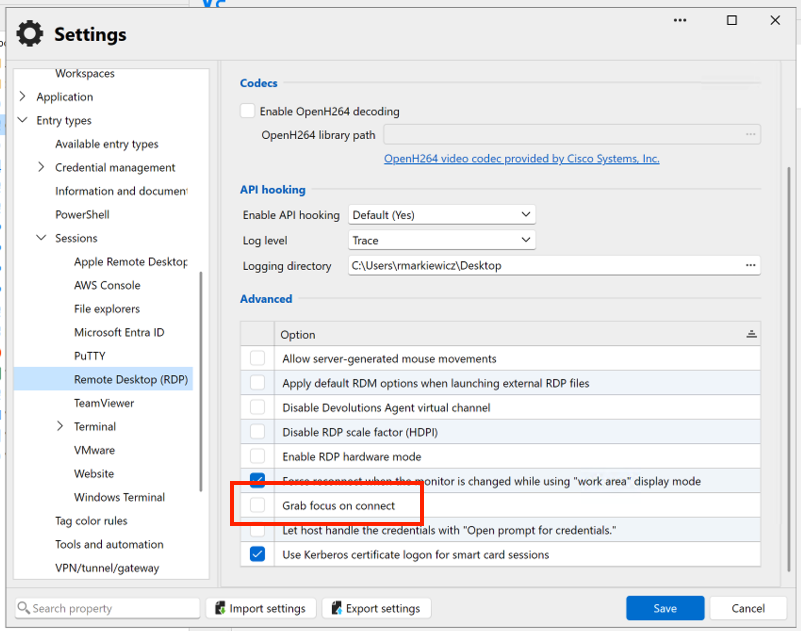
Can you also check if it's enabled? If it's not, and it works, that's great. If it's checked and you still have the problem, this may be a focus-related issue in the application generally for 2026.3. The answers to Carl's questions will be relevant.
Thanks and kind regards,
Richard Markievicz
Screenshot 2026-09-30 at 10.39.59.png
Hello again
I just checked it on 2026.3.9, and that setting does work for me, so please let us know if you have a problem using it.
Kind regards,
Richard Markievicz
Grab focus on connect was it.
Please consider making this a default setting.
Thanks.