
pavlyukoff
Not Double Action
Hello, @David Hervieux
See a big update.
I there a way in this update to say for tool to start only for first entry and stop only for last ?
To act as vpn, but not be a vpn, because vpn used too.
All RDP sessions open with scroll bars.
As for me - now it works
Jump tree on run scenarios
SOLVED : found new option for tool, that was set to TRUE by default.
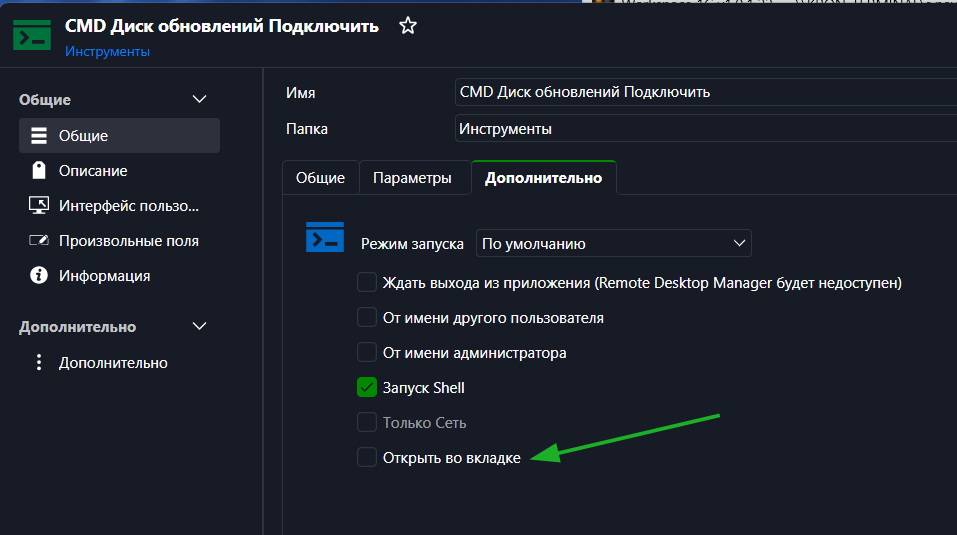
Unchecked this and now tools not change active row in navigation panel on launch RDP
Window is slightly too small to fit the RDP session
@pavlyukoff Can you further explain the "smartfit"? Are you talking about the workaround with smart sizing or something else?
You can also follow the forum thread for updates.
Best regards,
@Alexis Beauparlant - yes, i'm about it and yes. As for me - helps turn on scaling (not smart sizing) and then turn off it (every time).
Already moved to watch progress to those topic. Thanks
Jump tree on run scenarios
Is screenrecording needed or it understood by words ?
All RDP sessions open with scroll bars.
22 days ago it has started ?
Yesterday have updated only and also now waiting for really fix.
Jump tree on run scenarios
I have scenario for event for rdp connection.
Now it always open tree and activate element in this tree for scenario when starting rdp.
It's very annoying
Window is slightly too small to fit the RDP session
Yes. New version start RDP with smartfit with scrollbars. Very ugly
2026.1.12.0 - Wrong Cert Expire Rate
Understand.
But when it were external files - main idea was to track all of those files in one place.
Some scripts update certificates - and RDM at start just check dates and update them, when needed (it was a hope to this behavoir).
Now - as i understand - i must update every cert manually with open each and no plans at all to do this in auto mode ?
If so - ticket is closed )
2026.1.12.0 - Wrong Cert Expire Rate
Ok.
Understand of migrate to new type - it's ok.
But x509 have no link to external file (it used for apache) and no Update button.
Will it be updated at start of RDM ?
Or i must update every file manually and remember where which were placed (when see expired) ?
2026.1.12.0 - Wrong Cert Expire Rate
It's a Document (Certificate). File for apache.
X509 shows correctly - but from start idea is to watch\update file expire date on start RDM - to control updates of pem files.
2026.1.12.0 - Wrong Cert Expire Rate
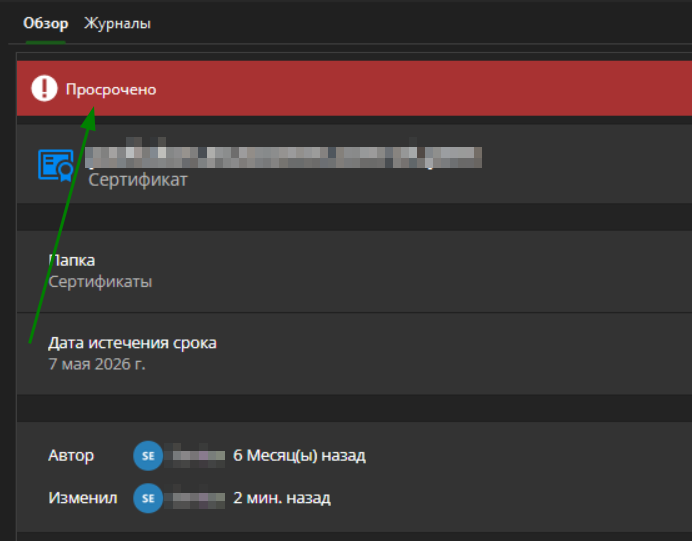
At start main page show me, that my PEM file in few days will expire.
I've renew my PEM - press update document - choose that PEM (you promise, that it will be done automatically at start).
Now it shows me with RED, that new file were expire 2 monthes ago.
But - expire date is....... 2026.05.07
Site with that pem opened without eny alerts and show same expire date.
Something wrong with logic or with some components for certificates.
Not Double Action
I'm already use VPN too for those connections.
Seems - I cannot use 2 VPN in one time
Not Double Action
I have 2 (or more) connections with BeforeStart and OnEnd actions.
Actions uses same Tool: MountVirtualDisk.cmd and UnmountVirtualDisk.cmd
When i connect to both connections - it buggy but it works fine.
But when i disconnect from one - i cannot disable do OnEnd and in tool (script) i cannot know - used it now in any other connection or not.
So - we need ability or checkbox - that RDM will see and not start action, if it used in other active connection.
"Only for FIRST active" - for "Before" actions
and
"Only for LAST active" - for "End" actions.
Hotkey for start entries
Yes
I want to start some entries without filtering list of searching.
Even favorities can be huge and i need to switch to them before and then switch back.
So if we can set hotkey for some entries - we can start most popular entry very quick.
Maybe even with local\global variants.
PS LOCAL - File not found
Hello - found some information. Here full comand line of RDM started process
"C:\Program Files\Devolutions\Remote Desktop Manager\runtimes\win-x64\native\wt\WindowsTerminal.exe"
-p "Windows PowerShell"
-d "C:\Program Files\Devolutions\Remote Desktop Manager"
"c:\windows\System32\windowspowershell\v1.0\powershell.exe"
-Command "& `"C:\Users\Semion\AppData\Local\Temp\RDM\e96dd709-34b7-4df3-9892-2548788012a3.ps1`""
and here help from powershell
PowerShell -Command "& {Get-EventLog -LogName security}"as wee see - "-Command" require real command, but not file.
if we mod full command line to
"C:\Program Files\Devolutions\Remote Desktop Manager\runtimes\win-x64\native\wt\WindowsTerminal.exe"
-p "Windows PowerShell"
-d "C:\Program Files\Devolutions\Remote Desktop Manager"
"c:\windows\System32\windowspowershell\v1.0\powershell.exe" "C:\Users\Semion\AppData\Local\Temp\RDM\e96dd709-34b7-4df3-9892-2548788012a3.ps1"
it works fine
PS LOCAL - File not found
I can record video if needed.
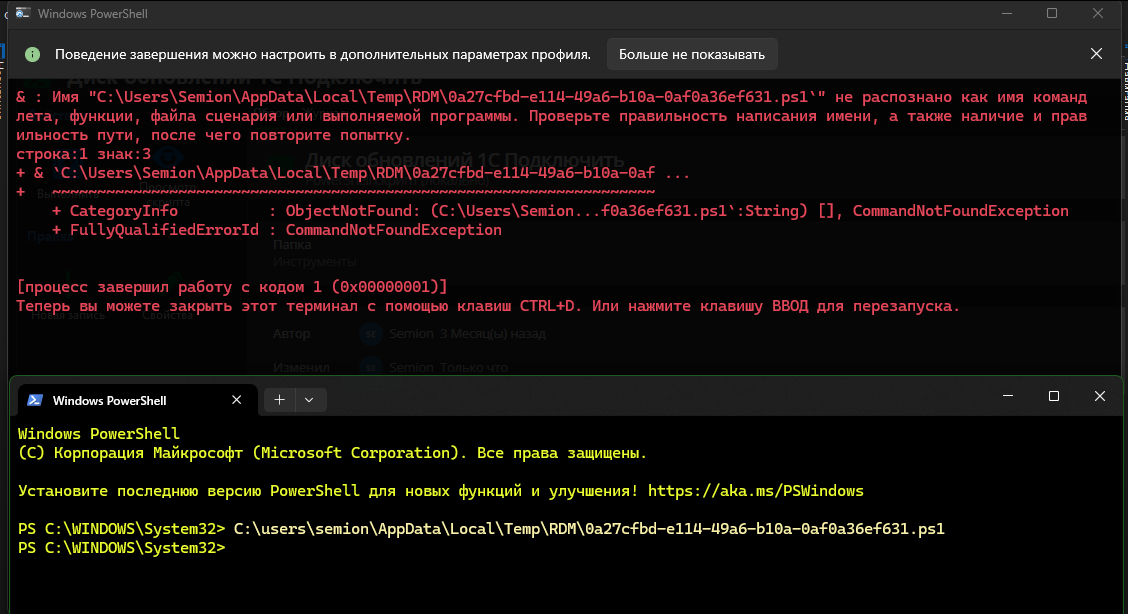
RDM start ps file with ' at end of name - see screenshot.
When i start same file from windows terminal with no admin rights - it run successfull.
It starts after some update - seems ot version with .net9
Before this i have no problems
What else i can do to help localize trouble ?
PS LOCAL - File not found
Can I guess 1 reason (looking to blackbox) for 2 tickets ?
RDM cannot recognize correctly user account and:
For this case add ' to the end of tmp file name and system cannot find file ending with '.
For ticket where RDM ask admin rights - it think, that destination and current accounts are different - this is a reason for asking admin rights (to access another account). Even for account, that present in Administrators group.
PS LOCAL - File not found
Have run successfuly those script from error in native windows terminal.
Maybe RDM's terminal have some troubles ? (as from last my problem with asking admin rights from RDM)
PS LOCAL - File not found
No - i just run RDM.
Seems - if i have no right to write TEMP folder - ps1 file would not have been created.
But file created and have my script inside.
Understand your thinks.
Cleared all TEMP folder and files.
Restart RDM.
Run script.
New file ps1 created.
Error in place.
Checked new file right: system, administrator and my user have full rights (file were created ))) ).
PS LOCAL - File not found
RDM - 2025.1.37.0 64-bit
Windows 11
Trying to use tool type "PowerShell Script Local"
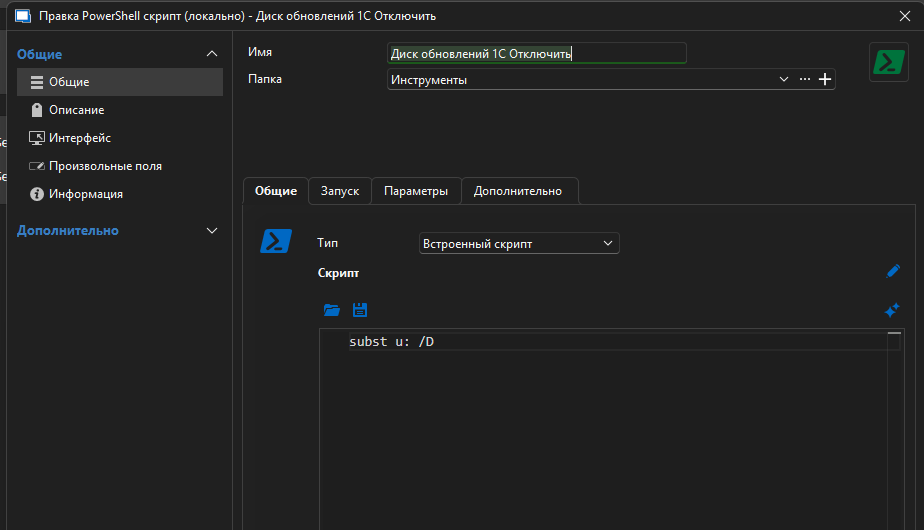
When I start it from EDIT - it works.
When I try to start it from RUN button
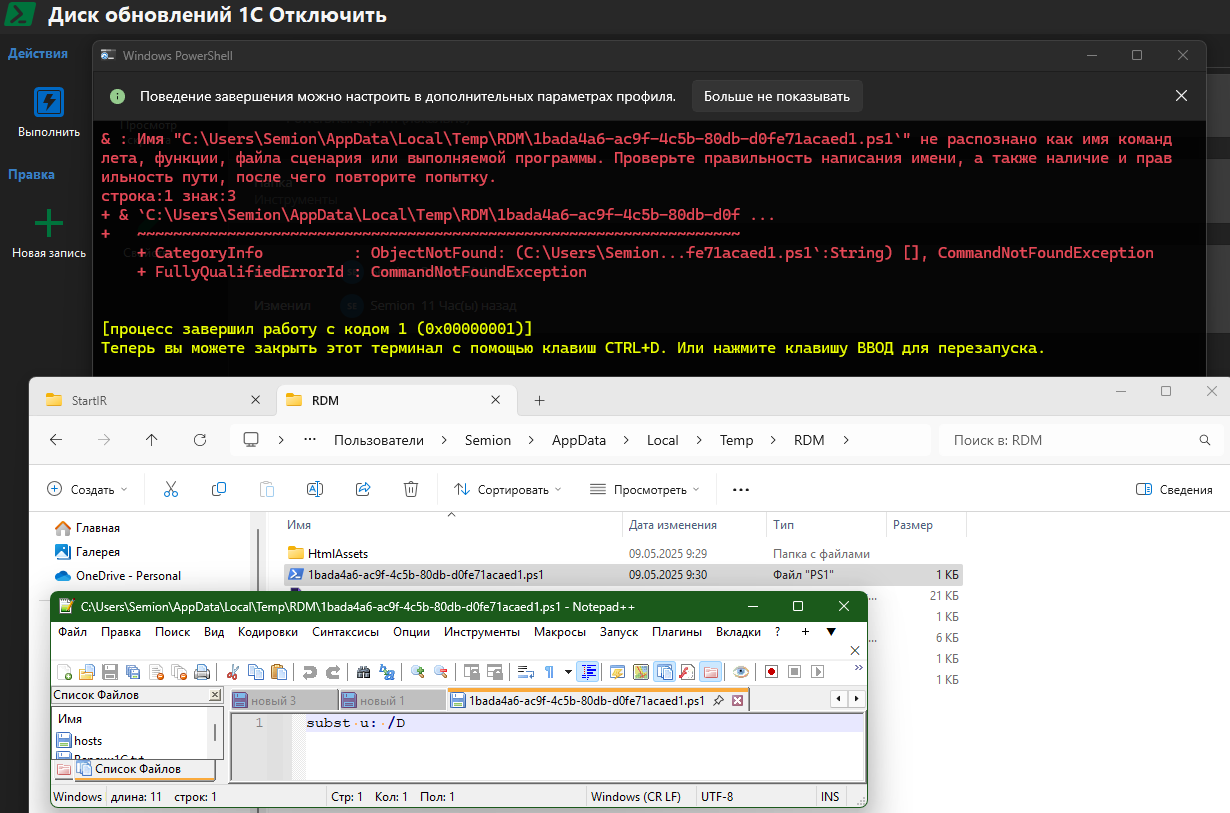
got exception - file not found.
File present in my temp folder.
Wrong ask for administrative rights
Strange, but found settings for MY LOCAL terminal to start always in privileged mode.
Switched it OFF and now RDM not ask admin rights.
It was not windows UAC - as we see on screenshots - it was RDM question.
And if RDM start it's own terminal - why it was ask for those rights ?
Wrong ask for administrative rights
With script type "Command line" - it works fine (seems left this as temporary solution)
With script type "PowerShell (local)" - ask admin rights.
Wrong ask for administrative rights
Downloaded portable (ZIP), extracted to desktop new folder.
not import any files
created new PS script - internal
typed "echo hello"
on RUN button it still ask
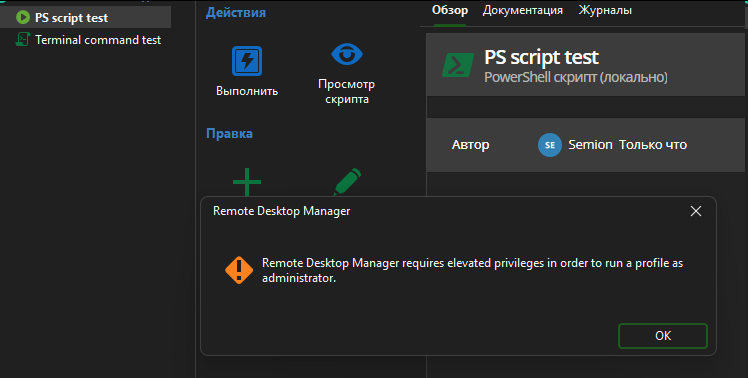
Wrong ask for administrative rights
Seems it always start "elevate-shim.exe".
No matter - have i check "run as administrator" in script options or no.