2026.1.12.0 - Wrong Cert Expire Rate

At start main page show me, that my PEM file in few days will expire.
I've renew my PEM - press update document - choose that PEM (you promise, that it will be done automatically at start).
Now it shows me with RED, that new file were expire 2 monthes ago.
But - expire date is....... 2026.05.07
Site with that pem opened without eny alerts and show same expire date.
Something wrong with logic or with some components for certificates.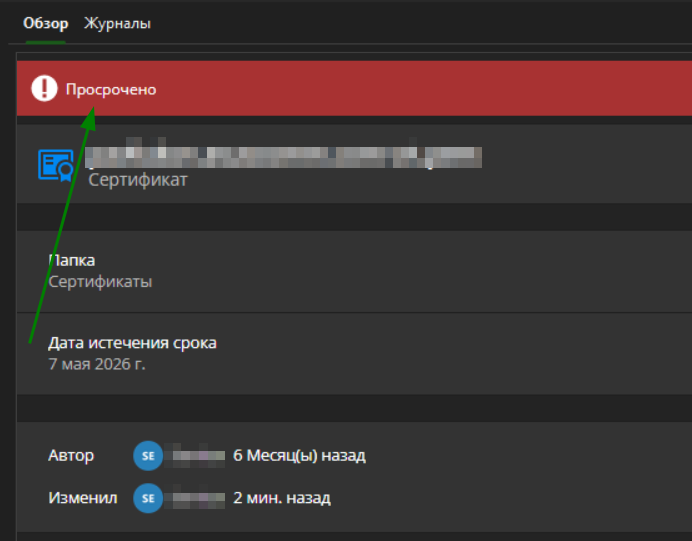
pem1.png
Recommended Answer
Hello,
Thank you for the clarification.
You understood the current behavior correctly: at the moment, Remote Desktop Manager does not support automatically keeping an entry synchronized with an external certificate file on disk. Internally, we confirmed that this was closer to what the old Document (Certificate) entry tried to do, but that entry is deprecated and did not handle this reliably, which is consistent with the incorrect expiration behavior you originally reported. The newer X.509 entry is designed to manage certificate data itself, not to stay linked to a file system object, so it will not automatically track changes made to an external PEM file.
So today, if your workflow depends on scripts renewing certificate files outside of RDM and you want RDM to reflect those changes automatically, we unfortunately do not have a supported feature that fully covers that scenario. With the X.509 entry, the certificate would need to be updated separately in RDM, which means keeping the external file and the RDM entry in sync manually.
At this time, this is not in our short-term plans. We do see the value in the use case, but right now it is not something we are planning to address in the near future.
That means your original report was valid, but the practical outcome is that the old Document (Certificate) entry will not be improved for this behavior, and the X.509 entry is the recommended option going forward for supported certificate handling.
Thank you again for taking the time to explain your workflow and expectations so clearly.
Kind regards,
Stephan
All Comments (8)
Hello
Can you tell me what kind of entry you created to hold the certificate? Is it a Document (Certificate) entry or an X.509 Credential entry?
Thanks and kind regards,
Richard Markievicz
It's a Document (Certificate). File for apache.
X509 shows correctly - but from start idea is to watch\update file expire date on start RDM - to control updates of pem files.
Hi,
Thanks for confirming!
We are currently looking into this internally.
I'll update you here as soon as we have more information.
Thanks,
Stephan
Hi,
Thank you for your detailed report and for confirming that you’re using a Document (Certificate) entry.
We’ve reviewed this internally and would like to share some clarification. The Document (Certificate) entry type is currently deprecated and will be removed in a future version of Remote Desktop Manager. Because of this, issues such as incorrect expiration display (like the one you’re seeing) are not being actively addressed for that entry type.
We recommend migrating your certificate to an X.509 Credential entry instead. This newer entry type is fully supported and correctly handles certificate expiration dates, as you’ve already noticed in your testing.
If you find that any information or functionality you need is missing from the X.509 entry, or if the migration process is unclear or time-consuming (for example, if you have many entries to update), please let us know. We’d be happy to guide you or explore ways to make this transition easier.
https://docs.devolutions.net/rdm/kb/how-to-articles/configure-x509-certificate-credential-entry-type/
Thanks again for bringing this to our attention, and don’t hesitate to reach out if you need assistance with the migration.
Kind regards,
Stephan
Ok.
Understand of migrate to new type - it's ok.
But x509 have no link to external file (it used for apache) and no Update button.
Will it be updated at start of RDM ?
Or i must update every file manually and remember where which were placed (when see expired) ?
Hello,
Thank you for your follow-up and for the additional details.
With the X.509 Credential entry type, certificates can be stored either directly in the database or referenced from the Windows certificate store. This entry type is designed to properly track certificate details such as expiration dates.
Regarding updates, the X.509 entry does include an “Update Certificate” button within the entry properties, which allows you to manually refresh or replace the certificate when needed.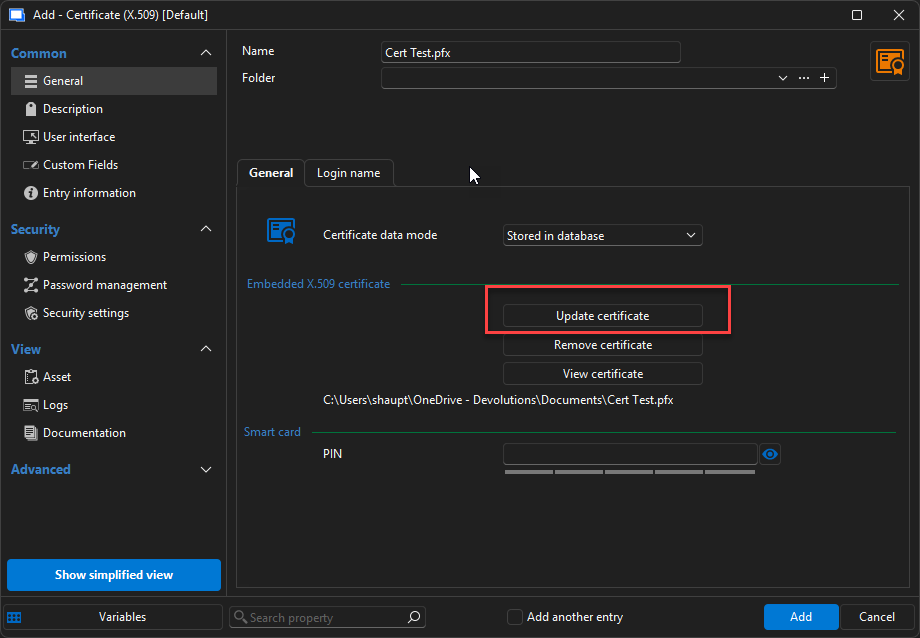
For expiration tracking, you can configure notifications directly in the entry properties. This allows you to define when and how you would like to be alerted before the certificate expires, helping you stay on top of renewals.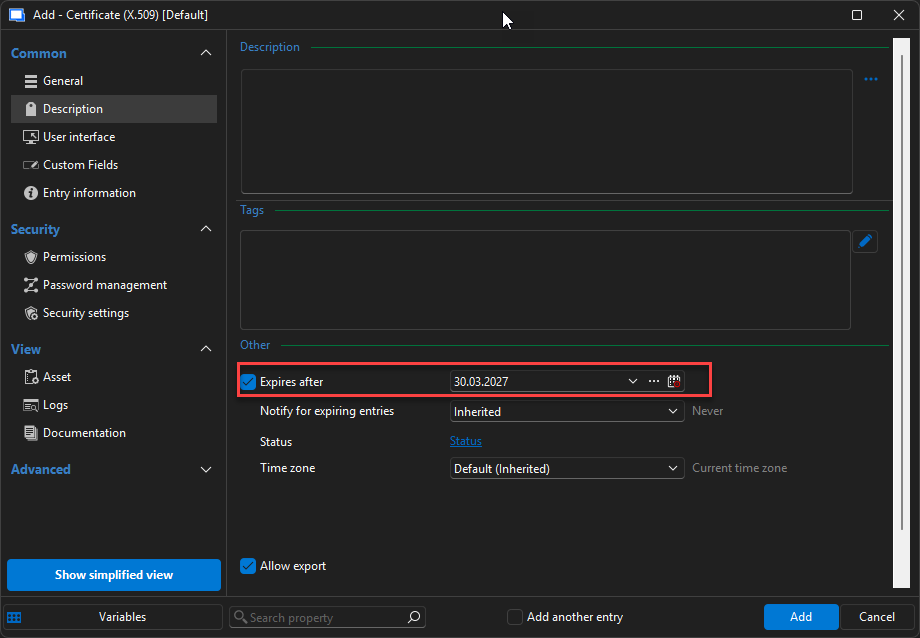
I hope this information is helpful. Feel free to ask if you have any questions.
Kind regards,
Stephan
612359c7-ede0-44f9-ad32-4bfb815c6a6d.png
7198d636-b7d1-4a5f-8ee9-11594895f9d7.png
Understand.
But when it were external files - main idea was to track all of those files in one place.
Some scripts update certificates - and RDM at start just check dates and update them, when needed (it was a hope to this behavoir).
Now - as i understand - i must update every cert manually with open each and no plans at all to do this in auto mode ?
If so - ticket is closed )
Hello,
Thank you for the clarification.
You understood the current behavior correctly: at the moment, Remote Desktop Manager does not support automatically keeping an entry synchronized with an external certificate file on disk. Internally, we confirmed that this was closer to what the old Document (Certificate) entry tried to do, but that entry is deprecated and did not handle this reliably, which is consistent with the incorrect expiration behavior you originally reported. The newer X.509 entry is designed to manage certificate data itself, not to stay linked to a file system object, so it will not automatically track changes made to an external PEM file.
So today, if your workflow depends on scripts renewing certificate files outside of RDM and you want RDM to reflect those changes automatically, we unfortunately do not have a supported feature that fully covers that scenario. With the X.509 entry, the certificate would need to be updated separately in RDM, which means keeping the external file and the RDM entry in sync manually.
At this time, this is not in our short-term plans. We do see the value in the use case, but right now it is not something we are planning to address in the near future.
That means your original report was valid, but the practical outcome is that the old Document (Certificate) entry will not be improved for this behavior, and the X.509 entry is the recommended option going forward for supported certificate handling.
Thank you again for taking the time to explain your workflow and expectations so clearly.
Kind regards,
Stephan