PS LOCAL - File not found

RDM - 2025.1.37.0 64-bit
Windows 11
Trying to use tool type "PowerShell Script Local"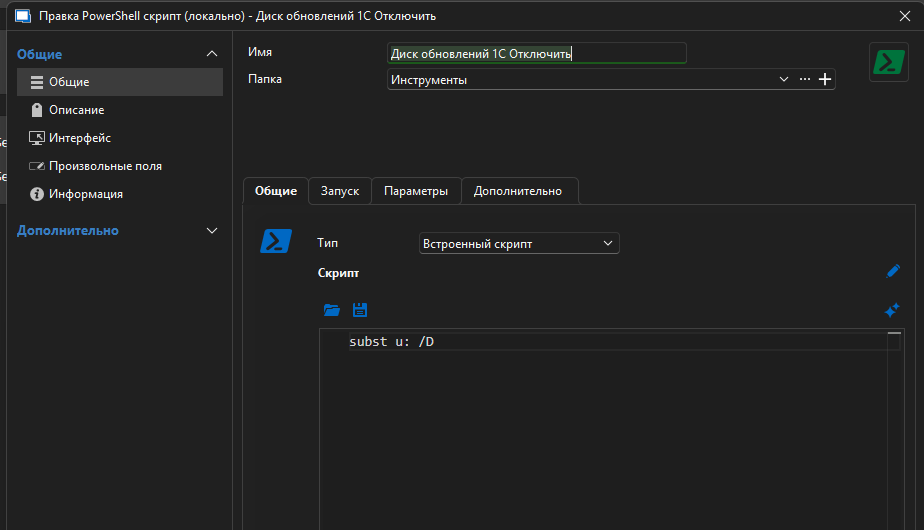 When I start it from EDIT - it works.
When I try to start it from RUN button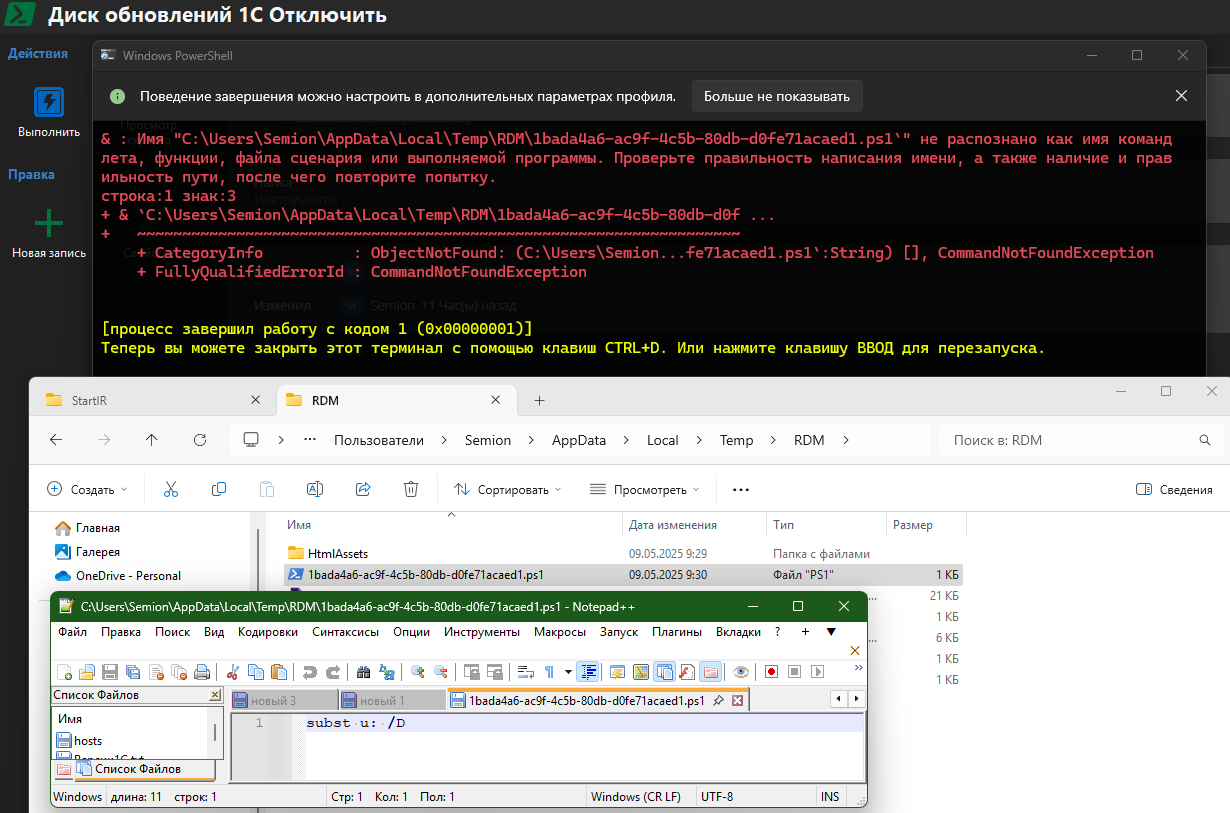 got exception - file not found.
File present in my temp folder.
22.png
11.png
All Comments (9)
Hello,
Thank you for reaching out to Devolutions Support.
Could you confirm whether you're launching RDM using RunAs?
If not, please check whether you have read/write access to the Temp folder.
Let me know what you find.
Best regards,
Jacob Lafrenière
No - i just run RDM.
Seems - if i have no right to write TEMP folder - ps1 file would not have been created.
But file created and have my script inside.
Understand your thinks.
Cleared all TEMP folder and files.
Restart RDM.
Run script.
New file ps1 created.
Error in place.
Checked new file right: system, administrator and my user have full rights (file were created ))) ).
Have run successfuly those script from error in native windows terminal.
Maybe RDM's terminal have some troubles ? (as from last my problem with asking admin rights from RDM)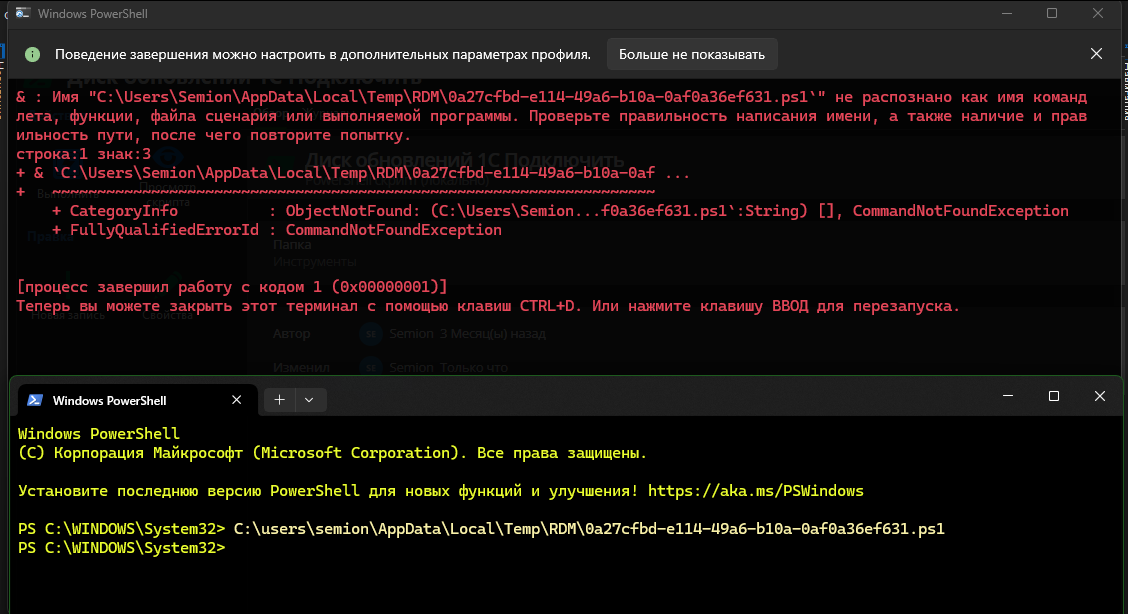
изображение.png
Can I guess 1 reason (looking to blackbox) for 2 tickets ?
RDM cannot recognize correctly user account and:
- For this case add ' to the end of tmp file name and system cannot find file ending with '.
- For ticket where RDM ask admin rights - it think, that destination and current accounts are different - this is a reason for asking admin rights (to access another account). Even for account, that present in Administrators group.
Hello,
Thank you for your follow-up.
I was not able to reproduce the issue on my end. Could you please check your local settings to ensure there are no permission-related restrictions that might be causing this behavior?
In a previous case, you found that a setting in your PowerShell terminal was configured to always run as Administrator, which led to a similar issue.
RDM relies on certain features from your local system. If it cannot access these, it may not function as expected.
Please let me know if you discover anything noteworthy.
Best regards,
Jacob Lafrenière
I can record video if needed.
RDM start ps file with ' at end of name - see screenshot.
When i start same file from windows terminal with no admin rights - it run successfull.
It starts after some update - seems ot version with .net9
Before this i have no problems
What else i can do to help localize trouble ?
Hello,
Thank you for the follow-up.
I will send you a private message with a ShareFile link where you can upload your video.
Could you also include an overview of the properties of the PowerShell entry in the video?
Best regards,
Jacob Lafrenière
Hello - found some information. Here full comand line of RDM started process
"C:\Program Files\Devolutions\Remote Desktop Manager\runtimes\win-x64\native\wt\WindowsTerminal.exe"
-p "Windows PowerShell"
-d "C:\Program Files\Devolutions\Remote Desktop Manager"
"c:\windows\System32\windowspowershell\v1.0\powershell.exe"
-Command "& `"C:\Users\Semion\AppData\Local\Temp\RDM\e96dd709-34b7-4df3-9892-2548788012a3.ps1`""
and here help from powershell
PowerShell -Command "& {Get-EventLog -LogName security}"as wee see - "-Command" require real command, but not file.
if we mod full command line to
"C:\Program Files\Devolutions\Remote Desktop Manager\runtimes\win-x64\native\wt\WindowsTerminal.exe"
-p "Windows PowerShell"
-d "C:\Program Files\Devolutions\Remote Desktop Manager"
"c:\windows\System32\windowspowershell\v1.0\powershell.exe" "C:\Users\Semion\AppData\Local\Temp\RDM\e96dd709-34b7-4df3-9892-2548788012a3.ps1"
it works fine
Hello,
Thank you for the follow-up.
We identified a similar case on our end related to this type of entry. Based on that, I believe the issue you're encountering will be resolved with an upcoming patch.
I’ll follow up with you once the fix has been deployed in a future update.
Best regards,
Jacob Lafrenière