
clement_chen
ZModem - Up/Download broken - ssh - 2025.2.26.0
Hello,
The problem has been fixed.
Thank a lot!.
Have a nice day,
Clement.
ZModem - Up/Download broken - ssh - 2025.2.26.0
Hello,
Here are the logs that came:
SZ
**<-H ZRQINIT(0, 0, 0, 0)


Server is requesting to send a file through ZMODEM


->H ZRINIT(0, 0, 0, 0) aa51


<-H ZRQINIT(0, 0, 0, 0)


Server is requesting to send a file through ZMODEM


->H ZRINIT(0, 0, 0, 0) aa51
RZ
->H ZFIN(0, 0, 0, 0) 022d


<-H ZRINIT(0, 0, 0, 35)


Server is requesting to receive a file through ZMODEM


->H ZFIN(0, 0, 0, 0) 022d


<-H ZRINIT(0, 0, 0, 35)


Server is requesting to receive a file through ZMODEM


->H ZFIN(0, 0, 0, 0) 022d


<-H ZRINIT(0, 0, 0, 35)


Server is requesting to receive a file through ZMODEM


->H ZFIN(0, 0, 0, 0) 022d


<-H ZRINIT(0, 0, 0, 35)
For both SZ and RZ, the log output is infinite.
But the log output pace of SZ is very slow, whereas RZ is really fast.
RDM version: 2025.2.29.0 64-bit (JIT)
Have a nice day,
Clement.
ZModem - Up/Download broken - ssh - 2025.2.26.0
Hello Clement,
Thanks for the additional feedback. It would make sense that it stopped working with 2025.2 as with that version we made a major change to our terminal library. The codebase was converted from C to C#, with a goal of being more maintainable and for some features to be more easy to implement in the future. While we tried to translate every function exactly, unfortunately some things slipped by us and that would explain why ZModem might not be working.
We'll try to get this back in working order as soon as we can.
Regards,
Thank you for the explanation!
Hello,
We have a potential fix internally and it should be available starting from the next release of RDM (2025.2.28.0).
Best Regards,
Hello,
After updating to 2025.2.28.0, ZModem still doesn't work.
Downloading will output this:
**

sz: skipped: yes.txt
                    **
Upload file:
rz waiting to receive.**But not files is moving at all.
Have a nice day,
Clement.
ZModem - Up/Download broken - ssh - 2025.2.26.0
Hello,
I can confirm that in the newest version of RDM, ZModem is broken.
I can't remember precisely what was the last functional version, but my colleague 2024.3.25.0 64-bit is still working.
(I would say that at least, all version from 2025.2.13.1 are broken)
Have a nice day,
Clement.
Chinese character in password fields
Hello,
Since the last update (2024.1.27.0 64-bit), it works perfectly !
Thank you a lot for your help ! Now I don't have to worry every time I type a password !
Have a nice day,
Clement.
Chinese character in password fields
Hello,
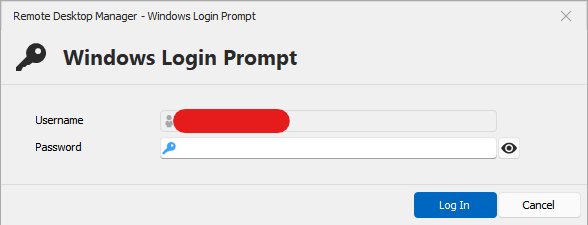
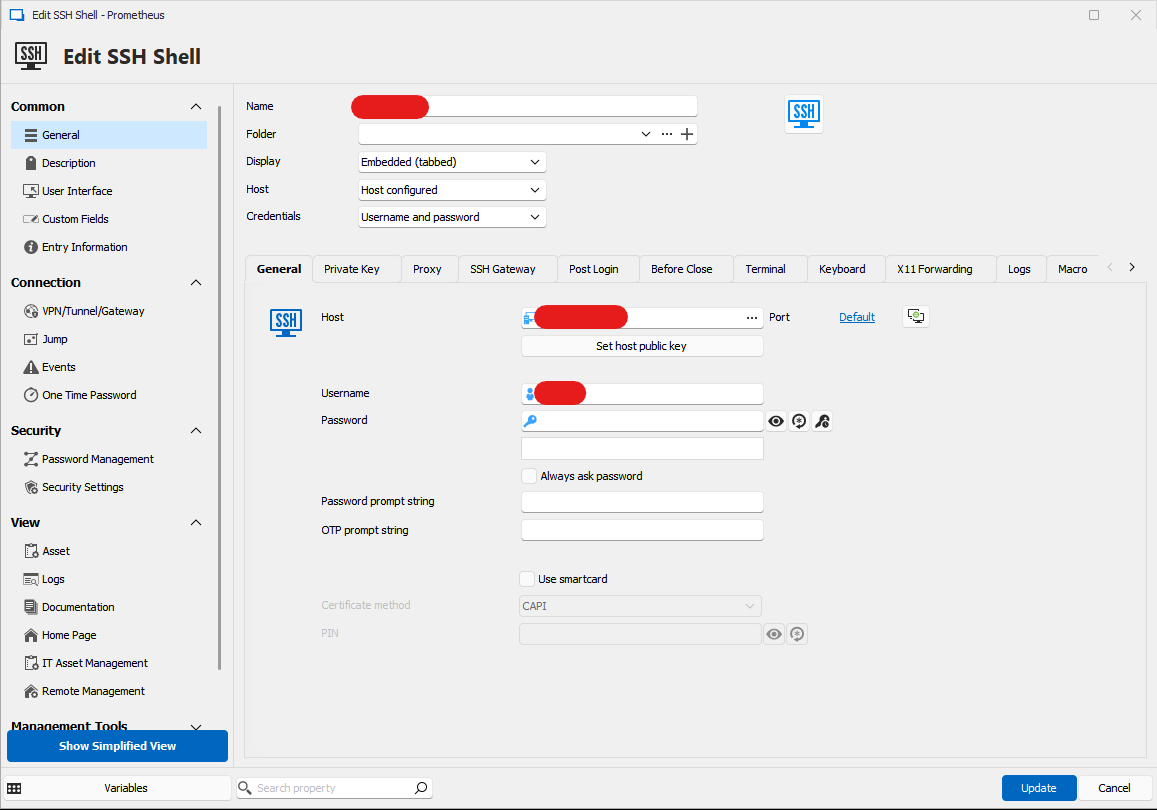
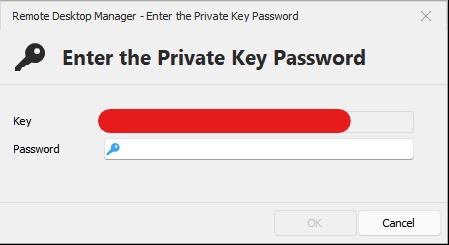
At the moment (2024.1.25), here are the different prompts where it doesn't work (I only use those ones, so I don't know if there is windows where it works):
This is the window for unlocking the application with the computer credentials
This is the window to edit a SSH Shell configuration (RDP doesn't work either)
This is the window to enter a SSH private key passphrase
Have a nice day,
Clement.
RDM crashes at startup
Hello,
Thank you for the update !
It works without issue now !
Have a nice day,
Clement.
Chinese character in password fields
Hello,
Thank you for the follow up.
Have nice day,
Clement.
Chinese character in password fields
Hello,
I have updated to the version 2024.1.25.
The option now does show up in the setting but after being enabled, my keyboard doesn't switch back to English mode (when I am typing in a password field).
And the IME window still appear in the top left corner of my screen.
Moreover, if I disable the setting "Disable IME for password fields", when I type my password using my Chinese keyboard in English mode,
then RDM will show full-width English characters and will duplicate my input. (But if I do so when I click the unhide password field button, then the characters are in normal width and unique.)

Have a nice day,
Clement.
Chinese character in password fields
Hello,
I have updated to the version 2024.1.24.
The option doesn't show up in the setting and the IME window doesn't disappear when I type the passphrase of my SSH private key.
Have a nice day,
Clement.
RDM crashes at startup
Hello,
I have found which feature make RDM crash, it's because I have enable Security -> Application security (local) -> Use this computer's credentials as application password.
After disabling this option, I have restarted RDM 2 times, because the first time there was some cryptographics errors.
At the second reboot, RDM now works again.
Have a nice day,
Clement.
RDM crashes at startup
Hello,
As you can see in the attached screenshot, with the latest update (2024.1.24.0), RDM has an error on startup.
RDM window then go blank with just the menu on top. I can't use it at all.
I have send you the error report to you.
DB : mysql lite
EDIT: Here is the details
NullReferenceException - Object reference not set to an instance of an object.

   at Devolutions.RemoteDesktopManager.Managers.LockManager.ValidateApplicationPasswordLogon(Boolean unlockMode)
   at Devolutions.RemoteDesktopManager.Managers.LockManager.ApplicationLogon(Boolean unlockMode)
   at Devolutions.RemoteDesktopManager.Forms.FrmMainDocumentManager.FrmMainRibbon_Shown(Object sender, EventArgs e)
   at DevExpress.XtraEditors.XtraForm.OnShown(EventArgs e)
   at System.Windows.Forms.Control.InvokeMarshaledCallbackHelper(Object obj)
   at System.Threading.ExecutionContext.RunInternal(ExecutionContext executionContext, ContextCallback callback, Object state)
--- End of stack trace from previous location ---
   at System.Threading.ExecutionContext.RunInternal(ExecutionContext executionContext, ContextCallback callback, Object state)
   at System.Windows.Forms.Control.InvokeMarshaledCallbacks()
------------------------ extended stack ------------------------
   at Devolutions.RemoteDesktopManager.Forms.FrmErrorMessage.ShowErrorMessage(Exception exception, String message, String title)
   at Devolutions.RemoteDesktopManager.Forms.FrmErrorMessage.ShowErrorMessage(Exception exception, String title)
   at Devolutions.RemoteDesktopManager.Managers.LogManager.OnThreadException(Object sender, ThreadExceptionEventArgs t)
   at System.Windows.Forms.Application.ThreadContext.OnThreadException(Exception ex)
   at System.Windows.Forms.Control.InvokeMarshaledCallbacks()
   at System.Windows.Forms.Control.WndProc(Message& m)
   at DevExpress.XtraEditors.DForm.WndProc(Message& m)
   at DevExpress.XtraEditors.XtraForm.WndProc(Message& msg)
   at DevExpress.XtraBars.Ribbon.RibbonForm.WndProc(Message& msg)
   at Devolutions.RemoteDesktopManager.Forms.FrmMainDocumentManager.WndProc(Message& m)
   at System.Windows.Forms.Control.ControlNativeWindow.WndProc(Message& m)
   at System.Windows.Forms.NativeWindow.Callback(HWND hWnd, MessageId msg, WPARAM wparam, LPARAM lparam)
   at System.Windows.Forms.NativeWindow.DefWndProc(Message& m)
   at DevExpress.Utils.Taskbar.Core.FilterWindow.WndProc(Message& m)
   at System.Windows.Forms.NativeWindow.Callback(HWND hWnd, MessageId msg, WPARAM wparam, LPARAM lparam)
   at Windows.Win32.PInvoke.DispatchMessage(MSG* lpMsg)
   at System.Windows.Forms.Application.ComponentManager.Microsoft.Office.IMsoComponentManager.FPushMessageLoop(UIntPtr dwComponentID, msoloop uReason, Void* pvLoopData)
   at System.Windows.Forms.Application.ThreadContext.RunMessageLoopInner(msoloop reason, ApplicationContext context)
   at System.Windows.Forms.Application.ThreadContext.RunMessageLoop(msoloop reason, ApplicationContext context)
   at Devolutions.RemoteDesktopManager.Program.Main(String[] args)
Have a nice day,
Clement.
SFTP Download window
Hello,
Thank you for the update !
Have a nice day,
Clement.
Chinese character in password fields
Hello,
Thank you for your replies !
I'm looking forward to try and test it !
Have a nice day,
Clement.
Chinese character in password fields
Hello,
Any news about the implementation of this feature ?
It would really save a lot of typo and backspace click for Asian people.
Have a nice day,
Clement.
SFTP Download window
Hello,
Since the last update (Version : 2024.1.23.0 64-bit), the SFTP download window now refresh itself automatically !
Thank you for your work !
Unfortunately, we still do not see a way to close this window after the download is completed.
Do you have any news regarding this feature ?
Have a nice day,
Clement.
SSH sessions no longer use ssh key
Hello,
We have the same problem here.
Have a nice day,
Clement.
RDM Crash when ssh session disconnect on linux server reboot
Hello,
This issue seemed to have been fixed in the version 2023.2.30.0. But with the version 2023.2.32.0, it came back.
The good news is that I have identified which setting makes RDM crash when I reboot a remote Linux server with SSH.
In SSH Shell -> General -> Terminal -> Advanced -> Use SFTP connection for remote file transfer.
If this setting is ON with the SSH connection that you are trying to reboot, RDM will crash just after the remote server is disconnecting.
When OFF, I have no issue at all.
Hope that this can help you.
Have a nice day,
Clement.
Zmodem download crash
Hello,
Thank you for your hard work !
I have been testing the new version all day. I have managed to successfully download different huge files such as 139M file.
But for some reason, on some download this issue still occurs. I have attached the log file for you to look at, and a screenshot of the terminal output when this error appear.

Have a nice day,
Clement.
SSH font spacing issue
Hello,
This issue seems to have been fixed with the version 2023.2.24.0 64-bit, at least for DejaVu Sans Mono.
Thank you for your work !
Have a nice day,
Clement.
RDM Crash when ssh session disconnect on linux server reboot
Hello,
Thank you for your reply.
Feel free to contact me if you need more data to replicate this issue.
Have a nice day,
Clement.
RDM Crash when ssh session disconnect on linux server reboot
Hello,
The same issue appear with the portable version of RDM.
Here is the log content :
Data source type: SQLite
Database path: C:\Users\Clement_Chen\AppData\Local\Devolutions\RemoteDesktopManager\Connections.db
Culture: en-US
OS: Windows 10 Version 22H2 (OS Build 19045.3324) 64-bit
OS Architecture: X64
Running since: 27 min 8 sec / Memory usage: 414 MB
Dpi: 100%
Installation path: C:\Program Files\Devolutions\Remote Desktop Manager
In Terminal Services: false
Proxy: Default
Opened connection: 10

========== DETAILS ==========

[2023/8/16 AM 11:21:09 - 2023.2.22.0 - 64-bit] Error Silent: System.Threading.ThreadAbortException: Thread was being aborted.
   at System.Threading.WaitHandle.WaitOneNative(SafeHandle waitableSafeHandle, UInt32 millisecondsTimeout, Boolean hasThreadAffinity, Boolean exitContext)
   at System.Threading.WaitHandle.InternalWaitOne(SafeHandle waitableSafeHandle, Int64 millisecondsTimeout, Boolean hasThreadAffinity, Boolean exitContext)
   at System.Threading.WaitHandle.WaitOne(Int32 millisecondsTimeout, Boolean exitContext)
   at Devolutions.RemoteDesktopManager.Business.HttpBrowserLinker.Run()
[2023/8/16 AM 11:21:09 - 2023.2.22.0 - 64-bit] Error Silent: System.Threading.ThreadAbortException: Thread was being aborted.
   at Devolutions.RemoteDesktopManager.Business.HttpBrowserLinker.Run()
   at System.Threading.ExecutionContext.RunInternal(ExecutionContext executionContext, ContextCallback callback, Object state, Boolean preserveSyncCtx)
   at System.Threading.ExecutionContext.Run(ExecutionContext executionContext, ContextCallback callback, Object state, Boolean preserveSyncCtx)
   at System.Threading.ExecutionContext.Run(ExecutionContext executionContext, ContextCallback callback, Object state)
   at System.Threading.ThreadHelper.ThreadStart()
[2023/8/16 AM 11:21:13 - 2023.2.22.0 - 64-bit] Error Silent: System.ObjectDisposedException: Cannot access a disposed object.
Object name: 'FrmMainDocumentManager'.
   at System.Windows.Forms.Control.MarshaledInvoke(Control caller, Delegate method, Object[] args, Boolean synchronous)
   at System.Windows.Forms.Control.Invoke(Delegate method, Object[] args)
   at Devolutions.RemoteDesktopManager.Managers.ThreadManager.Invoke(MethodInvoker invoker, Boolean force)
[2023/8/16 PM 01:55:37 - 2023.2.22.0 - 64-bit] Error Silent: System.Threading.ThreadAbortException: Thread was being aborted.
   at System.Threading.WaitHandle.WaitOneNative(SafeHandle waitableSafeHandle, UInt32 millisecondsTimeout, Boolean hasThreadAffinity, Boolean exitContext)
   at System.Threading.WaitHandle.InternalWaitOne(SafeHandle waitableSafeHandle, Int64 millisecondsTimeout, Boolean hasThreadAffinity, Boolean exitContext)
   at System.Threading.WaitHandle.WaitOne(Int32 millisecondsTimeout, Boolean exitContext)
   at Devolutions.RemoteDesktopManager.Business.HttpBrowserLinker.Run()
[2023/8/16 PM 01:55:37 - 2023.2.22.0 - 64-bit] Error Silent: System.Threading.ThreadAbortException: Thread was being aborted.
   at Devolutions.RemoteDesktopManager.Business.HttpBrowserLinker.Run()
   at System.Threading.ExecutionContext.RunInternal(ExecutionContext executionContext, ContextCallback callback, Object state, Boolean preserveSyncCtx)
   at System.Threading.ExecutionContext.Run(ExecutionContext executionContext, ContextCallback callback, Object state, Boolean preserveSyncCtx)
   at System.Threading.ExecutionContext.Run(ExecutionContext executionContext, ContextCallback callback, Object state)
   at System.Threading.ThreadHelper.ThreadStart()
[2023/8/16 PM 01:55:48 - 2023.2.22.0 - 64-bit] Error Silent: System.ObjectDisposedException: Cannot access a disposed object.
Object name: 'FrmMainDocumentManager'.
   at System.Windows.Forms.Control.MarshaledInvoke(Control caller, Delegate method, Object[] args, Boolean synchronous)
   at System.Windows.Forms.Control.Invoke(Delegate method, Object[] args)
   at Devolutions.RemoteDesktopManager.Managers.ThreadManager.Invoke(MethodInvoker invoker, Boolean force)
[2023/8/16 PM 01:55:48 - 2023.2.22.0 - 64-bit] Error Silent: System.NullReferenceException: Object reference not set to an instance of an object.
   at Devolutions.RemoteDesktopManager.Frames.Views.FreTreeViewSSH.Disconnect()
[2023/8/16 PM 01:55:48 - 2023.2.22.0 - 64-bit] Error Silent: System.ObjectDisposedException: Cannot access a disposed object.
Object name: 'NativeSsh'.
   at Devolutions.Protocols.NativeSsh.Disconnect()
   at Devolutions.RemoteDesktopManager.Frames.Embedded.FreEmbeddedNativeSshShell.Close()
   at Devolutions.RemoteDesktopManager.Frames.Embedded.FreEmbeddedNativeSshShell.Disconnecting()
   at Devolutions.RemoteDesktopManager.Managers.EmbeddedViewManager.Close(IFormConnectionContainer childForm, CloseConnectionMode closeConnectionMode)
[2023/8/16 PM 01:55:48 - 2023.2.22.0 - 64-bit] Error Silent: System.NullReferenceException: Object reference not set to an instance of an object.
   at Devolutions.RemoteDesktopManager.Frames.Views.FreTreeViewSSH.Disconnect()
[2023/8/16 PM 01:55:48 - 2023.2.22.0 - 64-bit] Error Silent: System.ObjectDisposedException: Cannot access a disposed object.
Object name: 'NativeSsh'.
   at Devolutions.Protocols.NativeSsh.Disconnect()
   at Devolutions.RemoteDesktopManager.Frames.Embedded.FreEmbeddedNativeSshShell.Close()
   at Devolutions.RemoteDesktopManager.Frames.Embedded.FreEmbeddedNativeSshShell.Disconnecting()
   at Devolutions.RemoteDesktopManager.Managers.EmbeddedViewManager.Close(IFormConnectionContainer childForm, CloseConnectionMode closeConnectionMode)
[2023/8/16 PM 01:55:49 - 2023.2.22.0 - 64-bit] Error Silent: System.NullReferenceException: Object reference not set to an instance of an object.
   at Devolutions.RemoteDesktopManager.Frames.Views.FreTreeViewSSH.Disconnect()
[2023/8/16 PM 01:55:49 - 2023.2.22.0 - 64-bit] Error Silent: System.ObjectDisposedException: Cannot access a disposed object.
Object name: 'NativeSsh'.
   at Devolutions.Protocols.NativeSsh.Disconnect()
   at Devolutions.RemoteDesktopManager.Frames.Embedded.FreEmbeddedNativeSshShell.Close()
   at Devolutions.RemoteDesktopManager.Frames.Embedded.FreEmbeddedNativeSshShell.Disconnecting()
   at Devolutions.RemoteDesktopManager.Managers.EmbeddedViewManager.Close(IFormConnectionContainer childForm, CloseConnectionMode closeConnectionMode)
Have a nice day,
Clement.
RDM Crash when ssh session disconnect on linux server reboot
Hello,
As the title said, each time I type "reboot" on my linux server, RDM will immediately crashes instead of just closing the SSH connection.
This problem is there since June of this year.
Can you tell me how to dump the log so I can send them to you ? Thank you.
My current version :
2023.2.22.0 64-bit Windows
MySQLite
Have a nice day,
Clement.
SSH font spacing issue
Hello,
I have the exact same problem since around June.
I had to install a custom font to get rid of this problem because the default font I use had this issue (DejaVu Sans Mono, Calibri, Arial...).
Courrier new, Cascaida Mono and some other fonts don't have this issue though.
I think this issue had been already discussed here, but still remains :
https://forum.devolutions.net/topics/39708/font-in-terminal-ssh
Have a nice day,
Clement.
SFTP Download window
Hello andaluspc,
The same way that you described in this thread (I'm also waiting for this feature to be implemented) :
https://forum.devolutions.net/topics/37067/sftp-on-ssh-session-doesnt-allow-going-to-parent-folder
SSH Session -> Properties -> Terminal -> Advanced -> Use SFTP connection then tick every option except "log to file".
Have a nice day,
Clement.