SSH font spacing issue

Hi there,
I'm using the windows Version of RDM 2023.2.18.0 64-bit and since updating to a slightly older version (I think it was 2023.2.14) RDM is displaying fonts in RDM with too much spacing. I'm using a monospace font, this also happens when using other fonts.
Thanks in advance
Andreas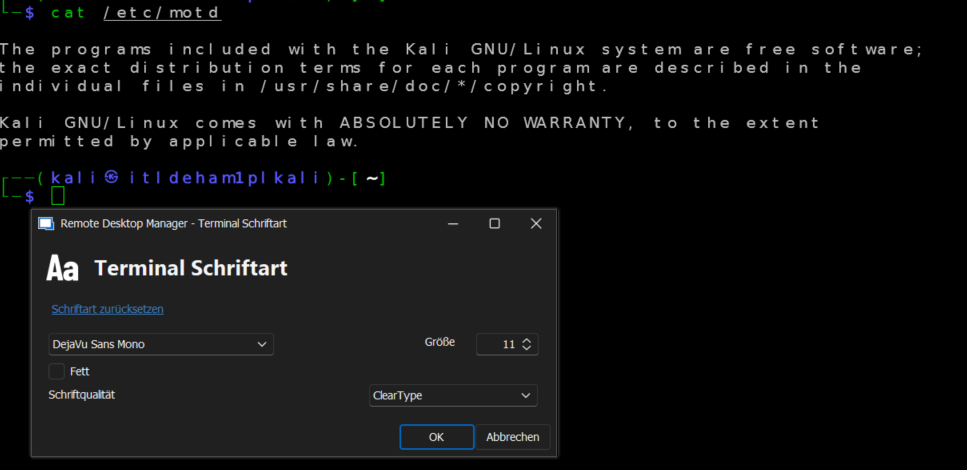
20230807rdm.PNG
All Comments (11)
Hello Andreas,
Thank you for contacting us on that matter.
I'm doing some tests, and I didn't see the DejaVu sans mono in the font list available.
Could you set your RDM in English by going to File -> Options -> User Interface -> Langage -> English?
Do you have the same issue if you select another Front from your list?
Best regards,
Patrick Ouimet
Hello,
I have the exact same problem since around June.
I had to install a custom font to get rid of this problem because the default font I use had this issue (DejaVu Sans Mono, Calibri, Arial...).
Courrier new, Cascaida Mono and some other fonts don't have this issue though.
I think this issue had been already discussed here, but still remains :
https://forum.devolutions.net/topics/39708/font-in-terminal-ssh
Have a nice day,
Clement.
Dear Clement,
Thank you for your helpful advice regarding this issue. Your point is well taken. Have you tried using a monospace font? If you switch to this type of font, does the issue still persist?
I will reach out to the engineering department for an update on this forum. Thank you again for your assistance.
Best regards,
Patrick Ouimet
Hi Patrick,
thanks for your replys. I seem to have the same behavior as clement, while DejaVu Sans Mono is a monospace font, switching to Lucida Console seems to work.
Thanks
Andreas
Thank you for your feedback.
I am currently awaiting updates from the engineering department.
In the meantime, could you please let me know if you have experienced the same issue while using a monospace font?
If so, could you try switching to a font with Monospace and see if the issue persists?
Best regards.
Patrick Ouimet
If I may, I would like to point out that fonts like Calibri and Arial will always look awkward in a terminal. They are proportional fonts and must be forced to monospace in order to fit in the grid of the terminal. RDM uses the width of the letter "M" to define the width of character cells of the terminal. It is usually the widest letter, so it is the minimum width to avoid characters overlapping. But it also means that many letters will appear as having to much space around, especially in a font like Arial which has a large difference of character widths.
The DejaVu Sans Mono is a monospace font, it should work perfectly in the terminal. My tests showed that it does work (on my machine), I suspect that it may fail on your system because of the language setting not being english. I will see what can be done to fix this.
Regards
Denis Vincent
Thanks for your pointers. Setting the font to Lucida Console seems to resolve the issue. However, DejaVu Sans Mono is a monospace font too and used to work until the last update.
I have changed RDM to english which unfortunately doesn't solve the problem.
I have found this in the logs, in case it helps:
[14.08.2023 11:20:14] Devolutions Protocols version: 2023.7.5.1 Windows

[14.08.2023 11:20:14] Terminal font: DejaVu Sans Mono [DejaVu Sans, fixed=False]
Hello,
I appreciate you taking the time to share your feedback with us.
I want to let you know that our engineering team is currently working on resolving the issue you reported. They have already made some changes to the RDM and we are currently testing the fix before releasing it in the next version.
Please know that we will keep you informed and notify you as soon as the new version containing the fix is available.
Thank you for your patience and understanding.
Sincerely,
Patrick Ouimet
Hello,
This issue seems to have been fixed with the version 2023.2.24.0 64-bit, at least for DejaVu Sans Mono.
Thank you for your work !
Have a nice day,
Clement.
Hello,
Thank you for getting back to us regarding the issue you reported. We are pleased to know that version 2023.2.24.0, has resolved the problem.
If you encounter any further issues or have any questions about our product, please don't hesitate to reach out to us. We are always happy to help.
Best regards,
Patrick Ouimet