
pirate585
RDM didnt read/carry certificate in SSH Key entity to perform SSH cert-based auth on SSH Gateway (jump host) entity
RDM ver. 2026.3.15 64-bit (PreJIT)
OS: Win11
Issue: a SSH key with SSH cert. Using the SSH Key to login SSH server, RDM presents both SSH key and SSH cert to SSH server for ssh-cert-auth. it works fine
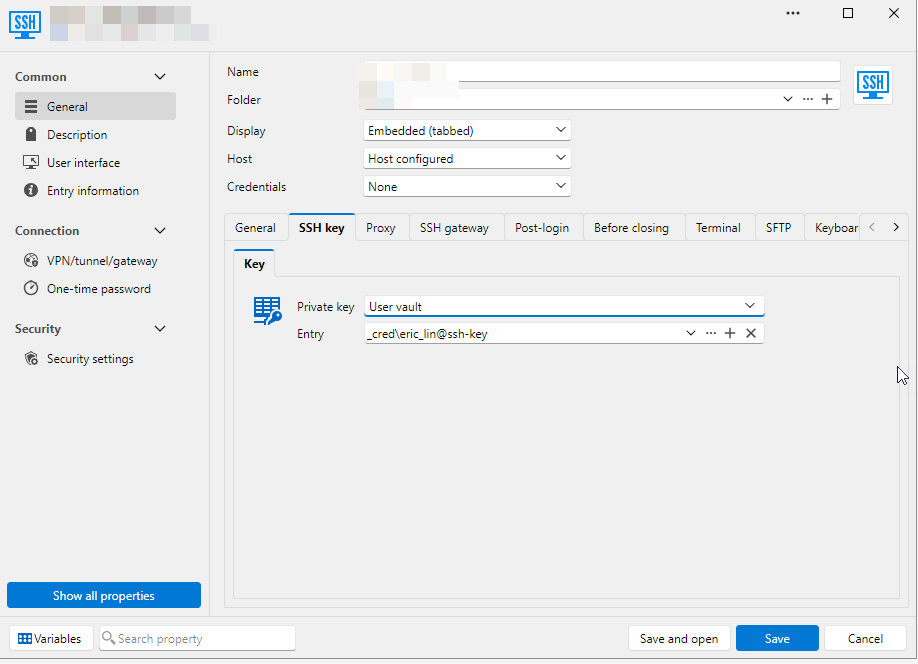
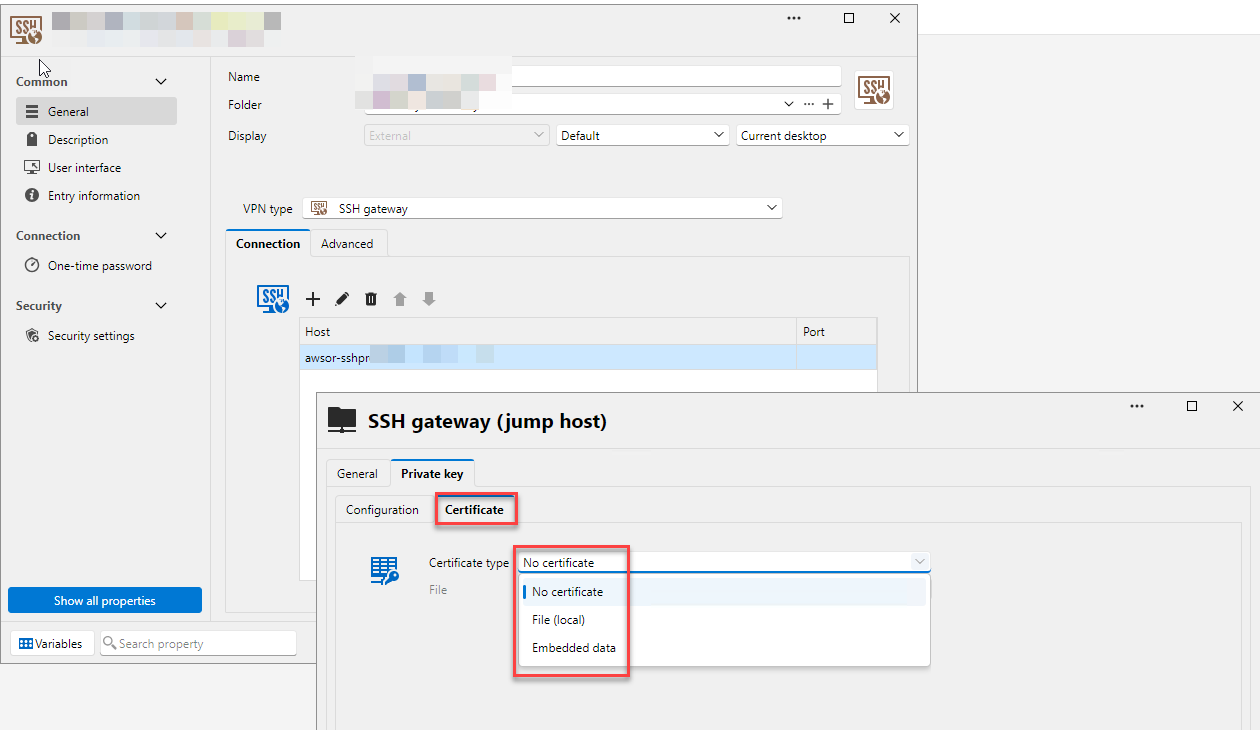
but in SSH gateway (jump host) entity, RDM didnt use SSH cert from SSH key entity. Instead, it asks to specify SSH cert from another source, File (local) or Embedded data. This behavior introduce extra operation overhead to maintain the same SSH cert in different entity (SSH key and multiple SSH gateways). Can RDM be modified to use SSH cert from SSH key?
Regards,
Eric
RDM didnt read/carry certificate in SSH Key entity to perform SSH cert-based auth
Hello Alexis,
False alarm.
SSH Key entry with cert works fine on RDM Win. Also tested File (local) and Embedded data. All good. no issue.
The issue was coming from my test. My cert was expired during the test....Orz
The implementation of SSH Shell entry to support SSH Key with cert fits our needs perfectly. We can simply replace the expired cert on SSH key entry. Quick and easy. Appreciate.
Regards,
Eric
RDM didnt read/carry certificate in SSH Key entity to perform SSH cert-based auth
Remote Desktop Manager 2026.3.15.0 64-bit (PreJIT)
RDM Win already support SSH Key (credential) with certificate.
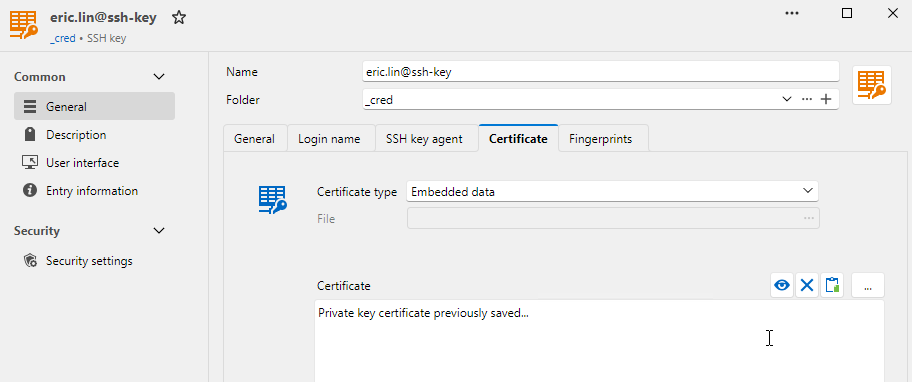
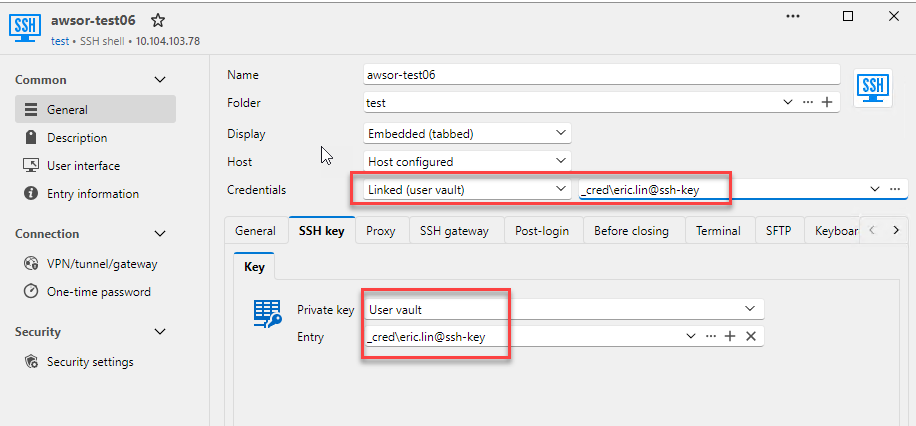
in SSH session, select the SSH Key with certificate installed. Neither the Credential or the SSH Key tab works
Regards,
Eric
can RDM use SSH cert in ssh key credential in ssh connection?
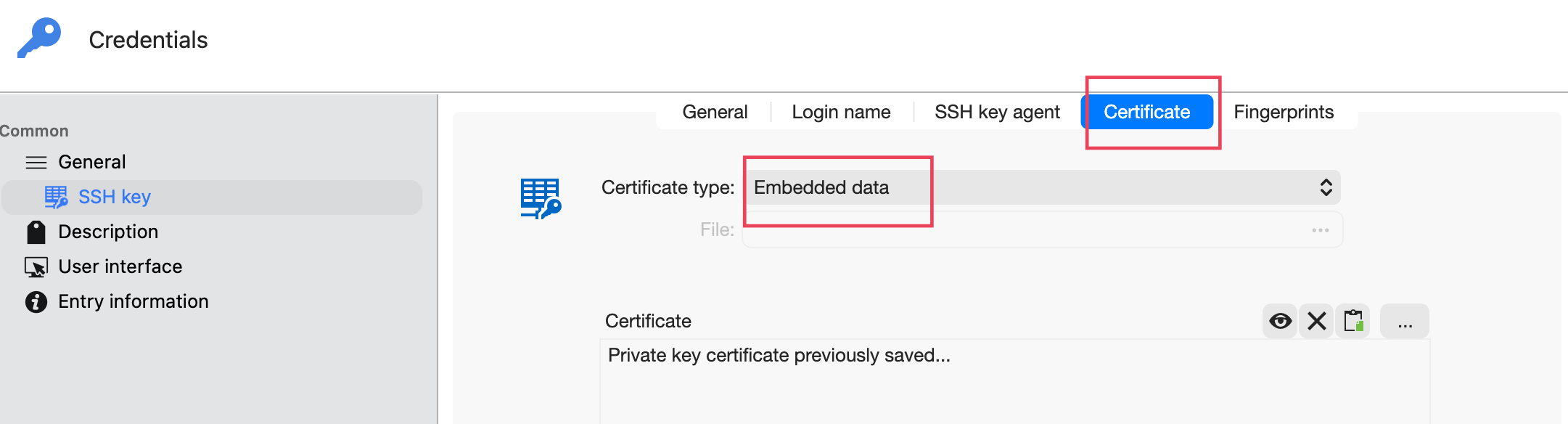
for SSH cert-based auth, I got my public key signed by private CA on SSH server and install it to the ssh key credential (snap1.png)
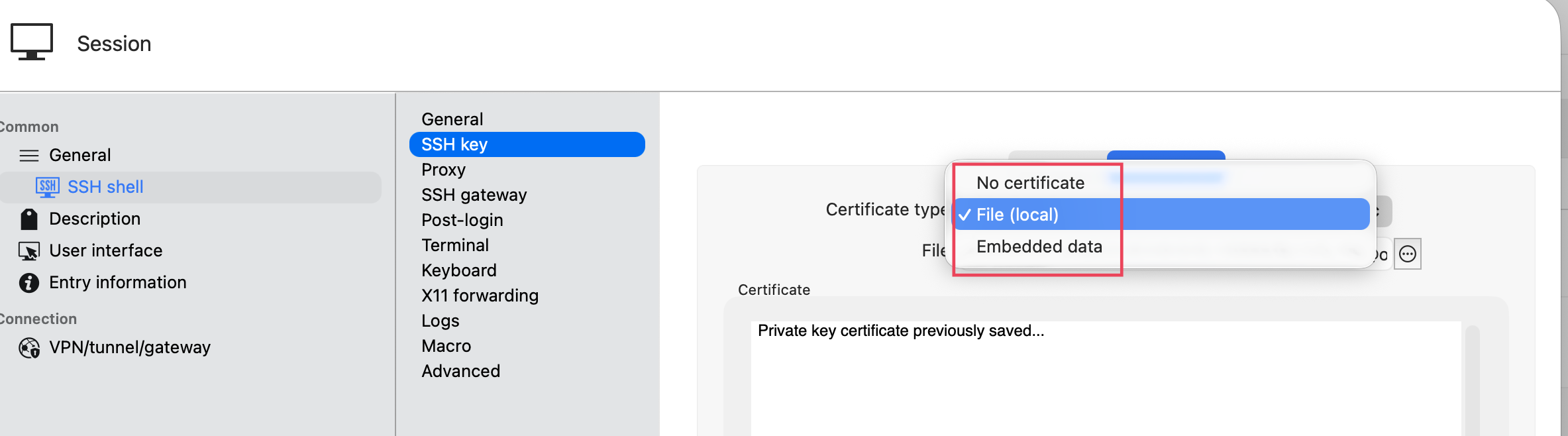
in ssh session, there is no option to read the signed cert from the ssh key credential. The options File (local) and Embedded data works fine if I provide the signed public key. (snap2.png)
Please help to check if this request is fesible or not.
Regards,
Eric
can RDM support RDP basic authentication to RDP Gateway?
Hi Richard,
Thanks for prompt reply. The PAM/Local authentication doc section is not 100% accurate. I've tested mstsc.exe (Windows 10/11 built-in) and RDCMan, and none of them work.
mstsc.exe works with rdpgw+OIDC, but not rdpgw+PAM.
Your feedback is very useful to indicate FeeRDP-derived and mstscax.dll-derived dont support basic auth. Appreciate your support. We will see what we can do.
Regards,
Eric
can RDM support RDP basic authentication to RDP Gateway?
MacOS: Tahoe 26.6.2
RDM MacOS: 2026.2.4.4
We are seeking replacement of Microsoft RD Gateway, and GO Remote Desktop Gateway (https://github.com/bolkedebruin/rdpgw) is one of candidates. During the evaluation, we have succeeded to make rdpgw to support OpenID Connect and PAM/local authentication in different setup. OIDC works great for on demand connection, but PAM/local authentication fits our RD client scenario more. One of requirements to use PAM/local authentication is RD client needs to support basic authentication (via TLS). I checked RDM for possible option to enable/use basic authentication when connecting via rdpgw, but no luck. Would you be kind to elaborate more info?
here's the .rdp file to test basic authentication via rdpgw. It works with Windows app (from App store)
full address:s:10.104.103.111:3389
gatewayhostname:s:test04.lab123.com
gatewayusagemethod:i:1
gatewaycredentialssource:i:4
gatewayprofileusagemethod:i:1
promptcredentialonce:i:0
authentication level:i:2
enablecredsspsupport:i:1
Regards,
Eric
[operation question] can RDM keep showing error screen instead of close it in a few seconds?
Richard, thank you. This is exactly I am looking for
[operation question] can RDM keep showing error screen instead of close it in a few seconds?
RDM MacOS: 2026.2.4.4
Hello,
when SSH or RDP to a server, if there is login issue (due to no shell, no permission, server offline...etc), the error message to be showed and closed in a few seconds. Most of time, it's hard to read error message or capture screenshot. Is it possible to extend the time of showing errors to 30/60 seconds or not to quit the error screen?
Regards,
Eric
got security negotiation failed (0x0002000C) when RDP via RD Gateway
Hi Richard,
Thank you for your prompt support. The workaround works fine and we are looking forward to have core problem fixed.
Regards,
Eric
got security negotiation failed (0x0002000C) when RDP via RD Gateway
Hi Richard,
I've sent you the new session log.
Change SSPI module to system also works as workaround.
got security negotiation failed (0x0002000C) when RDP via RD Gateway
Hi Richard,
After upgraded to RDM Mac ver.2026.2.3.2, it gets worst. I can reproduce the error on several RD gateway servers.
I tried to enable session log, but none of session was logged. Let's schedule an online troubleshooting. Would you please send the calendar link for scheduling?
Regards,
Eric
got security negotiation failed (0x0002000C) when RDP via RD Gateway
Hi Richard,
Appreciate the prompt response. Unfortunately, I am unable to reproduce the error on next day. There is no change on RDM and the problematic RD gateway, but no error on next day. I observe the case for a few days and all are good so far. I guess we can close this issue until it happens again.
Regards,
Eric
got security negotiation failed (0x0002000C) when RDP via RD Gateway
Hi there,
I am connecting to a Windows server via RD gateway, but got security negotiation failed (0x0002000C) error. May I know how to troubleshoot the error? I do additional test and here are the results
tried another RD gateway and it works fine
tried Windows App in apple store (https://apps.apple.com/tw/app/windows-app/id1295203466?mt=12) to connect to the problematic RD Gateway and it works fine, too
RDM Mac version: 2026.2.2.1
MacOS version: 26.5
Regards,
Eric
RDM hangs when one of active RDP session disconnected
test again on RDM Mac version 2026.2.2.1. the problem is resolved. thank you.
RDM hangs when one of active RDP session disconnected
Hi Erica,
Thanks for prompt reply. I use devolution hub personal and not enable/use offline mode. When the issue happens, the connection from RDM to data source is also good.
Here's how I reproduce the issue
use RDM to RDP (via RD Gateway) to 3 Windows servers
on one of the 3 servers, disable NIC or change its IP address (to simulate network lost), then RDM hangs
Regards,
Eric
RDM hangs when one of active RDP session disconnected
RDM version 2025.3.9.2 running on macOS tahoe 26.1
Hi Team,
I have RDM to RDP (via RD Gateway) to 5 Windows servers. If one of servers got disconnected (unstable network or lost connection), the RDM hangs. Is it possible to avoid RDM hangs when losing connection to one of connected servers?
Regards,
Eric
SSH Gateway does not accept SSH key (credential entry)
Hello, we've been able to reproduce the issue, a ticket has been sent to the Engineering Team.
Best regards,
Great. Looking forward to new update
SSH Gateway does not accept SSH key (credential entry)
Hello,
Thank you for sharing the video.
I wasn’t able to reproduce the issue on my end. I’ll investigate further with my team and follow up with you once we have more information.
In the meantime, could you please confirm the data source you’re using, just to be thorough?
I look forward to your response.
Best regards,
my data source is devolution hub personal.
SSH Gateway does not accept SSH key (credential entry)
Hi Jacob,
Thanks. I've uploaded ForumSSHGateway.mp4 to the web storage.
Regards,
Eric
SSH Gateway does not accept SSH key (credential entry)
Hello Jacob,
Thank you for the confirmation. I test the config per your suggestion, unfortunately, no lock. I also noticed an error on ssh client. This error will be showIn theed with and without empty user name field in ssh gateway config. The connection flow is RDM --> SSH Gateway --> SSH server


In the meantime, I also use the private SSH key (credential entry) to login to SSH gateway directly and it works well. The connection flow is RDM --> SSH Gateway (as SSH server)
SSH Gateway does not accept SSH key (credential entry)
SSH key entry is accepted by SSH terminal, but not SSH Gateway. Please help to update SSH Gateway entry to also accept SSH key entry as credential.
SSH Gateway does not accept SSH key (credential entry)
environment:
RDM Windows version: 2025.1.31.0
RDM MACOS version: 2025.1.16.3
Issue description:
the SSH Gateway entry doesnt accept ssh key in credential entry, but in embedded data.


On a contrary, in SSH terminal entry (not SSH Gateway entry), ssh key in credential entry is accepted.

Here's the SSH key entry for reference.

RDM Mac 2025.1.16.1 fail to RDP via RD Gateway
Hi @Richard Markiewicz,
thnks. everything is good on 2025.1.16.3.
Regards,
Eric
RDM Mac 2025.1.16.1 fail to RDP via RD Gateway
environment:
MACOS: Sequoia 15.3.2
RDM Mac: 2025.1.16.1
fail to RDP via RD Gateway with the following error.

if making RDP connection directly (without using RD gateway), no error.
The same RDP entry was working in previous version 2024.3.5.1. I got this error right after upgrade to version 2025.1.16.1
RDM Windows doest not support SSH certificate based authentication
Hi Carl,
Thank you. Confirmed the issue is fixed on RDS Windows 2025.1.25.0 64-bit.
Regards,
Eric