
lucabrighetti
Floating navigation bar not visible when in a session
Same issue here. I hope will be fixed soon
RDM [2026.3.4.0] - RDP Remote Desktop size set to auto open the RDP in a mini frame
Same issue here. in out case it looks that changing in advanced RDP version from "Latest" to "RDP (Free RDP Latest) solve the issue.
Incorrect host name displayed in RDM RDP sessions using Secretserver proxy
Ciao sorry for my late answare, yes I'll use my mail from this forum account
Remote Powershell Script - Git Integration
Yes I was looking to a similar feature to integrate Azure devops developed script!
Incorrect host name displayed in RDM RDP sessions using Secretserver proxy
Ciao,
yes RDM updated to 2024.3.15.0 64-bit. We can have a shared session thank you
Incorrect host name displayed in RDM RDP sessions using Secretserver proxy
Ciao!
Any news about this topic? if I use quickconnect with RDP Delinea Proxy template the tab is correctly displayed.
Incorrect host name displayed in RDM RDP sessions using Secretserver proxy
I can not see any difference, If I remove $HOST$ variable I can see on the "Host:" the proxy name (grayed out for privacy reason) but not the real host connected, On the tab just the entry name is reported
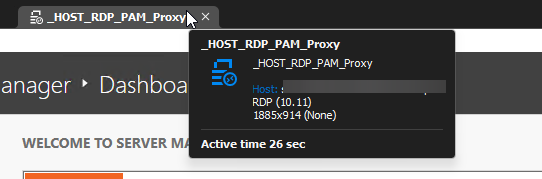
Incorrect host name displayed in RDM RDP sessions using Secretserver proxy
Ciao
this is the actual configuration:
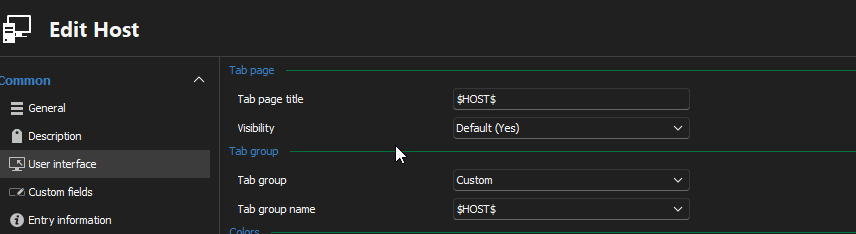
Incorrect host name displayed in RDM RDP sessions using Secretserver proxy
Hi,
yep those are the information:
RDM Version 2024.2.21.0 64-bit
Data source: SQL on Azure, using AD integrated
I'm just uploaded Forum-42826.zip on the provided link
Incorrect host name displayed in RDM RDP sessions using Secretserver proxy
Dear Team,
We are currently using RDM connected to Delinea Secretserver. Among the various entries, we utilize "HOST session" to establish RDP connections via the Secretserver proxy, similar to the quick connect functionality. When launching this entry, we are prompted to select the target host, and subsequently, an RDP connection is initiated using the specified credentials.
While this process functions correctly, we have observed that the session information displays the name of the Secretserver proxy instead of the actual host name. This makes it challenging to determine which server we are connected to when multiple sessions are open.
Is there a way to rectify this issue and ensure that the session information accurately reflects the name of the target host?
Delinea Secret Server proxy
In the future it would be possible to use "My priivileged Account" as credential for RDP via Delinea Proxy? (I mean: File --> My Account Setting --> My Privileged Account)
Secret Server MFA
Hi Luca!
To confirm, are you referring to the following?
Yes you are right, but we are using however mostly the "My privileged account", sometime "My personal credential"
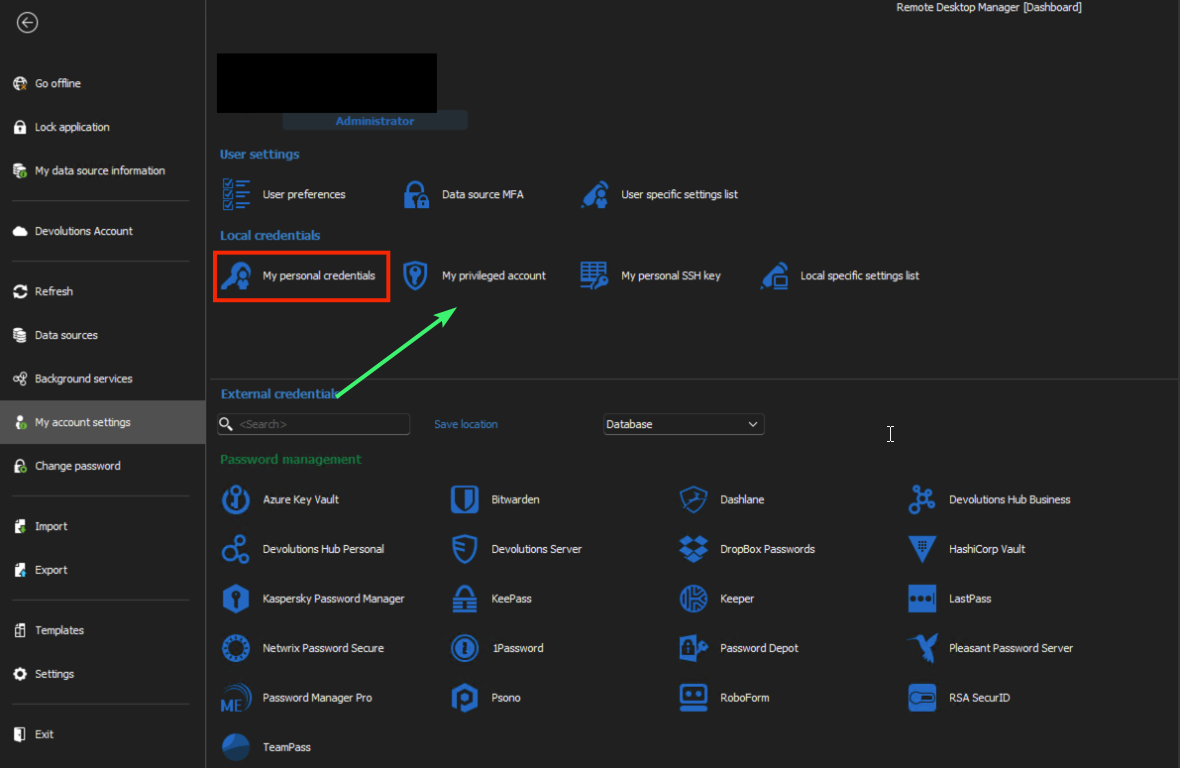
It it possible to implement it?
Secret Server MFA
Hi thank you for this new feature, we are using Secretserver with SSO and IWA. On our 'My Privileged Account' we have a privileged personal account linked on SecretServer personal Folder.
it would be possible to set the credential need to connect to proxy and host with RDM my privileged account? This will avoid to choose it every time and we can continue to use our personal privileged account isetad of creating a shared one.
2024.2.10 - Delinea Secret Server User Vault credential selection no longer working...
Ahh OK!
yes I can view the password (2. YES
2024.2.10 - Delinea Secret Server User Vault credential selection no longer working...
Ciao!
YES!
Can you specify how I can make this test?
YES!
2024.2.10 - Delinea Secret Server User Vault credential selection no longer working...
Hi we was using a command line entry to open Keepass

2024.2.10 - Delinea Secret Server User Vault credential selection no longer working...
This morning, a new update (version 2024.2.11.0) was released, and I can confirm that the issue has been partially resolved.
However, we are still encountering some problems with all entries that utilize the $PASSWORD$ variable . This is used in the command line to access passwords from the linked Vault (Delinea SecretServer).
Unfortunately, these entries are no longer functioning as expected. The “Allow password in variable” option is enabled on both the Credential link and the entry itself, but despite this, the issue persists. These entries were operational prior to the 2024.2.10 update.
Multiple Domains with RDM: Strategies for Efficient Privileged Account Management”
Than you for the suggestion!
It work for all the entry in the User Vault but what approach do you suggest for the entry in the main (public) shared vault?
2024.2.10 - Delinea Secret Server User Vault credential selection no longer working...
Hello,
We've made an internal fix for this issue, which will be available in version 2024.2.11.0.
Regards
any ETA for the release fix?
2024.2.10 - Delinea Secret Server User Vault credential selection no longer working...
+1
Multiple Domains with RDM: Strategies for Efficient Privileged Account Management”
Hello,
until today we have used RDM with a shared Vault among colleagues.
RDM is connected to the PAM (SecretServer), in which within the personal folders each IT member has their own privileged account. On RDM finally, in “my privileged account” we have set up the connection with our PAM personal privileged account.
Everything works magnificently. However, in a month we will find ourselves managing a two additional domains, totally separate from our production domain.
We would like to maintain the same approach in order to launch the various RDM entries with nominal privileged accounts in the new domains, as we already do with the prod domain.
However, we only have one “my privileged account” in RDM. How can we do it? Many are already using the “my personal account” with their personal user
Secret Server MFA
I would LOVE to see the RDP Proxy (and SSH) through Delinea Secret Server added to the road map.
For my team's use CASE, this is really required for us to use the RDM with Delinea Secret Server as that is our PAM solution for managing highly privileged assets, and we require the RDP proxying from the Distributed Services Engines to connect around Firewalls, to make sure that privileged credentials are never exposed in any way on non-privileged assets, and for the screen recording aspects that Delinea offers for auditing purposes.
Remote Desktop Manager is still a fantastic tool, and for less privileged scenarios the existing integration is lightning fast, I look forward to future improvements making it even more valuable.
I completely agree, we are in the same scenario, SecretServer proxy support it would be a game changer and it will allow to extend RDM to the rest of the team.
What is the "Active Directory dashboard"?
Is it possible using Active Directory Dashboard to create computer account? It would be very useful.
Secret Server MFA
I think it shouldn be possible atm, we have installed a Microsoft RD Gateway and we are using it with RDM. I hope SecretServer proxy will be integrated soon.
Variable for Linked (Vault) host?
Hi I have a similar problem,
I want to use $HOST$ taken from linked PAM that is Secrestserver . I've enabled the Event as suggested but it doesen't resolve $HOSTS$ variable.
