2024.2.10 - Delinea Secret Server User Vault credential selection no longer working...
2024.2.10 - Delinea Secret Server User Vault credential selection no longer working...

As the subject says - we have Delinea Secret Server as PAM solution and use User Vault to store our entries. I have all Credentials configured to pick them and when I click on the blue link in the entry, nothing happens. Wit 2024.2.8 this was working.
Clicking on the blue link that i obfuscated does not bring the credential selector. Going back to 2024.1.32... :(
Brgds Andreas
922d428d-d136-431c-95f1-e8e7b70285a9.png
All Comments (18)
Hello,
We've opened a ticket and are investigating. We will post back here once we have an update on the subject. Thank you for reporting this.
Regards,
Hubert Mireault
Hello,
We've made an internal fix for this issue, which will be available in version 2024.2.11.0.
Regards
Jonathan Del Signore
Hello,
thanks for the info - just because I am curious, how did that happen?
Brgds Andreas
+1
Hello,
The issue was caused by some architectural changes we made in order to make our UI more maintainable.
We should have caught most of these issues by now, and as always thank you for bringing it to our attention.
Regards
Jonathan Del Signore
Hello,
We've made an internal fix for this issue, which will be available in version 2024.2.11.0.
Regards
any ETA for the release fix?
Hello,
This version has to pass through our QA testing procedures. We are hoping to release this version either today or tomorrow.
Regards,
Hubert Mireault
Hello,
Working with 2024.2.11! Thanks for your help!
Brgds Andreas
This morning, a new update (version 2024.2.11.0) was released, and I can confirm that the issue has been partially resolved.
However, we are still encountering some problems with all entries that utilize the $PASSWORD$ variable . This is used in the command line to access passwords from the linked Vault (Delinea SecretServer).
Unfortunately, these entries are no longer functioning as expected. The “Allow password in variable” option is enabled on both the Credential link and the entry itself, but despite this, the issue persists. These entries were operational prior to the 2024.2.10 update.
@Andreas: Thanks for the feedback, glad this works for you.
@Luca: Could you give us more information on how you've configured this?
- What is the entry you are opening? Is it an RDP?
- What credential mode are you using on that entry? Is it "Linked (vault)" or something different?
- In what field of the entry is the variable used?
- If you link to a username/password entry instead of a Delinea Secret Server entry as a test, is the value correctly resolved?
I've done a few tests on my end and haven't reproduced this so it must require specific configurations to get the issue.
Regards,
Hubert Mireault
Hi we was using a command line entry to open Keepass 
cf637483-06eb-4f80-beab-38a78ad67fae.png
Hello Luca,
I seem to be configured the same way as you, but I still don't reproduce the issue, so there must be something else at play. I will ask our support team to contact you and open a case, so that we can more easily communicate with you and ask you for additional information.
Regards,
Hubert Mireault
Hello,
After further testing, we were able to reproduce this issue, so I don't think the support case will be necessary. We are currently investigating for a solution.
Regards,
Hubert Mireault
Hi Luca,
I'd like to confirm a few things with you if possible (we had a wrong configuration on our end, we don't actually reproduce your issue) :
- Can you confirm if "Allow password variables for all entries" is enabled in "Administration -> System Settings -> Password Policy

- If you do a "View Password" on the command line entry, do you see the right password?
- If you enter this password directly in your arguments instead of the variable, does it work?
Regards
Jonathan Del Signore
bc04eb31-e9f3-4638-b432-9e84cd8a88f9.png
Ciao!
- YES!
- Can you specify how I can make this test?
- YES!
Assuming you have the View Password permission, you can right-click on the CommandLine entry and view password here: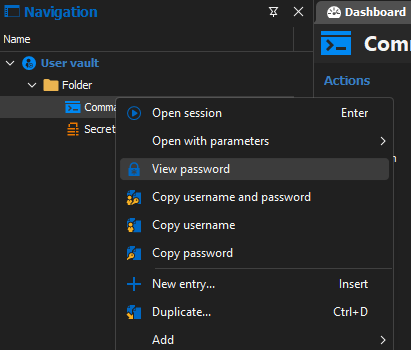
Jonathan Del Signore
fbe62571-f816-4d7d-be8e-0728afd8cc6b.png
Ahh OK!
yes I can view the password (2. YES
Alright thank you. In that case I'll ask our support team to open a case with you to keep investigating this issue.
Regards
Jonathan Del Signore