Incorrect host name displayed in RDM RDP sessions using Secretserver proxy
Incorrect host name displayed in RDM RDP sessions using Secretserver proxy

Dear Team,
We are currently using RDM connected to Delinea Secretserver. Among the various entries, we utilize "HOST session" to establish RDP connections via the Secretserver proxy, similar to the quick connect functionality. When launching this entry, we are prompted to select the target host, and subsequently, an RDP connection is initiated using the specified credentials.
While this process functions correctly, we have observed that the session information displays the name of the Secretserver proxy instead of the actual host name. This makes it challenging to determine which server we are connected to when multiple sessions are open.
Is there a way to rectify this issue and ensure that the session information accurately reflects the name of the target host?
All Comments (14)
Hello,
Thank you for reaching out to us regarding this,
- Could you please specify the version of RDM you are currently using?
- What type of data source are you using?
Additionally, could you send us a screenshot of your RDP entry Properties and of the issue? I'll send you a private message so that you can provide this to us securely.
Best regards,
Samuel Dery
Hi,
yep those are the information:
- RDM Version 2024.2.21.0 64-bit
- Data source: SQL on Azure, using AD integrated
I'm just uploaded Forum-42826.zip on the provided link
Hello Luca,
Thank you for your reply,
If you go into your RDP Entry Properties under the "User Interface" section, is there anything in the "Tab Title page" field? This could explain this behavior.
Let me know,
Best regards,
Samuel Dery
Ciao
this is the actual configuration: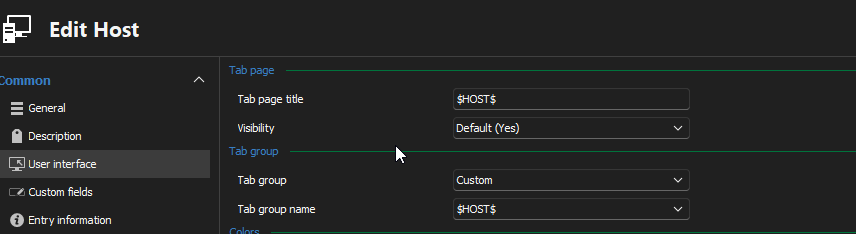
bc4e8b6a-cd60-4a5c-93a3-69aa9124a865.png
Hello Luca,
Thank you for your reply,
I see; if you remove the variable from this field, does it work as expected, or does it still display the Secret server proxy name?
Let me know,
Best regards,
Samuel Dery
I can not see any difference, If I remove $HOST$ variable I can see on the "Host:" the proxy name (grayed out for privacy reason) but not the real host connected, On the tab just the entry name is reported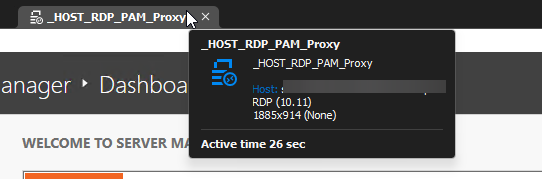
6f91ca3a-8eed-4cea-b00d-9cf380c010d3.png
Hello Luca,
Thank you for your reply,
I see, no problem,
I will need to discuss your issue with some of my colleagues, I will keep you updated with any news I have,
Best regards,
Samuel Dery
Ciao!
Any news about this topic? if I use quickconnect with RDP Delinea Proxy template the tab is correctly displayed.
Hello Luca,
Thank you for your reply,
My apologies for losing track of this, would you be interested in a remote session so that I can get a better understanding of your issue?
I'm assuming you've updated your instance of RDM since our last exchanges would this be correct?
Let me know,
Best regards,
Samuel Dery
Ciao,
yes RDM updated to 2024.3.15.0 64-bit. We can have a shared session thank you
Hello Luca,
Thank you for your reply,
Perfect, I will open a case so that we can do a remote session, would the email used for your forum account be the correct one to use for the case?
Let me know,
Best regards,
Samuel Dery
Ciao sorry for my late answare, yes I'll use my mail from this forum account
Hello,
Thank you for your reply,
Perfect, I've created the case and sent you a reply,
Best regards,
Samuel Dery
Hello,
For others that may be encountering this issue, we were able to resolve the problem by adding the $HOST$ variable under the "User Interface" -> "Tab Title" field of the "Template" entry used by the Host type entry.
Best regards,
Samuel Dery