What is the "Active Directory dashboard"?

Hello,
Sorry for this question, but I was not able to find it in the documentation and I was also unable to make it work...
I just found an 3 years old post in the forum, but that did not explain it.
I need to use credentials from my Secret Server Vault to access Active Directory with at least user admin permissions. But if I select the credentials from the vault, I only get invalid username or password. If I select Custom for the credentials and leave username and password empty, I get no error message, but also nothing useful.
So what is this dashboard for, what can be done with it and how do I get it to work with a user from the vault?
Thanks a lot for your help!
Brgds Andreas
83282277-1338-460b-a0cf-5840408cb6da.png
All Comments (34)
Agree with your question.. I'm also interested to know and I also can't get any decent information other than empty screens..
and if I dive in the properties, can enable show users, computers, groups, printers.. nice.. with some customizations..
if that works : can we even customize this further to show other objects we're interested in ? like group managed service accounts... ;-)
Hello Andreas,
This is an issue in the beta version 2023.2.7 that you are using, as it is still using our old LDAP stack. In the current beta you must use explicit credentials that have full permissions on the DC. The next beta release will be much better, and support better Authentication options including Single Sign On (which should allow you to connect with blank credentials) as well as an entirely new LDAP stack which should improve functionality for users with less privileges.
Paul
Hello Paul,
Thanks for the info!
Brgds Andreas
Agree with your question.. I'm also interested to know and I also can't get any decent information other than empty screens..
and if I dive in the properties, can enable show users, computers, groups, printers.. nice.. with some customizations..
if that works : can we even customize this further to show other objects we're interested in ? like group managed service accounts... ;-)
Hello Ben,
Our next beta version will support much more Active Directory functionality, and better Authentication support that gives better messages instead of blank screens. You can browse the entire AD tree structure and group things however you want. You can also view all properties of all objects, and manage group members, disable/enable users. I'll make a note to add enable/disable computers and printers in a follow up release.
Paul
Great! thanks for that. We'll be looking at that release
Regards, Ben
Hello Ben and Andreas,
The new release 2023.2 is available with the new Active Directory features, please let me know how the latest release works for you, if you see any issues and we will fix them, or if there are additional AD features you would like let me know and we will add them.
Thanks!
Paul
Hello Paul,
thanks for the info - unfortunately I am still unable to get it to work.
If I select Custom or Inherited it loads, but I don´t see anything. It does not matter if I start RDM with my regular user or a domain admin...
If I select my domain operator or admin credentials from my Secret Server vault, I just get this: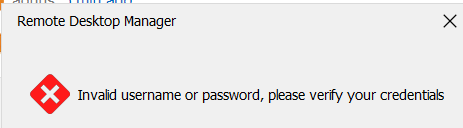
Brgds Andreas
2c0325ef-9704-4eb0-a488-da7ff88008e0.png
Thank you Andreas, you appear to have found a couple of issues, we are investigating the issues now. It looks like when using Custom or Inherited it connects and logs in fine, then loads the root DSE domain name, but then does not load the AD tree or the list of recently modified objects.
A few questions:
1) Can you confirm the root domain name is being displayed properly?
2) Do you have multiple forests in your domain?
3) Does the search work for you in the top right?
4) Do you know what version of Windows your DC is running? What is the domain functional level?
When using the Secret Server vault it does not appear to be using the correct credentials, we will work on trying to reproduce the issues in our lab and get back to you.
Regards,
Paul
Hello Paul,
The last question is easy - our DCs are Server 2022 and the Domain and Forest Function Level ist Server 2016 - i just did an upgrade this year... :)
about the rest - to be honest, I am really not sure if I did my config right. Because normally with regular user rights everybody is allowed to browse the AD. But even if I use inherited where I don´t get any error message, everything looks strange...
How should the config look like?!?
Brgds Andreas
Hello Paul,
it seems that with 2023.2.25 it is working now. I only don´t like that I don´t see anywhere with which credentials it is running. I ask this because I started the AD Dashboard with my AD operator user, closed it and changed to inherited which should be my regular user. But I am still able to create a user in AD which should not be the case I think.
But now as it is working, what is the purpose of this dashboard? Do you want to replace the AD MMC provided by Microsoft, or do you want to enable just a few tasks from it? Because I can create a user and a group, but I can´t add a user to a group - i need to open the group to add the user to it. With the AD MMC both ways are possible.
Brgds Andreas
Hello Andreas,
Great to hear that it is now working, we are continuously doing improvements and upgrades to the AD Console right now.
Yes the purpose is to centralize all your connections management inside RDM. As for adding a user to a group from inside a user, this is a great suggestion, I will create a ticket for that feature request and we will add that feature shortly.
Best Regards,
Paul
Hello Paul,
Thanks for your quick reply! Please also think about what I wrote in the first paragraph:
---cut---
I only don´t like that I don´t see anywhere with which credentials it is running. I ask this because I started the AD Dashboard with my AD operator user, closed it and changed to inherited which should be my regular user. But I am still able to create a user in AD which should not be the case I think.
---cut---
My AD operator user has the right to add a user to the AD. My regular user has only read-only rights. So when I change the user, the permissions sould also change which was not the case.
Brgds Andreas
I only don´t like that I don´t see anywhere with which credentials it is running. I ask this because I started the AD Dashboard with my AD operator user, closed it and changed to inherited which should be my regular user. But I am still able to create a user in AD which should not be the case I think.
Yes I agree this is a good idea, we should show the current user who is connected to AD, I will create a ticket for this.
Regards,
Paul
Hello Andreas,
This has now been released in the 2023.2.28. You can now see the currently connected user principal name when you hover your mouse over the Connection Tab. Please let me know how this works for you.
Thanks,
Paul
2195b213-f9d5-4267-89ca-be665dd774be.png
Hello Paul,
thanks - it is working! :)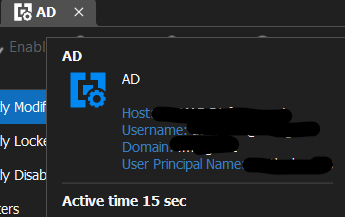
Brgds Andreas
c0b5c72b-1653-4c5f-b7fb-e92646d732b8.png
Hello Paul,
I'd like to second Andrea's comment about adding groups to a user. I was just searching how to do that and came across this article. I know this is a recent Addition to RDM, I'm already using it, and being able to add a user to multiple groups would be very helpful.
Mike
Hello Paul,
I'd like to second Andrea's comment about adding groups to a user. I was just searching how to do that and came across this article. I know this is a recent Addition to RDM, I'm already using it, and being able to add a user to multiple groups would be very helpful.
Mike
Hello Mike,
Yes I agree this is high on our priority list, you will see the feature added very shortly.
Paul
Is it possible using Active Directory Dashboard to create computer account? It would be very useful.
Is it possible using Active Directory Dashboard to create computer account? It would be very useful.
No it is not currently possible to create a computer account, but great idea, I will log it as a feature request and we will add it to a future version!
Thanks for the feedback,
Paul Dumais
Is it possible using Active Directory Dashboard to create computer account? It would be very useful.
No it is not currently possible to create a computer account, but great idea, I will log it as a feature request and we will add it to a future version!
Thanks for the feedback,
Paul Dumais
Hello Paul, is there a way to show how many Users are currently created in one specific OU ? This would be very helpful for us to know.
Hello Paul, is there a way to show how many Users are currently created in one specific OU ? This would be very helpful for us to know.
We do not currently support displaying the number of Users in a specific OU. The LDAP protocol does not really support counting the number of objects that the directory contains. We could display the number of loaded objects, but the maximum paging size of query requests to the directory is 1000 objects, do you typically have more than 1000 users in each OU? if you have less than 1000 in each OU then we could display this number.
Thanks,
Paul
I'd like to second Andrea's comment about adding groups to a user. I was just searching how to do that and came across this article.
I'd like to second Andrea's comment about adding groups to a user. I was just searching how to do that and came across this article.
Thanks for echoing this requests, we are now prioritizing this request higher.
Paul
Hello Paul, is there a way to show how many Users are currently created in one specific OU ? This would be very helpful for us to know.
We do not currently support displaying the number of Users in a specific OU. The LDAP protocol does not really support counting the number of objects that the directory contains. We could display the number of loaded objects, but the maximum paging size of query requests to the directory is 1000 objects, do you typically have more than 1000 users in each OU? if you have less than 1000 in each OU then we could display this number.
Thanks,
Paul
Hello Paul, thank you for your quick respond. No we do not have OUs with more then 1000 Users. We have many small ADs in different domains, so that would help us out.
Hello Paul, thank you for your quick respond. No we do not have OUs with more then 1000 Users. We have many small ADs in different domains, so that would help us out.
Great, I have opened a feature enhancement request, we will add a status bar that displays statistics about what is displayed, eg: number of user, groups, computers, objects.
Paul
Hello Paul, thank you for your quick respond. No we do not have OUs with more then 1000 Users. We have many small ADs in different domains, so that would help us out.
Great, I have opened a feature enhancement request, we will add a status bar that displays statistics about what is displayed, eg: number of user, groups, computers, objects.
Paul
Hey Paul, are there any news when the update with the features will come?
Hey Paul, are there any news when the update with the features will come?
We are currently working on a major UI update to the Active Directory console, there will be many new features including this one. I expect it to be part of 2024.3 releasing in Sep/Oct.
Paul
Hey Paul, are there any news when the update with the features will come?
We are currently working on a major UI update to the Active Directory console, there will be many new features including this one. I expect it to be part of 2024.3 releasing in Sep/Oct.
Paul
Hello Paul,
thanks for the update!
Hello Paul,
I also have a few feature requests:
- It is not possible to copy most of the text from the properties windows. I open e.g. the properties from a user or computer and I want to copy the objectSid or DN property - this is not possible at the moment. It seems only writable properties can be copied. Would be nice to be able to copy both - the name and value.
- Filter the attributes tab - like possible with the AD MMC - for attributes that have values (and hide the attributes with "<None>")
- Add a "Windows LAPS" Tab next to the Bitlocker recovery Tab, if Windows LAPS is used. Windows LAPS overview | Microsoft Learn
Thanks a lot for your help!
Brgds Andreas
Hello Andreas,
1) Yes we can definitely add this, we are currently doing a massive improvement to our AD UI, so I will definitely implement this, as it was overlooked when first implemented
2) Other customers have also asked this, it is high on our priority list, I have attached this request to our existing ticket.
3) This is a great feature request, I have logged a ticket.
Thanks,
Paul
Will we be able to launch the AD Dashboard with our PAM account? It seems now that I can only launch the dashboard with my current logged in user (which is a domain user account). Accessing with PAM seems to be an ideal solution.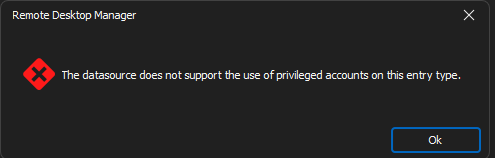
ab2d5b88-994c-4986-97d9-4bbb8df84cb9.png
Will we be able to launch the AD Dashboard with our PAM account? It seems now that I can only launch the dashboard with my current logged in user (which is a domain user account). Accessing with PAM seems to be an ideal solution.
Hello Kelly,
I have created a ticket to make sure we add the ability to connect with a PAM account, thanks!
Paul
Will we be able to launch the AD Dashboard with our PAM account? It seems now that I can only launch the dashboard with my current logged in user (which is a domain user account). Accessing with PAM seems to be an ideal solution.
Hello Kelly,
Can you verify that the PAM Usage Policies in your DVLS server are enabled for the Active Directory Dashboard type of entry? This could be the cause of this error message, more information on how to enable it can be found here:
PAM usage policies - Devolutions Documentation
Thanks,
Paul
Will we be able to launch the AD Dashboard with our PAM account? It seems now that I can only launch the dashboard with my current logged in user (which is a domain user account). Accessing with PAM seems to be an ideal solution.
Hello Kelly,
Can you verify that the PAM Usage Policies in your DVLS server are enabled for the Active Directory Dashboard type of entry? This could be the cause of this error message, more information on how to enable it can be found here:
PAM usage policies - Devolutions Documentation
Thanks,
Paul
This worked out perfectly, thank you!