Secret Server MFA
Hi,
we have Secret Server since a few days. But the login requires MFA (Azure Login). Do you see any way to implement such feature for RDP Manager? Otherwise I can no more use it.
Cheers
Jan
All Comments (99)
Hello Jan,
We do not yet support SAML (Azure AD) authentication with Secret Server, it is on our roadmap, but we do not yet have an ETA.
Best regards,
Richard Boisvert
Hi Richard,
thanks for the quick info. Would be really nice to have it implemented asap. Waiting for the version :)
THanks
Jan
Hi Richard,
Any change you can provide an update/ETA?
We are planning to implement Secret Server in Q3 2022 and without this functionality we will stop using RDM and use native Secret Server functionality using the Connection Manager. Since RDM offers many other features I would like to continue using it. This is not possible without RDM integration with Secret Server SAML authentication to Azure AD/MFA.
Hello,
There is still no ETA for implementing SAML (Azure AD) with Secret Server, unfortunately. We had issues for a long time contacting Thycotic, but the situation is better since they merged as Delinea.
It is an often-requested feature, so it is high priority.
Best regards,
Richard Boisvert

Disabled
Hi Richard,
Is there anywhere we can follow the development on this topic?
Looking forward to hearing from you
Best regards,
Mark Johansen
Hello Mark,
We were recently granted access to an instance with SAML by Delinea, so our team can start working on the integration. Our plan is to have the feature available in the 2022.3 release of RDM, in Q4 of this year.
Best regards,
Richard Boisvert
Disabled
Hello Richard,
That is wonderful news - is it possible to sign up for beta on this branch as it's a vital service for my company and is very interested in facilitating test of this.
Best regards
Mark Johansen
Hello Mark,
The beta should be available in October, you can subscribe for notifications on this forum for the announcement: https://forum.devolutions.net/forums/14/remote-desktop-manager--beta
Best regards,
Richard Boisvert
Hello Mark,
The beta should be available in October, you can subscribe for notifications on this forum for the announcement: https://forum.devolutions.net/forums/14/remote-desktop-manager--beta
Best regards,
Hi, is the Azure AD MFA integration with SecretServer available on latest RDM 2022.3.24.0 64-bit?
Hello Luca,
There were some issues with our SAML integration with Secret Server, but there has been progress in the past few weeks. The official target date is the 2023.1 release of RDM, but if it is available before, it will be added in a minor version of RDM 2022.3.
Best regards,
Richard Boisvert
Hi Richard,
is there any update on this? when will this be released?
BR
Srikanth
Hello Srikanth,
After verifying with Delina, the REST API of Secret Server does not support SAML authentication. Once Delinea adds it on their end, we will be able to integrate it to RDM.
Best regards,
Richard Boisvert
Hi,
so this is not going to be available on 2023.1 as per your message above?
BR
Srikanth
Hello,
Unless Delinea adds support to SAML by then, it will unfortunately not be possible.
Best regards,
Richard Boisvert
Hello Srikanth, hello Richard,
We face the same problem, as our Secret Server instance is using a corporate SAML MFA solution, making the simple login with in RDM not usable.
Our integration solution is to use a web password credential entry (like Chrome passwords or 1Password), so RDM opens a web site, then let Delinea's Web Password Filler plugin fill in the credentials.
Of course we also would welcome a more streamlined solution, but I think a custom corporate card/app has small chance of getting integrated.
However, I'd like to raise attention to the API token feature in Secret Server. Once a user is logged into the Secret Server (by any method, by any browser), he/she can copy out an API token, allowing scripts to use this authenticated session live (so no reauthentication necessary).
This is located on the user preferences page, as "Generate API Token and Copy to Clipboard".
Maybe asking this key and having a map of credentials<->Secret IDs might be an integration possibility.
What do you think, Richard, can this be a solution?
Best regards,
Zsombor Aklan
Hello Zsombor,
I will send the information to the engineering team to see if it could be an option, but since it requires manual intervention every time the token expires, it is not the best experience.
Best regards,
Richard Boisvert
Hello Zsombor,
I verified with the engineer in charge of the integration, and he was given the option to use the Delinea WPF to retrieve the token and bring it back to RDM. The engineer will verify if it is possible to parse the webpage to retrieve the token automatically, which would simplify the process and be the best workaround. He cannot commit to an ETA at this time, however.
Delinea told us the native SAML integration will be addressed in the future, so hopefully it will be possible soon.
Best regards,
Richard Boisvert
Hello Richard,
This is great news! Thank you for the quick reply! Please feel free - you or the engineering team - to contact me directly if you need a live demo or some more details from our Secret Server integration; I will be happy to assist!
Best regards,
Aklan Zsombor
Hi, do you have any news? Did Delinea give any ETA about SAML implementation in REST API?
Hello Luca,
My last info is from Richard, the same what you can see above. Since then Delinea has released Web Password Filler v3.4.2, with a lot of fixes. Maybe this gives Delinea some more chances. I am also awaiting news.
@Richard, is there some updates? I still uphold my offer to show our integration method (but most probably it is already known to the dev team) :) Anyway, let me know if I can contribute.
Best regards,
Zsombor
Hello,
Luca - We did not receive any update from Delinea, unfortunately.
Zsombor - The engineering team was provided that workaround from Delinea as well, it is still on the to do list of the engineer in charge of the integration to try to automate it and see if it is viable. Thank you again for your offer.
Best regards,
Richard Boisvert
Hi , are there any news on this toppic ?
we facing the same issue
Regards Robert
Hello Robert,
The engineering task is still in the backlog, unfortunately. We will let you know once we have more details.
Best regards,
Richard Boisvert
Hi Richard,
Any news about this topic?
We need to add MFA to Secretserver portal login, and at the moment only Connection Manager is able to connect to the server if MFA is enabled.
We have several RDM licenses ending at the end of the year, RDM is a great tool, we don't want to migrate to Connection Manager.... But we will be forced to do that if we will not be able to grab credential from Secretserver to connect to several server.
L.
Hello,
Unfortunately, there is no update on the integration of SAML to Delinea / Secret Server. Their API still does not support it, so we are working on a workaround method.
Best regards,
Richard Boisvert
Disabled
Hello
We're introducing Secret Server now to our company and depending on this feature we have to decide if we're authenticating to Secret Server via SAML or AD. Can you tell me in what state the workaround is or already provide an ETA?
Best Regards
Philipp
Hello Philip,
There is no new information at this time, unfortunately.
Best regards,
Richard Boisvert
This is really bad news .. my company requires the MFA authentication
it is activated at SecretServer and we are not more able to access the stored password from RDM .. i bet a RDM replacement discussion will start soon
Would be too bad, as we all love your product :(
Robert
Disabled
This is really bad news .. my company requires the MFA authentication
it is activated at SecretServer and we are not more able to access the stored password from RDM .. i bet a RDM replacement discussion will start soon
Would be too bad, as we all love your product :(
Robert
Hi Robert
If you've enabled the MFA on the user object in Secret Server you should be able to use this in RDM. Just enable the setting in the general section of the secret server entry in RDM, explained in step 4.2 on this RDM KB: Secret server entry configuration - Devolutions
BR
Philipp
This is really bad news .. my company requires the MFA authentication
it is activated at SecretServer and we are not more able to access the stored password from RDM .. i bet a RDM replacement discussion will start soon
Would be too bad, as we all love your product :(
Robert
Hi Robert
If you've enabled the MFA on the user object in Secret Server you should be able to use this in RDM. Just enable the setting in the general section of the secret server entry in RDM, explained in step 4.2 on this RDM KB: Secret server entry configuration - Devolutions
BR
Philipp
We are just testing Secret Server with internal MFA with RDM and I confirm it is working.
sorry my fault .. my company is using Azure AD with SAML :(
so the described option is not solution for us
Disabled
we're in the same boat, we've established our structure in RDM and would like to keep it. In the link I've attached it is mentioned that the SAML authentication should be supported from RDM version 2023.1 onward and we were kind of relying on this, but about nine months later after the release of 2023.1 there is still no sign of this implementation. I don't know of any other products which offer all the integrations like RDM, so at the moment we're thinking about starting with the AD integration of the users and move to SAML after RDM is able to. This is causing some major delays in our project but we don't see other ways atm.
we're in the same boat, we've established our structure in RDM and would like to keep it. In the link I've attached it is mentioned that the SAML authentication should be supported from RDM version 2023.1 onward and we were kind of relying on this, but about nine months later after the release of 2023.1 there is still no sign of this implementation. I don't know of any other products which offer all the integrations like RDM, so at the moment we're thinking about starting with the AD integration of the users and move to SAML after RDM is able to. This is causing some major delays in our project but we don't see other ways atm.
Right , this is really disappointing .. my company is unfortunately not waiting for RDM to get this working : SecretServer is already switched to SAML (as well as many other services). So using RDM is not Impossible anymore, but we lost a lot of comfort and functionality. And the bigger the pain gets , the louder the discussion gets about replacing to a product which is able to handle this
Hello Together,
we are also awaiting the SAML integration method. I understand if it is hard to code.
9 months ago I mentioned in my post the possibility of using the user's API token (bearer token, actually) which can be put to the clipboard. This way the SAML authentication burden would be off from Remote Desktop Manager, as the user would perform this in her browser. Only the URL and this token field would be required for the credential entry. @Richard: Was this considered? Because that might be a quick win, even if it is not as convenient as a SAML logon page.
Best regards,
Zsombor
Disabled
We could definitely live with a workaround described by Zsombor if it would mean that we could use the SAML in Secret Server. Please reconsider if this is a viable solution. Is there maybe a forum on Delinea about this topic where we can try to push the topic further if it's dependent on the Delinea API?
to me this sounds quick and dirty , but if a login page of SecretServer would appear for all the SAML stuff and the API token would be used to gather all following info .. this would be good enough i guess
Hello,
The 2023.3.20 version of RDM Windows is now available (https://devolutions.net/remote-desktop-manager/home/download/). If your Secret Server instance is located in the Cloud, and contains "secretservercloud" in the URL, the SAML authentication is now available.
You will be authenticated in a small webpage, and the OAuth token will then be re-used in RDM to access the Secret Server credentials.
If it works properly, we will see if it is implemented on on-prem environments.
Best regards,
Richard Boisvert
Disabled
Hi Richard
This is great news, we'll test this new feature in the course of the next week and I'll report back here.
BR
Philipp
This sounds promising .. looking forward to the On-Prem function .. do you have any time estimations ?
Robert
Hello Richard!
Thank you for the good news! Together with me, 81 IT admins are appreciating your efforts and looking forward to it!
Best regards,
Zsombor
Hello Robert,
Currently, the SAML authentication is only available for the Cloud version of Secret Server. If we receive enough positive responses from the community that it works correctly, the developers will look into adding the functionality to the on-premise version.
Best regards,
Richard Boisvert
Too bad :(
version 2023.3.20.0 was working with our On-Prem solution with SAML .. all we were looking for was working
but now i can see there was a "fix" at 2023.3.22.0 with the comment "Fixed Secret Server on-premise authenticating with web login instead of oauth"
i fear this will disable the SAML ability in our Env ... so this is no fix for me :(
i'll definitly stay on 2023.3.20.0 until you fix the fix again :)
robert
Hello Robert,
We will update this thread when it is available again.
Best regards,
Richard Boisvert
Hello Robert,
In the latest version (2023.3.24), an SSO authentication mode will work with the Cloud and on-prem, whether the SSO is active or not. OAuth mode is recommended for users who do not have SSO so that login is automatic.
Best regards,
Richard Boisvert
Changed the my Priv Cred setting to SSO
I've been ask to provide my password .. but i'm missing the web window for the SAML login ... how does this work?
Which account is taken ?
i our case we may have different accounts for Secret Server and RDM SQL Database .. so i guess it might get mandatory to have this web login window
it would be at leased more transparent .. any idea who i can bring this back ?
Robert
Hello Robert,
When you connect to your data source in RDM, when you open it, for example, it will prompt you to login to your Secret Server instance in a browser.
The username used is the one that you used in the browser window, it is not saved in RDM (the fields are grayed out).
Do you have the same issue after you close and re-open RDM?
Best regards,
Richard Boisvert
Hello Richard!
I had the time now to setup our Secret Server in RDM (v2023.3.28 at this moment), and I must say, Devolutions engineers did a superb job! Our Secret Server, with SSO login, with corporate customizations, with Azure login, works perfectly. There are many search options as well and I find the possibility of mapping the logon field names to template field names very good. The speed is also very good. So, 84+ IT admins -- including me -- thank you sincerely for doing this integration!.
The only thing I got confused with is the "lookup method" as there are some cases where the results are either more or less than I expect, but this is more like an advisory support case and not a thread to be discussed here.
It is rare that a custom feature request posted in a forum gets implemented in such a good quality. Thanks and keep up the good work!!
Best regards,
Zsombor
Hello Zsombor,
Thank you for the kind words; I shared them with the developer who worked on the integration.
For other users, we also have a quick guide to configure the SSO - https://docs.devolutions.net/kb/remote-desktop-manager/how-to-articles/delinea-secret-server-sso/
For the "lookup method", most users use the Prompt for list and then select the account in the entries. See point 3 and 4 of https://docs.devolutions.net/kb/remote-desktop-manager/how-to-articles/secret-server-entry-configuration/
Best regards,
Richard Boisvert
Disabled
Hi All
It took us a bit longer than originally planned, but now we've integrated the Secret Server with SAML and can report back that it works great from RDM.
Thank you for implementation of this feature which saved us quite a lot of time.
The only question I have is if it necessary to have the credentials saved in the Secret Server Settings under "My Account Settings"? Will there be also a SAML implementation with Tokens instead of fixed credentials in the future or will it stay this way?
Best regards
Philipp
Hello Philipp,
With the SSO authentication method, you do not need to save anything under "My Account Settings". The SSO uses the token, the credentials cannot be set in the entry, as they are grayed out: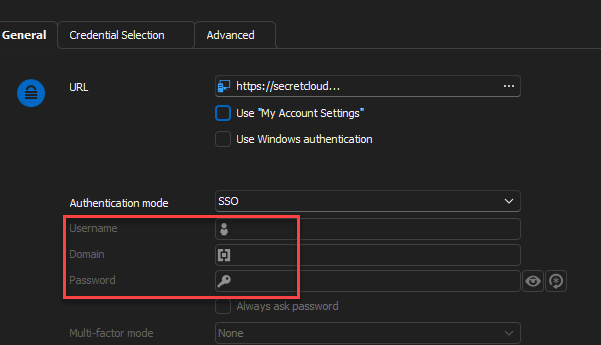
Best regards,
Richard Boisvert
6b2167ef-3752-480c-b621-c17323d33785.png
Hello,
To avoid future confusion, we'll disable My Account Settings and Windows Authentication checkboxes when SSO is selected, since they have no effect.
Regards
Jonathan Del Signore
Disabled
Hi everyone
Thank you for clearing this up, I can confirm that after removing the check on "Use My Account Settings" and clearing the SecretServer Account Settings everything is working fine.
Best Regards
Philipp
Hello Philipp,
Excellent, thank you for confirming it now works.
Best regards,
Richard Boisvert
The Secret Server plugin so far is working fine with SSO/SAML - you made some IT engineers quite happy.
Nevertheless we are intending to use RDP Proxy feature within Delinea - this is currently not possible, am I correct?
Is this something you will be looking at?
Thanks for your feedback & support!
Regards
Marco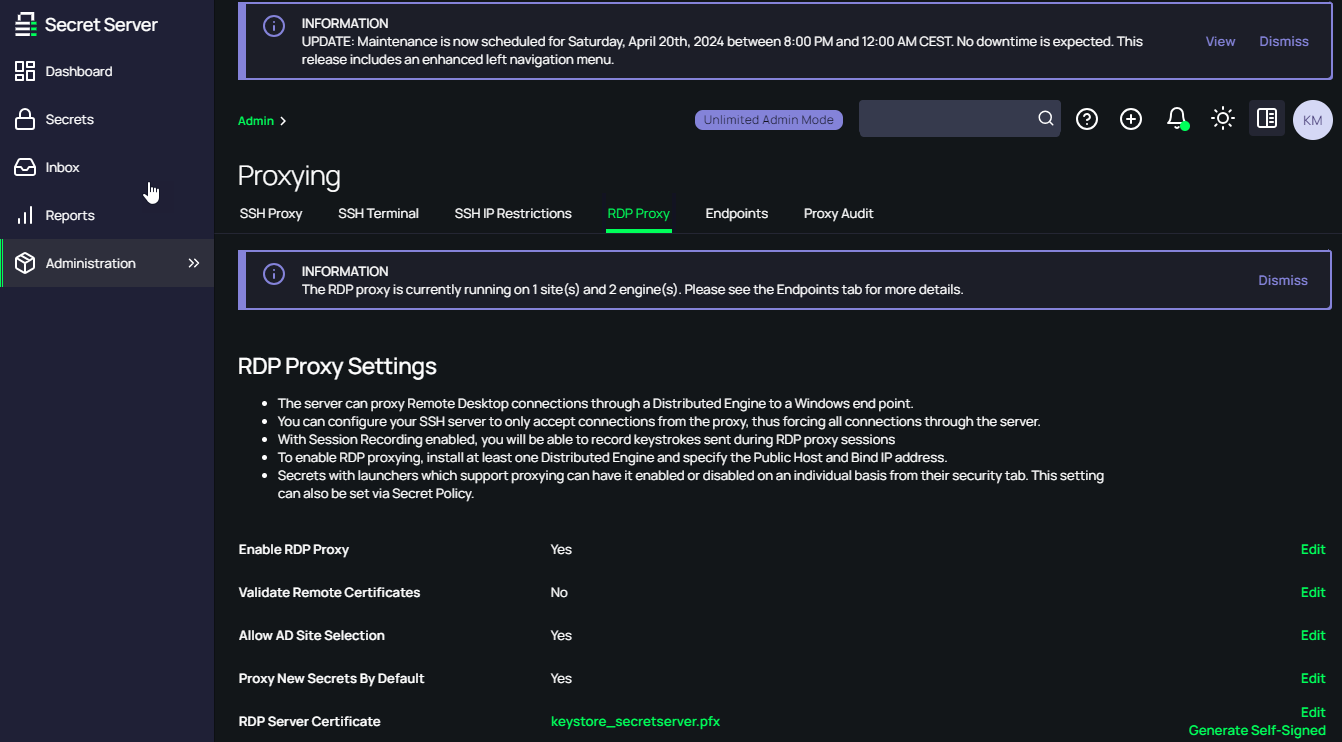
876aa601-7547-4bfb-a572-6ff93e660f91.png
I think it shouldn be possible atm, we have installed a Microsoft RD Gateway and we are using it with RDM. I hope SecretServer proxy will be integrated soon.
Hi,
Indeed RDP and SSH Proxies are not implemented in RDM yet. It was already in the back of our head, but I have formally opened a ticket. We cannot provide any ETA as of yet.
Best regards,
Xavier Fortin
I would LOVE to see the RDP Proxy (and SSH) through Delinea Secret Server added to the road map.
For my team's use CASE, this is really required for us to use the RDM with Delinea Secret Server as that is our PAM solution for managing highly privileged assets, and we require the RDP proxying from the Distributed Services Engines to connect around Firewalls, to make sure that privileged credentials are never exposed in any way on non-privileged assets, and for the screen recording aspects that Delinea offers for auditing purposes.
Remote Desktop Manager is still a fantastic tool, and for less privileged scenarios the existing integration is lightning fast, I look forward to future improvements making it even more valuable.
I would LOVE to see the RDP Proxy (and SSH) through Delinea Secret Server added to the road map.
For my team's use CASE, this is really required for us to use the RDM with Delinea Secret Server as that is our PAM solution for managing highly privileged assets, and we require the RDP proxying from the Distributed Services Engines to connect around Firewalls, to make sure that privileged credentials are never exposed in any way on non-privileged assets, and for the screen recording aspects that Delinea offers for auditing purposes.
Remote Desktop Manager is still a fantastic tool, and for less privileged scenarios the existing integration is lightning fast, I look forward to future improvements making it even more valuable.
I completely agree, we are in the same scenario, SecretServer proxy support it would be a game changer and it will allow to extend RDM to the rest of the team.
Hi jrj and luca!
RDM Windows 2024.2.14.0 is now available and comes with two new types of entries, RDP over Delinea Secret Server Proxy and SSH over Delinea Secret Server Proxy: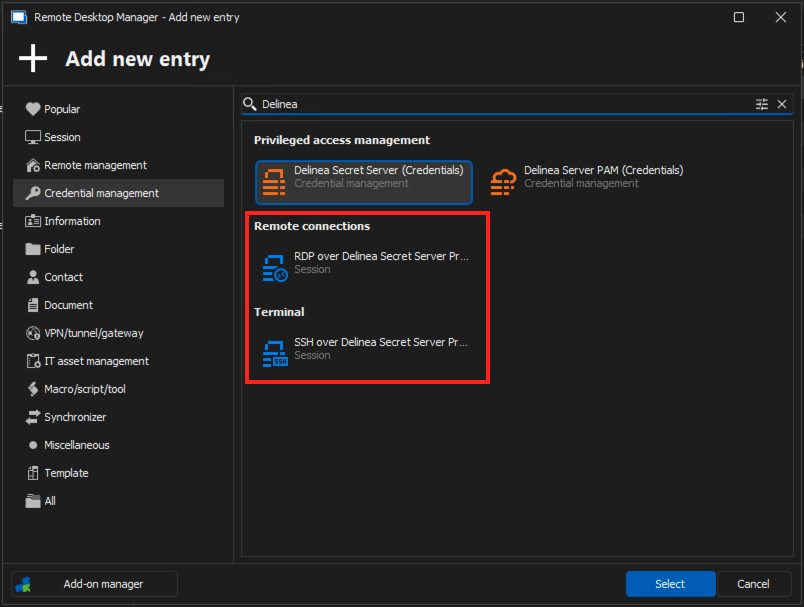
Those two entry types are pretty straight forward to configure. In both case, you need to:
1) Set the host you want to connect to (over Secret Server proxy)
2) Select a Secret Server credential entry used to establish the connection with the Secret Server instance and obtain the proxy host and the temporary credentials to use
3) Optionally, and if the credential entry selected is configured to prompt, you can select a specific account to uses for the authentication. If left empty, you will be prompted at launch. If the credential is not configured to prompt, the account selected in said credential will be used.
Here's an example with RDP over Delinea Secret Server Proxy: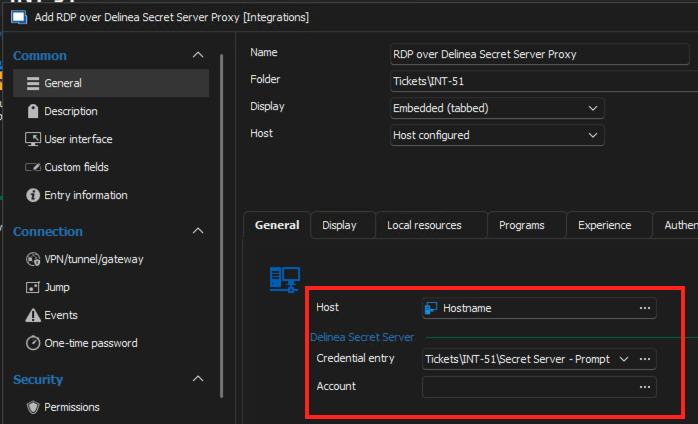
Do not hesitate if you have any questions! And please, do tell me if it works properly for you!
Best regards,
Xavier Fortin
RDPOverDelinaSecretServerSettings.png
AddDelineaSecretServerProxyEntries.png
Xavier-
This sounds awesome. I will share with my team and we will have to investigate trying this out.
Just to be clear though, this would require the Add-On Licensing for the Delinea Integration Module, correct?
Funnily enough, not with the version 2024.2.14.0. That's mainly an oversight on my part though 😅
That being said, the license is require to create Secret Server credential entries though which are required to make the session work. So in the long run, this is definitely required.
Best regards,
Xavier Fortin
Hi Xavier,
I am very excited you started working on implementing this featrue that soon.
I am currently running into this issue when starting a new "RDP over Delinea Secret Server Proxy" session.
Once the credential is checked out it seems to be working fine - but currently i either need to check out the credential via Secret Server dashboard or start a "non - Delinea Secret Server Proxy" session to check out the credential before using "RDP over Delinea Secret Server Proxy" sessions.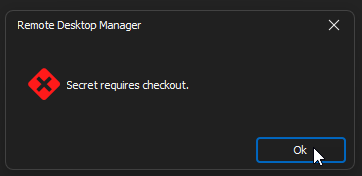
Regards
Marco
b29ecf19-a349-485c-87d8-e6c9698cfe31.png
Hi Xavier,
short question/suggestion - although i am working a lot with the great QuickConnect feature I also have RDP session entries for a lot of servers.
Would it be an option/idea to convert current RDP sessions into the new session type somehow?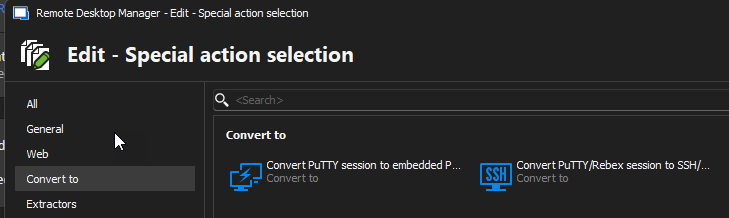
60e79b86-2a78-47e5-b116-54d2e3f1b2b5.png
Hi Xavier,
one of my colleagues is missing the "Account" option for the new entry type, so he cannot definea the Delina secret.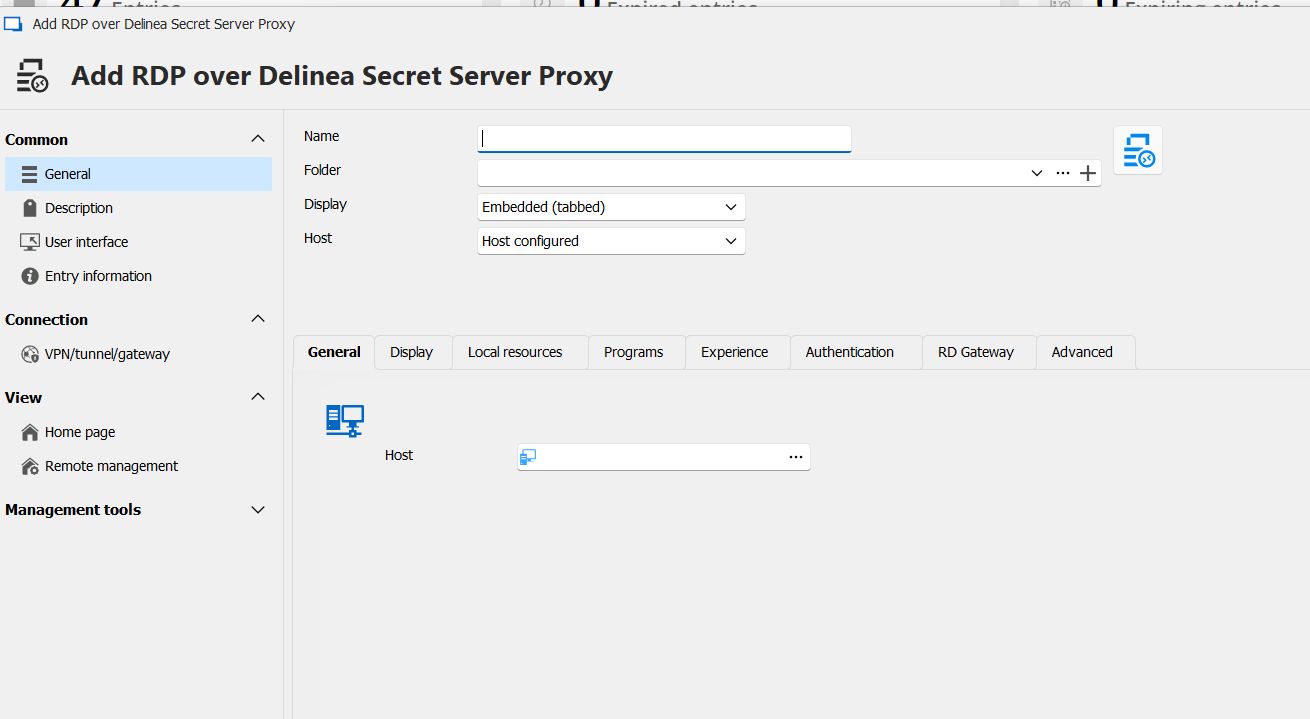
30ae64b8-52b8-4214-9735-a835112a8f5b.png
Hi Marco!
I'll address your inquiries one by one!
1) For the issue with the checkout, I'm going to assume I must have missed something in the implementation. If the checkout works with the credential entry, it should really work with the sessions too. I'm guessing I've missed some verification for the checkout on the sessions. I'm opening a ticket for this. Just to confirm, when you say you checkout the credential, you mean the credential entry in RDM, right?
2) For now, there's nothing specific for this, but we already support a "Change type" action that I believe would work. You can access this option by right-clicking one or multiple entries, select Edit -> Edit (special actions)... and, in the shown window, search for "Change type", you could then select "RDP over Delinea Secret Server Proxy" and it should convert your RDP entries directly. Of course, those won't have the credential and account configured into them.
3) I'll admit that this one got me a bit stumped. The panel that contains the Delinea Secret Server specific settings should definitely be visible here, since the RDP specific panels (for credentials and the RDP type are hidden). So I can't really imagine why this would do it 🤔 If they edit an already existing entry, do they have the same issue? Is there anything different about their user as compared to yours? Is it in the same data source as you? Also, could they provide a video of them going through the steps of creating an entry, to see if I can notice something special going on?
Best regards,
Xavier Fortin
Hi Xavier,
ad 1) i am checking out the Delinea Secret - which is configured as an RDM credential entry
Just let me know if you need any further information.
ad 2) The change type function is working so far - the hostname will maintain so that is fine.
What then may would be nice if the Credential entry could also be defined on a folder level and could be inherited as it currently can be done for regular RDP sessions.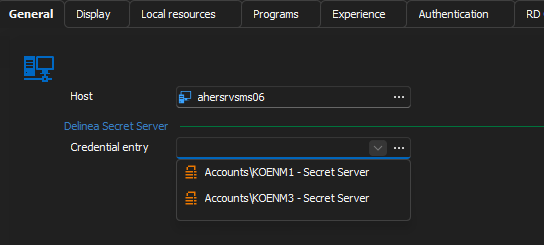
ad 3) We are not using a common data source - everyone has its own, but in general we kind of have the same usage patterns for RDM.
He does not have any existing entries for RDP over Delinea Secret server proxy because this was not available so far ; )
He is just right clicking - New Entry and selects the new entry type "RDP over Delinea Secret Server Proxy".
f53999c3-0f1a-4281-9e19-aa8568267d50.png
And if they create one, and try to edit it afterward, do they still not see the field?
Best regards,
Xavier Fortin
It is the same when editing an newly created entry, he still does not see the necessary credential entry option.
As I have no clue what could explain this, I'll have to try and reproduce the environment the closest I can.
What data source are they creating entries into?
What type of user do they use in this data source? Admin, standard user? Any permission limitation?
Are they creating the entry in a shared vault? Their personal user vault?
Do they have access to other data sources? If so, is the issue reproducible in all of them?
Could you have them share their configuration files with me? The two files (RemoteDesktopManager.cfg and RemoteDesktopManager.ext) can be found in the application configuration directory: C:\Users\<username>\AppData\Local\Devolutions\RemoteDesktopManager
Best regards,
Xavier Fortin
Hi Marco! Me again!
A couple of updates.
First, I've found a fix for the checkout (although I'm not that proud of it). The issue wasn't actually that I missed a step for the checkout, but that the API route to obtain a secret entry (/secrets/{secret_id}/) automatically checks out the entry while the API routes to get RDP and SSH proxy informations (/rdpproxy/ and /sshproxy/) do not.
Even though the documentation seems to indicate that this should be possible (autoCheckout), I've tried and it didn't work on my side. So instead, what I did is tried first without checking out, and if it fails because of a checkout being required, I get the secret (as would be done with the credential entry), and try to get the proxy information again. This is not ideal, but has worked in my tests.
Secondly, I've opened a ticket for the inheritance of the credential entry setting in the proxy entries. I can't provide any timeline as for the implementation of this though.
Lastly, we (in this case, no me yet) might have reproduce the issue with the RDP settings not being visible and might have to do with high DPI screen. Can you confirm if the user with the issue have a screen with a large resolution (1440p, 4K, etc.) and if so, what, if any, scaling settings are applied in Windows settings?
Best regards,
Xavier Fortin
Hi Xavier,
thanks a lot for your feedback.
Apparently it has to do with the display settings scaling - in the office he had configured 125% scaling - today in the home office with notebook only with no scaling he can see the additional credential entry.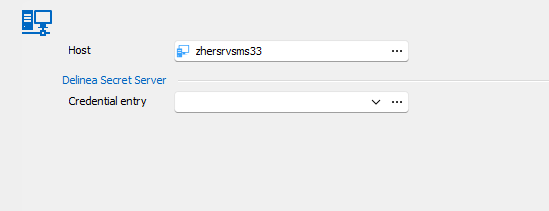
652c606f-6da5-479a-ab00-f48eacb7f583.png
Hi Marco!
Yep, we came to the same conclusion! And I've made a fix for this. A new version should be available soon with it (as well as the fix for the checkout).
When it's out, just tell me if either of the issues persist.
Best regards,
Xavier Fortin
@Xavier Fortin-
I had a chance to test today, and with the known work around of checking out the credential first, and then kicking off the proxied connection the connection itself seemed to work. I understand you need to hear back from the Delinea Developers about why the proxy endpoints do not properly perform the checkout.
To clarify though, I seemed to have to checkout the Credential manually in Delinea Directly before attempting to use the Proxied RDP Connection in RDM. I did not see a way to checkout the credential directly in Remote Desktop Manager. Did I miss something or possibly configure my Delinea Secret Server Credential source incorrectly? Do I need to create a Credential Entry for each credential and not use the prompt for list option? We require comments on all credential Checkouts and when viewing the password for a credential. We also utilize multiple Delinea managed credentials, so I configured my Secret Server Credential selection options for "Prompt for list" so I could choose the proper credential when setting up the Proxied Connection. That part does seem to work and properly reference the selected credential on the Proxied Connection entry, but I can't find anyway to actually checkout the credential from within Remote Desktop Manager in that scenario.
Also, and I have not had a chance to follow up with our Delinea Administrators on this, but I noticed that even though the connection appeared to be proxied through the Delinea Distributed Engine servers, that it did not appear to perform any sort of Screen Recording, which we do see if we use the Delinea Connection Manager tool from Delinea or the Delinea Secret Server Protocol Handler for RDP. Detection of typed text still appeared to function though, so I am unsure of what to make on the missing video. Do you know if the Screen Recording is something that has to be passed as an option when making the RDP Connection somehow or is that a function of the Deline Connection Manager or Protocol Handler directly and not performed on the Distributed Engine Side?
Thanks for any insights!
Hi jrj,
For the checkout, does it not checkout automatically if you try to resolve the Credential entry in RDM (not the proxy ones)? I'm talking of clicking on "View password" on the credential entry.
The fix for this (which should be available soon) trigger the checkout by resolving the secret. So if resolving the credential entry in RDM doesn't work, the workaround would most likely not work either.
As for the recording, this might very well be a limitation of passing by RDM. I believe Secret Server use a custom RDP client to manage the recording, which is most likely not supported with the RDP ActiveX from Microsoft. I'll have to check back with one of my colleague who looked into it, but this would definitely requires a lot more work, assuming that it's even possible. I'm guessing you would probably have the same issue if you used the msrdp process directly (which you can try by configuring your session to launch in external mode).
Best regards,
Xavier Fortin
@Xaiver-
I do not attempt to "view" passwords saved in Delinea as we never want to expose them in any fashion on our Daily Use devices. This is one of the reasons why we couldn't pursue using RDM with Delinea initially, since it was really just retrieving the password and then using it to make an RDP connection from our desktop to the Server directly. We are attempting to use Delinea to protect our "Tier 0" assets like Domain controllers without requiring the use of a dedicated Privilege Access Workstation. That is why we only wish to use the Proxied Connection, so that the actual credential is never stored in memory on my regular device.
Just to clarify, when making the proxy connection from my desktop through Delinea, you are using the Certificate based credential to connect from my Device to the Delinea Connection Console, and Delinea is then making the actual RDP Connection from the Delinea Connection Console to the Remote Server correct? You are never viewing or accessing the actual password of the credential directly, so the actual credential is never being exposed to my workstation device in the proxied connection workflow, correct?
in case it helps clarify what I am seeing, what I did was create a Delinea Secret Server Entry with Authentication type of SSO, but then on the Credential Selection screen I set the look up as "Prompt for list"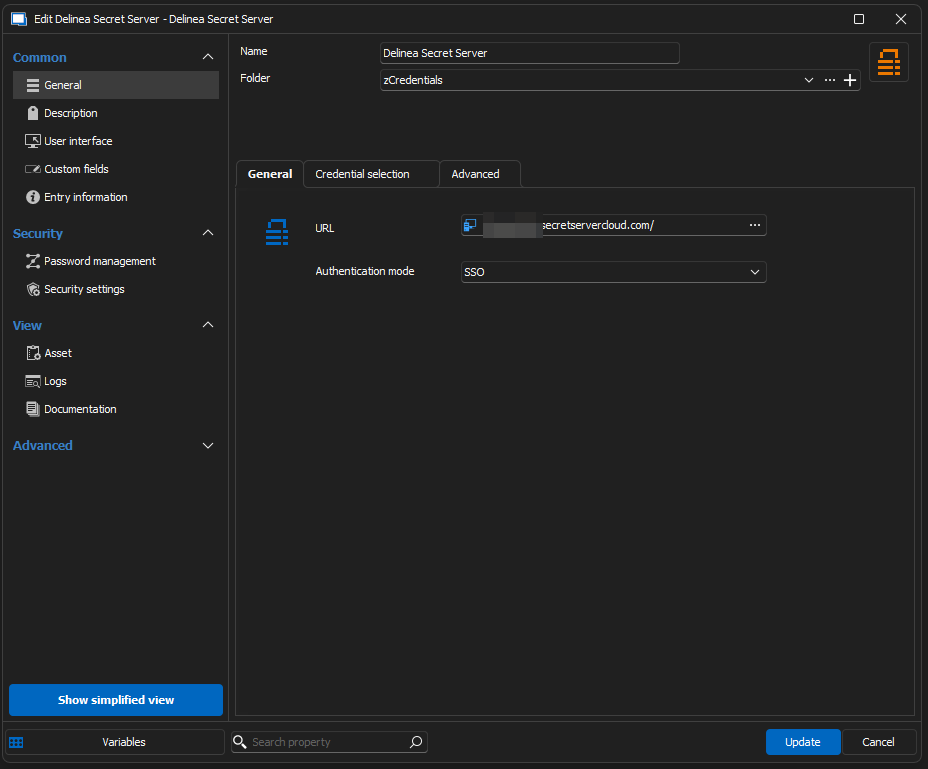
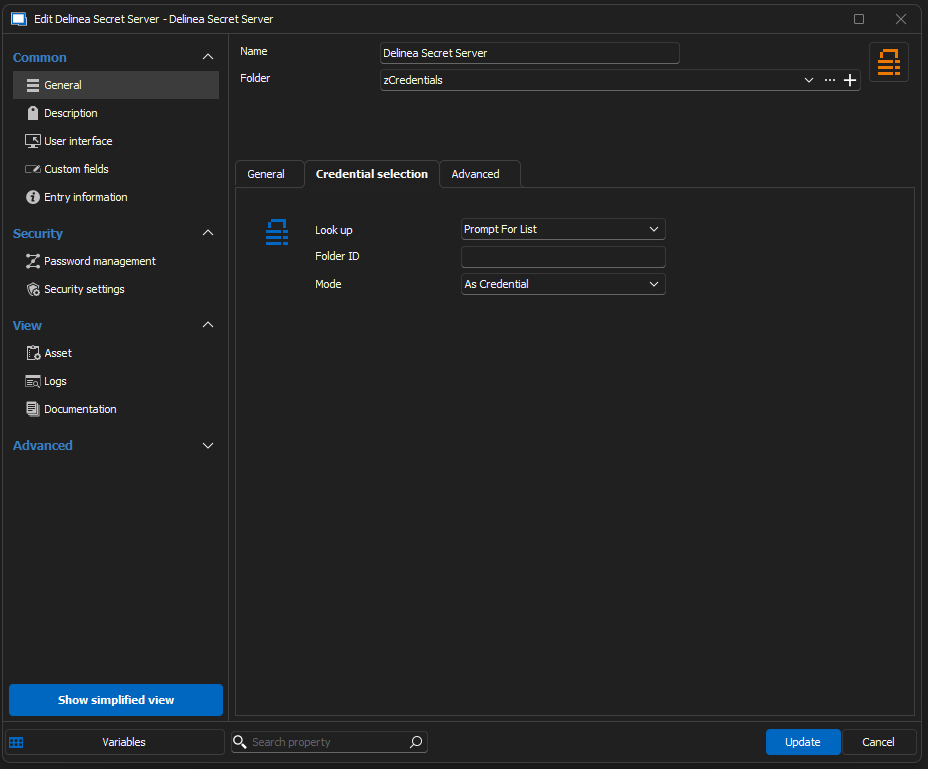
Then on my actual 'RDP over Delinea Secret Server Proxy' connection entry, when it wanted me to select the Account, I had a pop-up window that allowed me to choose the proper credential out of all the credentials that I have access to inside of Delinea (and I believe that may have required checkout but it has been a day or so since I set this up), so I chose the specific credential that was need for this host. Once that was selected it appears to remember which credential I wanted to use. 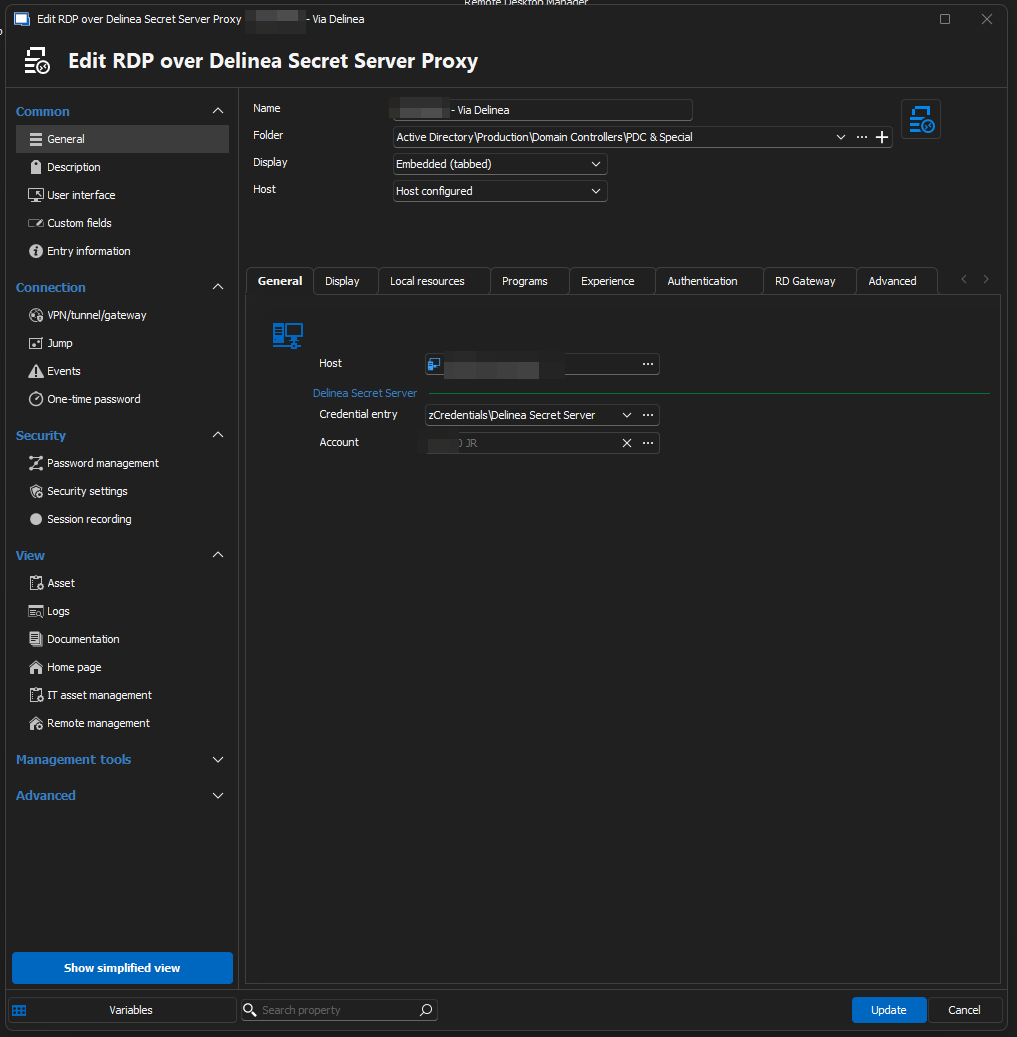
When I attempt to open the connection, I do get prompted for my SSO Sign into Delinea, which I successfully complete, but after that is done, that is when I am presented with the "Secret Requires Comment and Checkout" error. Unless the AutoCheckOut will allow me to provide a comment we may still get stuck because we require comments for credential checkout.
But with this setup, there really isn't a path to "view" that specific credential or explicitly check it out from within RDM. I have had to go into either the Delinea Portal, or the Delinea Connection Manager client, and checkout the credential in advance of attempting to use RDM to establish the Remote Desktop Connection.
Instead of using the 'Prompt for list' lookup option, should I instead create a 'Delinea Secret Server' Entry for each Credential I want to use and specify that credential explicitly somehow? Might that allow me to check out the credential from within RDM?
As for the screen recording stuff. I will reach out to our Cyber Security Team who runs Delinea for my organization and see if they can offer any insights into how the Screen Recording works and gets uploaded into Delinea. I had, probably mistakenly, assumed it was being recorded on the Delinea Server that is proxying the connection, but if that is something that has to be done by the client side, I can definitely see how that could be outside of the scope of what RDM might be expected to implement.
I do know there is a special "protocol handler" that you have to install if you do not want to use their Delinea Connection Manager, which very well could be a custom implementation of the RDP client even though it visually appears identical.
Thank you again for all your work on improving the Integrations with Delinea and your feedback. It is much appreciated.
58a4217c-81ea-417f-a7dd-1d443f8b4d7f.png
b8df998a-6ed5-4a00-8f91-11e1252884de.png
f254a998-e9f1-41d5-abf1-c00a6b4b17a4.png
Hi jrj,
Just to clarify, when making the proxy connection from my desktop through Delinea, you are using the Certificate based credential to connect from my Device to the Delinea Connection Console, and Delinea is then making the actual RDP Connection from the Delinea Connection Console to the Remote Server correct? You are never viewing or accessing the actual password of the credential directly, so the actual credential is never being exposed to my workstation device in the proxied connection workflow, correct?
Without a checkout, yes. We just send the machine name to the Secret Server instance, an they return the proxy host to connect too and the generated temporary credential to use, which are not the actual credential credential of the entry. But, as stated in my previous post, the API route to obtain the proxy information do not auto checkout, but is still blocked by the checkout. This means that this call cannot be made if the account requires a checkout. The workaround that I came up with for now is to call the get secret route, which fetches the account. In theory, this account should contain the credentials (outside of some Secret Server permissions that I am not aware of) since it's the same call we make to resolve the credentials. So in that sense, this workaround probably wont do it for you, the user won't see the creds, but they are fetch regardless.
Just to be confirms that it works though, have you tried the 2024.2.15.0? It should be available now and contains the workaround. I'll see if I can't find a better way to trigger the checkout.
When I attempt to open the connection, I do get prompted for my SSO Sign into Delinea, which I successfully complete, but after that is done, that is when I am presented with the "Secret Requires Comment and Checkout" error. Unless the AutoCheckOut will allow me to provide a comment we may still get stuck because we require comments for credential checkout.
In theory, since I fall back on using our method GetSecret, this method is supposed to manage the comment too, as well as approval request and something called double lock. You can confirm this as well in the version 2024.2.15.0.
Instead of using the 'Prompt for list' lookup option, should I instead create a 'Delinea Secret Server' Entry for each Credential I want to use and specify that credential explicitly somehow? Might that allow me to check out the credential from within RDM?
Even with "Prompt with list, you should still be able to "resolve" and so checkout the account. I understand that you don't want your using the reveal credentials, which I understand perfectly, but as a test for now, you should still be able to click the "View Password" button, which would prompt you with the account list, and after selecting an account and closing the View Password window, it should now be checked out.
As for the screen recording stuff. I will reach out to our Cyber Security Team who runs Delinea for my organization and see if they can offer any insights into how the Screen Recording works and gets uploaded into Delinea. I had, probably mistakenly, assumed it was being recorded on the Delinea Server that is proxying the connection, but if that is something that has to be done by the client side, I can definitely see how that could be outside of the scope of what RDM might be expected to implement.
I got back in touch with my colleague, and indeed, he confirmed that the recording is done client side, usually in Secret Server launcher (like you, I would usually have assumed this to be done on the proxy). It's not impossible per say to implement on our side, we'd have to figure out the call and frequency for sending the screen capture, but it is any thing but trivial. This would need more in depth analysis on our side.
For now, I'll look into improving the checkout mechanism/comment prompting mechanism in the case of the proxy.
Best regards,
Xavier Fortin
Hi jrj,
Me again! It's just to let you know that I find a better way to make the checkout. I originally assumed that there were none because it is not listed in their API documentation. But I realized that of course there has to be since there's a "Checkout" button. So, it should be fairly straight forward to implement this.
I'll keep working on implementing the other scenarios (such as Comment).
Best regards,
Xavier Fortin
@Xavier-
I have to admit, I thought I had updated to 2024.2.15.0, but apparently, I downloaded and forgot to install it. (for some reason the download and install function no longer appears to do anything and I have to download it with my default browser)
When I updated things work as you suggested when I right clicked on the Delinea Secret and clicked 'View Password' from the context menu,
When I did the View Password it worked precisely like you said, it made me login, presented me with the ability to choose a secret, then properly prompted me to check it out and provide a comment. Once I did that, I was able to use that credential to successfully make an RDP connection.
Looking forward to seeing if you can make the checkout work with your last comments so we never have to "view" the password.
I had another thought on the screen recording stuff, and I wasn't sure if would be a lot of work or even be something Devolutions would want to consider, but I realized when you install the Secret Server Protocol Handler, Delinea adds some files to C:\Program Files\Thycotic Software Ltd\Secret Server Protocol Handler\ ...Including what appears to be a tweaked version of putty and either a custom RDP Client, or some type of wrapper around it. I wouldn't even know where to begin to pass the information to those, but that might be an alternative to having to "reinvent the wheel" when it came to the screen recording. Since Delinea requires the Protocol Handler to be installed if you are not going to use the Delinea Connection Manager tooling directly, it might be a reasonable dependency to require if people wish to use RDM. If you have back channels to the Delinea Folks maybe you could just invoke those executables somehow from within RDM to let their existing code handle all of the negotiation and required steps to implement screen recording? Just thought I'd share the idea.
It's possible, but I think those are the custom clients that manage the recording (they'd need to be embedded to support capturing the screen). The possibility would be to change the external mode to supports those special clients and launch the session externally. But in this manner, the launched session would not have tabs inside of RDM. This will definitely requires more investigation.
Xavier Fortin
@XavierFortin
Thanks for the implementation of the two reported "bugs" - so far looking good from my side.
Now constantly using the QuickConnect option with the new connection type.
Once the inheritance option may be in place i'll also switch the tree of my existing connection entries.
Hi Marco,
Glad to hear this works good for you. For the inheritance, this might not be available before the release of the beta for RDM 2024.3. I'll try to keep the thread posted on the availability of the beta.
Hi jrj,
I've pushed a fix for the checkout and the comment requirement, I've also added handling of the approval requirement if ever it's also needed by someone. This should be available in RDM 2024.2.16.0.
Best regards,
Xavier Fortin
Hi thank you for this new feature, we are using Secretserver with SSO and IWA. On our 'My Privileged Account' we have a privileged personal account linked on SecretServer personal Folder.
it would be possible to set the credential need to connect to proxy and host with RDM my privileged account? This will avoid to choose it every time and we can continue to use our personal privileged account isetad of creating a shared one.
Hi Luca!
To confirm, are you referring to the following?
If so, this should be possible but, of course, the "My personal credentials" would need to be a Secret Server, otherwise the session would fail. Also, in the case where the credential is configured to prompt, it would not be possible to pre-select an account, as it is if you directly select the credential in the entry currently.
Best regards,
Xavier Fortin
Screenshot 2024-07-17 at 7.53.07 AM.png
Hi Luca!
To confirm, are you referring to the following?
Yes you are right, but we are using however mostly the "My privileged account", sometime "My personal credential"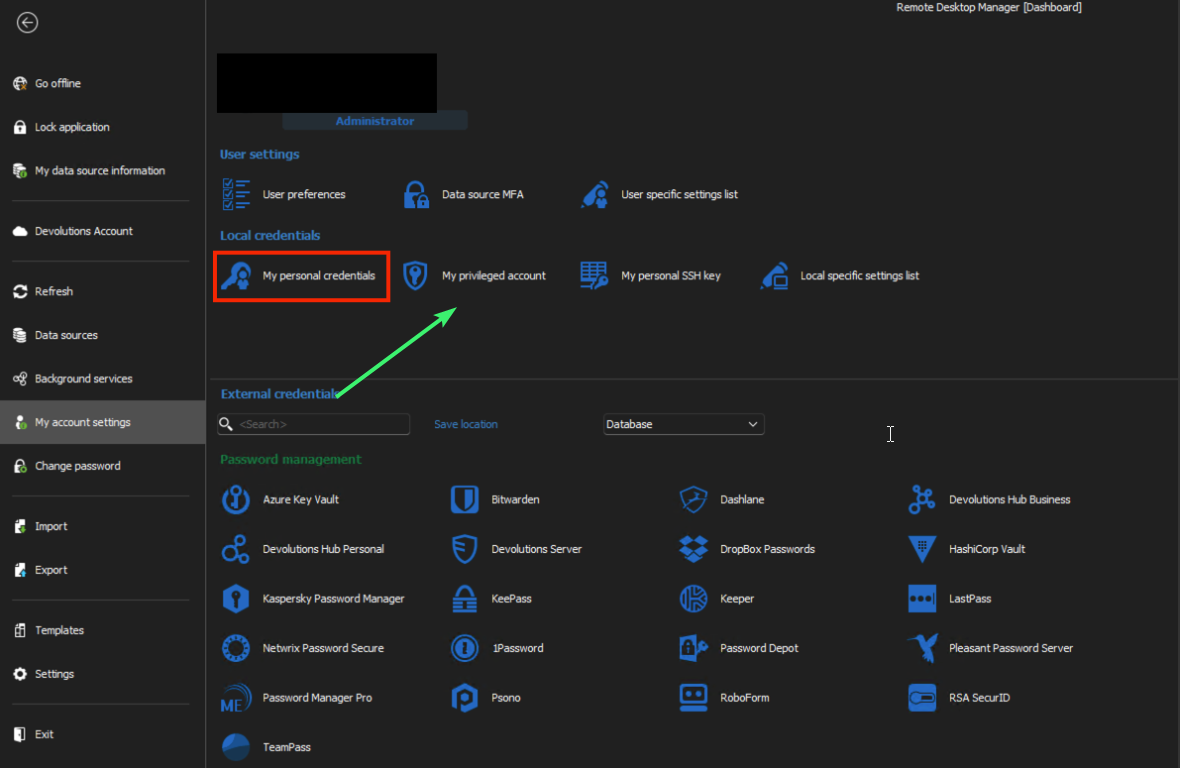
It it possible to implement it?
5d4d5127-1d45-4aac-a59d-574959dcafa5.png
@Xavier Forin-
I have updated to 2024.2.16.0 and the revamped checkout/comment process worked perfectly. Thank you for all of your hard work.
I had a couple of other questions/concerns now that I have been able to use this for a day or so. I wasn't sure if these issues had been considered or if I was just missing how to accomplish things. Some background, in our Delina Secret Server Configuration, check-outs default to 8 hours, and a checkout can be extended up to a day.
However, from within RDM, I am not seeing how to "manage" the checked-out credential.
How do I view the duration of the checked-out credential in RDM?
How would I extend the duration of the checked-out credential in RDM?
How can I check a credential back in when I done, but the checkout time period has not expired?
Note: We do not have automatic check in when a connection is closed configured, as we might need to use the same credential to connect to multiple Remote Desktop Hosts.
Any thoughts/guidance are appreciated!
J.R. Jenkins
Yes you are right, but we are using however mostly the "My privileged account", sometime "My personal credential"
It it possible to implement it?
Yes, and the ticket I've opened cover both cases. It's also already done, but unfortunately won't be available until the release of the beta version of the next major release (2024.3).
Best regards,
Xavier Fortin
@Xavier Forin-
I have updated to 2024.2.16.0 and the revamped checkout/comment process worked perfectly. Thank you for all of your hard work.
I had a couple of other questions/concerns now that I have been able to use this for a day or so. I wasn't sure if these issues had been considered or if I was just missing how to accomplish things. Some background, in our Delina Secret Server Configuration, check-outs default to 8 hours, and a checkout can be extended up to a day.
However, from within RDM, I am not seeing how to "manage" the checked-out credential.
How do I view the duration of the checked-out credential in RDM?
How would I extend the duration of the checked-out credential in RDM?
How can I check a credential back in when I done, but the checkout time period has not expired?
Note: We do not have automatic check in when a connection is closed configured, as we might need to use the same credential to connect to multiple Remote Desktop Hosts.
Any thoughts/guidance are appreciated!
J.R. Jenkins
Hi jrj!
I've already opened a ticket for this with the request here: https://forum.devolutions.net/topics/42469/delinea-secret-server-check-out-extension-and-check-in-support
At the moment, it is unfortunately not possible.
Best regards,
Xavier Fortin
@Xavier-
Ahhh! Sorry for the double post then.. I had assumed I hadn't properly submitted that post when I didn't see it here, I have subscribed the proper thread. Thank you again!
No trouble 😉
I'm working on those right now.
Best regards,
Xavier Fortin
I am getting this error most of the time after entering the 2nd authentication factor for the secret server.
when i click OK and start the session again it open successfully - so I would assume it is a timing issue.
Just let me know if you need any logs and how i can provide them.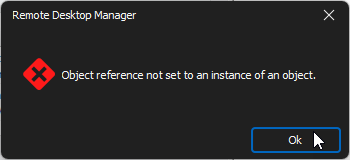
7217ea50-b593-4f19-9e2d-5ef74b4d8832.png
Hi Marco,
Could you provide your application logs? You can find them from the ribbon Help page -> Application Logs.
Best regards,
Xavier Fortin
I had the mentioned error today and yesterday at least twice but it seems they are not in the application log - thats whats in it for the last 30 days.
[8/5/2024 9:15:57 AM - 2024.2.17.0 - 64-bit] Error silent: System.NullReferenceException: Object reference not set to an instance of an object.
at Devolutions.RemoteDesktopManager.RemoteDesktopManagerCommunicator.Open(String[] parameters)
[8/8/2024 2:01:59 PM - 2024.2.18.0 - 64-bit] Info: Windows shutdown occurring, closing application.
Well we can see a NullReferenceException in you logs, so this could be it. But if that's all that is in your application logs, it goes back to the 5th of August, and I imagine you had the error more recently?
Best regards,
Xavier Fortin
yes i had the error yesterday and today as well but there are no logs from today or yesterday.
Oh! I think you might be hitting the same issue as https://forum.devolutions.net/topics/42665/rdm-object-reference-not-set-to-an-instance-of-an-object
I've made a change that should be available in the next release of RDM (2024.2.21.0).
Could you tell me how your "Credential selection" tab is configured in your Secret Server credential entry?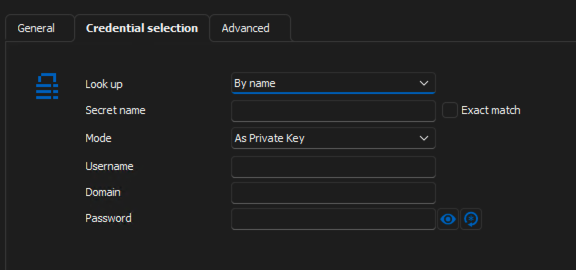
Best regards,
Xavier Fortin
03635780-3a71-4805-9730-1a6e1854ede0.png
The credential enty look like this: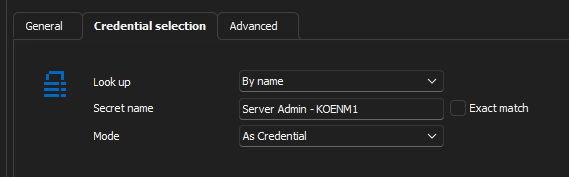
bd920ade-9da3-4a1e-9cf4-66e1a245667a.png
Yep, that's exactly like the user from the other thread. If the issue persists after the next update, please, to tell me.
Best regards,
Xavier Fortin
Yes you are right, but we are using however mostly the "My privileged account", sometime "My personal credential"
It it possible to implement it?
Hi Luca,
This should now be available with the release of RDM 2024.3.
Best regards,
Xavier Fortin
Hi,
As of 2025.1, the recording is now supported for both the RDP and SSH over Delinea Secret Server proxy entries.
Best regards,
Xavier Fortin