RDM "Object reference not set to an instance of an object"

I am re-opening this. I am getting this error the first time I click on a item that is connected to Devolution's Secret Server, after the second click all works fine. I have tried to store connection password in memory, but that fails after a few clicks on items connected to it. currently running 2024.2.17.0 of RDM and there is nothing recorded in the logs that I can see.
Ross
All Comments (24)
Hello,
What Devolutions Server (DVLS) version are you using?
Does this error occur on any entry type or just on specific entries?
Do you have relevant error messages in the DVLS Logs or RDM in the Help - Application Logs?
Best regards,
Érica Poirier
We are not using DVLS only RDM. any entry that is connected to the Secret Server connection fails the first time and then works the second time. If I restart RDM, it works for a few connections and then the error starts popping up. There is nothing in the logs, blank data. also we are running Secret Server Version: 11.7.000002. I also reached out to a few coworkers and they are having the same issue as I am with the latest version of RDM.
Ross
Hello Ross,
When you get the object reference error again could you please send us the full call stack of the error so we might have a better idea of what is causing your issue?
Or is the error message you are getting simply an "Object refrerence not set..." without a call stack?
Best Regards,
Michaël Beaudin
Can you tell me how to collect the call stack, not sure of your ask.
here is my setup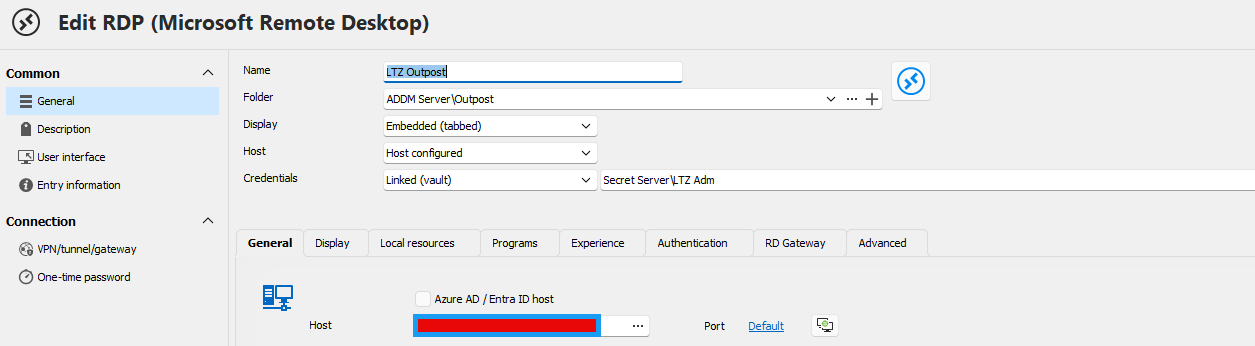
ec212e9b-7f24-400d-b599-53c25688921a.png
Hi ross,
What does the error window looks like? Can you provide a screenshot? Is there any details in it other than the message?
Could you try with RDM 2024.2.19.0? We've made a change that handled a case of null reference in the error handling. This shouldn't solve whatever issue is happening, but hopefully, this could provide a more appropriate error message.
Best regards,
Xavier Fortin
on 2024.2.17.0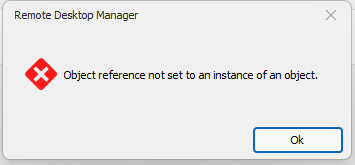
after install 2024.2.19.0 the issue is not showing I will continue to test different connections and see if the error comes back.
8268ff0f-6949-4741-980c-fd0b3917fd63.png
so it took about 10 clicks and the error started to pop up again on version 2024.2.19.0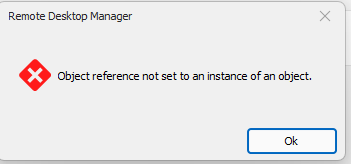
Still nothing showing in the help -> applications logs
I took every option on the error filter and this returned
System.Threading.Tasks.TaskCanceledException: A task was canceled.
at Devolutions.Ipc.Network.Connection.SendAsync(Byte[] data, CancellationToken cancellationToken)
at Devolutions.Ipc.Network.Connection.SendAsync(Message message, CancellationToken cancellationToken)
at Devolutions.Ipc.IpcClient.InvokeRemoteCallAsync(Message message, Object[] parameters)
at Devolutions.Ipc.IpcClient.<>c__DisplayClass23_0.<<Devolutions-Ipc-Proxy-IRemoteProxyHandler-InvokeMethod>b__0>d.MoveNext()
--- End of stack trace from previous location ---
at Devolutions.Ipc.IpcClient.Devolutions.Ipc.Proxy.IRemoteProxyHandler.InvokeMethod(String methodName, Object[] parameters)
at Devolutions.RemoteDesktopManager.IRemoteDesktopManagerProxy__Implementation.Open(String[] parameters)
at Devolutions.RemoteDesktopManager.RemoteDesktopManagerCommunicator.Open(String[] parameters)
8e46eeac-d4b0-4c13-92d4-eefc149645bc.png
This is weird. Could you generate a profiling log?
To do so:
- Open the profiler window (Help -> Profiler)
- Select the Debug only tab
- Click on the "..." button and check the API and Debug option and press OK
- Reproduce the issue
Lines should start filling the profiler text view. Once you've reproduce the error, copy the content of the text view and share it with us.
Best regards,
Xavier Fortin
here is what is in debug tab.
Double click triggered
Double click node:LTZ Outpost
here is what is in performance tab
Main thread (UI)
----------------------------------------
SelectionChanged - Default : 13 ms
Secret Server - GetSecrets...
Secret Server - Login OAuth : 2024 ms
Secret Server - GetSecrets : 2215 ms
Thread : 36
----------------------------------------
36 - Connection States: Refresh : 1 ms
Unfortunately, it seems that our current logs with Secret Server are inadequate for properly identifying the issue. This means that I will have the remedy the situation and have you test further down the line with additional logs to try and narrow down the issue.
I'll get back in touch with you.
Sorry for the inconvenience.
Best regards,
Xavier Fortin
no problem, just ping me when you are ready.
Ross
Hi ross,
I've made the changes for the additional logs. So when the next version of RDM (2024.2.20.0) is available. Could your reproduce the issue again, with the profiler window opened and send me both the content of the Debug tab from the profiler as well as the application logs of RDM?
Best regards,
Xavier Fortin
Hi ross!
RDM 2024.2.20.0 is available with the added logs. If you could reproduce the issue again, with the profiler opened on the Debug tab with Debug and API selected. I'd like to have the output of the profiler as well as the application logs when you get a chance.
Best regards,
Xavier Fortin
here is the data from the profiler. I provided the failure data and then the success, first click failed, second click worked. there was nothing in the application log again.
Double click triggered
Double click node:CCP Outpost
Delinea Secret Server - SecretServerTokenReader.Authenticate::Begin
Delinea Secret Server - SecretServerTokenReader.Authenticate::End
Delinea Secret Server - SecretServerTokenReader.GetSecrets::Begin
Delinea Secret Server - SecretServerTokenReader.Authenticate::Begin
Delinea Secret Server - SecretServerManager.TryParseContent - Response content for SecretServerTokenReader.Authenticate is valid JSON object
Delinea Secret Server - SecretServerTokenReader.Authenticate::End
Delinea Secret Server - SecretServerTokenReader.GetSecrets::End
Double click triggered
Double click node:CCP Outpost
Delinea Secret Server - SecretServerTokenReader.Authenticate::Begin
Delinea Secret Server - SecretServerTokenReader.Authenticate::End
Delinea Secret Server - SecretServerTokenReader.GetSecrets::Begin
Delinea Secret Server - SecretServerManager.TryParseContent - Response content for SecretServerTokenReader.GetSecrets is valid JSON object
Delinea Secret Server - SecretServerTokenReader.GetSecrets::End
Delinea Secret Server - SecretServerTokenReader.GetSecret::Begin
Delinea Secret Server - SecretServerManager.TryParseContent - Response content for SecretServerTokenReader.GetSecret is valid JSON object
Delinea Secret Server - SecretServerTokenReader.GetSecret::End
rdpClientAdvancedSettings4.AuthenticationLevel:0
rdpClientAdvancedSettings6.EnableCredSspSupport:True
May I ask for your application logs as well? The error should in theory be logged now (which was not the case before).
Best regards,
Xavier Fortin
it is empty
68ac19e7-4070-4f00-ae9f-6d630213b37c.png
But you still receive the same error message? This is weird, have I missed the proper spot where the error occurs 🤔
At least with the profiling logs, we know the error occurs after the end of the GetSecrets (plural) call but before the beginning of the GetSecret one (singular).
Xavier Fortin
yes same popup error window with the same error text.
Is your entry configured with "Look up" set to "By name"? Because I think I might just have reproduce the issue.
Xavier Fortin
Screenshot 2024-08-20 at 11.31.09 AM.png
yes, 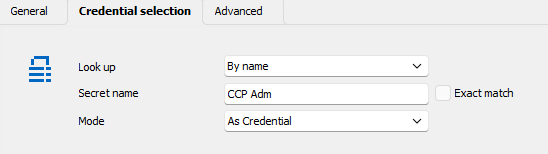
ecddecf1-97f6-4787-ab5a-8ffbac4b0807.png
Hi ross!
I believe I have found the issue and have made the proper fix. You can expect it to be available in the next release of RDM.
Best regards,
Xavier Fortin
Thank you so much and I will watch for the next update.
Ross
Version 2024.2.21.0 has fixed the issue that I was having.
Thank you.
Ross
Glad to hear it Ross! Do not hesitate to reach back if you have any other issues.
Best regards,
Xavier Fortin