Delinea Secret Server Check Out extension and Check In support
Delinea Secret Server Check Out extension and Check In support
0 vote

@Xavier Fortin-
One of your favorite needy users here. :)
I updated to 2024.2.16.0 and everything appears to be working just as described.
However, I thought of two activities that we hadn't discussed previously, and I wasn't sure if they would be something you could address or not.
Currently, when we check out a credential from Delinea Secret Server, it is checked out for a standard duration. However, before that duration expires, we have an option to "extend" the checkout, which I believe will essentially reset the duration counter to its initial value. I believe the Secret Server has some protections to prevent a credential from being extended "forever" so there is probably a maximum checkout time as well. When a credential is checked back in, the Delinea secret server will then force a password change on the credential.
My questions/asks are:
Is there any way to show in RDM the duration of the current credential checkout?
Is there any way from within RDM to extend the credential checkout if that is allowed?
Is there any way in RDM to check back in a credential when we have completed the activities that require it?
Since this is a little off topic for this thread, I am happy to open a new forum/support post if that is more appropriate.
Thank you,
All Comments (5)
Hi jrj,
I've taken the liberty of moving it to a new thread myself 😉
I'll open a ticket to investigate those three points. The last one should be fairly easy. As for the first two, it'll depend on how easily it is to get the checkout status, and remaining time from the server. It should in theory be possible though 🤔
Best regards,
Xavier Fortin
@Xavier-
thank you for you continued attention. I understand that this might take some time and research. I have subscribed to this thread for updates.
J.R.
Hi jrj,
I've added support for checking in and extending the check out on an opened RDP/SSH over Delinea Secret Server proxy entry in RDM. The menu to manage this are available in the embedded menu accessible from the tab button of the opened entry: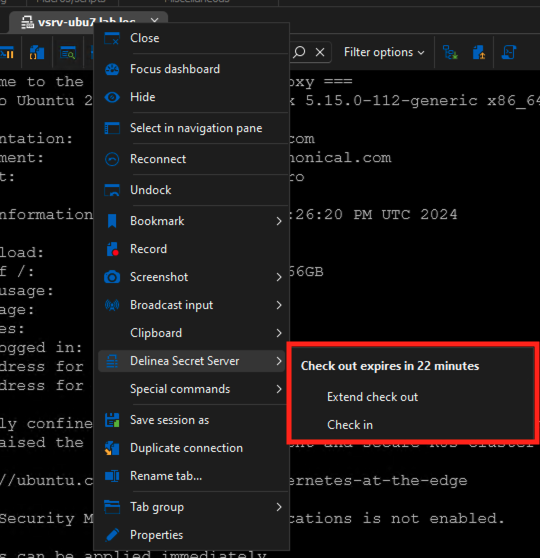
Obviously, because of this, it means that for now, the only way to check in a Secret Server entry in RDM will be to have a session opened. This is not ideal, but unless we implement a larger dashboard-like feature for Secret Server, this is hard to plug in the current way RDM functions.
This should be available in the next minor release of RDM 2024.2.17.0. Do not hesitate to get back in touch if you have feedback, or think of anything else.
Best regards,
Xavier Fortin
CheckOutManagement.png
@Xavier-
Thanks for the update.
I will obviously test this myself when I can get the update, but could you tell me your experience when you checked in the credential from the open session? i.e. did it log you out of the active session and close the remote desktop window, or did you then have to go ahead and manually log out of the session? It just seems like this might be a weird edge case for users to watch out for until you all decide how to implement that type of feature in the Secret Server Credential entry or possible dashboard you were mentioning.
Thanks again for your continued work on this plug-in!
J.R.
Hi jrj,
Sorry for the delay! I had typed my response already, but it seems I never actually sent it!
My experience has been that, after a short (but variable) delay, about a few seconds, the session gets automatically disconnected by the proxy itself. You can then close the tab (if it remain opened).
That being said, this was implemented a few versions back, so you should be able to test it yourself.
Best regards,
Xavier Fortin