
jmalina
Devolutions Password Manager Extension
Hi Oliviere,
I can confirm that this helped us.
Thank you
Best regards,
Jirka
Devolutions Password Manager Extension
Hi,
we found an issue in login from extension version 2026.3.1.6 to Devolutions Server 2026.2.16.0.
The DVLS server site says Success, but the plugin still need Log in:
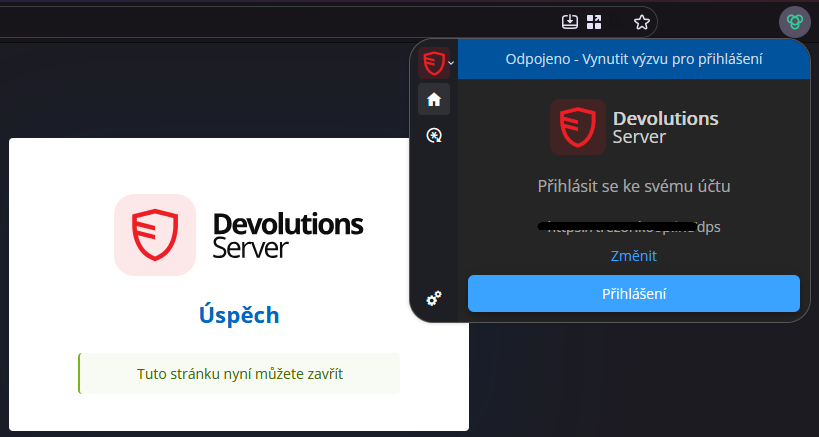
In the plugin debug mode the console says:
"Uncaught TypeError: can't access property "id", t.tab is undefined
handleContentScriptMessage moz-extension://b9db24f1-9cb0-4317-be62-98d85be2339e/entries/background/background.js:1"
The same issue is reported from users with Chrome browser.
MS Edge still use an older version 2026.2.3.5 and there is no problem.
Upgrade to the Devolution Server 2026.3.5.0 is not possible because there exists an issue with login to the CyberArk plugin used in RDM (reported at https://forum.devolutions.net/topics/56266/202635--saml-authentication-failed-against-cyberark).
RDM can't connect Devolutions Server
Hello,
RDM returns error by connecting to 1 of 5 servers with Devolutions Server. Web access to this server is OK.
The error:
Devolutions.RemoteDesktopManager.Business.TryGoOfflineException: Could not obtain data source settings. The server might not be responding.

   at Devolutions.RemoteDesktopManager.Business.DataSources.RDMSConnectionDataSource.GetDataSourceSettings(String repositoryID)

   at Devolutions.RemoteDesktopManager.Business.DataSources.RDMSConnectionDataSource.GetDataSourceSettings()

   at Devolutions.RemoteDesktopManager.Managers.ConnectionManager.LoadDataSourceSettingsFromDataSource(ConnectionEngine engine)

   at Devolutions.RemoteDesktopManager.Managers.ConnectionManager.ValidatePoliciesPart1(ConnectionEngine engine, Boolean hasChanged)

   at Devolutions.RemoteDesktopManager.Managers.ConnectionManager.LoadConnectionsFromDataSource(ConnectionEngine engine, Boolean hasChanged)

   at Devolutions.RemoteDesktopManager.Managers.ConnectionManager.LoadConnections(BaseConnectionDataSource dataSource)
The issue started after upgrade the devolutions server to the version 2024.1.6.0. We tried update that affected server to the latest 2024.1.8.0 but the issue still persists.
Unistall the devolutions server and install it back is the same issue.
RDM is in the last version 2024.1.20.0 64-bit
Thanks for your help.
Devolutions Server 2023.3.4.0 with LoginOAuth errors
Hi Samuel,
I can confirm it works for me ;-)
Thanks
Devolutions Server 2023.3.4.0 with LoginOAuth errors
Hi,
After upgrade the Devolution Server to version 2023.3.4.0 I see errors in the event log by login to the devolutions server website with trying to use SSO.
The errors:
AmbiguousMatchException - The request matched multiple endpoints. Matches:
Devolutions.Server.Controllers.APIControllers.V2.BackendApiController.LoginOAuth (Devolutions.Server)
Devolutions.Server.Controllers.APIControllers.V2.BackendApiController.LoginOAuthWindowsAuth (Devolutions.Server)
Login with SSO in the Remote Desktop Manager is working fine. The issue is with the Devolutions Server website SSO login only.
Upgrade to 2023.3.5.0 did not helped us.
Windows Authentication for web interface (Single Sign On)
Hi,
is there any news with this feature?
Thanks
RDM - Contact - Call and chat via another app than Skype
Hi Jean-Francois,
is possible to change the caption from "Skype" to universal name "Chat"?
It can give mistification if the user don't have the Skype app.
Thanks
BR
Jiří Malina
RDM 2022.1.12 cannot authorize in Devolutions Server 2022.1.7
I was able to login up to update to version 2022.1.12.0. Now I am in the same issue :-(
Devolutions Server - PowerShell - Get-DSEntries return 404
Hi Alexandre,
it works for me in version from github. The version from Powershell Gallery do not contain param -All.
Maybe will be fine to upgrade the version on the Powershell Gallery ;-)
Thanks
BR
Jiří Malina
Devolutions Server - PowerShell - Get-DSEntries return 404
Hi @Richard,
I tested it with module from Github, but still the same error :-(. Is the URL right?
Thanks
RDM - Contact - Call and chat via another app than Skype
Hi @Hubert,
in which version is planed this func?
Thanks
Devolutions Server - PowerShell - Get-DSEntries return 404
Hi,
I need to get Entries in the Vault, but Get-DSEntries -VaultId $vaultId return me the ErrorMessage: "No HTTP resource was found that matches the request URI 'https://<server name>/dps/api/Connections/list/all'"; StatusCode: 404
Tested on:
Devolutions Server versions 2021.2.13.0 and 2021.2.8.0
Powershell module 2021.5.0 (current version) from Powershell gallery
Powershell version 7.2.0
Other commands like Get-DSEntry works fine and I can read the data
Is the URI wrong, or what can I do to get Id's of all entries?
Thanks for your help
BR
Jiří Malina
Contact - call to a number via softphone
Hi @David,
yes, I mean the Devolutions Server. RDM has it :-)
Thank you
Contact - call to a number via softphone
Hi,
would it be possible to add a "tel:" protocol handler to a contact for phone numbers?
Subsequently, we could use calls using softphones, as well as now by clicking on the email to send a message.
Thanks
Contact - missing informations
Hi,
I'm unable to scroll down to view all informations about the contact like on the screen in attach:

RDM - Contact - Call and chat via another app than Skype
Hi,
will be possible to manualy config own protocol handler in options?
We don't use Skype4B and the Callto: do not work for us.
We use Webex, where the protocol handler is "webexteams://im?email=<email_address>" or "webex://im?email=<email_address>" for chat. "tel://<Phone Number>" is possible to change in the settings of Windows 10, so it works for us.
I presume it will be bether to have an option to change Skype to another app if Skype is EoL. And the chat is in many cases better than call.
Thank you