
Andreas
[2026.3.3] Get-PSUIdentity -Integrated in .universal config scripts fails with "Unauthenticated" under Permissive security model
Version: 2026.3.3 (also 2026.3.2). Last working version: 2026.2.4
Hosting: Docker (Linux container), 2-node cluster, PostgreSQL plugin, Git sync (OneWay, Data__Mode=Manual)
Security model: API__SecurityModel=Permissive, API__TrustCertificate=true (set as environment variables; verified inside both containers with docker exec <container> env)
Problem
Since upgrading from 2026.2.4 to 2026.3.x, every configuration load fails on both nodes for all universal scripts that call a PSU cmdlet with -Integrated. The admin console shows:
Invalid configuration: /root/.PowerShellUniversal/Repository/.universal/eventHubs.ps1
Unauthenticated. Specify an app token, use default credentials or enable permissive security model. (Computer: node-01)
The same error appears for roles.ps1 and publishedFolders.ps1, on both nodes. These are exactly
the three config scripts that call Get-PSUIdentity -Integrated. All other config scripts load fine.
Minimal repro
.universal/roles.ps1:
$identities = Get-PSUIdentity -Integrated
New-PSURole -Name "Test" -Description "Test"
Start the server with API__SecurityModel=Permissive -> the configuration load of roles.ps1 fails with "Unauthenticated".
Expected
According to the docs, with the Permissive model cmdlets run as the System user, and -Integrateduses the backchannel; authorization is only performed in the Strict model. The configuration should load, as it did in 2026.2.4.
Actual
The configuration load is rejected as unauthenticated, although the error message itself suggests enabling the permissive model, which is already enabled.
Impact
Event hubs, roles and published folders defined in these scripts are not registered, so agents can't connect to their event hubs. We can't upgrade our test/production instances.
Notes
Not intermittent: it happens on every container start/configuration reload.
The 2026.3.2 fix ("Integrated API Security Model not being honored by PSU cmdlets") and the 2026.3.3 fix ("Integrated API Security Model and -Integrated enforcing permissions incorrectly") did not resolve it.
Possibly related: 56550 (Invoke-PSUScript -Integrated authorizing the caller, fix announced for 2026.3.3) and 56545 (same "Unauthenticated" message, but reported only for non-Permissive models). In our case Permissive is set and the error still occurs on every configuration load.
Before 2026.2 we had to add
-Integratedto these calls because the external API (gRPC via Api.Url) failed during configuration load, so dropping-Integratedis not an option.
Is there a supported workaround (other than switching to API__SecurityModel=Integrated, which affects Send-PSUEvent -ComputerName routing in our multi-node setup)?
Best Regards
Andreas
[Devolutions Gateway] Validate the TLS certificate at service startup, not at first handshake
Summary
The Gateway's two certificate sources behave very differently when something is wrong, and only one of them fails in a way an administrator can act on.
With a file-based certificate, the Gateway reads and binds the certificate at startup. One it cannot read, parse or bind stops the service, and the reason is written to a boot.stacktrace file next to gateway.json. That is exactly the behaviour you want: the problem is visible immediately, before any user tries to connect.
With TlsCertificateSource: System, nothing reads the store at startup at all. The lookup and the private key acquisition both happen inside a callback that runs per incoming handshake. The service therefore starts cleanly, opens the listener, and reports itself as healthy — and the failure only appears once per connection, in the log.
We would like the certificate-store path brought in line with the file-based path: resolve the certificate once at startup and fail loudly there.
We are aware this is a real change rather than relocating an error that already exists. The file-based path is the precedent we are asking you to match.
What we saw
Our Gateway was configured to load its certificate from the Windows certificate store. The service account had no read permission on the private key. From the outside, everything looked healthy:
PS> Get-Service DevolutionsGateway
Status   Name                DisplayName
------   ----                -----------
Running  DevolutionsGateway  Devolutions Gateway Service

PS> Get-NetTCPConnection -LocalPort 7171 -State Listen
LocalAddress   LocalPort  State
------------   ---------  -----
::             7171       Listen
0.0.0.0        7171       Listen
The startup sequence in the log was equally clean:
INFO devolutions_gateway::listener: Listening on https://[::]:7171
INFO devolutions_gateway::listener: Listening on https://0.0.0.0:7171
INFO devolutions_gateway: devolutions-gateway service started
No boot.stacktrace was written, because the service had not failed to start — it had simply never looked at the store.
The actual problem appeared only when a client connected, and then repeated for every connection thereafter:
ERROR devolutions_gateway::tls::windows: Failed to resolve TLS certificate
error="no usable certificate found in the system store;
key acquisition failures: cert[0]: failed to acquire key: Error code 80090016"

ERROR devolutions_gateway::listener: handle_https_peer failed
error="TLS handshake failed: unexpected error: no server certificate chain resolved"
0x80090016 is NTE_BAD_KEYSET. The message itself is excellent — it named the exact cause, and we fixed it within a minute of finding it. The problem is purely where and when it becomes visible.
The request
Perform the store lookup and key acquisition once at service startup, in addition to the per-handshake path. If the certificate cannot be found or its private key cannot be acquired, report it at startup with:
the certificate subject that was looked for
the store name and location that were searched
the account the service is running as
the underlying error
For example:
ERROR Cannot use configured TLS certificate.
      Subject: CN=gateway.example.com
      Store:   LocalMachine\My
      Service account: NT AUTHORITY\NetworkService
      failed to acquire key: 0x80090016 (NTE_BAD_KEYSET)
      -> Verify that the service account has read permission
         on the certificate's private key.
Whether the service should then refuse to start, as the file-based path does, or start and report unhealthy, is a design decision we have no strong opinion on. What matters is that the condition is visible before a user tries to connect, rather than being inferred from a listener that accepts connections and drops every one of them.
Why this matters
The installer has performed certificate checks since 2026.2.x, which is a good addition — but it only covers configuration made through the installer. Anything that changes afterwards is unchecked:
gateway.jsonedited directly, which is the documented way to configure the certificate store optiona certificate replaced or renewed in the store
private key permissions changed by policy or by a GPO
the service account changed
In all of those cases the installer's validation ran long ago, and the next indication that something is wrong is a user reporting that they cannot connect.
There is already a doctor diagnostic that performs closely related checks — SAN presence, EKU serverAuth, missing intermediates. Running an equivalent resolution step at service start would close the gap between "the installer said it was fine" and "it is fine right now".
References
Existing file-based behaviour, for comparison:
The difference between the two certificate sources described above was confirmed by Devolutions support in this thread:
https://forum.devolutions.net/topics/55273/gateway-versuib-2926220-not-working
---
Related request for Devolutions Server: surface the actual reason behind "Certificate could not be verified", which is the dialog users see when this condition occurs.
Gateway versuib 2926.2.2.0 not working
Hi @Michel Audi
Thank you - and noted that you have now corrected your own reasoning twice in this thread rather than letting it stand. That is worth more to us than a fast answer would have been.
On the upgrade method
It was neither of the two you had in mind. The upgrade was performed remotely from Devolutions Server, through the Devolutions Agent - not by running the MSI interactively on the host, and not by any script of ours.
That is worth dwelling on, because it means we never constructed a command line. Whatever properties reached the installer were assembled by the Agent, which is your code, not ours. If that switch can be supplied explicitly on an unattended install, the Agent's update path is the one place in our environment where it could have been supplied without anyone deciding to.
Two details that may matter:
- The Agent on that host was 2025.2.1, against a 2026.2.x Gateway MSI. An Agent of that vintage building the command line for a newer installer is exactly where a stale or mismatched property set would come from.
- Remote upgrade through Devolutions Server is the standard route, not an unusual one. If the Agent does pass that switch, it would be passed on every in-place upgrade performed this way - which would fit multiple environments hitting the same behaviour at the same version boundary considerably better than the CA-certificate theory did.
This is answerable entirely on your side, by reading what the Agent's update path passes to `msiexec`. No test in our environment would tell you anything you cannot establish from your own source.
On the startup behaviour
Thank you for the correction - that changes the request materially, and I would have posted it wrongly otherwise. I had assumed the Gateway resolves the certificate at load time and merely reports the failure late. If nothing reads the store until the first handshake, then what I am asking for is a new step, not a relocated message.
I have worded the feature request accordingly and cited the file-based path as the precedent: it reads and binds at startup, stops the service, and writes `boot.stacktrace`. The request is simply to bring the certificate-store path in line with that. Framing it as consistency between the two sources is considerably more persuasive than how I had it, so thank you for that as well.
Both requests are posted separately, since they belong to different products:
- Devolutions Server - surface the actual reason behind "Certificate could not be verified"
- Devolutions Gateway - resolve the TLS certificate at service startup when using the certificate store
One observation on the other environments in this thread
You said my list is enough to work from, including the second environment here. I would be careful with that, because I do not think our cases are as alike as they look, and I would rather flag it than have it cost you time.
Two things in the earlier posts do not line up with mine:
hjbos saw the problem before upgrading the Gateway. In his third post he states that he had the Gateway ID error after upgrading Devolutions Server but while the Gateway was still on 2026.1.0. Ours behaved the opposite way round: a Gateway downgrade to 2026.1.2.0 cleared it immediately, with Devolutions Server untouched. If his trigger is on the server side and ours is on the Gateway side, then treating both as one Gateway-version regression may be pointing the investigation at the wrong component.
The evidence that his certificate is fine is a browser check. In your reply to him you concluded the Gateway is healthy and the certificate valid, on the basis of the `/jet/health` page. Later, in your reply to me, you specifically asked for a check that was not a browser check, because a browser fills in what a server will not. That reservation was never applied to his environment or to kts's. As far as I can see from the thread, nobody has yet confirmed what those two Gateways actually present to Devolutions Server on the wire.
There is also a tension between the two explanations given in this thread. In your reply to hjbos and kts, the certificate was valid and the fault was in how the Devolutions Server web interface reads it in the trust dialog. In your reply to me, empty fields mean no certificate was presented at all. Both are plausible, but they cannot both be the general explanation for the same empty dialog, and which one applies to their environments looks unresolved.
If it helps them: the check that settled it for us was reading the Gateway log during a failed attempt. `C:\ProgramData\Devolutions\Gateway`, filter for `tls` or `handle_https_peer`. If the Gateway is presenting a certificate and Devolutions Server still shows the dialog empty, the log will be silent at that moment - and that distinguishes your two explanations in about thirty seconds, without anyone posting a certificate chain in public.
On the rest
Appreciated that you are passing on the recording correction as stated, and that you are telling me the crash fix is closed against an unreleased build rather than implying it is available. Both are more useful than optimism.
Best regards,
Andreas
[Devolutions Server] Surface the actual reason behind "Certificate could not be verified"
Summary
When Devolutions Server cannot validate a Gateway certificate, it shows a single message — "Certificate could not be verified" — for at least three fundamentally different situations that each require a completely different fix. In our case the dialog appeared with every field blank, while the Gateway log at the same moment contained the precise cause. The information exists; it just never reaches the person looking at the screen.
We lost most of a working day to this, and the same empty dialog appears in other threads on this forum, where it consistently leads people to conclude their certificate is at fault.
What we saw
Devolutions Server displayed:
⚠ Certificate could not be verified

Issued To        (empty)      Issued by     (empty)
Expires on       (empty)      Issued On     (empty)
Thumbprint       (empty)
The Devolutions Gateway log, at the same timestamp:
ERROR devolutions_gateway::tls::windows: Failed to resolve TLS certificate
error="no usable certificate found in the system store;
key acquisition failures: cert[0]: failed to acquire key: Error code 80090016"

ERROR devolutions_gateway::listener: handle_https_peer failed
error="TLS handshake failed: unexpected error: no server certificate chain resolved"
`0x80090016` is `NTE_BAD_KEYSET`. The Gateway service account had no read permission on the certificate's private key, so no certificate was presented and the handshake never completed. Nothing was wrong with the certificate itself — it is CA-issued, has the correct SANs and the Server Authentication EKU, and is valid until 2029.
Because the dialog said "could not be verified", we spent a long time investigating trust and certificate chains. That was entirely the wrong direction, and the dialog is what pointed us there.
Request 1 — distinguish the failure modes
"Certificate could not be verified" currently covers at least three cases:
| What actually happened                        | What the user must do
---------------------------------------------------------------------------------
| No certificate was presented at all           | Fix the Gateway's certificate loading — permissions, store lookup, listener scheme
| A certificate was presented, chain incomplete | Add the intermediate certificate
| A certificate was presented, not trusted      | Install the CA certificate in the trust store
These have nothing in common except the dialog they produce. In particular: **when all fields come back empty, no certificate was presented.** That is not a verification failure, and the dialog should not describe it as one.
Request 2 — name the likely cause
A single additional sentence turns a dead end into a starting point. For example:
> No certificate was presented by the Gateway.
> The Gateway may not have been able to load it. Check the Gateway log at `C:\ProgramData\Devolutions\Gateway`, and verify that the Gateway service account has read access to the certificate's private key.
Request 3 — pass the Gateway's own error text through
The Gateway already produces exactly the right string. A collapsible Details section in the dialog containing the raw error would cover every case, including ones nobody has anticipated, and requires no per-error design work.
The same pattern in Remote Desktop Manager
Worth mentioning because it is the same failure of translation, not a separate complaint. RDM showed "Unable to connect to the recording server." The Gateway had in fact answered — with HTTP 507 and the body `recording storage is not writable`:
WARN  devolutions_gateway::api::jrec: Refusing JREC push:
      recording storage is not writable
ERROR devolutions_gateway::http: error=507 Insufficient Storage
      recording storage is not writable
The cause was that our `RecordingPath` pointed at a drive root, where the default Windows volume ACL lets `BUILTIN\Users` create folders but not files. The connection had succeeded; the storage was rejected. "Unable to connect" is not merely vague here — it describes something that did not happen.
Why this is worth doing
Both problems were permission issues with a one-line fix. Both were diagnosed in under a minute once we read the Gateway log, and both were essentially undiagnosable from the UI alone. Every user who hits the empty certificate dialog will reasonably conclude that their certificate is broken, because that is what the message tells them — and will then open a support case about a certificate that was never the problem.
---
Related request for Devolutions Gateway: validate the TLS certificate at service startup rather than at first handshake.
Gateway versuib 2926.2.2.0 not working
Hi @Michel Audi
Thank you — that is a straight answer, and the build comparison is genuinely useful. Your conclusion that the service's certificate code did not change, and that the installer is where the changes landed, matches what we observed.
I do have to be direct about the retest, though: we are not going to run it.
Production is stable on 2026.2.4 and we are not going to put it through another upgrade and downgrade cycle to reproduce a fault we have already worked around. Building the scenario cleanly in a lab is a meaningful piece of work — install the old build, configure a file-based certificate, verify, upgrade, capture and compare — and it is not work we have capacity for. We have spent a full day on this already, and the diagnosis we did produce, including both root causes and the exact log lines, was handed over in full.
You are also better placed to run it than we are. You have both builds, the installer and the source; we have neither. If the question is whether the 2026.2.x installer alters an existing file-based configuration during an upgrade, that is answerable on your side in a controlled environment without touching a customer's production system.
What you have from us
For reproduction, everything we know:
Upgrade path: 2026.1.2.0 → 2026.2.2.0, in place
Certificate source at the time: file-based (`TlsCertificateFile` / `TlsPrivateKeyFile`)
Certificate: issued by our internal CA, Server Authentication EKU, SANs covering both the public FQDN and the internal machine FQDN, valid until 2029, unchanged throughout
Listener: HTTPS on 7171 before and after the upgrade — this was not a listener that silently reverted to plaintext
Symptom: Devolutions Server showed "Certificate could not be verified" with every field blank
Downgrade to 2026.1.2.0 resolved it immediately, with no other change made
hjobs reports the same behaviour at the same version boundary in a separate environment, which is a second data point you can work from
If we happen to come across a pre-upgrade backup of the production `gateway.json` in the course of normal work, I will post the diff here. I am not planning to go looking for it.
What we will do
I will post the two error-message proposals in the feature request section under my own name, with the log excerpts. That costs us nothing and benefits every user who hits the same empty dialog.
One further suggestion on the same theme: the Gateway could detect an unusable certificate at startup rather than at the first handshake. It already knows at load time that it cannot acquire the private key. Failing loudly at service start — naming the certificate subject and the account it tried to use — would be considerably more useful than reporting the listener as up and then logging the same error once per incoming connection.
On Remote Desktop Manager
Appreciated that you did not overstate it. For the record: in our case the storage was not full — 11 GB free — the path simply was not writable by the service account. A message about being out of space would have misdirected us just as effectively as the old one did. Worth passing on to whoever owns that wording.
Happy to answer questions about our environment if that helps you reproduce it.
Best regards,
Andreas
Gateway versuib 2926.2.2.0 not working
Hi @Michel Audi
Update from our side. We tracked both problems down and want to share the findings, because in each case the Gateway itself knew the exact cause while the UI did not show it.
Answers to your questions
Certificate source: originally file-based (TlsCertificateFile / TlsPrivateKeyFile). We have since moved to the Windows certificate store (TlsCertificateSource: System).
Was 2026.2.2.0 an upgrade? Yes - upgraded from 2026.1.2.0.
Certificate: unchanged throughout. Issued by our internal CA, valid until 2029, Server Authentication EKU, SANs covering both the public FQDN and the internal machine FQDN. No certificate was re-issued at any point.
Root cause 1 - private key not accessible to the service account
After switching to the certificate store, the Gateway found the certificate but could not use it:
ERROR devolutions_gateway::tls::windows: Failed to resolve TLS certificate
error="no usable certificate found in the system store;
key acquisition failures: cert[0]: failed to acquire key: Error code 80090016"

ERROR devolutions_gateway::listener: handle_https_peer failed
error="TLS handshake failed: unexpected error: no server certificate chain resolved"
0x80090016 is NTE_BAD_KEYSET. The Gateway service runs as NT AUTHORITY\NetworkService, which had no read access to the certificate's private key. Granting that account read permission on the private key resolved it immediately - the HTTPS listener then completed handshakes normally.
Root cause 2 - recording storage not writable
After upgrading to 2026.2.4, session recording failed:
WARN  devolutions_gateway::api::jrec: Refusing JREC push:
      recording storage is not writable
ERROR devolutions_gateway::http: error=507 Insufficient Storage
      at devolutions-gateway/src/api/jrec.rs:92:20: recording storage is not writable
Our RecordingPath is a drive root (E:\). The default ACL of a Windows data volume grants BUILTIN\Users the right to create folders in the root but not to create files there:
BUILTIN\Users:(OI)(CI)(RX)
BUILTIN\Users:(CI)(AD)
BUILTIN\Users:(IO)(WD)
The pre-flight writability check therefore failed even though ~11 GB were free. Granting NETWORK SERVICE modify rights on the path resolved it.
Worth noting: this only surfaced after the upgrade, because the "refuse JREC push when recording storage reaches capacity" check was introduced in 2026.2.0. The underlying permission gap had presumably been there all along.
Current state
Production is running 2026.2.4 with TlsCertificateSource: System, HTTPS listener on 7171, TCP listener on 8181. Certificate validation, Gateway diagnostics and session recording all work.
Still open
We have not yet retested the original failure with TlsCertificateSource: External (file-based) on a 2026.2.x build. Until we do, we cannot say whether the original 2026.2.2.0 regression is actually resolved or merely bypassed by moving to the certificate store. We will run that test and report back.
On the certificate chain: it turned out not to be chain-related at all, so we did not need to share the s_client output.
Product feedback - please improve these error messages
This is the part we would really like to see acted on. In both cases the Gateway log contained a precise, actionable error message, while the UI showed something generic that actively pointed us in the wrong direction.
Devolutions Server displayed "Certificate could not be verified" with Issued To, Issued by, Expires on, Issued On and Thumbprint all empty, at the exact moment the Gateway log said failed to acquire key: Error code 80090016. An empty dialog reads as "this certificate is broken" and sends people straight into a trust and chain investigation — which is where this thread started. The actual cause was a file ACL.
Remote Desktop Manager displayed "Unable to connect to the recording server" in response to an HTTP 507 whose body already said recording storage is not writable. The connection had in fact succeeded — the storage was rejected. "Unable to connect" is not just vague here, it is wrong.
What we would ask for
Pass the Gateway's own error string through to the UI. The Gateway already produces exactly the right text. Even a collapsible "Details" section containing the raw error would be enough, and it costs nothing to implement.
Distinguish the failure modes instead of collapsing them into one message. "Certificate could not be verified" currently covers at least three completely different situations: no certificate was served at all, a certificate was served but the chain is incomplete, and a certificate was served but is not trusted. Each needs a different fix. When all the fields come back empty, the Gateway did not send a certificate — the dialog should say that, not imply the certificate failed verification.
Add a hint about likely causes. For example:
"The Gateway did not present a certificate. It may not have been able to load it - check the Gateway log and verify that the service account has read access to the certificate's private key."
"The Gateway rejected the recording (HTTP 507): recording storage is not writable. Check the permissions on the configured RecordingPath."
Either of these would have taken us from symptom to cause in minutes instead of most of a day. We would also expect it to reduce your support load: the empty certificate dialog appears in other forum reports too, and every one of those users will reasonably conclude that their certificate is at fault - because that is what the message tells them.
Best regards,
Andreas
Gateway versuib 2926.2.2.0 not working
Hello hjobs,
Thank you for the update and for the version details.
Just to clarify where we stand: the Console exception when editing the Gateway is resolved following the configuration change, so the remaining issue is the "Gateway ID Unknown" error when opening a session.
To investigate this properly we need to review your logs and Gateway configuration, so I am opening a support case for you — you will receive an email shortly with the case number. We will request the required information there rather than on the forum, as logs and configuration files can contain host names and user details that should not be posted publicly.
I will follow up with you directly in the case.
Best regards,
@Michel Audi
Hey Michel
Any News regarding this Bug?
We have the same Certificate Issue since 2026.2.2.0 Gateway Version. Downgrade to GW to 2026.1.2.0 immediately fixed the Issue.
Looks like a GW Bug for me; maybe only with CA Certs?
Best Regards
Andreas
RDM 2026.2.5.0: very Slow when have active Vault Filter
@Stéfane Lavergne
Here you are.
100ms:
Level: 1 [Debug], Auto-Mode (100 ms): True

=== Main Thread ===
[14:27:42.985039] - ApplyFilter...
[14:27:42.985060] -     Filter : test
[14:27:44.921964] -     TreeView.LoadConnectionList...
[14:27:44.921972] -         BeginUpdate...
[14:27:44.921976] -             LoadConnectionInTreeNode : 1927 ms
[14:27:44.921982] -         BeginUpdate : 1933 ms
[14:27:44.921983] -     TreeView.LoadConnectionList : 1936 ms
[14:27:44.943953] - ApplyFilter : 1959 ms
[14:27:46.896786] - · FrmMainDocumentManager.SetControlStates...
[14:27:46.896794] -     · Main...
[14:27:46.896797] -         · Decorators : 1889 ms
[14:27:46.896812] -     · Main : 1942 ms
[14:27:46.896815] - · FrmMainDocumentManager.SetControlStates : 1943 ms
[14:27:46.936397] - SelectionChanged - Default : 17 ms
[14:27:58.350246] - TreeView.LoadConnectionList...
[14:27:58.350259] -     BeginUpdate...
[14:27:58.350262] -         LoadConnectionInTreeNode : 1905 ms
[14:27:58.350267] -     BeginUpdate : 1909 ms
[14:27:58.350269] - TreeView.LoadConnectionList : 1911 ms
[14:27:58.514844] - SelectionChanged - Default : 76 ms
[14:27:58.731373] - ApplyFilter...
[14:27:58.731387] -     Filter : hello
[14:28:02.729265] -     TreeView.LoadConnectionList...
[14:28:02.729270] -         BeginUpdate...
[14:28:02.729272] -             · FrmMainDocumentManager.SetControlStates...
[14:28:02.729274] -                 · Main...
[14:28:02.729278] -                     · Decorators : 1953 ms
[14:28:02.729293] -                 · Main : 1958 ms
[14:28:02.729300] -             · FrmMainDocumentManager.SetControlStates : 1959 ms
[14:28:02.732174] -             LoadConnectionInTreeNode : 1973 ms
[14:28:02.732180] -         BeginUpdate : 3991 ms
[14:28:02.732181] -     TreeView.LoadConnectionList : 4000 ms
[14:28:04.770962] -     TreeView.LoadConnectionList...
[14:28:04.770967] -         BeginUpdate...
[14:28:04.770970] -             LoadConnectionInTreeNode : 1955 ms
[14:28:04.770986] -         BeginUpdate : 2036 ms
[14:28:04.770987] -     TreeView.LoadConnectionList : 2038 ms
[14:28:04.772366] - ApplyFilter : 6040 ms
[14:28:04.779065] -                 · RefreshDashboard [async] : 4009 ms
[14:28:04.891162] - SelectionChanged - Default : 63 ms
[14:28:05.017370] - SelectionChanged - Default : 95 ms

=== Thread 83 (.NET TP Worker) ===
[14:27:58.584133] - · LoadRootDashboardOverViewAsync - Full Load...
[14:27:58.584277] -     · GenerateDashboardData : 100 ms
[14:27:58.584437] - · LoadRootDashboardOverViewAsync - Full Load : 100 ms
[14:28:05.003839] - · LoadRootDashboardOverViewAsync - Full Load...
[14:28:05.003847] -     · GenerateDashboardData : 112 ms
[14:28:05.003853] - · LoadRootDashboardOverViewAsync - Full Load : 112 ms

=== Thread 122 (.NET TP Worker) ===
[14:27:32.375301] - Connection States: Refresh : 33 ms
[14:28:04.855869] - · LoadRootDashboardOverViewAsync - Full Load...
[14:28:04.855877] -     · GenerateDashboardData : 117 ms
[14:28:04.856063] - · LoadRootDashboardOverViewAsync - Full Load : 118 ms
[14:28:04.989994] - · LoadRootDashboardOverViewAsync - Full Load...
[14:28:04.990002] -     · GenerateDashboardData : 106 ms
[14:28:04.990132] - · LoadRootDashboardOverViewAsync - Full Load : 106 ms
10ms:
Level: 1 [Debug], Auto-Mode (10 ms): True

=== Main Thread ===
[14:29:11.057050] - ApplyFilter...
[14:29:11.057063] -     Filter : test
[14:29:13.072542] -     TreeView.LoadConnectionList...
[14:29:13.072546] -         BeginUpdate...
[14:29:13.072547] -             LoadConnectionInTreeNode : 2009 ms
[14:29:13.072548] -         BeginUpdate : 2013 ms
[14:29:13.072549] -     TreeView.LoadConnectionList : 2015 ms
[14:29:13.076553] - ApplyFilter : 2019 ms
[14:29:13.104333] - · DVLS - Api - .GetCheckOuts...
[14:29:13.104342] -     · WebAPI.GetCheckOuts : 22 ms
[14:29:13.104344] - · DVLS - Api - .GetCheckOuts : 22 ms
[14:29:13.200303] - · FrmMainDocumentManager.SetControlStates...
[14:29:13.200374] -     · Main...
[14:29:13.200376] -         · SessionMenuManager.SetControlStates...
[14:29:13.200377] -             · SetControlStatesTempAccessMenu...
[14:29:13.200377] -                 · DVLS - Api - .GetServerTime...
[14:29:13.200427] -                     · WebAPI.GetServerTime : 17 ms
[14:29:13.200433] -                 · DVLS - Api - .GetServerTime : 18 ms
[14:29:13.200452] -             · SetControlStatesTempAccessMenu : 18 ms
[14:29:13.200911] -         · SessionMenuManager.SetControlStates : 19 ms
[14:29:15.249742] -         · Decorators : 2042 ms
[14:29:15.249754] -     · Main : 2067 ms
[14:29:15.249756] - · FrmMainDocumentManager.SetControlStates : 2068 ms
[14:29:15.259187] - SelectionChanged - Default : 9 ms
[14:29:18.436131] - TreeView.LoadConnectionList...
[14:29:18.436164] -     BeginUpdate...
[14:29:18.436168] -         LoadConnectionInTreeNode : 2012 ms
[14:29:18.436170] -     BeginUpdate : 2016 ms
[14:29:18.436171] - TreeView.LoadConnectionList : 2017 ms
[14:29:18.530267] - SelectionChanged - Default...
[14:29:18.530282] -     · LoadConnectionDetails...
[14:29:18.530283] -         · LoadConnectionInControls:FreRootDashBoard...
[14:29:18.530283] -             · RefreshCurrentWidgetLayout...
[14:29:18.530284] -                 · DVLS - Api - .GetDashboardWidgetLayout...
[14:29:18.530286] -                     · WebAPI.GetDashboardWidgetLayout : 22 ms
[14:29:18.530287] -                 · DVLS - Api - .GetDashboardWidgetLayout : 22 ms
[14:29:18.530493] -             · RefreshCurrentWidgetLayout : 23 ms
[14:29:18.553083] -             · GenerateDashboardData...
[14:29:18.553088] -                 · RegisterCustomWidgetsDescriptors...
[14:29:18.553088] -                     · DVLS - Api - .GetCustomWidgets...
[14:29:18.553092] -                         · WebAPI.GetCustomWidgets : 18 ms
[14:29:18.553093] -                     · DVLS - Api - .GetCustomWidgets : 18 ms
[14:29:18.553110] -                 · RegisterCustomWidgetsDescriptors : 18 ms
[14:29:18.560575] -             · GenerateDashboardData : 30 ms
[14:29:18.560982] -         · LoadConnectionInControls:FreRootDashBoard : 53 ms
[14:29:18.561144] -     · LoadConnectionDetails : 53 ms
[14:29:18.584018] -     · Finally...
[14:29:18.584022] -         · UIManager.FrmMain.EnableSetControlStates...
[14:29:18.584022] -             · FrmMainDocumentManager.SetControlStates...
[14:29:18.584025] -                 · Main...
[14:29:18.584025] -                     · SessionMenuManager.SetControlStates...
[14:29:18.584026] -                         · SetControlStatesTempAccessMenu...
[14:29:18.584026] -                             · DVLS - Api - .GetServerTime...
[14:29:18.584029] -                                 · WebAPI.GetServerTime : 21 ms
[14:29:18.584034] -                             · DVLS - Api - .GetServerTime : 21 ms
[14:29:18.584056] -                         · SetControlStatesTempAccessMenu : 21 ms
[14:29:18.584560] -                     · SessionMenuManager.SetControlStates : 22 ms
[14:29:18.591234] -                 · Main : 29 ms
[14:29:18.591238] -             · FrmMainDocumentManager.SetControlStates : 30 ms
[14:29:18.591239] -         · UIManager.FrmMain.EnableSetControlStates : 30 ms
[14:29:18.592287] -     · Finally : 31 ms
[14:29:18.592289] - SelectionChanged - Default : 85 ms
[14:29:18.617622] -             · RefreshDashboard [async] : 57 ms
[14:29:19.002219] - ApplyFilter...
[14:29:19.002230] -     Filter : hello
[14:29:21.096725] -     TreeView.LoadConnectionList...
[14:29:21.096729] -         BeginUpdate...
[14:29:21.096730] -             · LoadConnectionInControls:FreRootDashBoard...
[14:29:21.096732] -                 · RefreshCurrentWidgetLayout...
[14:29:21.096732] -                     · DVLS - Api - .GetDashboardWidgetLayout...
[14:29:21.096736] -                         · WebAPI.GetDashboardWidgetLayout : 49 ms
[14:29:21.096737] -                     · DVLS - Api - .GetDashboardWidgetLayout : 49 ms
[14:29:21.096866] -                 · RefreshCurrentWidgetLayout : 49 ms
[14:29:21.122759] -                 · GenerateDashboardData...
[14:29:21.122764] -                     · RegisterCustomWidgetsDescriptors...
[14:29:21.122765] -                         · DVLS - Api - .GetCustomWidgets...
[14:29:21.122770] -                             · WebAPI.GetCustomWidgets : 21 ms
[14:29:21.122771] -                         · DVLS - Api - .GetCustomWidgets : 21 ms
[14:29:21.122795] -                     · RegisterCustomWidgetsDescriptors : 21 ms
[14:29:21.131169] -                 · GenerateDashboardData : 34 ms
[14:29:21.131475] -             · LoadConnectionInControls:FreRootDashBoard : 84 ms
[14:29:23.140791] -             · FrmMainDocumentManager.SetControlStates...
[14:29:23.140795] -                 · Main...
[14:29:23.140796] -                     · Decorators : 2003 ms
[14:29:23.140814] -                 · Main : 2008 ms
[14:29:23.140816] -             · FrmMainDocumentManager.SetControlStates : 2009 ms
[14:29:23.143466] -             LoadConnectionInTreeNode : 2040 ms
[14:29:23.143471] -         BeginUpdate : 4139 ms
[14:29:23.143471] -     TreeView.LoadConnectionList : 4141 ms
[14:29:25.226263] -     TreeView.LoadConnectionList...
[14:29:25.226267] -         BeginUpdate...
[14:29:25.226268] -             · LoadConnectionInControls:FreRootDashBoard...
[14:29:25.226268] -                 · RefreshCurrentWidgetLayout...
[14:29:25.226269] -                     · DVLS - Api - .GetDashboardWidgetLayout...
[14:29:25.226272] -                         · WebAPI.GetDashboardWidgetLayout : 22 ms
[14:29:25.226273] -                     · DVLS - Api - .GetDashboardWidgetLayout : 22 ms
[14:29:25.226407] -                 · RefreshCurrentWidgetLayout : 22 ms
[14:29:25.245896] -                 · GenerateDashboardData...
[14:29:25.245900] -                     · RegisterCustomWidgetsDescriptors...
[14:29:25.245901] -                         · DVLS - Api - .GetCustomWidgets...
[14:29:25.245904] -                             · WebAPI.GetCustomWidgets : 15 ms
[14:29:25.245906] -                         · DVLS - Api - .GetCustomWidgets : 15 ms
[14:29:25.245925] -                     · RegisterCustomWidgetsDescriptors : 15 ms
[14:29:25.250781] -                 · GenerateDashboardData : 24 ms
[14:29:25.250949] -             · LoadConnectionInControls:FreRootDashBoard : 47 ms
[14:29:25.271316] -             · FrmMainDocumentManager.SetControlStates...
[14:29:25.271319] -                 · Main...
[14:29:25.271319] -                     · SessionMenuManager.SetControlStates...
[14:29:25.271320] -                         · SetControlStatesTempAccessMenu...
[14:29:25.271320] -                             · DVLS - Api - .GetServerTime...
[14:29:25.271322] -                                 · WebAPI.GetServerTime : 18 ms
[14:29:25.271326] -                             · DVLS - Api - .GetServerTime : 18 ms
[14:29:25.271342] -                         · SetControlStatesTempAccessMenu : 18 ms
[14:29:25.271618] -                     · SessionMenuManager.SetControlStates : 19 ms
[14:29:25.278950] -                 · Main : 26 ms
[14:29:25.278956] -             · FrmMainDocumentManager.SetControlStates : 27 ms
[14:29:25.280457] -             LoadConnectionInTreeNode : 2056 ms
[14:29:25.280459] -         BeginUpdate : 2134 ms
[14:29:25.280460] -     TreeView.LoadConnectionList : 2135 ms
[14:29:25.280962] - ApplyFilter : 6278 ms
[14:29:25.384099] -                 · RefreshDashboard [async] : 4252 ms
[14:29:26.467397] - SelectionChanged - Default...
[14:29:26.467418] -     · LoadConnectionDetails...
[14:29:26.467575] -         · LoadConnectionInControls:FreRootDashBoard...
[14:29:26.467576] -             · RefreshCurrentWidgetLayout...
[14:29:26.467577] -                 · DVLS - Api - .GetDashboardWidgetLayout...
[14:29:26.467580] -                     · WebAPI.GetDashboardWidgetLayout : 19 ms
[14:29:26.467584] -                 · DVLS - Api - .GetDashboardWidgetLayout : 19 ms
[14:29:26.467740] -             · RefreshCurrentWidgetLayout : 19 ms
[14:29:26.490278] -             · GenerateDashboardData...
[14:29:26.490283] -                 · RegisterCustomWidgetsDescriptors...
[14:29:26.490283] -                     · DVLS - Api - .GetCustomWidgets...
[14:29:26.490287] -                         · WebAPI.GetCustomWidgets : 18 ms
[14:29:26.490288] -                     · DVLS - Api - .GetCustomWidgets : 18 ms
[14:29:26.490308] -                 · RegisterCustomWidgetsDescriptors : 18 ms
[14:29:26.495960] -             · GenerateDashboardData : 28 ms
[14:29:26.496728] -         · LoadConnectionInControls:FreRootDashBoard : 48 ms
[14:29:26.498334] -     · LoadConnectionDetails : 50 ms
[14:29:26.509186] -     · Finally...
[14:29:26.509188] -         · UIManager.FrmMain.EnableSetControlStates...
[14:29:26.509189] -             · FrmMainDocumentManager.SetControlStates...
[14:29:26.509190] -                 · Main : 10 ms
[14:29:26.509193] -             · FrmMainDocumentManager.SetControlStates : 10 ms
[14:29:26.509194] -         · UIManager.FrmMain.EnableSetControlStates : 10 ms
[14:29:26.509196] -     · Finally : 10 ms
[14:29:26.509197] - SelectionChanged - Default : 61 ms
[14:29:26.731521] -             · RefreshDashboard [async] : 235 ms
[14:29:27.418739] - SelectionChanged - Default...
[14:29:27.418747] -     · LoadConnectionDetails...
[14:29:27.418748] -         · LoadConnectionInControls:FreRootDashBoard...
[14:29:27.418750] -             · RefreshCurrentWidgetLayout...
[14:29:27.418751] -                 · DVLS - Api - .GetDashboardWidgetLayout...
[14:29:27.418753] -                     · WebAPI.GetDashboardWidgetLayout : 16 ms
[14:29:27.418754] -                 · DVLS - Api - .GetDashboardWidgetLayout : 16 ms
[14:29:27.418961] -             · RefreshCurrentWidgetLayout : 17 ms
[14:29:27.439469] -             · GenerateDashboardData...
[14:29:27.439473] -                 · RegisterCustomWidgetsDescriptors...
[14:29:27.439474] -                     · DVLS - Api - .GetCustomWidgets...
[14:29:27.439480] -                         · WebAPI.GetCustomWidgets : 15 ms
[14:29:27.439482] -                     · DVLS - Api - .GetCustomWidgets : 16 ms
[14:29:27.439499] -                 · RegisterCustomWidgetsDescriptors : 16 ms
[14:29:27.447981] -             · GenerateDashboardData : 29 ms
[14:29:27.448394] -         · LoadConnectionInControls:FreRootDashBoard : 46 ms
[14:29:27.449917] -     · LoadConnectionDetails : 48 ms
[14:29:27.457784] - SelectionChanged - Default : 56 ms
[14:29:27.786299] -             · RefreshDashboard [async] : 338 ms

=== Thread 27 (.NET TP Worker) ===
[14:29:18.578712] - · LoadRootDashboardOverViewAsync - Full Load...
[14:29:18.578719] -     · GenerateDashboardData...
[14:29:18.578719] -         · TemporaryAccessManager.GetAccessRequests...
[14:29:18.578720] -             · DVLS - Api - .GetAccessRequests...
[14:29:18.578723] -                 · WebAPI.GetAccessRequests : 17 ms
[14:29:18.578725] -             · DVLS - Api - .GetAccessRequests : 17 ms
[14:29:18.599463] -             · DVLS - Api - .GetServerTime...
[14:29:18.599466] -                 · WebAPI.GetServerTime : 20 ms
[14:29:18.599470] -             · DVLS - Api - .GetServerTime : 20 ms
[14:29:18.599483] -         · TemporaryAccessManager.GetAccessRequests : 38 ms
[14:29:18.621762] -         · RepositoryAccessRequestManager.GetAccessRequests...
[14:29:18.621766] -             · GetAccessRequests...
[14:29:18.621767] -                 · DVLS - Api - .GetVaultAccessRequests...
[14:29:18.621796] -                     · WebAPI.GetVaultAccessRequests : 22 ms
[14:29:18.621798] -                 · DVLS - Api - .GetVaultAccessRequests : 22 ms
[14:29:18.621812] -             · GetAccessRequests : 22 ms
[14:29:18.621813] -         · RepositoryAccessRequestManager.GetAccessRequests : 22 ms
[14:29:18.646017] -         · TodoManager.GetTodos...
[14:29:18.646021] -             · GetTodos...
[14:29:18.646021] -                 · DVLS - Api - .GetTodoData...
[14:29:18.646023] -                     · WebAPI.GetTodoData : 24 ms
[14:29:18.646024] -                 · DVLS - Api - .GetTodoData : 24 ms
[14:29:18.646032] -             · GetTodos : 24 ms
[14:29:18.646037] -         · TodoManager.GetTodos : 24 ms
[14:29:18.670616] -         · RegisterCustomWidgetsDescriptors...
[14:29:18.670620] -             · DVLS - Api - .GetCustomWidgets...
[14:29:18.670622] -                 · WebAPI.GetCustomWidgets : 20 ms
[14:29:18.670623] -             · DVLS - Api - .GetCustomWidgets : 20 ms
[14:29:18.670639] -         · RegisterCustomWidgetsDescriptors : 21 ms
[14:29:18.679871] -     · GenerateDashboardData : 119 ms
[14:29:18.680000] - · LoadRootDashboardOverViewAsync - Full Load : 119 ms
[14:29:18.835763] -     · RefreshDashboard [async] : 155 ms
[14:29:21.149134] - · LoadRootDashboardOverViewAsync - Full Load...
[14:29:21.149139] -     · GenerateDashboardData...
[14:29:21.149140] -         · TemporaryAccessManager.GetAccessRequests...
[14:29:21.149140] -             · DVLS - Api - .GetAccessRequests...
[14:29:21.149144] -                 · WebAPI.GetAccessRequests : 17 ms
[14:29:21.149145] -             · DVLS - Api - .GetAccessRequests : 17 ms
[14:29:21.149170] -         · TemporaryAccessManager.GetAccessRequests : 17 ms
[14:29:21.170510] -         · RepositoryAccessRequestManager.GetAccessRequests...
[14:29:21.170514] -             · GetAccessRequests...
[14:29:21.170515] -                 · DVLS - Api - .GetVaultAccessRequests...
[14:29:21.170517] -                     · WebAPI.GetVaultAccessRequests : 21 ms
[14:29:21.170518] -                 · DVLS - Api - .GetVaultAccessRequests : 21 ms
[14:29:21.170528] -             · GetAccessRequests : 21 ms
[14:29:21.170531] -         · RepositoryAccessRequestManager.GetAccessRequests : 21 ms
[14:29:21.195882] -         · TodoManager.GetTodos...
[14:29:21.195887] -             · GetTodos...
[14:29:21.195888] -                 · DVLS - Api - .GetTodoData...
[14:29:21.195891] -                     · WebAPI.GetTodoData : 25 ms
[14:29:21.195892] -                 · DVLS - Api - .GetTodoData : 25 ms
[14:29:21.195901] -             · GetTodos : 25 ms
[14:29:21.195906] -         · TodoManager.GetTodos : 25 ms
[14:29:21.220598] -         · RegisterCustomWidgetsDescriptors...
[14:29:21.220602] -             · DVLS - Api - .GetCustomWidgets...
[14:29:21.220605] -                 · WebAPI.GetCustomWidgets : 21 ms
[14:29:21.220606] -             · DVLS - Api - .GetCustomWidgets : 21 ms
[14:29:21.220619] -         · RegisterCustomWidgetsDescriptors : 21 ms
[14:29:21.225569] -     · GenerateDashboardData : 94 ms
[14:29:21.225577] - · LoadRootDashboardOverViewAsync - Full Load : 94 ms
[14:29:25.268572] - · LoadRootDashboardOverViewAsync - Full Load...
[14:29:25.268577] -     · GenerateDashboardData...
[14:29:25.268578] -         · TemporaryAccessManager.GetAccessRequests...
[14:29:25.268578] -             · DVLS - Api - .GetAccessRequests...
[14:29:25.268582] -                 · WebAPI.GetAccessRequests : 17 ms
[14:29:25.268583] -             · DVLS - Api - .GetAccessRequests : 17 ms
[14:29:25.288649] -             · DVLS - Api - .GetServerTime...
[14:29:25.288653] -                 · WebAPI.GetServerTime : 19 ms
[14:29:25.288657] -             · DVLS - Api - .GetServerTime : 19 ms
[14:29:25.288691] -         · TemporaryAccessManager.GetAccessRequests : 37 ms
[14:29:25.311162] -         · RepositoryAccessRequestManager.GetAccessRequests...
[14:29:25.311165] -             · GetAccessRequests...
[14:29:25.311166] -                 · DVLS - Api - .GetVaultAccessRequests...
[14:29:25.311168] -                     · WebAPI.GetVaultAccessRequests : 22 ms
[14:29:25.311169] -                 · DVLS - Api - .GetVaultAccessRequests : 22 ms
[14:29:25.311183] -             · GetAccessRequests : 22 ms
[14:29:25.311184] -         · RepositoryAccessRequestManager.GetAccessRequests : 22 ms
[14:29:25.332788] -         · TodoManager.GetTodos...
[14:29:25.332792] -             · GetTodos...
[14:29:25.332792] -                 · DVLS - Api - .GetTodoData...
[14:29:25.332794] -                     · WebAPI.GetTodoData : 21 ms
[14:29:25.332796] -                 · DVLS - Api - .GetTodoData : 21 ms
[14:29:25.332804] -             · GetTodos : 21 ms
[14:29:25.332809] -         · TodoManager.GetTodos : 21 ms
[14:29:25.353990] -         · RegisterCustomWidgetsDescriptors...
[14:29:25.353994] -             · DVLS - Api - .GetCustomWidgets...
[14:29:25.353995] -                 · WebAPI.GetCustomWidgets : 17 ms
[14:29:25.353997] -             · DVLS - Api - .GetCustomWidgets : 17 ms
[14:29:25.354012] -         · RegisterCustomWidgetsDescriptors : 17 ms
[14:29:25.362359] -     · GenerateDashboardData : 111 ms
[14:29:25.362369] - · LoadRootDashboardOverViewAsync - Full Load : 111 ms
[14:29:26.512632] - · LoadRootDashboardOverViewAsync - Full Load...
[14:29:26.512636] -     · GenerateDashboardData...
[14:29:26.512637] -         · TemporaryAccessManager.GetAccessRequests...
[14:29:26.512637] -             · DVLS - Api - .GetAccessRequests...
[14:29:26.512639] -                 · WebAPI.GetAccessRequests : 15 ms
[14:29:26.512645] -             · DVLS - Api - .GetAccessRequests : 15 ms
[14:29:26.512684] -         · TemporaryAccessManager.GetAccessRequests : 15 ms
[14:29:26.536068] -         · RepositoryAccessRequestManager.GetAccessRequests...
[14:29:26.536073] -             · GetAccessRequests...
[14:29:26.536075] -                 · DVLS - Api - .GetVaultAccessRequests...
[14:29:26.536076] -                     · WebAPI.GetVaultAccessRequests : 23 ms
[14:29:26.536077] -                 · DVLS - Api - .GetVaultAccessRequests : 23 ms
[14:29:26.536090] -             · GetAccessRequests : 23 ms
[14:29:26.536092] -         · RepositoryAccessRequestManager.GetAccessRequests : 23 ms
[14:29:26.560195] -         · TodoManager.GetTodos...
[14:29:26.560198] -             · GetTodos...
[14:29:26.560199] -                 · DVLS - Api - .GetTodoData...
[14:29:26.560201] -                     · WebAPI.GetTodoData : 24 ms
[14:29:26.560202] -                 · DVLS - Api - .GetTodoData : 24 ms
[14:29:26.560210] -             · GetTodos : 24 ms
[14:29:26.560218] -         · TodoManager.GetTodos : 24 ms
[14:29:26.584470] -         · RegisterCustomWidgetsDescriptors...
[14:29:26.584479] -             · DVLS - Api - .GetCustomWidgets...
[14:29:26.584483] -                 · WebAPI.GetCustomWidgets : 19 ms
[14:29:26.584486] -             · DVLS - Api - .GetCustomWidgets : 20 ms
[14:29:26.584504] -         · RegisterCustomWidgetsDescriptors : 20 ms
[14:29:26.592708] -     · GenerateDashboardData : 96 ms
[14:29:26.592717] - · LoadRootDashboardOverViewAsync - Full Load : 96 ms
[14:29:27.465000] - · LoadRootDashboardOverViewAsync - Full Load...
[14:29:27.465004] -     · GenerateDashboardData...
[14:29:27.465005] -         · TemporaryAccessManager.GetAccessRequests...
[14:29:27.465005] -             · DVLS - Api - .GetAccessRequests...
[14:29:27.465006] -                 · WebAPI.GetAccessRequests : 16 ms
[14:29:27.465009] -             · DVLS - Api - .GetAccessRequests : 16 ms
[14:29:27.465040] -         · TemporaryAccessManager.GetAccessRequests : 16 ms
[14:29:27.491995] -         · RepositoryAccessRequestManager.GetAccessRequests...
[14:29:27.492003] -             · GetAccessRequests...
[14:29:27.492004] -                 · DVLS - Api - .GetVaultAccessRequests...
[14:29:27.492006] -                     · WebAPI.GetVaultAccessRequests : 26 ms
[14:29:27.492008] -                 · DVLS - Api - .GetVaultAccessRequests : 26 ms
[14:29:27.492056] -             · GetAccessRequests : 27 ms
[14:29:27.492067] -         · RepositoryAccessRequestManager.GetAccessRequests : 27 ms
[14:29:27.514310] -         · TodoManager.GetTodos...
[14:29:27.514316] -             · GetTodos...
[14:29:27.514316] -                 · DVLS - Api - .GetTodoData...
[14:29:27.514318] -                     · WebAPI.GetTodoData : 22 ms
[14:29:27.514321] -                 · DVLS - Api - .GetTodoData : 22 ms
[14:29:27.514332] -             · GetTodos : 22 ms
[14:29:27.514347] -         · TodoManager.GetTodos : 22 ms
[14:29:27.540133] -         · RegisterCustomWidgetsDescriptors...
[14:29:27.540140] -             · DVLS - Api - .GetCustomWidgets...
[14:29:27.540142] -                 · WebAPI.GetCustomWidgets : 18 ms
[14:29:27.540144] -             · DVLS - Api - .GetCustomWidgets : 18 ms
[14:29:27.540161] -         · RegisterCustomWidgetsDescriptors : 18 ms
[14:29:27.546090] -     · GenerateDashboardData : 97 ms
[14:29:27.546100] - · LoadRootDashboardOverViewAsync - Full Load : 97 ms
in both tests, first time i enteres "test" and second time i entered "hello".
RDM 2026.2.5.0: very Slow when have active Vault Filter
Hey @Marco Hofmann @Stéfane Lavergne
We tested with 2026.2.12.0 and rolled it out after noticed, thats much faster than before, but still not fast as before with a lot of entries.
But for us its absolutely usable with the above Version.
Sorry for the late Reply!
Best Regards,
Andreas
2026.2.1 — Endpoint URL validation false positive: static URL rejected when a parameterized route shares the same prefix ("It matches an existing internal URL")
Product: PowerShell Universal 2026.2.1 (upgraded from 2026.1.1 — issue does not exist on 2026.1.1)
Environment: Linux (Docker), multi-node, PostgreSQL, configuration as code (git-synced .universal repository)
Summary
Since upgrading to 2026.2.1, endpoint URL validation rejects a static endpoint URL whenever a parameterized endpoint exists whose path starts with the same segments. The two routes are distinct (different segment counts) and represent the standard REST collection/item pattern (GET /resource + GET /resource/:id). This configuration has been working unchanged since v4 and loads fine on 2026.1.1.
Minimal reproduction
endpoints.ps1:
New-PSUEndpoint -Url "/test" -Method GET -Endpoint { "static" }
New-PSUEndpoint -Url "/test/:param" -Method GET -Endpoint { $Param }
On configuration sync, validation of the static URL fails with:
Endpoint URL /test is not valid. It matches an existing internal URL: GET:/test/:param
Important detail for reproducing this: the error does not necessarily appear on the very first
registration into an empty database. It appears once the parameterized route is already registered —
i.e. on the next configuration sync, after a restart, or when a second node in a multi-node setup
loads the same repository. This may be why issue #5627 (same error class, App URLs) could never be
reproduced in-house.
Real-world error (verbatim)
Invalid configuration: endpoints.ps1
(Endpoint URL /v1/runner/jobs is not valid. It matches an existing internal URL:
POST:/v1/runner/jobs/:jobId/status
at PowerShellUniversal.Configuration.UrlValidator.ValidateStaticUrls[T](T item, String url, String[] methods)
   in src\PowerShellUniversal.Configuration\UrlValidator.cs:line 185
at PowerShellUniversal.Configuration.UrlValidator.Validate(Endpoint endpoint)
   in src\PowerShellUniversal.Configuration\UrlValidator.cs:line 47
at PowerShellUniversal.Configuration.EndpointService.UpdateAsync(ModelOperationContext`1 context)
   in src\PowerShellUniversal.Configuration\Endpoints.cs:line 213
at UniversalAutomation.Services.ConfigurationScript`1.ReadAsync(...)
   in src\PowerShellUniversal\ConfigurationScript.cs:line 461
Our production configuration (unchanged for years):
POST /v1/runner/jobs
GET  /v1/runner/jobs
GET  /v1/runner/jobs/:jobId
POST /v1/runner/jobs/:jobId/status
GET  /v1/runner/jobs/:jobId/status
...
Note that /v1/runner/jobs (3 segments) is reported as "matching"
POST:/v1/runner/jobs/:jobId/status (5 segments). A correct route matcher can never match these two — it looks like `ValidateStaticUrls` truncates parameterized route templates at the first route parameter and then compares the remaining prefix against static URLs.
Knock-on effects
environments.ps1 is marked invalid with the same error, because the environments sync re-triggers endpoint validation:
at PowerShellUniversal.Configuration.EnvironmentsConfigurationScript.OnReadAfterAllAsync(SyncContext syncContext) in src\PowerShellUniversal.Configuration\Environments.cs:line 43So a single validation false positive invalidates both the endpoints and the environments configuration — the entire custom REST API is down. In our case several hundred deployed agents lost connectivity after the upgrade; this is a hard outage for us.
What we tried
Curly-brace syntax (
/test/{param}) instead of:param— not supported, does not work.Reordering the endpoint definitions — no effect (validation compares against routes already registered from the previous sync / the other node).
Looked for a setting to disable or relax endpoint URL validation — none exists as far as we can tell (neither in appsettings.json nor in the feature flags).
Merging the two routes into a single endpoint is not possible: an endpoint has exactly one URL, and
/testmust remain directly callable.Renaming routes so that no static URL is a prefix of a parameterized one would break all deployed API clients — not feasible.
Expected behavior
A static URL should only be rejected when it actually conflicts with an existing route (same method and same path shape/segment count) — as was the case up to and including 2026.1.1.
Related
https://github.com/ironmansoftware/powershell-universal/issues/5627 — same error class for App URLs ("was working for years"), closed unresolved when the repo was archived. The reproduction above is deterministic and should finally make this debuggable.
The validator appears to have been introduced with the CVE-2026-3563 fix (advisory DEVO-2026-0008) in 2026.1.4. We jumped from 2026.1.1 directly to 2026.2.1, so this validation ran against our repository for the first time.
Questions
Can the false positive in
UrlValidator.ValidateStaticUrlsbe fixed so that the standard REST pattern (GET /resource+GET /resource/:id) validates correctly again?Until a fix ships: is there any supported way to bypass or relax endpoint URL validation? We are currently blocked from running 2026.2.x at all.
Docker 2026.2.0-ubuntu-24.04 blazor.server.js missing
@Dynamic66 Next week. We have a couple other issues I would like to try to nail down so don't know the exact day but I don't want this one to linger.
@Adam Driscoll
Hey Adam,
Eighteen days ago you said the fix would be out "next week." I completely get wanting to nail down the other issues first; better than shipping something broken. But I have to ask: how exactly are we defining "next week" here?
You said yourself you didn't want this one to linger, and right now it kind of is. Back when you were doing weekly updates, this would've been out the door already, so I know it's well within your reach. Would a small quickfix for just this one issue be too much to ask while you finish off the rest?
Thanks for all the work you put into this, just really hoping to see this one move soon.
Cheers
RDM 2026.2.5.0: very Slow when have active Vault Filter
Andreas,
I'm still unable to reproduce the issue, so I've put this investigation on hold for now. However, David identified a potential problem and implemented a fix that should help. This fix will be included in the next release.
Once the release is available, please give it a try and let us know whether the issue has been resolved. Based on the results, we'll reassess the situation and determine the next steps.
Best regards,
@Stéfane Lavergne
Hi Stefane
Thanks for the update, and please thank David for the work on this.
Ill install the next release once its out and test whether the issue is resolved. To set expectations, though: since the fix was made without being able to reproduce the problem, id want a remote session if it doesnt fully resolve things, rather than another round of changes based on assumptions. The behavior is reproducible in my environment, so a live look should be straightforward whenever we get there.
Ill report back with results after testing the release.
Btw, do you have an ETA for it?
Best regards,
Andreas
RDM 2026.2.5.0: very Slow when have active Vault Filter
Still not reproducing. Can you tell me more about your data structure?
Do you have a deep folder structure?
Do you use variables? If so, which ones?
What type of connections are you using (RDP, web, etc.)?
Do you use linked credentials?
Thanks.
@Stéfane Lavergne
No We dont have a deep Structure. I guess max 4-5 Folders deep.
No we dlnt use Variables.
We use several Session Types like RDP, Web, SSH. Most Entries are Credentials, Certs, Tokens..
Yes, we have linked Credentials on almost all Sessions. Also linked Credentials from personal Vault.
RDM 2026.2.5.0: very Slow when have active Vault Filter
What filter options have you enabled?
I'm assuming "All vaults" is not selected.
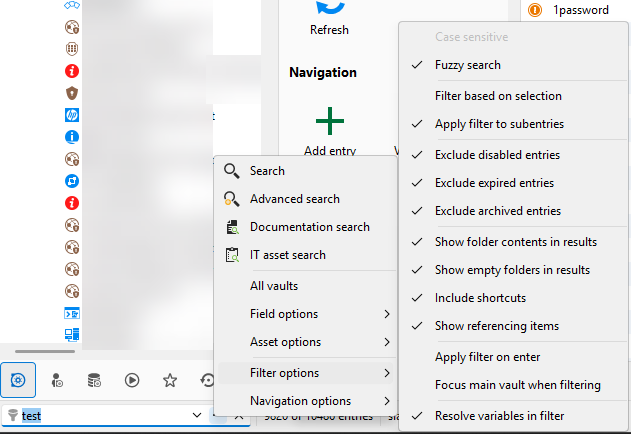
@Stéfane Lavergne
Ive the following Options set:
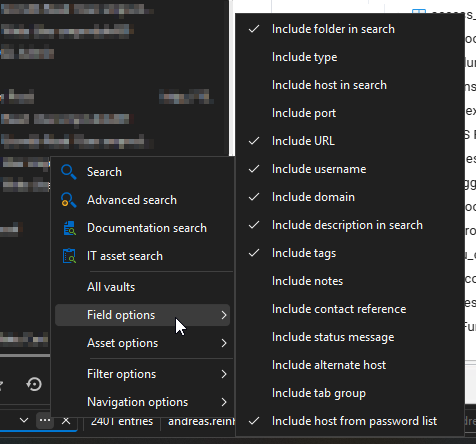
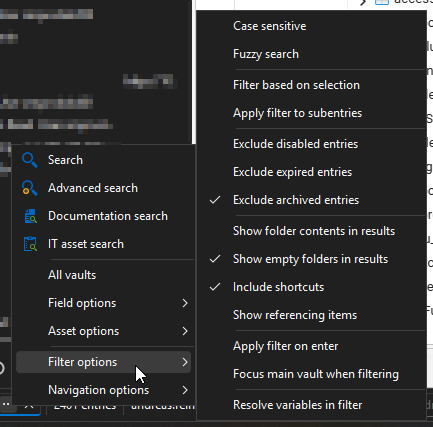
RDM 2026.2.5.0: very Slow when have active Vault Filter
I will need to investigate and attempt to reproduce the issue. We can see that the Decorators step consistently takes more than 2 seconds to complete, which is not expected.
I will get back to you once I have identified the cause of the issue or if I need any additional information.
Sorry for the inconvenience.
Best regards,
@Stéfane Lavergne
Many thanks!
RDM 2026.2.5.0: very Slow when have active Vault Filter
Ok, let's hold off on the dumps for now.
Can you rerun it with the profiler level set to 1, auto mode enabled with a 100ms interval?
We're seeing a few slow calls, but not the details. Hopefully auto mode will capture the culprit.
Decorators : 2296 ms
LoadConnectionInTreeNode : 2318 ms
@Stéfane Lavergne
Sure, here you are.
Ive enabled as you wrote above, then added Filter, switched 2 Tabs, then removed the Filter again.
Level: 1 [Debug], Auto-Mode (100 ms): True

=== Main Thread ===
16:03:38.434269 - ApplyFilter...
16:03:38.434279 -     Filter : test
16:03:40.783838 -     TreeView.LoadConnectionList...
16:03:40.783843 -         BeginUpdate...
16:03:40.783844 -             LoadConnectionInTreeNode : 2341 ms
16:03:40.783846 -         BeginUpdate : 2345 ms
16:03:40.783846 -     TreeView.LoadConnectionList : 2349 ms
16:03:40.791515 - ApplyFilter : 2357 ms
16:03:43.261026 - SelectionChanged - Default...
16:03:43.261031 -     · Finally...
16:03:43.261031 -         · UIManager.FrmMain.EnableSetControlStates...
16:03:43.261032 -             · FrmMainDocumentManager.SetControlStates...
16:03:43.261032 -                 · Main...
16:03:43.261033 -                     · Decorators : 2325 ms
16:03:43.261038 -                 · Main : 2331 ms
16:03:43.261041 -             · FrmMainDocumentManager.SetControlStates : 2331 ms
16:03:43.261042 -         · UIManager.FrmMain.EnableSetControlStates : 2331 ms
16:03:43.261045 -     · Finally : 2331 ms
16:03:43.261046 - SelectionChanged - Default : 2351 ms
16:03:51.679575 - · FrmMainDocumentManager.SetControlStates...
16:03:51.679578 -     · Main...
16:03:51.679579 -         · Decorators...
16:03:51.679579 -             · FrmMainDocumentManager.SetControlStates...
16:03:51.679579 -                 · Main...
16:03:51.679581 -                     · Decorators : 2338 ms
16:03:51.679585 -                 · Main : 2357 ms
16:03:51.679587 -             · FrmMainDocumentManager.SetControlStates : 2357 ms
16:03:51.679709 -         · Decorators : 4729 ms
16:03:51.679711 -     · Main : 4754 ms
16:03:51.679712 - · FrmMainDocumentManager.SetControlStates : 4756 ms
16:03:58.277893 - · FrmMainDocumentManager.SetControlStates...
16:03:58.277897 -     · Main...
16:03:58.277897 -         · Decorators...
16:03:58.277898 -             · FrmMainDocumentManager.SetControlStates...
16:03:58.277898 -                 · Main...
16:03:58.277899 -                     · Decorators : 2356 ms
16:03:58.277905 -                 · Main : 2377 ms
16:03:58.277907 -             · FrmMainDocumentManager.SetControlStates : 2377 ms
16:03:58.278054 -         · Decorators : 4735 ms
16:03:58.278056 -     · Main : 4763 ms
16:03:58.278057 - · FrmMainDocumentManager.SetControlStates : 4764 ms
16:04:03.254627 - ApplyFilter...
16:04:03.254636 -     Filter :
16:04:03.267896 -     TreeView.LoadConnectionList...
16:04:03.267900 -         BeginUpdate...
16:04:03.267903 -             LoadConnectionInTreeNode : 3 ms
16:04:03.267905 -             PreCreateGroups : 0 ms - Run count : 1
16:04:03.267906 -         BeginUpdate : 10 ms
16:04:03.267907 -     TreeView.LoadConnectionList : 13 ms
16:04:03.270466 -     Load Expand States...
16:04:03.270468 -         Expanded: 17 - Nodes : 2459
16:04:03.270915 -         Nodes...
16:04:03.270919 -             Expand : 0 ms - Run count : 13
16:04:03.270920 -         Nodes : 0 ms
16:04:03.270951 -     Load Expand States : 0 ms
16:04:03.275779 - ApplyFilter : 21 ms
16:04:03.438648 - SelectionChanged - Default : 64 ms

=== Thread 134 (.NET TP Worker) ===
16:03:27.604477 - Connection States: Refresh : 30 ms
RDM 2026.2.5.0: very Slow when have active Vault Filter
Hi Andreas,
We have not yet been able to reproduce the issue with a vault containing 10,000 entries. Would it be possible for you to generate a mini dump file while the process is frozen and send it to us?
If so, please carefully follow the steps outlined here (see warning):
https://docs.devolutions.net/rdm/kb/troubleshooting-articles/hung-rdm-dump-file-creation/
Best regards,
@Stéfane Lavergne
Just to clarify: RDM is not hanging. Its just very slow when trying to interact with RDM.
If you want i can show you everything via Remote.
Edit: Just activated Profiler with extended Level (507903).
Here is what i noticed:
=== Main Thread ===
15:52:12.595713 - REMOTE:    GET - /api/connection/states...
15:52:12.596171 - REMOTE:     RefreshConnections : 8 ms
15:52:12.596178 - REMOTE:     GetAllConnectionStates...
15:52:12.596180 - REMOTE:         GetAllConnectionStates.CanView : 0 ms - Count : 3
15:52:12.596181 - REMOTE:     GetAllConnectionStates : 1 ms
15:52:12.596182 - REMOTE:    GET - /api/connection/states : 9 ms
15:52:12.603798 - REMOTE:    GET - /api/connection/openedconnections : 18 ms
15:52:13.127603 - REMOTE:    GET - /api/accessrequest/all...
15:52:13.127608 - REMOTE:     GetAllAndUpdateExpired...
15:52:13.127609 - REMOTE:         GetAll : 0 ms
15:52:13.127609 - REMOTE:         UpdateWhenExpired : 0 ms
15:52:13.127609 - REMOTE:         AddConnectionName : 0 ms
15:52:13.127610 - REMOTE:     GetAllAndUpdateExpired : 0 ms
15:52:13.127610 - REMOTE:    GET - /api/accessrequest/all : 0 ms
15:52:13.127626 - DVLS - Api - .GetAccessRequests...
15:52:13.127631 -     WebAPI.GetAccessRequests : 18 ms
15:52:13.127640 - DVLS - Api - .GetAccessRequests : 18 ms
15:52:13.148407 - REMOTE:    GET - /api/connection/server-time/df47e61e-0ba0-46a7-9116-300515eea2de : 0 ms
15:52:13.148420 - DVLS - Api - .GetServerTime...
15:52:13.148436 -     WebAPI.GetServerTime : 20 ms
15:52:13.148439 - DVLS - Api - .GetServerTime : 20 ms
15:52:18.676328 - ApplyFilter...
15:52:18.676345 -     Filter : test
15:52:21.001868 -     TreeView.LoadConnectionList...
15:52:21.001873 -         BeginUpdate...
15:52:21.001883 -             LoadConnectionInTreeNode : 2318 ms
15:52:21.001888 -         BeginUpdate : 2322 ms
15:52:21.001888 -     TreeView.LoadConnectionList : 2324 ms
15:52:21.005233 - ApplyFilter : 2329 ms
15:52:21.134534 - REMOTE:    GET - /api/connection/server-time/3c411b9f-ff12-4579-a12b-32a9048c9299 : 0 ms
15:52:21.134550 - SelectionChanged - Default...
15:52:21.134552 -     DVLS - Api - .GetServerTime...
15:52:21.134555 -         WebAPI.GetServerTime : 22 ms
15:52:21.134560 -     DVLS - Api - .GetServerTime : 22 ms
15:52:21.169702 - REMOTE:    GET - /api/attachment/4651b21d-c844-4a6f-ab9a-4dfd2ea193c9 : 5 ms
15:52:21.197608 - REMOTE:    GET - /api/handbook/4651b21d-c844-4a6f-ab9a-4dfd2ea193c9 : 1 ms
15:52:23.479698 - SelectionChanged - Default : 2369 ms
15:52:30.960725 - REMOTE:    GET - /api/connection/server-time/d535690f-e48e-4243-af4b-78c53f3683e4 : 0 ms
15:52:30.960739 - DVLS - Api - .GetServerTime...
15:52:30.960742 -     WebAPI.GetServerTime : 18 ms
15:52:30.960744 - DVLS - Api - .GetServerTime : 18 ms
15:52:40.548863 - REMOTE:    GET - /api/connection/server-time/2040515f-b25f-4e51-af0f-dd8b0c3a2ce7 : 0 ms
15:52:40.548883 - DVLS - Api - .GetServerTime...
15:52:40.548887 -     WebAPI.GetServerTime : 18 ms
15:52:40.548895 - DVLS - Api - .GetServerTime : 18 ms
15:53:11.463637 - REMOTE:    GET - /api/connection/server-time/4da108fa-a7d3-4822-931a-ed426dccf401 : 0 ms
15:53:11.463651 - FrmMainDocumentManager.SetControlStates...
15:53:11.463652 -     Main...
15:53:11.463653 -         SessionMenuManager.SetControlStates...
15:53:11.463653 -             SetControlStatesTempAccessMenu...
15:53:11.463654 -                 DVLS - Api - .GetServerTime...
15:53:11.463658 -                     WebAPI.GetServerTime : 17 ms
15:53:11.463660 -                 DVLS - Api - .GetServerTime : 17 ms
15:53:11.463677 -             SetControlStatesTempAccessMenu : 17 ms
15:53:11.463913 -         SessionMenuManager.SetControlStates : 18 ms
15:53:11.467483 -         MainMenuManager.SetControlStates...
15:53:11.467489 -             SetControlStatesReportReportsMenu : 2 ms
15:53:11.467591 -         MainMenuManager.SetControlStates : 3 ms
15:53:11.469210 -         FreEmbeddedDashboard.SetControlStates : 1 ms
15:53:13.798922 -         Decorators...
15:53:13.798928 -             FrmMainDocumentManager.SetControlStates...
15:53:13.798929 -                 Main...
15:53:13.798930 -                     MainMenuManager.SetControlStates...
15:53:13.798933 -                         SetControlStatesReportReportsMenu : 2 ms
15:53:13.799091 -                     MainMenuManager.SetControlStates : 3 ms
15:53:13.816813 -                     EmbeddedMenuManager.SetControlStates : 17 ms
15:53:13.818940 -                     FreEmbeddedDashboard.SetControlStates : 2 ms
15:53:16.115957 -                     Decorators : 2296 ms
15:53:16.115965 -                 Main : 2320 ms
15:53:16.115967 -             FrmMainDocumentManager.SetControlStates : 2321 ms
15:53:16.116157 -         Decorators : 4645 ms
15:53:16.116161 -     Main : 4670 ms
15:53:16.116162 - FrmMainDocumentManager.SetControlStates : 4671 ms
15:53:27.601488 - REMOTE:    GET - /api/connection/openedconnections : 19 ms
15:53:27.628807 - REMOTE:    GET - /api/connection/states...
15:53:27.628876 - REMOTE:     RefreshConnections : 5 ms
15:53:27.628877 - REMOTE:     GetAllConnectionStates...
15:53:27.628878 - REMOTE:         GetAllConnectionStates.CanView : 0 ms - Count : 3
15:53:27.628878 - REMOTE:     GetAllConnectionStates : 1 ms
15:53:27.628881 - REMOTE: GET - /api/connection/states : 6 msRDM 2026.2.5.0: very Slow when have active Vault Filter
Hello,
Just to help me understand, it's when you switching opened tabs? Could you give me more details like the number of opened connections?
Regards
@David Hervieux
Just try it by yourself - it doesnt matter if you have 2, 4 or 10 opened Sessions. As soon you remove the active Filter, everything is back fast.
Edit: I just realized, it happens only when you have much entries in Vault.
In my Case 1900+ and 2400+. When i do it in a Vault with only 2 Folders in it, its still fast.
RDM 2026.2.5.0: very Slow when have active Vault Filter
RDM 2026.2.5.0 / 2026.2.7.0
DVLS 2026.2.4.0
Hi All
Please move this to Bug Section if its a Bug, thanks!
When having an active Vault Filter (left bottom corner), then the whole RDM hangs a little and Server Tab Switching kills your patience.
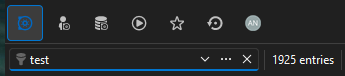
After removing the active Filter, everything is working normal again.
Thanks for looking at!
Best Regards
Andreas
Docker 2026.2.0-ubuntu-24.04 blazor.server.js missing
Hi All
With newest Docker Image 2026.2.0-ubuntu-24.04 im unable to login.
The File _framework/blazor.server.js is not available anymore which results in a JS Crash:

Result: Black Website after Login.
Looks like the Image has never been tested for me 😕
Best Regards
Andreas
RDM 2026.1.10.0 Vault filter handling
Hi @Eduard Sepúlveda López
Following up on my previous post - Ive tested builds 2026.1.11.0, 2026.1.12.0, and 2026.1.14.0, and the issue persists in all of them:
Open Vault dropdown
Type a filter string
Press Enter or Ctrl+Enter -> no vault switch, mouse click still required
Auto-scroll to active vault still not working
Is there a ticket reference for this, or can you let me know the current status? With several hundred vaults, this is a significant workflow regression for us.
Best regards,
Andreas
RDM 2026.1.10.0 Vault filter handling
Thank you for reporting this and for the clear details.
A new build was released yesterday, and this issue should now be fixed after updating.
In the meantime (or as an alternative), you can use Ctrl + Enter after typing your filter to trigger the same vault switch action you previously had with Enter.
If you still see the behavior after updating to the latest build, please let us know.
Best regards,
@Eduard Sepúlveda López
With RDM 2026.1.11.0, 12 and 14 still the same issue as posted in first post.
Not able to navigate with Keyboard. Also Ctrl+Enter dont work at all.
Best Regards,
Andreas
Edit: It also still not scroll to the currently active Vault in select field as it did in the 2025 Version.
RDM 2026.1.10.0 Vault filter handling
Hi All
It looks for us that the Vault search/change handling has beend changed since new 2026 version.
Before 2026:
Clicking on Vault List Dropdown
Entering a search filter
Using directly your Keyboards Enter for select/switchig the Vault
With new 2026:
Clicking on Vault List Dropdown
Youre active in the Search Field
No option available, to navigate with Keyboard - a Mouse click is forcely needed!

Is it possible to get the old behaviour back? We have all become very accustomed to the old way of dealing with several hundred vaults, and it was very intuitive, which it no longer is.
Furthermore, the dropdown menu no longer automatically scrolls to the active vault when I open the vault selection.
Best Regards
Andreas
RMD: Unwanted VPN Session close
Hi @Hubert Mireault
Thanks a lot for the fast fix.
If you want, you can send me the Release via PN and i will also test it on our Side.
Best Regards
Andreas
RMD: Unwanted VPN Session close
Hi @Hubert Mireault
Im able to reproduce when i open and close an SSH Tunnel - not every Time, but when it happens, the whole Computer lags and is almost unable to work with until RDM is closed (my setup has 20 cores and 32gb ram).
Best Regards
Andreas
Edit: It also happens when you open an SSH Tunnel, let it open, switching a Vault and open another SSH Tunnel